
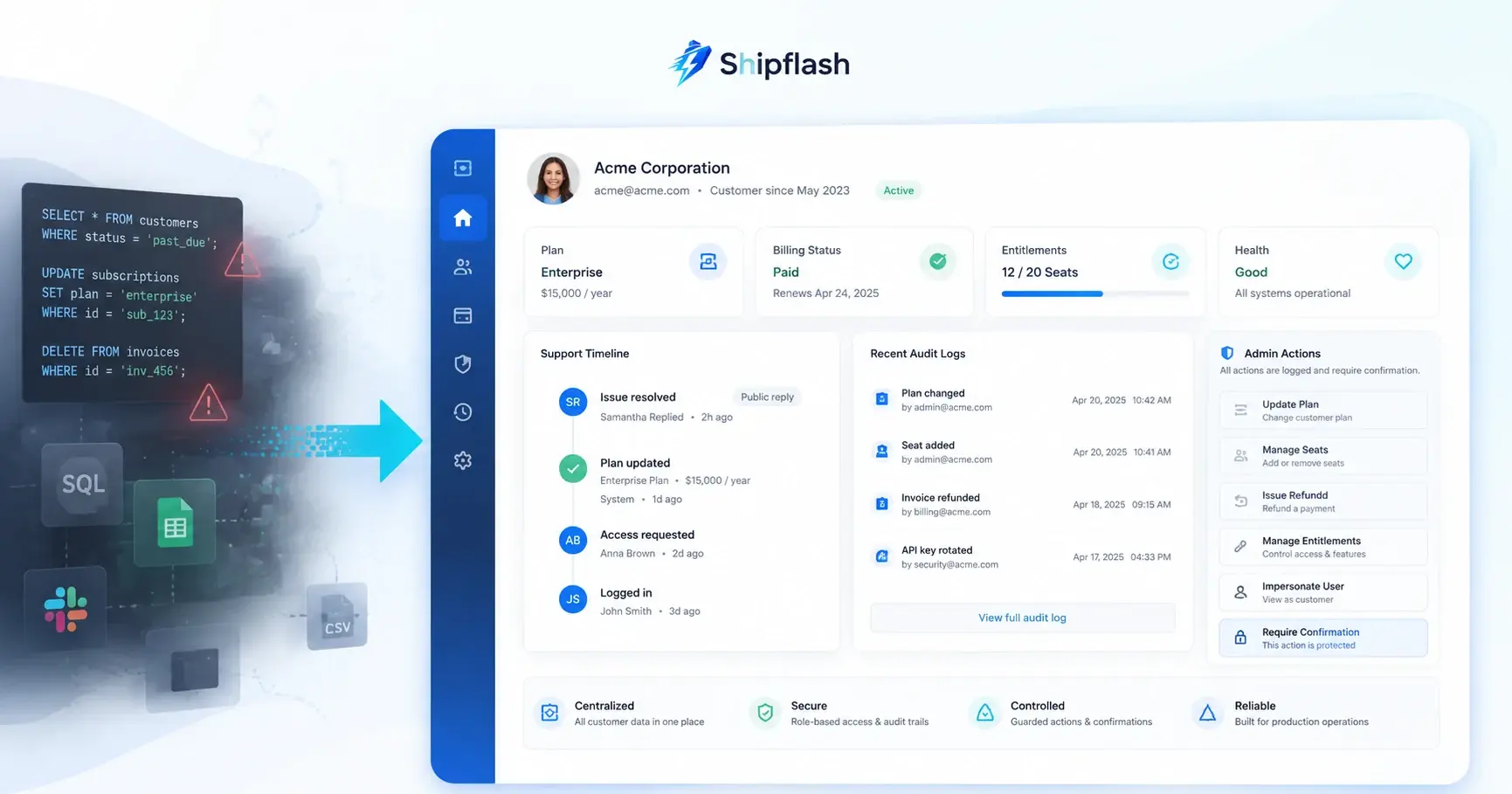
A customer emails support with a familiar complaint:
“I paid for the Pro plan, but my account still says Free.”
The fastest response appears to be opening the database, finding the customer row, and changing a value manually.
It may even work.
But the database does not tell you whether the payment provider recorded the purchase, whether a webhook failed, whether an entitlement projection is stale, whether the user signed in with a different email, or whether another process will overwrite your manual change five minutes later.
You have fixed the visible symptom without understanding the system failure.
That is the difference between editing data and operating a SaaS product.
A production-minded SaaS admin dashboard is not merely a prettier interface over database tables. It is a controlled operational layer that helps authorized people investigate customer problems, understand system state, perform approved actions, and leave enough evidence to explain exactly what happened later.
This guide explains how to build that layer for a Next.js and Supabase SaaS without turning your admin panel into a dangerous collection of unrestricted buttons.
What is a SaaS admin dashboard?
A SaaS admin dashboard is a private operations workspace used to investigate customers, manage product state, review billing and delivery activity, and execute controlled support actions.
Its job is not to expose every database field.
Its job is to help an operator answer four questions:
- What happened?
- What state is the customer in now?
- What action is safe to perform?
- Who performed that action, and why?
A useful admin workspace connects information that is otherwise scattered across your application database, authentication provider, billing provider, email service, webhook history, background jobs, and logs.
That makes it different from a reporting dashboard.
An analytics dashboard tells you that 14 subscriptions failed this week. An operations dashboard helps you open one affected customer, identify the failed renewal event, inspect the resulting entitlement state, retry the correct process, and confirm that access was restored.
Why direct SQL becomes an operational liability
SQL is indispensable for development, migrations, analysis, and incident investigation. The problem begins when recurring support procedures depend on someone manually editing production tables.
Direct database work gradually becomes an undocumented internal API.
Support asks an engineer to run a query. The engineer copies an old command from Slack, changes an email address, and executes it against production. There is no validation beyond the operator’s judgment, no structured approval, and often no durable record of why the change was made.
This creates several risks.
A database row rarely represents the complete customer state
A subscription customer may exist simultaneously as:
- An authenticated user
- An application profile
- A Stripe or Lemon Squeezy customer
- One or more purchases or subscriptions
- A local billing projection
- A collection of product entitlements
- An email recipient with delivery or suppression history
- An actor in audit and activity records
Changing one row does not necessarily update the other systems.
A manual UPDATE subscriptions SET status = 'active' might make the dashboard look correct while the billing provider still considers the subscription canceled. The next reconciliation process could reverse the change, or the product could grant access to someone who has not paid.
A reliable billing system must separate provider state, internal billing records, and product access. That separation is explored in more depth in SaaS Billing Architecture: Webhooks, Entitlements, Reconciliation, and Reliable Access Control.
Manual changes bypass business rules
A support action normally has conditions.
A refund may only be allowed for a completed payment. A suspension should preserve the reason and previous state. An entitlement repair should verify the provider record first. An email retry should not resend a message that has already been delivered.
A raw database update bypasses those preconditions unless the operator remembers to check each one manually.
Database access is usually broader than the task requires
An operator who only needs to inspect a customer’s subscription may receive credentials capable of reading or modifying unrelated customer data.
That conflicts with the principle of least privilege. OWASP recommends granting only the access needed, denying access by default, and validating authorization on every request rather than assuming that reaching an internal interface is sufficient.
Side effects become invisible
Changing a database field may not trigger the same behavior as the intended product command.
For example, suspending an account might also need to:
- Revoke active sessions
- Disable privileged API access
- Cancel queued work
- Notify the customer
- Record an audit event
- Schedule a review or automatic restoration
A direct update usually performs only the first visible mutation.
The investigation disappears
When someone asks why an account was modified, a database timestamp is not enough.
You need to know who initiated the action, which customer was affected, what the operator observed, what they intended to do, whether the operation succeeded, and which external requests were created.
Without that context, every future incident starts from zero.
SQL should remain an engineering tool, not become your customer-support interface.
An admin dashboard should expose operations, not arbitrary CRUD
A common mistake is generating a generic interface that lets administrators create, read, update, and delete rows from every table.
That is convenient to build, but it transfers responsibility for business correctness from the application to the operator.
A safer admin system exposes explicit commands.
Instead of allowing someone to edit a status column, provide actions such as:
- Suspend customer access
- Restore customer access
- Retry failed notification
- Reconcile billing state
- Revoke active sessions
- Issue an approved refund
- Rebuild entitlements from provider records
Each command should encode its own authorization requirements, preconditions, validation, side effects, and audit behavior.
For example, Reconcile billing state is not equivalent to editing a subscription row. It means retrieving authoritative provider records, comparing them with local projections, calculating the correct entitlement state, recording any discrepancy, and applying a controlled repair.
That distinction is the foundation of safe SaaS operations.
What should a SaaS admin dashboard include?
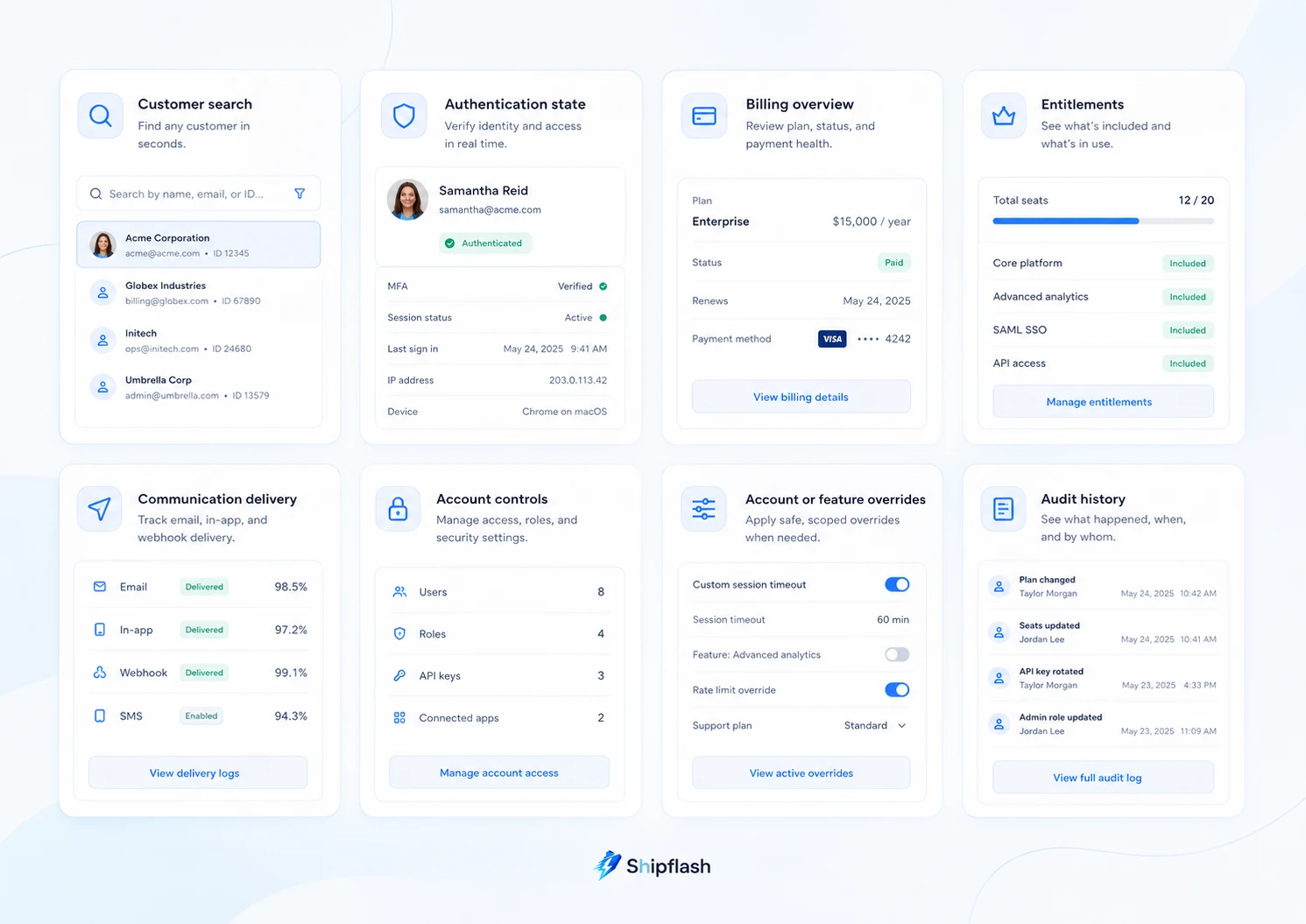
A minimum viable SaaS admin dashboard should include customer search, identity and access details, billing history, entitlement state, notification diagnostics, safe operational actions, and an append-only audit trail.
The exact modules vary by product, but the following capability matrix provides a practical baseline.
| Operational area | Minimum viable capability | Unsafe shortcut | Evidence of a good implementation |
|---|---|---|---|
| Customer discovery | Search by email, user ID, provider customer ID, or order ID | Searching only one profile table | Results connect related identities and show their sources |
| Authentication | View signup method, verification state, sessions, and relevant security state | Editing authentication tables manually | Operators can revoke sessions through an approved action |
| Billing | View provider customers, purchases, subscriptions, invoices, refunds, and webhook history | Treating one local status column as authoritative | Provider and local states are displayed separately |
| Entitlements | Explain why a customer currently has access | Manually toggling a paid flag | Every entitlement points to its source and effective period |
| Communications | Inspect delivery, bounce, complaint, and retry history | Resending messages from an email provider dashboard without context | Retries are idempotent and connected to the original message |
| Account controls | Suspend, restore, or restrict accounts through explicit commands | Editing status directly | Actions require a reason and create audit records |
| Configuration | Manage approved feature or account overrides | Adding undocumented flags to JSON metadata | Overrides have an owner, scope, reason, and expiry |
| Audit history | Record sensitive reads and mutations | Relying only on infrastructure logs | Events identify actor, target, reason, request, and result |
This is not a checklist of screens. It is a description of the questions your operations team must be able to answer.
Build a customer operations view, not a customer table view
The customer detail page is the center of a SaaS admin workspace.
It should provide a coherent operational picture without pretending that every system agrees.
A strong customer view displays each state with its provenance.
For example:
| Customer property | Current value | Source | Last confirmed |
|---|---|---|---|
| Authentication status | Active | Supabase Auth | 2 minutes ago |
| Subscription | Past due | Stripe | 4 minutes ago |
| Local billing projection | Active | Application database | 4 minutes ago |
| Product entitlement | Pro until August 12 | Entitlement ledger | 4 minutes ago |
| Last transactional email | Bounced | Resend webhook | 1 hour ago |
The disagreement is useful. It tells the operator where to investigate.
Flattening these values into one green or red badge removes the evidence needed to diagnose the problem.
Make identifiers visible and copyable
Customer support often starts with incomplete information. A user may provide an email address while the billing provider uses a different customer ID and the application stores a separate user UUID.
Expose the identifiers operators actually need:
- Application user ID
- Authentication user ID
- Provider customer ID
- Subscription or order IDs
- Relevant request IDs
- Recent webhook event IDs
Identifiers should be easy to copy, but they should not automatically become editable fields.
Show timelines instead of isolated states
The current value explains what is true now. A timeline helps explain how it became true.
A useful operational timeline might include:
10:02:14  Checkout completed at billing provider
10:02:15  payment.succeeded webhook received
10:02:15  Webhook signature verified
10:02:16  Billing projection updated
10:02:16  Pro entitlement granted
10:02:17  Receipt notification queued
10:02:20  Email provider accepted message
A broken workflow becomes visible immediately:
10:02:14  Checkout completed at billing provider
10:02:15  payment.succeeded webhook received
10:02:15  Webhook signature verified
10:02:16  Billing projection update failed
10:02:16  Entitlement not granted
The admin dashboard should then offer a narrowly scoped repair, such as Reprocess billing event, rather than asking the operator to reconstruct the correct state manually.
Keep authorization inside every admin operation
Hiding an admin button in the interface is not an authorization system.
Next.js documentation recommends treating Server Actions and Route Handlers with the same security considerations as public-facing API endpoints. Each mutation must authenticate the user and verify that the user is authorized to perform that particular action.
A server-side admin action should therefore repeat the relevant checks even when the surrounding page is already restricted.
'use server'

import { z } from 'zod'
import { requireAdminPermission } from '@/lib/auth/require-admin-permission'
import { suspendCustomerAccount } from '@/features/customers/suspend-customer'
import { writeAuditEvent } from '@/features/audit/write-audit-event'

const inputSchema = z.object({
  customerId: z.string().uuid(),
  reason: z.string().trim().min(10).max(500),
  expectedStatus: z.enum(['active', 'past_due']),
  requestId: z.string().uuid(),
})

export async function suspendCustomer(input: unknown) {
  const actor = await requireAdminPermission({
    permission: 'customers.suspend',
    requireMfa: true,
  })

  const payload = inputSchema.parse(input)

  const result = await suspendCustomerAccount({
    customerId: payload.customerId,
    expectedStatus: payload.expectedStatus,
    reason: payload.reason,
    actorId: actor.userId,
    requestId: payload.requestId,
  })

  await writeAuditEvent({
    actorId: actor.userId,
    actorRole: actor.role,
    action: 'customer.suspended',
    targetType: 'customer',
    targetId: payload.customerId,
    reason: payload.reason,
    requestId: payload.requestId,
    result: 'succeeded',
    beforeState: result.beforeState,
    afterState: result.afterState,
  })

  return { ok: true }
}
The example intentionally checks more than “is this user an admin?”
It verifies a specific permission, requires a reason, validates the expected customer state, carries a request ID, and records the outcome.
Use capabilities instead of one universal admin role
A small product may begin with user and admin roles. That can work while one trusted founder performs every operation.
It becomes fragile when customer support, finance, content, and engineering responsibilities separate.
A permission model can remain simple while still distinguishing important capabilities:
customers.read
customers.suspend
customers.restore
billing.read
billing.refund
billing.reconcile
notifications.read
notifications.retry
impersonation.start
settings.update
audit.read
The user interface may use roles to group permissions, but the server should authorize the capability required by the command.
Require stronger authentication for consequential actions
Reading a customer profile and issuing a refund should not have identical security requirements.
Supabase MFA sessions expose an Authenticator Assurance Level, allowing applications to distinguish a conventional login from one that has completed a second factor. Supabase also emphasizes that MFA must be enforced in the backend, APIs, or Row Level Security policies rather than merely appearing in the interface.
Step-up authentication is especially valuable for actions such as:
- Issuing refunds
- Starting impersonation
- Changing another operator’s role
- Exporting customer data
- Rotating sensitive configuration
- Deleting or permanently anonymizing accounts
Treat elevated database access as a containment boundary
An admin backend often needs to perform operations that an ordinary customer cannot.
That does not mean every admin request should receive unlimited database access.
Supabase service-role and secret keys can bypass Row Level Security and must remain in trusted backend components. They should never be exposed to the browser.
A safer design keeps elevated access behind a small command layer:
Admin interface
      ↓
Authenticated Server Action or Route Handler
      ↓
Permission and MFA check
      ↓
Validated business command
      ↓
Narrow database function or service module
      ↓
Audit event and external side effects
Do not create a general adminSupabaseClient utility that can be imported anywhere without restrictions.
Prefer narrowly named services such as:
reconcileCustomerBilling()
suspendCustomer()
retryNotification()
restoreEntitlementsFromPurchase()
The function name should communicate the business operation being performed.
For data accessed through Supabase’s Data API, use both explicit Postgres grants and Row Level Security. Supabase describes grants as controlling which database objects a role can reach, while RLS controls which rows that role can access.
A deeper treatment of policy design, service-role boundaries, and negative authorization testing is available in Supabase Row Level Security for Next.js SaaS.
Design dangerous actions in safety tiers
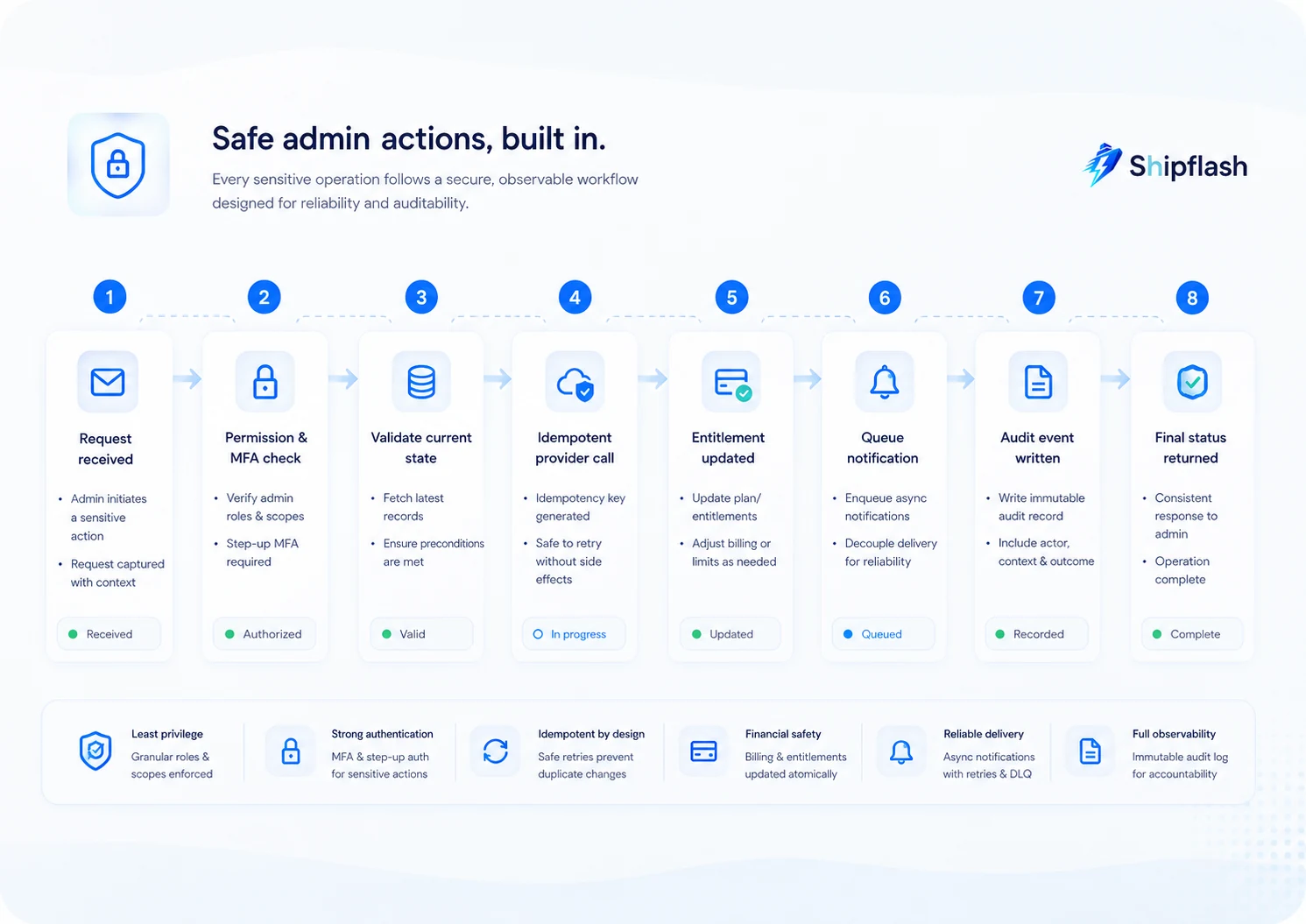
Not every admin operation needs a confirmation dialog. Requiring the same ceremony for every click trains operators to dismiss warnings automatically.
Classify actions by consequence instead.
| Tier | Examples | Recommended protection |
|---|---|---|
| Read-only | View customer, inspect invoice, review webhook | Permission check and access logging where appropriate |
| Reversible | Add internal note, apply temporary feature override | Reason, visible expiry, and normal audit event |
| Consequential | Suspend account, retry workflow, revoke sessions | Explicit confirmation, current-state check, reason, idempotency |
| Financial or privileged | Refund payment, start impersonation, change operator role | MFA, dedicated permission, typed confirmation, enhanced audit record |
| Destructive | Delete or anonymize account data | Delay or approval where practical, dependency preview, irreversible warning |
Require reasons that help future investigators
A reason should describe the evidence and intent.
Weak:
Customer issue
Useful:
Customer reported account takeover through ticket SUP-184.
Suspending access while ownership verification is completed.
Reasons should not become a place to paste passwords, full payment details, access tokens, or unnecessary personal information.
Re-check state immediately before mutation
The customer state may change between opening the page and confirming an action.
Use optimistic concurrency or explicit preconditions:
if (customer.status !== expectedStatus) {
  throw new ConflictError(
    'Customer status changed. Refresh before attempting this action.'
  )
}
This prevents an operator from applying a decision based on stale information.
Make retries safe
Admin operations often call external providers. The application may time out after the provider accepts a request but before the operator receives a success response.
Without idempotency, clicking again could create a duplicate refund, duplicate credit, or repeated notification.
Stripe supports idempotency keys for safely retrying create or update requests without repeating the operation.
Create idempotency keys from the logical operation, not the browser click:
admin-refund:{paymentId}:{approvedAmount}:{operationId}
Store the operation record before calling the provider so that the result can be recovered after a timeout.
Build refunds as a workflow, not a button
A refund is one of the clearest examples of why admin operations need business semantics.
A safe refund flow should answer:
- Which payment is being refunded?
- Is it eligible?
- Is the refund full or partial?
- What is the reason?
- Has another refund already been created?
- What should happen to the customer’s entitlement?
- Should the customer receive a notification?
- What happens if the provider accepts the refund but the local update fails?
Stripe notes that refunds can be full or partial and are funded from the account’s available balance; insufficient balance can affect how the refund proceeds.
The admin interface should display that operational context before confirmation rather than reducing the action to a red button.
The local workflow could look like this:
1. Create pending refund operation
2. Validate operator permission and MFA
3. Validate payment and refundable amount
4. Send idempotent request to billing provider
5. Store provider refund record
6. Recalculate billing and entitlement state
7. Queue customer notification
8. Mark operation completed
9. Record final audit event
If steps six or seven fail, do not pretend the refund failed. The provider may already have accepted it.
Instead, surface the operation as partially completed and provide an appropriate recovery command.
Long-running or retryable operations should move outside the request lifecycle. The decision framework in What Should Run in the Background? Queues, Cron Jobs, and Retries for Next.js SaaS explains how to handle idempotency, retry backoff, leases, dead-letter states, and replay.
Make customer impersonation narrow, visible, and temporary
Impersonation can be valuable when a support agent needs to reproduce a customer-specific problem. It can also become one of the most dangerous features in the product.
A safe implementation should not simply replace the operator’s session with the customer’s session.
Instead, create a dedicated impersonation context containing:
type ImpersonationContext = {
  sessionId: string
  actorUserId: string
  targetUserId: string
  reason: string
  startedAt: string
  expiresAt: string
  allowedCapabilities: string[]
}
The session should be short-lived and clearly visible throughout the interface.
A persistent banner might say:
You are viewing the product as customer@example.com. Actions are attributed to your administrator account. Impersonation ends in 11 minutes.
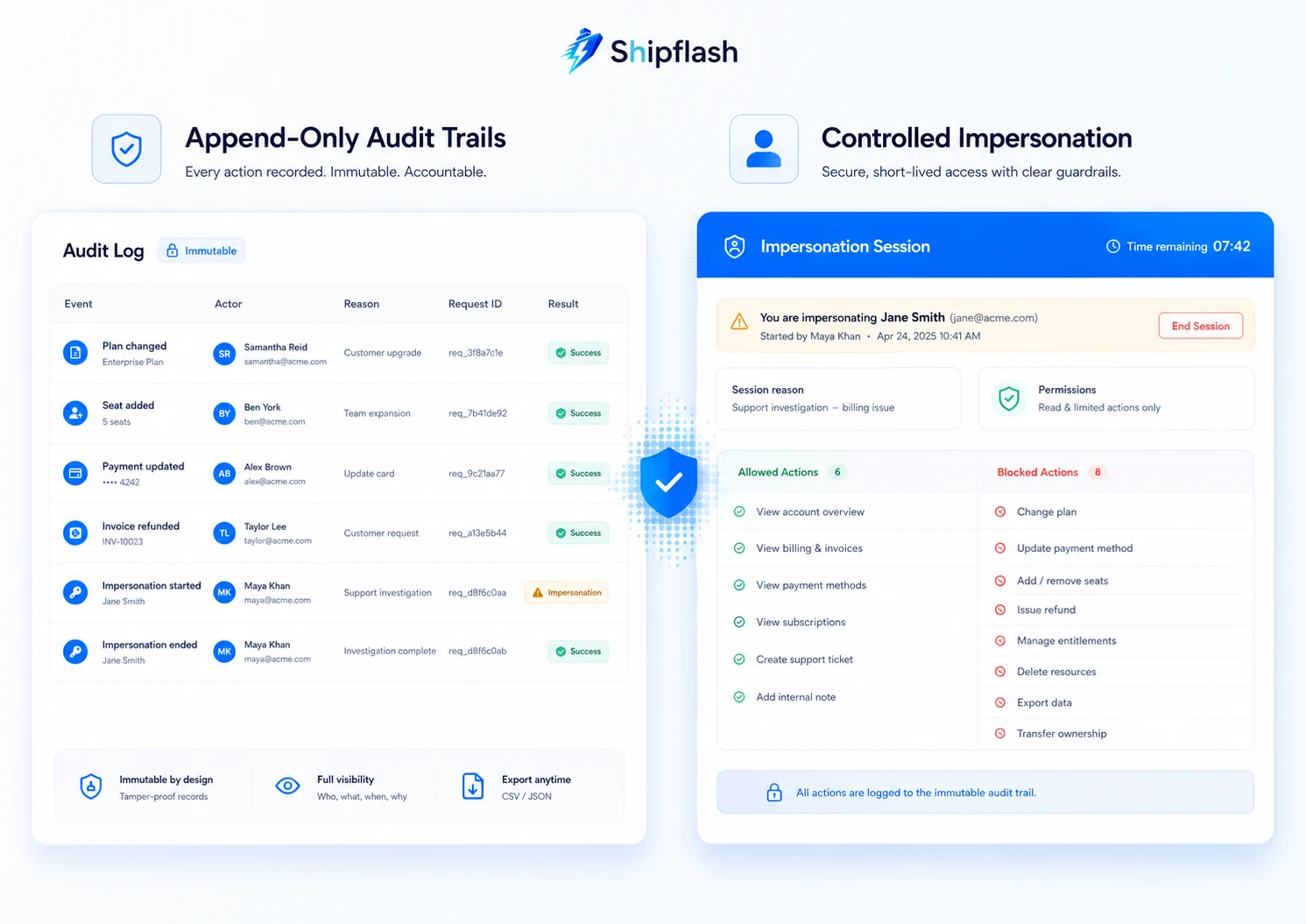
Recommended impersonation boundaries
An impersonated session should usually be unable to:
- Change the customer’s password or MFA settings
- View full payment credentials
- Issue refunds
- Change another operator’s permissions
- Start another impersonation session
- Access secrets or internal administration routes
- Perform destructive account actions
You may also choose to disable normal product mutations entirely and provide a read-only reproduction mode.
Attribute every action to the operator
Do not record an impersonated mutation as though the customer initiated it.
The audit event needs both identities:
{
  "action": "project.settings.updated",
  "actor_user_id": "admin-user-id",
  "effective_user_id": "customer-user-id",
  "impersonation_session_id": "impersonation-session-id",
  "reason": "Reproducing support ticket SUP-221"
}
That distinction protects the customer and the operator.
Create an application-level audit trail
Infrastructure logs are valuable, but they rarely capture the business meaning of an admin action.
A web server may record that someone called POST /admin/customers/123/suspend. An application audit event should explain who performed the suspension, which customer was affected, why it was performed, what changed, and whether the operation succeeded.
OWASP recommends consistent application logging because infrastructure logs alone often miss the contextual events needed for security investigations and operational analysis.
A practical audit schema might look like this:
create table admin_audit_events (
  id uuid primary key default gen_random_uuid(),
  occurred_at timestamptz not null default now(),

  actor_user_id uuid not null,
  actor_role text not null,
  effective_user_id uuid,

  action text not null,
  target_type text not null,
  target_id text not null,

  reason text not null,
  request_id uuid not null,
  impersonation_session_id uuid,

  result text not null
    check (result in ('succeeded', 'failed', 'partially_completed')),

  before_state jsonb,
  after_state jsonb,
  metadata jsonb not null default '{}'::jsonb
);
What should an audit event contain?
At minimum:
| Field | Purpose |
|---|---|
| Actor | Identifies the administrator or system process |
| Effective user | Identifies the customer context during impersonation |
| Action | Uses a stable business event name |
| Target | Identifies the affected customer, payment, message, or setting |
| Reason | Captures the operator’s stated intent |
| Request ID | Connects the event to application logs and traces |
| Before and after state | Records the meaningful change without copying excessive data |
| Result | Distinguishes success, failure, and partial completion |
| Timestamp | Establishes sequence and supports investigation |
Keep audit logs append-only
Normal application roles should not be able to update or delete audit events.
Corrections should be represented by a new event rather than rewriting history.
An audit record may also contain sensitive information, so “log everything” is not a safe policy. Avoid recording secrets, passwords, complete tokens, full card details, or unrestricted database snapshots.
Capture the smallest useful representation of the operation.
A practical customer-support investigation flow
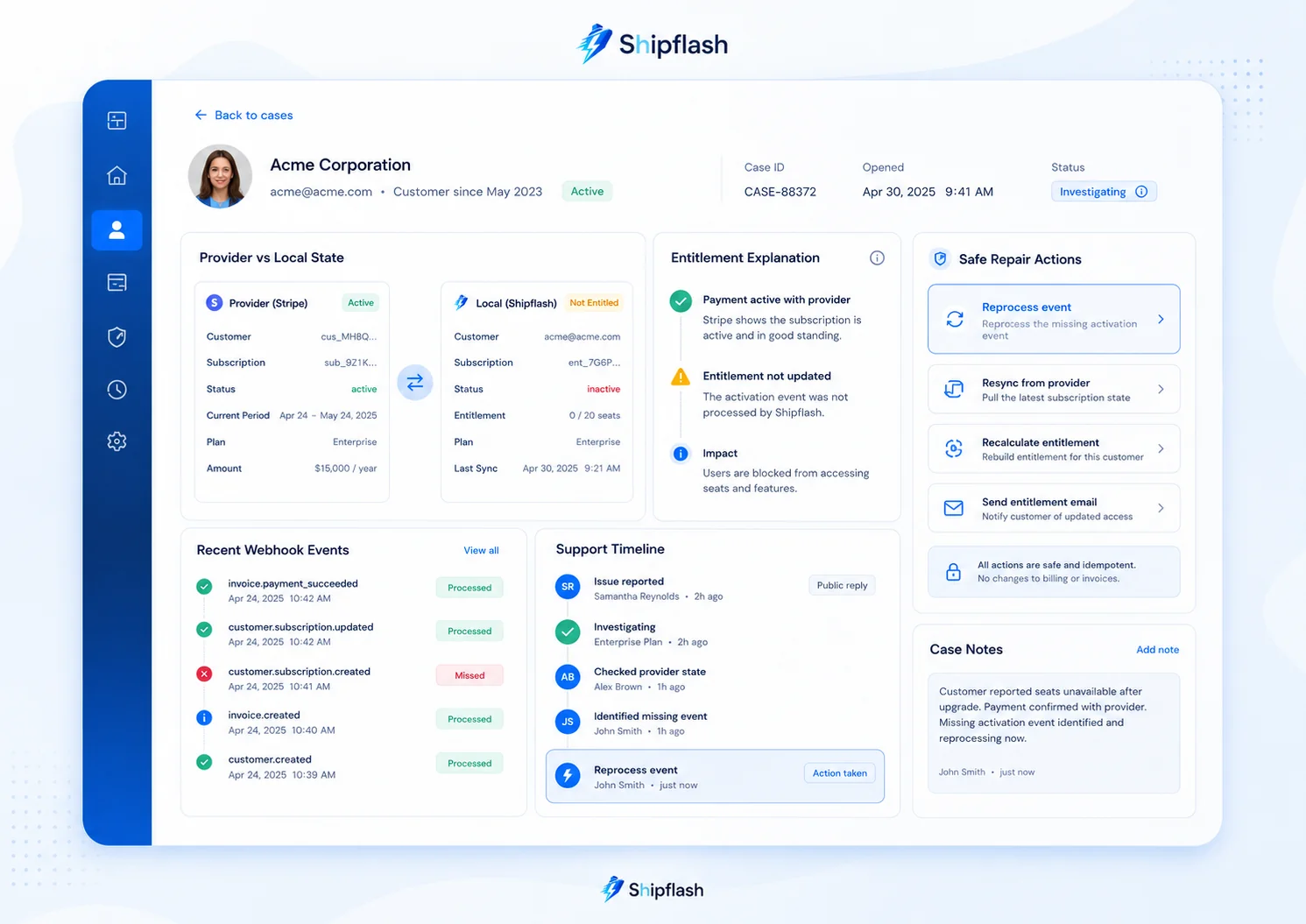
An admin workspace should guide the operator through evidence before presenting corrective actions.
Consider the customer who paid but did not receive access.
Step 1: Resolve the customer identity
Search by the email, order ID, provider customer ID, or user ID supplied in the support request.
Confirm that the authenticated user and billing customer are correctly linked.
Step 2: Check provider state
Retrieve the relevant customer, payment, subscription, or order from the active billing provider.
Do not infer payment success from a local table alone.
Step 3: Inspect webhook processing
Find the provider event that should have updated the application.
Show:
- Signature verification result
- Event type
- Provider event ID
- First received time
- Processing attempts
- Last error
- Final processing state
Step 4: Compare local billing records
Determine whether the provider state was correctly projected into the application.
A mismatch should be presented explicitly:
Provider subscription: active
Local subscription: incomplete
Difference detected: yes
Step 5: Explain the entitlement
The operator should be able to see why the product granted or denied access.
For example:
Entitlement: Pro access
Current status: inactive
Expected source: subscription sub_123
Reason: local subscription projection is incomplete
Step 6: Check related communication
Confirm whether the receipt, verification message, or support notification was queued, accepted, delivered, bounced, or suppressed.
For end-to-end email diagnostics, see Your SaaS Email Was Sent—But Did It Arrive?.
Step 7: Offer the narrowest repair
In this case, the correct action may be:
Reprocess billing event evt_123 and rebuild entitlements from provider state.
That is safer than:
Set customer to Pro.
Step 8: Verify the result
After the repair, display the updated provider, projection, entitlement, and notification states.
Do not make the operator manually refresh several disconnected tools to confirm success.
Separate read models from command models
Admin dashboards often need wide, joined views that would be inconvenient to load from normalized tables repeatedly.
It is reasonable to create dedicated operational read models.
For example:
create view admin_customer_overview as
select
  p.user_id,
  p.email,
  p.status as account_status,
  b.provider_customer_id,
  b.subscription_status,
  e.current_plan,
  e.access_expires_at,
  n.last_delivery_status
from profiles p
left join billing_customers b on b.user_id = p.user_id
left join current_entitlements e on e.user_id = p.user_id
left join notification_summary n on n.user_id = p.user_id;
The read model can be optimized for support investigation.
Mutations should still go through explicit commands rather than updating the view’s underlying tables directly.
This creates a useful division:
- Read models answer operational questions quickly.
- Commands enforce business rules and produce controlled changes.
- Audit events explain what operators and systems did.
- Background jobs complete retryable or long-running side effects.
Feature and account overrides need ownership and expiry
Temporary overrides are common in SaaS support.
You may need to give a customer temporary access, increase a limit while investigating a problem, disable a faulty feature, or extend a trial.
The dangerous version is an unstructured JSON field:
{
  "pro": true,
  "limit": 999999,
  "special": true
}
Nobody knows who created it, why it exists, or when it should be removed.
A better override record contains:
type AccountOverride = {
  key: string
  value: unknown
  customerId: string
  reason: string
  createdBy: string
  createdAt: string
  expiresAt: string | null
  sourceTicketId: string | null
}
The admin dashboard should distinguish permanent configuration from temporary operational exceptions.
Expired overrides should be removed or deactivated automatically. Upcoming expirations can be surfaced to operators before they affect the customer.
Protect billing and provider credentials
An admin workspace frequently calls payment providers, email providers, and other privileged APIs.
Use separate, restricted credentials where the provider supports them. Stripe recommends restricted API keys with only the permissions required by a particular system instead of using unrestricted secret keys everywhere.
Credential scope should follow the command boundary.
A service that only reads disputes should not receive permission to create refunds. A notification diagnostics service should not receive access to unrelated billing resources.
This limits the impact of both programming mistakes and credential compromise.
Test admin operations as production-critical features
Admin tooling often receives less testing than customer-facing features because only trusted staff can access it.
That is backwards.
Admin actions are unusually powerful and frequently used during stressful incidents, when operators are more likely to make mistakes.
At minimum, test:
- Unauthorized and underprivileged access
- Missing or invalid reasons
- Stale expected state
- Duplicate submissions
- Provider timeout after success
- Partial completion
- Audit event creation
- Impersonation expiry
- Background-job retries
- Sensitive-data filtering
- Concurrent operator actions
A refund test should prove that two submissions with the same operation ID do not create two provider refunds.
An impersonation test should prove that the effective customer cannot access admin routes.
A suspension test should prove that the operation records the previous state and can be safely reversed.
Include the most consequential admin paths in your release gates alongside the customer journeys they protect. Next.js SaaS Production Checklist: 60 Checks Before You Launch provides a wider production-readiness framework for authorization, billing, webhooks, migrations, observability, backups, and rollback.
Build the admin workspace in stages
A small SaaS does not need a complete enterprise back-office platform before launch.
It does need a safe path away from repeated production SQL.
Stage 1: Read-only investigation
Start with customer search and joined operational views.
Operators should be able to inspect authentication, billing, entitlement, webhook, notification, and audit state without receiving direct database credentials.
Stage 2: Reversible actions
Add session revocation, notification retry, temporary overrides, and account suspension.
Every action should require authorization, validation, a reason, and an audit event.
Stage 3: Billing and repair workflows
Add provider-aware reconciliation, entitlement rebuilding, and refund workflows.
Introduce durable operation records and idempotency.
Stage 4: Controlled impersonation
Add short-lived, limited impersonation only after the underlying authorization and audit systems are dependable.
Stage 5: Approval and automation
As the team grows, add approval requirements for high-risk operations, automated anomaly detection, scheduled reconciliation, and operational reporting.
The sequence matters.
A polished admin interface without command safety or auditability merely makes dangerous actions easier to perform.
Common questions about SaaS admin operations
Should customer-support staff have production database access?
Usually, no.
Support personnel should receive an operational interface with the minimum data and commands needed for their responsibilities. Engineers may still require production access for exceptional investigations, but recurring support procedures should become documented application operations.
Is a generic CRUD admin generator enough?
It can accelerate read-only internal tooling, but unrestricted CRUD is a poor model for consequential business actions.
Refunding a payment, suspending a customer, rebuilding entitlements, and retrying a webhook are commands with different rules. They should not be represented as arbitrary field edits.
Should the billing provider or application database be the source of truth?
Different systems can be authoritative for different facts.
The provider is normally authoritative for provider-owned payment and subscription state. Your application should own product entitlements and operational history. The admin dashboard should show these states separately and explain how they are connected.
Do small SaaS products really need audit logs?
Small products may have fewer operators, but they still need to explain sensitive changes and recover from mistakes.
A focused append-only audit trail is easier to introduce while the system is small than after support procedures have spread across SQL scripts, provider dashboards, and private messages.
Your admin dashboard is part of the product architecture
A SaaS is not finished when customers can sign up, pay, and use the main feature.
Someone must also be able to understand why a customer cannot sign in, why a payment did not grant access, why a notification failed, and what happened after a support action was taken.
Without an operations layer, those questions become database queries, provider-dashboard searches, and one-off scripts.
That approach may survive the first few customers. It does not become safer as the product grows.
A production-ready admin workspace gives your team a controlled way to investigate and act:
- It preserves the boundaries between authentication, billing, entitlements, communications, and product state.
- It replaces arbitrary updates with explicit business commands.
- It enforces permissions where actions execute.
- It makes retries and partial failures recoverable.
- It records enough evidence to understand every consequential change.
A strong production-ready SaaS foundation should include these operational capabilities from the beginning, rather than waiting until customer support becomes an emergency.
Shipflash provides a production-minded SaaS foundation with structured customer, billing, communications, analytics, content, security, and admin modules—giving founders and developers a safer starting point than rebuilding operational tooling after launch.
The goal is not to eliminate SQL.
It is to ensure that helping a customer does not require treating your production database like a user interface.