
A SaaS product can feel fast while it is still a prototype.
A user submits a form. The server writes a database row, sends an email, calls a billing provider, updates analytics, generates a document, and records an audit event—all before returning a response.
It works during development. It might even work for the first hundred users.
Then one external API becomes slow, a deployment interrupts an invocation, two webhook deliveries arrive at the same time, or a cron job processes the same record twice. The problem is no longer whether the code can perform the task. The problem is whether the task can finish reliably when production behaves unpredictably.
That is the real purpose of background jobs.
The practical rule: Keep work synchronous only when the user needs its result before the response can be returned. Use Next.js after() for bounded, non-critical side effects. Use cron for recurring triggers. Use a durable queue for work that must survive failures. Use a durable workflow when a business process contains multiple steps, waits, retries, or external events.
This distinction matters because “run it in the background” is not an architecture. It is a decision about execution guarantees.
A reliable SaaS foundation must decide:
- Whether the task may be lost
- Whether it can run more than once
- How it should recover from failure
- How long it may run
- How much concurrency it can safely use
- What evidence will exist when something goes wrong
Those decisions are part of making a production-ready SaaS foundation, not optimizations to add after launch.
What Is a Background Job in Next.js?
A background job is work that does not need to finish inside the original user-facing request.
Examples include:
- Delivering transactional email
- Reconciling billing records
- Processing an uploaded file
- Generating a report
- Retrying a failed webhook action
- Cleaning up expired data
- Synchronizing an external integration
- Sending scheduled notifications
The phrase can be misleading, however. Next.js does not provide one universal background-job system that covers every reliability requirement.
Next.js provides after() for running work after a response or render completes. Hosting platforms can provide scheduled HTTP invocations. Supabase can schedule database jobs and store durable queue messages. External workflow platforms can coordinate stateful work across multiple executions.
These tools solve different problems.
The first architectural mistake is treating them as interchangeable.
The Five Ways to Execute Work
Most Next.js SaaS tasks belong in one of five execution models.
| Execution model | Best suited for | Survives interruption? | Built-in retry? | Typical example |
|---|---|---|---|---|
| Synchronous request | Work required for the response | No separate durability | No | Validate and create an account |
| Next.js after() | Short, non-critical post-response work | Not as a durable queue | No | Record analytics or activity logs |
| Cron job | Recurring schedules and maintenance triggers | Scheduler-dependent | Not necessarily | Run reconciliation every 15 minutes |
| Durable queue | Independent work that must eventually finish | Yes | Worker-dependent | Deliver an email from an outbox |
| Durable workflow | Multi-step, long-running business processes | Yes | Usually | Trial sequence, document pipeline, provisioning |
The correct choice is not determined only by how long the code takes.
A task that takes 200 milliseconds may still need a queue if losing it would create a billing or access-control inconsistency. A task that takes five seconds might be acceptable in after() if it is only recording optional analytics.
The important questions are durability, business impact, and failure behavior.
When Work Should Stay Synchronous
Some operations belong inside the request because the response would be misleading without them.
Consider a user changing the name of a workspace. The application should not return “saved” before the authorized database mutation has completed. Similarly, a checkout endpoint should not tell the client that a session exists before the billing provider has returned the session identifier.
Synchronous work usually includes:
- Authentication
- Authorization
- Input validation
- The primary database mutation
- Creation of the resource needed by the response
- Recording critical state required for later processing
The request should establish a truthful system state.
That does not mean every consequence of the mutation must finish before the response. The database can save the workspace change synchronously while an audit notification is delivered later.
A useful boundary is:
Commit the fact synchronously. Process its consequences asynchronously.
For example, account creation and the intention to send a welcome email should be persisted together. The external email request can happen later.
When to Use Next.js after()
Next.js provides the after() API for scheduling work after a response or prerender has completed.
It is useful when a task should not delay the response but is still small enough to run within the same invocation. Next.js supports it in Server Components, Server Functions, Route Handlers, and other server contexts. Its callback remains subject to the route’s configured or platform-provided maximum duration.
Good uses of after() include:
- Writing non-critical request analytics
- Recording an optional activity signal
- Invalidating an auxiliary cache
- Sending telemetry
- Updating a best-effort search signal
- Logging the result of an operation
Here is a simplified Route Handler:
import { after } from "next/server";

import { requireCurrentUser } from "@/lib/auth/require-current-user";
import { recordActivity } from "@/lib/activity/record-activity";
import { updateProfile } from "@/lib/profile/update-profile";

export const maxDuration = 15;

export async function POST(request: Request) {
  const user = await requireCurrentUser();
  const input = await request.json();

  const profile = await updateProfile({
    userId: user.id,
    displayName: input.displayName,
  });

  after(async () => {
    await recordActivity({
      actorId: user.id,
      action: "profile.updated",
      resourceId: profile.id,
    });
  });

  return Response.json({ profile });
}
The response does not wait for recordActivity(). That improves perceived latency.
But after() should not be treated as a durable queue.
It still runs within the lifecycle and duration limits of the invocation. Vercel explicitly notes that post-response promises share the function timeout and can be cancelled if that function reaches its limit.
Do not rely on after() when losing the task could:
- Leave a customer without paid access
- Lose a transactional email that must be delivered
- Skip a refund or entitlement update
- Leave an uploaded asset permanently unprocessed
- Break an audit or compliance requirement
- Create an unreconciled provider state
For those tasks, persist durable work before returning the response.
Why “Fire and Forget” Is Not a Queue
A common implementation looks like this:
export async function POST() {
  void sendWelcomeEmail();

  return Response.json({ ok: true });
}
This is not a background-job system.
The function may return before the promise settles. Depending on the runtime and hosting environment, the process can be frozen or terminated. Failures may become unhandled rejections. There is no durable record, retry schedule, attempt count, or replay mechanism.
Even when it appears to work, the application cannot answer basic operational questions:
- Was the email actually sent?
- Did it fail before contacting the provider?
- Did the provider accept it but the response time out?
- Was it attempted twice?
- Can an administrator replay it?
- How long has it been pending?
A queue exists to make those questions answerable.
When to Use Cron Jobs
A cron job is a scheduler. It decides when something should start.
It does not automatically make the work durable, idempotent, retryable, or safe to run concurrently.
That distinction is critical.
A cron expression can invoke a Next.js Route Handler every hour. If the route loads 50,000 records, processes them in one invocation, and fails at record 49,000, the schedule has worked correctly. The job architecture has not.
Vercel Cron Jobs
Vercel Cron invokes a configured HTTP path on a schedule. The invocation uses the same duration constraints as a Vercel Function. Vercel also documents that failed cron invocations are not automatically retried.
A simple configuration might look like this:
{
  "$schema": "https://openapi.vercel.sh/vercel.json",
  "crons": [
    {
      "path": "/api/cron/process-email-outbox",
      "schedule": "*/5 * * * *"
    }
  ]
}
The endpoint should be authenticated. Vercel supports a CRON_SECRET environment variable and sends it as a bearer token when invoking the route.
import { timingSafeEqual } from "node:crypto";

import { processEmailOutboxBatch } from "@/lib/jobs/process-email-outbox-batch";

export const maxDuration = 60;

function secretsMatch(actual: string | null, expected: string): boolean {
  if (!actual.startsWith("Bearer ")) {
    return false;
  }

  const supplied = Buffer.from(actual.slice("Bearer ".length));
  const configured = Buffer.from(expected);

  return (
    supplied.length === configured.length &&
    timingSafeEqual(supplied, configured)
  );
}

export async function GET(request: Request) {
  const secret = process.env.CRON_SECRET;

  if (!secret || !secretsMatch(request.headers.get("authorization"), secret)) {
    return Response.json({ error: "Unauthorized" }, { status: 401 });
  }

  const result = await processEmailOutboxBatch({
    limit: 25,
    workerId: crypto.randomUUID(),
  });

  return Response.json(result);
}
The route processes a bounded batch rather than trying to empty the entire queue.
That keeps execution predictable and lets the next scheduled invocation continue from durable state.
Vercel’s schedule frequency and timing precision also depend on the account plan. Its current documentation lists once-daily scheduling with hourly precision on Hobby, while Pro and Enterprise support per-minute schedules. Verify the active plan limits before designing time-sensitive workflows.
Supabase Cron
Supabase Cron uses the pg_cron extension. It can run SQL, call a database function, or make an HTTP request.
This is useful when the schedule is closely related to database state:
- Expire stale records
- Enqueue recurring reconciliation work
- Archive old operational data
- Rebuild a materialized result
- Invoke an Edge Function
- Release abandoned leases
Supabase recommends limiting cron concurrency and keeping individual runs bounded; its documentation currently recommends no more than eight jobs running concurrently and no more than ten minutes per job.
A recurring job can enqueue work rather than performing every external side effect inside Postgres:
select cron.schedule(
  'enqueue-billing-reconciliation',
  '*/15 * * * *',
  $$
    select internal.enqueue_billing_reconciliation();
  $$
);
This creates a useful separation:
- Cron decides when
- The queue records what
- Workers decide how and when it is safe to execute
That separation makes retries, concurrency, and replay easier to control.
When to Use a Durable Queue
A durable queue is appropriate when a task must remain available until a worker successfully processes it or deliberately marks it as failed.
Good queue candidates include:
- Transactional email delivery
- File processing
- Billing reconciliation
- Search indexing
- Webhook follow-up work
- Export generation
- Integration synchronization
- Notification fan-out
- AI generation tasks
- Large cleanup operations
Supabase Queues is based on the pgmq extension and stores messages in Postgres. Its documentation describes durable message storage, delivery through a visibility window, optional archival, and queue management through Postgres tooling.
A durable queue gives you the persistence layer, but your application still needs clear processing rules:
- What makes a message ready?
- How long does a worker own it?
- What happens when the worker crashes?
- Which errors should be retried?
- When is a message considered permanently failed?
- How does replay work?
- How are duplicate effects prevented?
A queue without those answers is only a table of pending work.
When to Use a Durable Workflow Platform
A queue is usually enough for one independent task.
A durable workflow becomes valuable when the process contains several dependent steps or must wait for something outside the current execution.
Examples include:
- Provision account resources, create a billing customer, send onboarding email, and verify completion
- Generate a report, wait for external data, render a file, upload it, and notify the customer
- Start a trial, send reminders over several days, wait for conversion, and end the sequence
- Run an AI generation step, request approval, then publish the result
- Retry one failed step without repeating all completed steps
Platforms such as Inngest and Trigger.dev provide durable execution primitives, retries, saved state, concurrency controls, waits, and operational visibility.
Inngest models work as checkpointed steps. Successful steps can be reused while a failed step is retried independently, avoiding unnecessary re-execution of earlier work.
Trigger.dev places task runs into queues and supports task-specific or shared concurrency limits, which can protect a database or rate-limited external API.
These platforms add an external dependency, but they can remove substantial orchestration code when a workflow includes long waits, several side effects, or complex recovery behavior.
A Practical Decision Framework
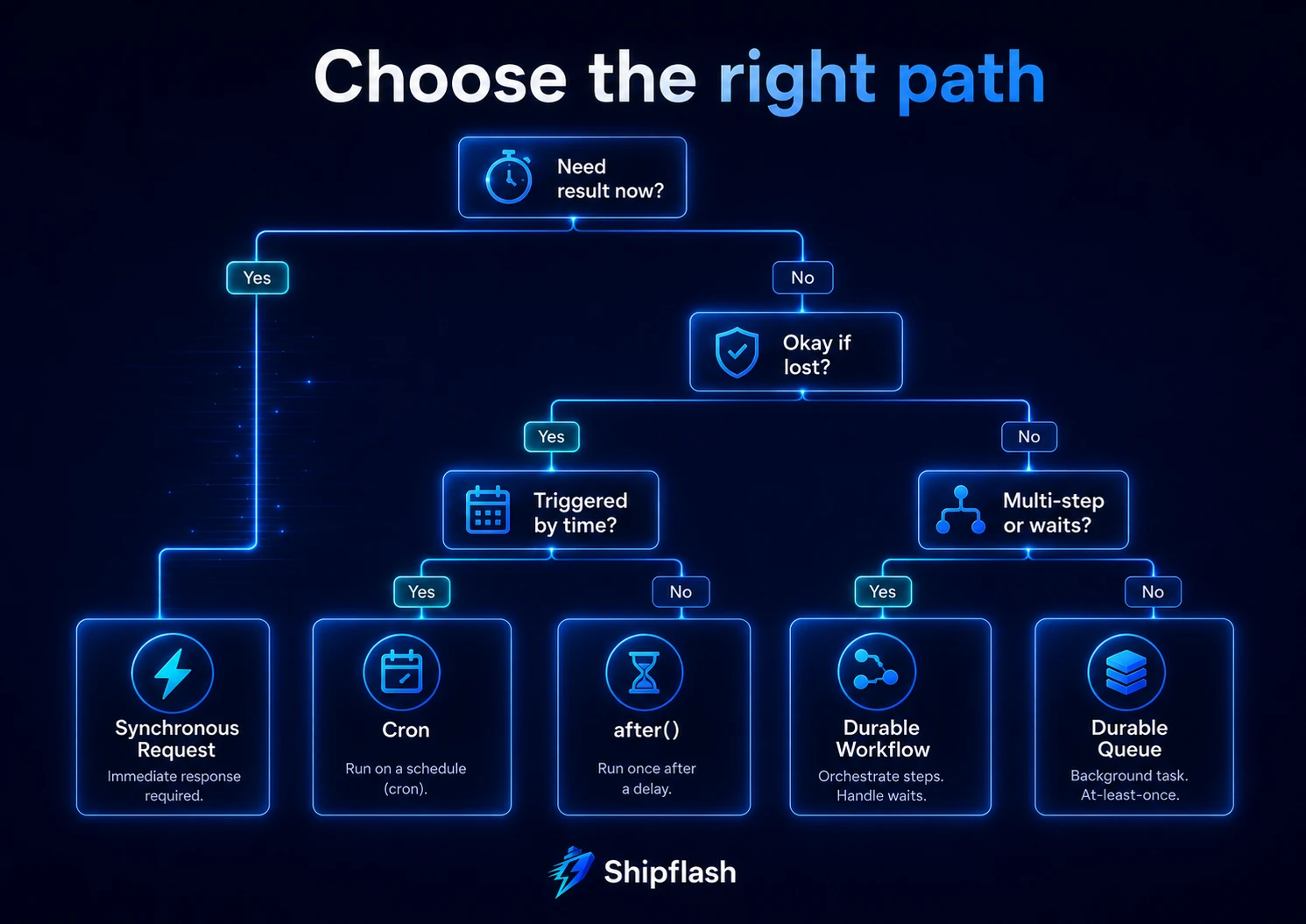
Use the following sequence when deciding where work belongs.
1. Does the user need the result now?
When the response is not truthful without the result, keep the operation synchronous.
Creating the resource requested by the user is synchronous. Sending a notification about that resource usually is not.
2. Is losing the side effect acceptable?
When occasional loss is acceptable and the operation is small, after() may be appropriate.
When loss would create a customer-facing or financial inconsistency, persist the task in a queue.
3. Is the task triggered by time?
Use cron to create or wake the work.
Avoid using cron as the only record that the work exists. A durable job row or queue message should track important tasks independently of the schedule.
4. Can the task execute more than once?
In production, the safe assumption is yes.
A worker may complete the external action and crash before recording success. A lease may expire while the original worker is still running. A webhook provider may redeliver an event. An administrator may replay a failed job.
Design the effect to be idempotent.
5. Does the task contain several resumable steps?
Use a durable workflow when the process must pause, wait for external events, or retry one step without replaying all previous work.
The Production Pattern: Transactional Outbox and Worker
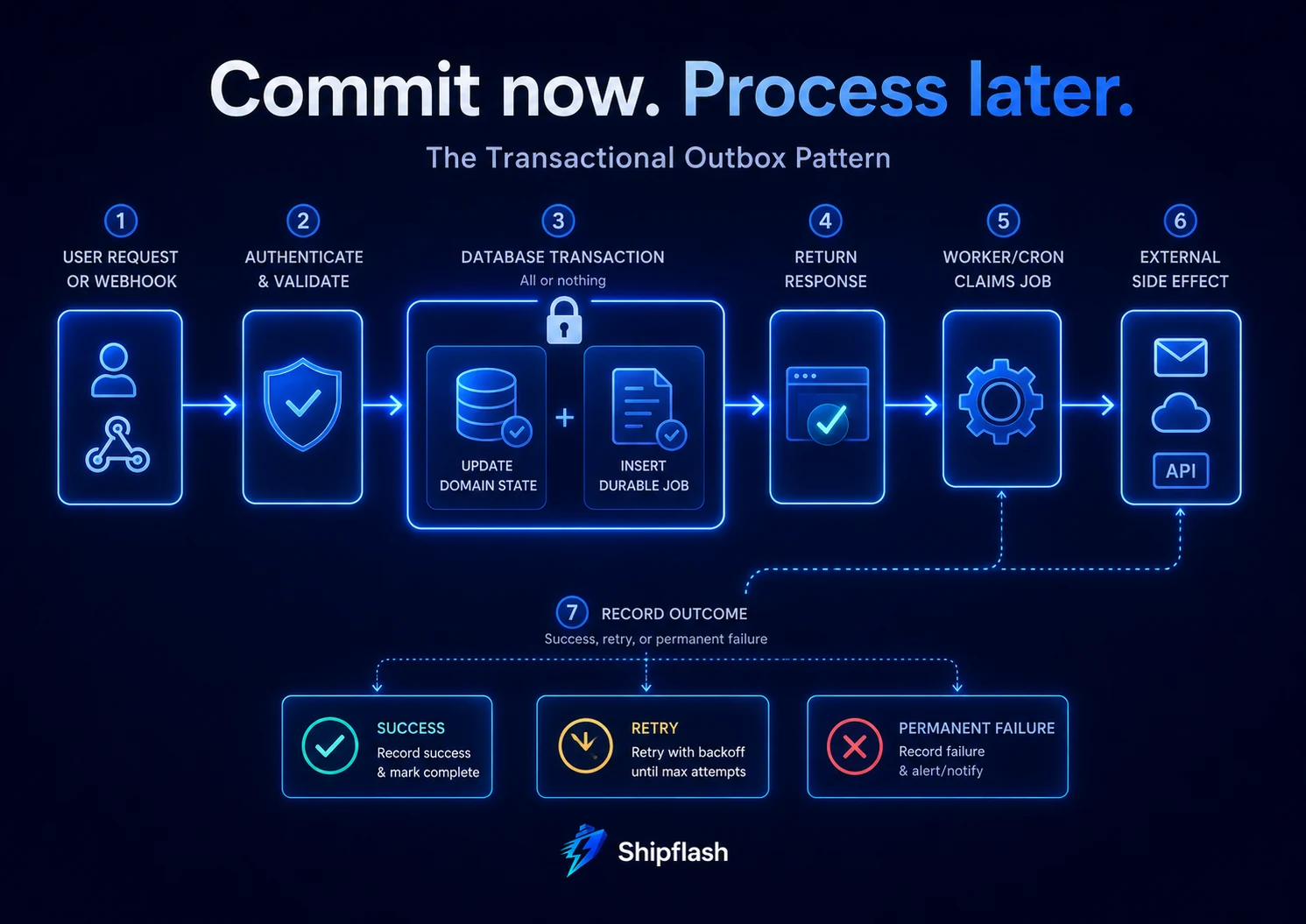
One of the safest patterns for a Next.js and Supabase SaaS is a transactional outbox.
The application performs its primary database change and creates a durable job record in the same transaction. A worker processes the job later.
User request or webhook
        │
        ▼
Authenticate and validate
        │
        ▼
Database transaction
  ├─ Update domain state
  └─ Insert durable job
        │
        ▼
Return response
        │
        ▼
Cron or queue worker claims job
        │
        ▼
External side effect
        │
        ▼
Record success, retry, or permanent failure
The transaction closes an important reliability gap.
Without it, two bad outcomes are possible:
- The domain change commits, but the job is never created.
- The job is created, but the domain change rolls back.
For example, a user can be created without a welcome-email job, or an email job can be sent for an account that was never successfully created.
When using Supabase, several separate client calls do not automatically form one transaction. Put the domain mutation and outbox insertion in a database function, SQL transaction, or another server-side transaction boundary when they must succeed atomically.
Designing a Durable Job Table
A production job table needs more than a processed boolean.
The following simplified schema records scheduling, ownership, attempts, errors, and completion:
create schema if not exists internal;

create table internal.background_jobs (
  id uuid primary key default gen_random_uuid(),

  queue_name text not null,
  job_type text not null,
  payload jsonb not null default '{}'::jsonb,

  dedupe_key text,
  payload_version integer not null default 1,

  status text not null default 'pending'
    check (
      status in (
        'pending',
        'processing',
        'retry',
        'completed',
        'failed'
      )
    ),

  priority smallint not null default 100,

  attempts integer not null default 0,
  max_attempts integer not null default 8,
  available_at timestamptz not null default now(),

  locked_at timestamptz,
  locked_by text,

  last_error text,

  created_at timestamptz not null default now(),
  updated_at timestamptz not null default now(),
  completed_at timestamptz
);

create unique index background_jobs_dedupe_key_idx
  on internal.background_jobs (queue_name, dedupe_key)
  where dedupe_key is not null;

create index background_jobs_ready_idx
  on internal.background_jobs (
    queue_name,
    status,
    priority,
    available_at,
    created_at
  )
  where status in ('pending', 'retry');
Keep this table in a private schema or otherwise restrict it to trusted server-side roles. Browser clients should not be able to enqueue arbitrary internal jobs, read sensitive payloads, or mark work as completed.
This is the same trust-boundary principle used when designing Supabase Row Level Security for a Next.js SaaS: database access should match the authority of the caller, not merely the existence of a session.
Use Small, Versioned Payloads
A job payload should carry stable identifiers and the minimum immutable context required for processing.
Prefer:
{
  "subscriptionId": "sub_internal_123",
  "providerEventId": "evt_456",
  "reason": "webhook_follow_up"
}
Avoid copying an entire user, subscription, or invoice object into the queue.
Large mutable snapshots become stale. Sensitive values may be retained longer than expected. Schema changes become harder to deploy.
The worker can load the latest domain state using the identifier. When historical state matters, save the required immutable fields deliberately and add a payload_version.
Claiming Jobs Safely with a Lease
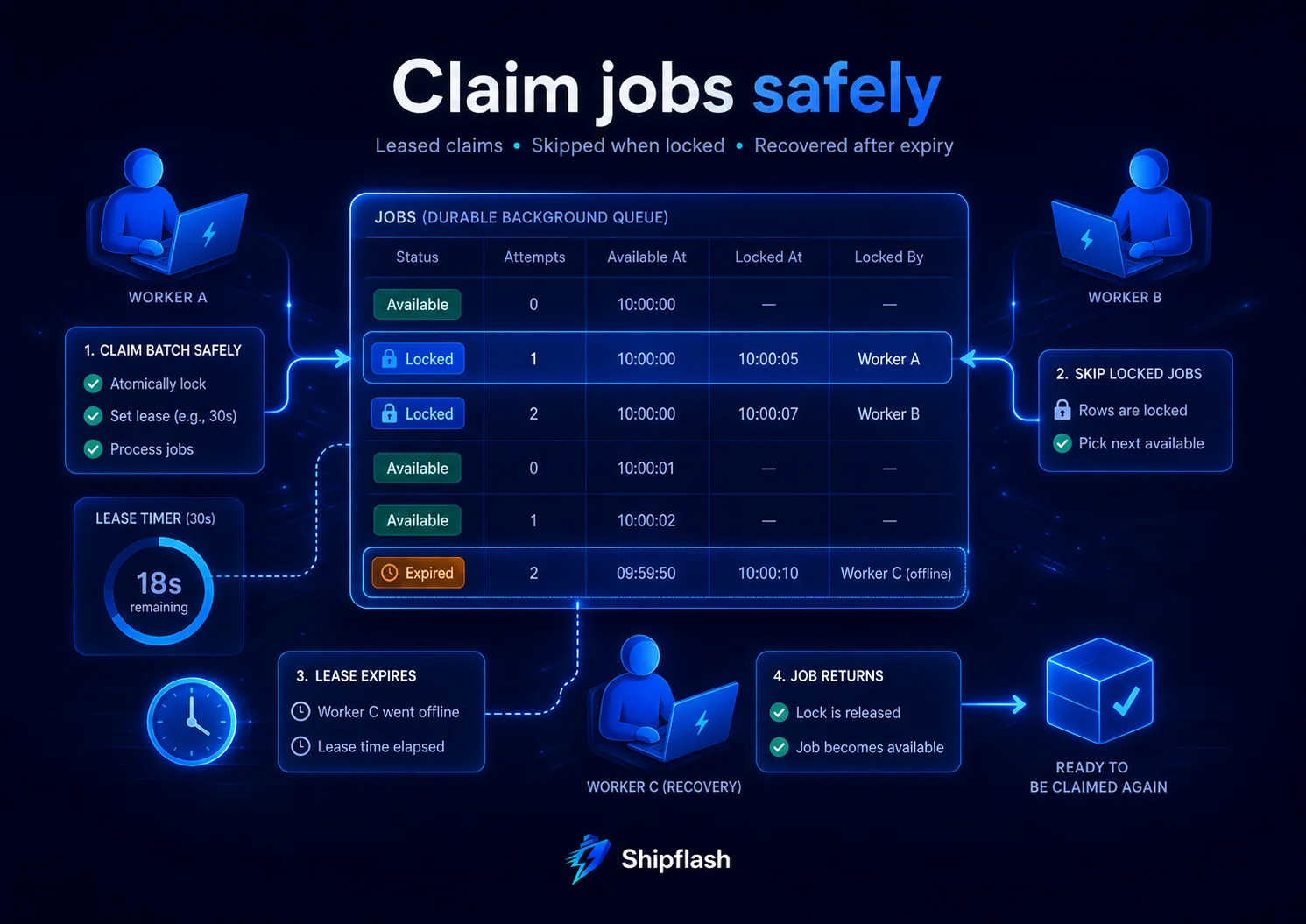
Multiple workers must not process the same available row at the same time.
PostgreSQL supports FOR UPDATE SKIP LOCKED, which is specifically suitable for avoiding contention among multiple consumers of a queue-like table.
A worker can claim a bounded batch:
with candidates as (
  select id
  from internal.background_jobs
  where queue_name = 'email'
    and status in ('pending', 'retry')
    and available_at <= now()
    and (
      locked_at is null
      or locked_at < now() - interval '5 minutes'
    )
  order by priority asc, created_at asc
  for update skip locked
  limit 25
)
update internal.background_jobs as jobs
set
  status = 'processing',
  locked_at = now(),
  locked_by = $1,
  attempts = jobs.attempts + 1,
  updated_at = now()
from candidates
where jobs.id = candidates.id
returning jobs.*;
The lock protects the claim transaction. The lease fields protect the job after the transaction has committed.
If the worker crashes, another worker can recover the job after the lease expires.
The lease duration should be longer than a normal execution but short enough that abandoned work is recovered promptly. Long-running jobs may need lease renewal or heartbeat updates.
A lease is not proof that only one execution can ever happen. A slow worker can continue running after its lease expires. Another worker may then claim the same job.
That is why the effect itself must remain idempotent.
Idempotency: Aim for One Outcome, Not One Execution
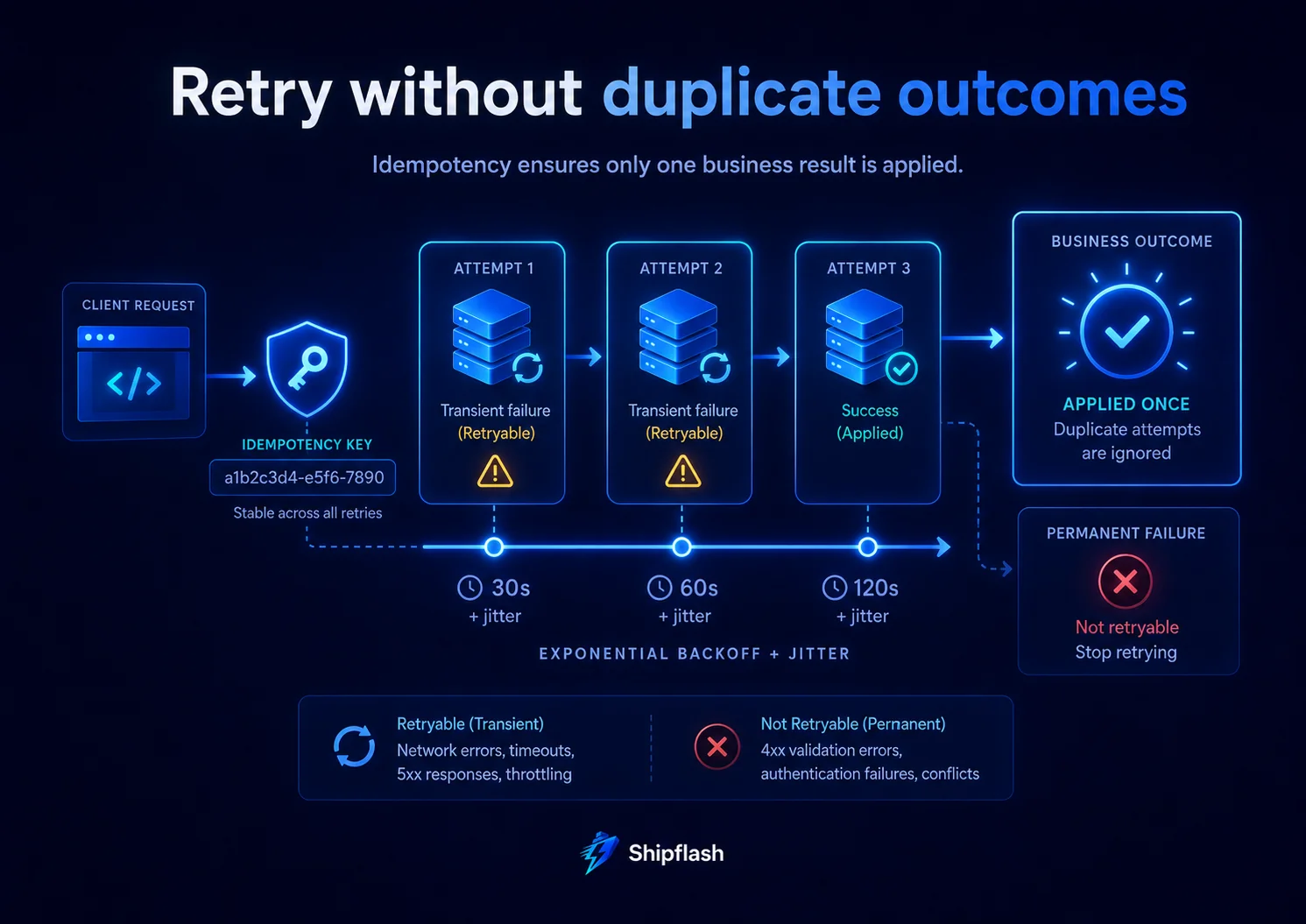
Exactly-once execution is rarely a safe application-level assumption.
Networks can time out after a provider has accepted a request. Workers can crash after completing an action but before marking the job complete. Messages can be redelivered.
A more realistic target is:
The task may execute more than once, but the business outcome should be applied once.
There are several layers of idempotency.
Enqueue Idempotency
Assign a stable deduplication key:
insert into internal.background_jobs (
  queue_name,
  job_type,
  dedupe_key,
  payload
)
values (
  'billing',
  'reconcile_subscription',
  'reconcile:subscription:sub_internal_123:2026-07-28T10:00',
  jsonb_build_object(
    'subscriptionId',
    'sub_internal_123'
  )
)
on conflict (queue_name, dedupe_key)
where dedupe_key is not null
do nothing;
PostgreSQL’s ON CONFLICT behavior uses unique constraints or indexes to resolve competing inserts atomically.
Processing Idempotency
Before applying an internal effect, check whether the relevant event or operation has already been recorded.
Examples include:
- A unique provider_event_id for webhooks
- A unique notification key for one-time email
- A unique (customer_id, period_start) reconciliation run
- A unique import row identifier
- A unique credit-ledger operation key
Provider Idempotency
When an external provider supports idempotency keys, derive one from the stable internal operation rather than generating a new value for every retry.
The same logical operation should reuse the same provider key.
Completion Idempotency
Updating a job from processing to completed should be conditional on the current worker’s ownership when possible. A late worker should not overwrite a newer retry’s status.
Building a Retry Policy
Retries should be deliberate, bounded, and based on the error category.
Retrying every error wastes resources and can make permanent failures worse.
Retry Transient Failures
Examples include:
- Network timeouts
- Temporary connection failures
- HTTP 429 rate limits
- Provider 5xx responses
- Short-lived database contention
- Temporary service unavailability
Do Not Automatically Retry Permanent Failures
Examples include:
- Invalid payload structure
- Unsupported job version
- Missing required resource
- Revoked or invalid credentials
- A provider rejecting a malformed request
- An authorization policy denying the operation
A permanent error should move toward investigation or a failed state instead of consuming all retry capacity.
Treat Ambiguous Results Carefully
The hardest case is a request that times out after being sent to an external provider.
You may not know whether the provider completed the operation.
Do not blindly create a different operation on retry. Reuse an idempotency key, query the provider by your internal reference, or reconcile the result before trying again.
Exponential Backoff with Jitter
Immediate retries can overload a struggling dependency.
Exponential backoff increases the delay after each failure. Jitter adds randomness so many workers do not retry at exactly the same time.
const SECOND = 1_000;
const MINUTE = 60 * SECOND;
const MAX_DELAY = 6 * 60 * MINUTE;

export function calculateRetryDelay(attempt: number): number {
  const normalizedAttempt = Math.max(1, attempt);

  const exponentialDelay =
    30 * SECOND * 2 ** Math.min(normalizedAttempt - 1, 10);

  const cappedDelay = Math.min(exponentialDelay, MAX_DELAY);

  // Add up to 25% jitter.
  const jitter = Math.floor(Math.random() * cappedDelay * 0.25);

  return cappedDelay + jitter;
}
A worker can use the delay to schedule the next attempt:
const delay = calculateRetryDelay(job.attempts);

await markJobForRetry({
  jobId: job.id,
  workerId,
  availableAt: new Date(Date.now() + delay),
  error: serializeJobError(error),
});
Retries should also respect provider instructions such as Retry-After when available.
External workflow platforms can manage this automatically. For example, Inngest supports configurable retries and step-level recovery, while Trigger.dev supports retry timing, exponential factors, maximum delays, and randomized retry intervals.
Dead-Letter Handling and Manual Replay
Eventually, a task must stop retrying.
After the configured maximum attempts, move it to a permanent failed state or dead-letter queue.
Keep enough information to investigate:
- Job ID
- Job type
- Payload version
- Attempt count
- First and most recent failure timestamps
- Last normalized error
- Correlation or request ID
- Provider event ID
- Worker version
- Relevant resource ID
Do not immediately delete failed jobs.
A failed job is operational evidence. Removing it can turn a recoverable incident into an unexplained customer complaint.
Replay should be an explicit action. The system should record:
- Who requested the replay
- Why it was replayed
- Whether the original job was reused or superseded
- Which idempotency key protects the effect
- The result of the new attempt
A replay button without idempotency controls is a duplicate-action button.
Concurrency Is a Safety Control
Increasing concurrency can reduce queue latency, but it can also overwhelm the systems the worker depends on.
A worker pool may be limited by:
- Database connections
- CPU or memory
- Provider rate limits
- Email sending limits
- File-processing capacity
- Per-customer ordering requirements
- Lock contention
- Downstream API quotas
Configure concurrency around the narrowest dependency, not the theoretical capacity of the queue.
Some tasks also need serialization by resource.
Two reconciliation jobs for the same subscription should not modify its local entitlement state concurrently. You can enforce that using a database lock, a resource-specific lease, or a concurrency key derived from the subscription ID.
Trigger.dev supports shared queues and configurable concurrency limits. Inngest supports concurrency constraints at function, environment, or account scope.
Concurrency and rate limiting are related but different:
- Concurrency limits how many tasks run simultaneously.
- Rate limiting limits how many operations can start or complete during a time window.
A provider may allow ten concurrent requests but only one hundred requests per minute. Your worker may need both controls.
Observability for Background Jobs
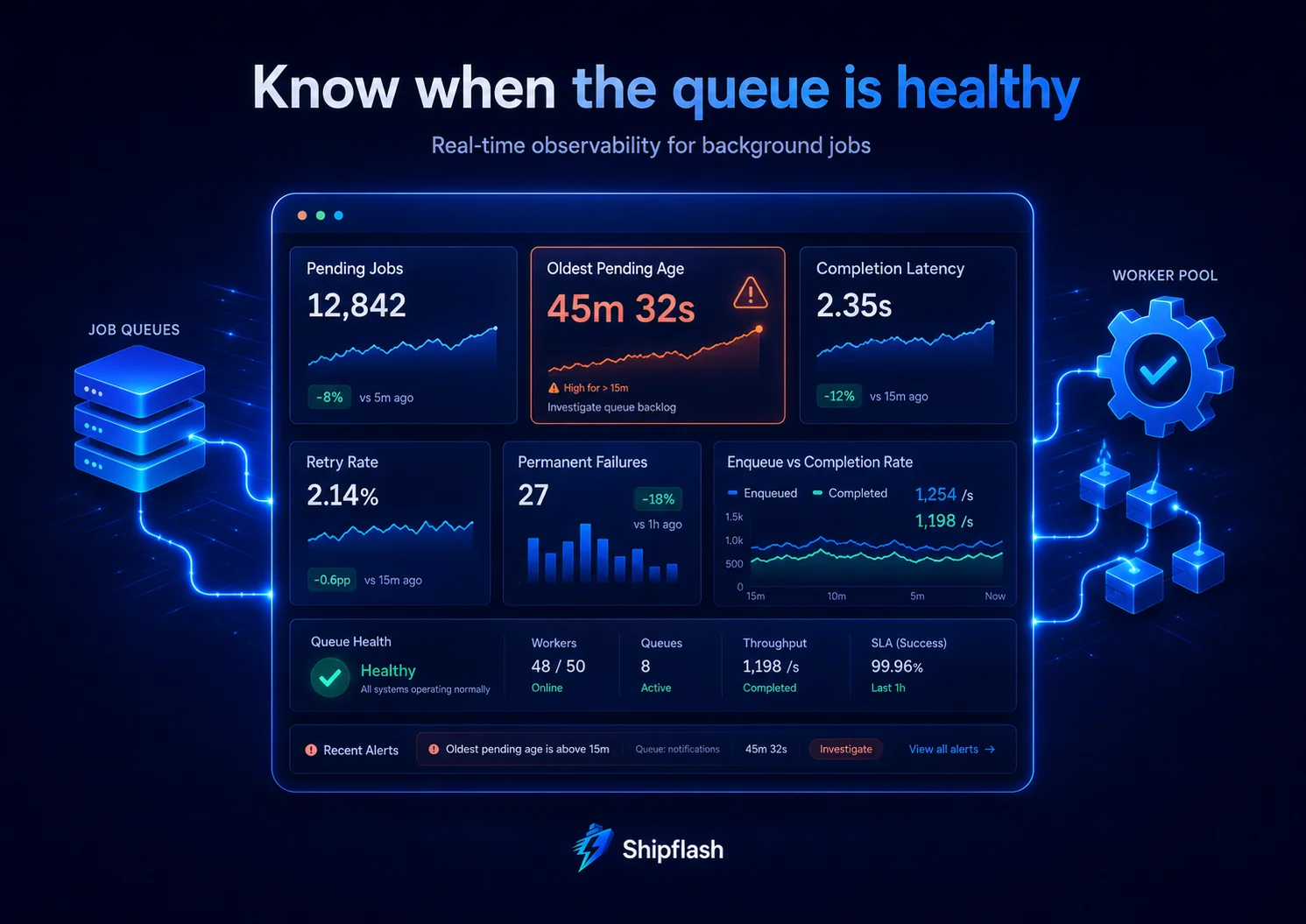
A background system is not reliable merely because it retries.
You also need to know whether it is keeping up.
Every job execution should produce structured context such as:
{
  "jobId": "job_123",
  "jobType": "deliver_email",
  "attempt": 3,
  "workerId": "worker_456",
  "requestId": "req_789",
  "resourceId": "notification_123",
  "provider": "resend",
  "outcome": "retry",
  "durationMs": 842,
  "errorCode": "provider_timeout"
}
Useful queue metrics include:
| Metric | What it reveals |
|---|---|
| Pending job count | Current queue depth |
| Oldest pending age | Whether customers are waiting too long |
| Completion latency | Time between enqueue and completion |
| Retry rate | Dependency instability or code failures |
| Permanent failures | Jobs requiring intervention |
| Lease expirations | Crashes, timeouts, or undersized leases |
| Processing duration | Capacity and performance changes |
| Enqueue rate versus completion rate | Whether backlog is growing |
The age of the oldest pending job is often more actionable than queue depth alone.
A queue containing 10,000 jobs may be healthy when all jobs are less than a minute old. A queue containing three jobs may be broken when the oldest has been waiting for six hours.
Comparing the Main Background-Job Options
| Option | Strongest use case | Main advantage | Main limitation |
|---|---|---|---|
| Next.js after() | Short, non-critical post-response work | Minimal additional infrastructure | Not a durable job record |
| Vercel Cron | Scheduled HTTP triggers | Simple Next.js deployment integration | Failed invocations are not automatically retried |
| Supabase Cron | Database-related recurring work | Close to Postgres state and functions | Scheduler does not replace job durability |
| Supabase Queues | Durable Postgres-native messages | Fits a Supabase architecture | You still design and run the worker |
| Inngest | Event-driven, multi-step workflows | Checkpointed steps and durable retries | Additional platform and integration |
| Trigger.dev | Long-running TypeScript tasks | Queues, retries, waits, and concurrency controls | Additional platform and integration |
| Self-managed worker system | Maximum infrastructure control | Flexible runtime and processing model | Highest operational responsibility |
A small SaaS does not need every option.
A practical starting architecture might be:
- Next.js Route Handlers for user requests and webhooks
- after() for optional logs and analytics
- A Postgres outbox for important work
- Vercel Cron or Supabase Cron to wake workers
- Supabase Queues or a database-backed job table for durability
- An external workflow platform only when orchestration becomes complex
Worked Example: Transactional Email Delivery
Transactional email is a classic background job.
The wrong flow is:
Create user
→ Call email provider
→ Wait
→ Return response
If the email provider is slow, signup becomes slow. If the provider fails, you must choose between failing the signup or accepting an account without a durable email attempt.
A stronger flow is:
Database transaction
  ├─ Create user profile
  └─ Create welcome-email outbox row

Return success

Worker
  ├─ Claim outbox row
  ├─ Send email with stable idempotency/reference key
  ├─ Record provider message ID
  └─ Complete or retry
The account is created independently of provider latency. The system preserves the intention to send the message and can retry it safely.
Store the rendered message or a stable template version when exact historical content matters. Otherwise, a later template change could cause a retry to send different content from the original attempt.
Worked Example: Billing Reconciliation
Webhooks are important, but they are not the only source of billing truth.
Events can be delayed, delivered more than once, handled out of order, or fail during downstream processing. A recurring reconciliation job compares provider state with local subscription and entitlement records.
This complements the event-driven architecture described in SaaS Billing Architecture: Webhooks, Entitlements, Reconciliation, and Reliable Access Control.
A safe reconciliation design uses two stages.
First, cron enqueues bounded reconciliation jobs:
Every 15 minutes
→ Select subscriptions due for reconciliation
→ Enqueue one job per subscription
Then workers process them with limited concurrency:
Claim subscription job
→ Fetch provider state
→ Compare local billing record
→ Apply idempotent correction
→ Record reconciliation result
Do not let one cron invocation loop through the entire customer base.
Per-subscription jobs improve isolation. One provider error does not roll back every other customer. Retries target the failed subscription rather than replaying the full batch.
Worked Example: Webhook Follow-Up
A webhook Route Handler should do only the work necessary to accept the event safely:
- Verify the signature.
- Enforce a request-size limit.
- Parse and validate the payload.
- Insert the provider event using a unique event ID.
- Enqueue required downstream work.
- Return the appropriate response.
Sending email, generating invoices, updating analytics, or calling several additional services inside the webhook route increases timeout and redelivery risk.
Persist the event first. Then process its consequences through jobs.
Provider webhook
→ Verify signature
→ Insert event with unique provider_event_id
→ Enqueue follow-up work
→ Return success
→ Worker updates entitlements and notifications
The unique provider event ID protects against duplicate delivery. The downstream jobs still need their own business-level idempotency keys.
Worked Example: Cleanup and Retention
Cleanup jobs are usually scheduled but should still be bounded.
Avoid:
delete from rate_limits
where expires_at < now();
A large unbounded deletion can hold locks, create write pressure, generate substantial database churn, and exceed execution limits.
Prefer small batches:
delete from rate_limits
where id in (
  select id
  from rate_limits
  where expires_at < now()
  order by expires_at asc
  limit 5000
);
Run the batch repeatedly until the backlog is gone.
For large tables, consider partitioning, retention windows, vacuum behavior, and whether archival is required before deletion.
Worked Example: Scheduled Health Checks
A health check should report health. It should not secretly perform broad repair work.
A readiness endpoint may verify a database dependency or another required service. An authorized scheduler or monitoring service can call it and record the outcome.
When the check finds a problem, enqueue a separate repair or investigation job.
This separation avoids several problems:
- Monitoring requests accidentally performing mutations
- Public callers triggering expensive recovery work
- Long repairs causing the health endpoint itself to time out
- Repeated monitors launching duplicate repairs
- Unclear logs mixing detection and remediation
Protect non-public health and operational endpoints with dedicated secrets, reject unauthorized callers before touching expensive dependencies, and rotate those secrets independently from customer authentication.
Deployment-Safe Background Jobs
Background jobs often outlive the deployment that created them.
A message can be enqueued by version A and processed after version B has been deployed. During a rolling deployment, old and new workers may run simultaneously.
Use payload versions:
{
  "payloadVersion": 2,
  "subscriptionId": "sub_internal_123"
}
Workers should either support recent payload versions or fail unsupported versions clearly.
A safe deployment sequence is:
- Deploy consumers that can understand the old and new payload.
- Start producing the new payload.
- Wait for old queued messages to drain.
- Remove old consumer support in a later deployment.
Do not enqueue:
- Class instances
- Framework-specific objects
- Open database connections
- Request or response objects
- Temporary file handles
- Secrets that can be loaded securely during processing
Queue payloads are persisted data and should be treated as a versioned interface.
These checks belong alongside the broader release gates in the Next.js SaaS Production Checklist.
Common Background-Job Anti-Patterns
| Anti-pattern | Why it fails | Better approach |
|---|---|---|
| void sendEmail() in a Route Handler | No durability or retry record | Persist an outbox job |
| Cron processes every eligible record | Timeouts and all-or-nothing batches | Enqueue bounded per-resource jobs |
| Retry every error | Permanent failures consume capacity | Classify transient and permanent errors |
| Assume one execution | Crashes and lease expiry cause duplicates | Make effects idempotent |
| Unbounded worker concurrency | Overloads the database or provider | Set dependency-aware limits |
| Boolean processed field | Cannot represent retry, ownership, or failure | Use explicit job states |
| Delete failed jobs immediately | Removes operational evidence | Retain and support controlled replay |
| Put secrets inside payloads | Expands exposure and retention | Resolve secrets at execution time |
| Reuse mutable payloads without versions | Deployments break old jobs | Version the queue contract |
| Let browsers enqueue arbitrary jobs | Creates an authority-escalation path | Restrict enqueueing to trusted server code |
A Production Readiness Checklist for Next.js Background Jobs
Before shipping a background task, verify the following:
| Area | Release question | Required evidence |
|---|---|---|
| Execution model | Why is this synchronous, post-response, scheduled, queued, or orchestrated? | Documented decision |
| Durability | Can the task be lost safely? | Persisted job for critical work |
| Atomicity | Can domain state commit without its job? | Transaction or outbox design |
| Idempotency | What happens when it executes twice? | Unique operation key and duplicate test |
| Retry policy | Which errors are retryable? | Error classification |
| Backoff | Can retries overload the dependency? | Exponential delay and jitter |
| Attempts | When does retrying stop? | Maximum attempt count |
| Dead letters | How are permanent failures reviewed? | Failed state and investigation path |
| Lease | How does a crashed worker release work? | Expiry or heartbeat |
| Concurrency | What protects downstream capacity? | Queue or worker limit |
| Rate limiting | What protects external quotas? | Time-window limiter |
| Observability | Can one job be traced end to end? | Structured logs and identifiers |
| Alerting | How is a stuck queue detected? | Oldest-age and failure alerts |
| Replay | Can operators retry safely? | Audited replay action |
| Security | Who can enqueue, inspect, and execute jobs? | Server-only authorization |
| Deployment | Can new workers process existing payloads? | Payload-version compatibility |
| Retention | How long are completed and failed jobs kept? | Documented retention policy |
A job is not production-ready until the team can explain both its success path and its recovery path.
Frequently Asked Questions
Can Next.js run background jobs?
Next.js can run post-response work through after(), and a Next.js Route Handler can act as a cron endpoint or queue worker. However, durable job storage, retry state, leases, dead-letter handling, and replay require additional infrastructure or application code.
Is Next.js after() a job queue?
No. after() schedules work after the response or render finishes, but it remains tied to the invocation’s execution limits. It does not create a durable job record, attempt history, lease, or dead-letter queue. Use it for short, non-critical side effects rather than work that must eventually succeed.
Does Vercel Cron retry failed jobs?
Vercel’s current documentation states that it does not retry a cron invocation when the invocation fails. Important cron work should therefore enqueue durable jobs or implement another explicit retry mechanism.
Should a cron job process the queue directly?
A cron-triggered endpoint can process a small, bounded batch. For larger or more important workloads, use cron to wake a worker or enqueue work, then track each task independently.
When should I use Supabase Queues?
Supabase Queues is a strong fit when the application already uses Supabase and needs durable Postgres-native message storage without adding a separate queue datastore. You still need to design workers, idempotency, retry classification, concurrency, observability, and replay.
Do queues guarantee exactly-once processing?
Do not build business logic around an assumption that code can run only once. Workers can crash or lose ownership after applying a side effect. Design for repeated execution and enforce an idempotent business outcome using unique keys, state checks, and provider idempotency support.
When is an external workflow platform worth it?
Use a durable workflow platform when a process has multiple dependent steps, long waits, external events, complex retries, or operational requirements that would otherwise require a substantial custom orchestration system.
Should webhook processing happen in the background?
Signature verification, payload validation, event deduplication, and durable persistence should happen before acknowledging the webhook. Expensive or failure-prone follow-up work should normally be queued.
How many background workers should a SaaS run?
There is no universal number. Start with low, explicit concurrency and increase it based on queue latency, database capacity, provider quotas, execution duration, and error rates. Concurrency should be a controlled configuration rather than an accidental result of traffic.
Build for Recovery, Not Just Execution
The first version of a background task is usually easy.
The production version must survive slow providers, duplicate events, worker crashes, rate limits, deployments, database contention, and human replay.
The architecture becomes much clearer when each tool has one responsibility:
- Synchronous code establishes the state required by the response.
- after() handles bounded, non-critical post-response work.
- Cron determines when recurring work starts.
- Queues preserve work until it is processed.
- Workers execute jobs with leases, retries, and concurrency controls.
- Durable workflows coordinate long-running, multi-step processes.
- Idempotency prevents repeated execution from becoming a repeated business outcome.
- Observability makes recovery possible when automation stops working.
The goal is not to move as much code as possible into the background.
The goal is to put each responsibility in an execution model whose failure behavior matches its business importance.
Shipflash provides a structured, production-oriented SaaS foundation for developers, founders, and AI-assisted teams that want to start past repetitive infrastructure and keep the resulting product maintainable as it grows.