
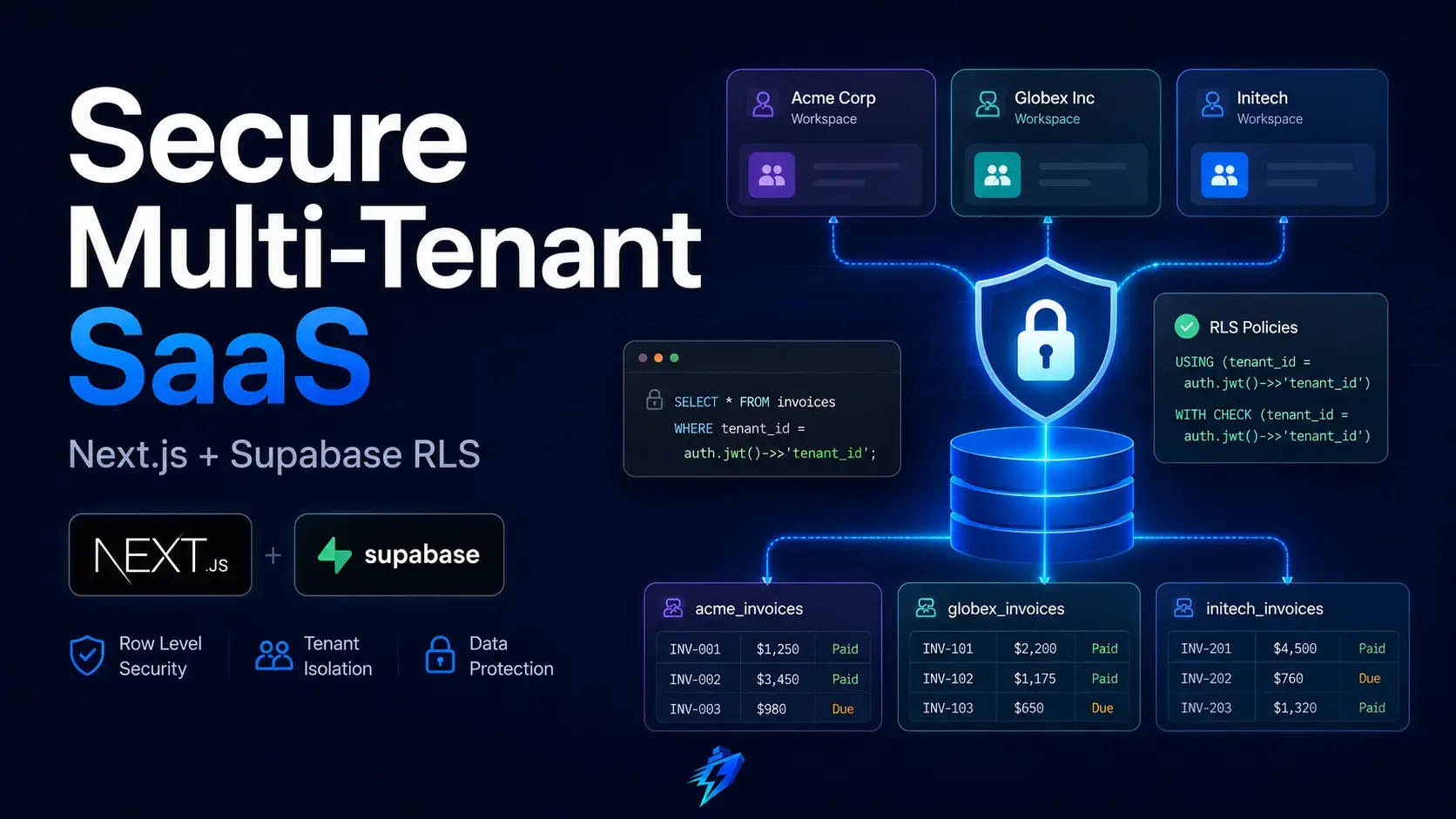
Authentication is not the same as authorization.
A user can be correctly signed in to your Next.js application and still access another customer’s data if your database queries trust a user-supplied ID, your server route forgets a membership check, or an AI coding tool generates a convenient query without understanding your tenancy model.
Supabase Row Level Security, usually shortened to RLS, closes that gap at the database boundary. It allows PostgreSQL to decide which rows a request may read, insert, update, or delete based on the request’s database role and authenticated identity.
Direct answer: For a multi-tenant Next.js SaaS, RLS should act as the final authorization boundary around every exposed tenant-owned table. Your application should still validate sessions, permissions, inputs, and business rules, but a missing check in one Server Action should not expose another organization’s records.
That sounds straightforward. The difficult part is not turning RLS on. The difficult part is designing policies that match your product model, work correctly with Supabase Auth and Next.js server-side rendering, remain safe when service-role access is introduced, perform well as tables grow, and can be verified before every deployment.
This guide builds that production model from the ground up.
For a wider explanation of how authentication, database access, billing, webhooks, and operational controls fit together, start with Shipflash’s guide to a production-ready SaaS foundation. RLS is one layer of that wider architecture, not a replacement for it.
What Is Supabase Row Level Security?
Supabase RLS is PostgreSQL Row-Level Security applied to tables that your application accesses through Supabase’s Data API or database clients.
Without RLS, a PostgreSQL privilege such as SELECT generally applies to every row in the table. With RLS enabled, policies add row-specific conditions to normal queries and mutations. PostgreSQL applies those conditions before returning or changing the affected rows.
When RLS is enabled and no applicable policy allows an operation, PostgreSQL uses a default-deny posture for normal table access. The official PostgreSQL row security documentation and Supabase RLS guide explain the underlying behavior in detail.
The easiest mental model is to imagine a policy as an authorization filter attached to the table:
create policy "Users can read their own profile"
on public.profiles
for select
to authenticated
using ((select auth.uid()) = user_id);
When a signed-in user queries profiles, PostgreSQL behaves as though the policy condition were added to the query. Rows that do not satisfy the condition are not visible to that request.
That database-level enforcement matters because a modern Next.js application can reach the same data through many paths:
- a Server Component;
- a Server Action;
- a Route Handler;
- a client-side Supabase query;
- an RPC function;
- a background worker;
- an admin tool;
- a webhook handler;
- a future feature written by a different developer or AI agent.
If authorization exists only inside one page loader or API handler, every new path must reproduce it perfectly. RLS makes the database responsible for a critical part of the rule.
Authentication, Authorization, Grants, and RLS Are Different Layers
A secure SaaS needs all four concepts, and they answer different questions.
| Layer | Main question | Typical mechanism |
|---|---|---|
| Authentication | Who is making the request? | Supabase Auth session and JWT |
| Application authorization | Is this action valid in the product workflow? | Server-side role checks, state checks, validation |
| PostgreSQL privileges | May this database role perform this operation at all? | GRANT and REVOKE |
| Row Level Security | Which specific rows may this request access or mutate? | USING and WITH CHECK policies |
Supabase Auth provides an identity. It does not automatically know that a user belongs to Organization A but not Organization B.
PostgreSQL grants decide whether the authenticated role may issue SELECT, INSERT, UPDATE, or DELETE against a table. RLS then narrows that operation to permitted rows. Column-level privileges can narrow updates further when users should edit a project name but must never move the project to another organization or change its creator.
Application code still matters. It should reject malformed input, return an intentional 401, 403, or 404, enforce product invariants, apply rate limits, and produce useful audit logs.
RLS is the last boundary that prevents a forgotten application check from becoming a cross-tenant data leak.
This layered model is especially important for software built quickly with AI tools. A generated interface can look finished while its authorization model remains incomplete. That is one reason the path from a vibe-coded prototype to a production SaaS requires more than polishing the UI.
Design the Tenant Model Before Writing Policies
RLS policies cannot rescue an ambiguous data model.
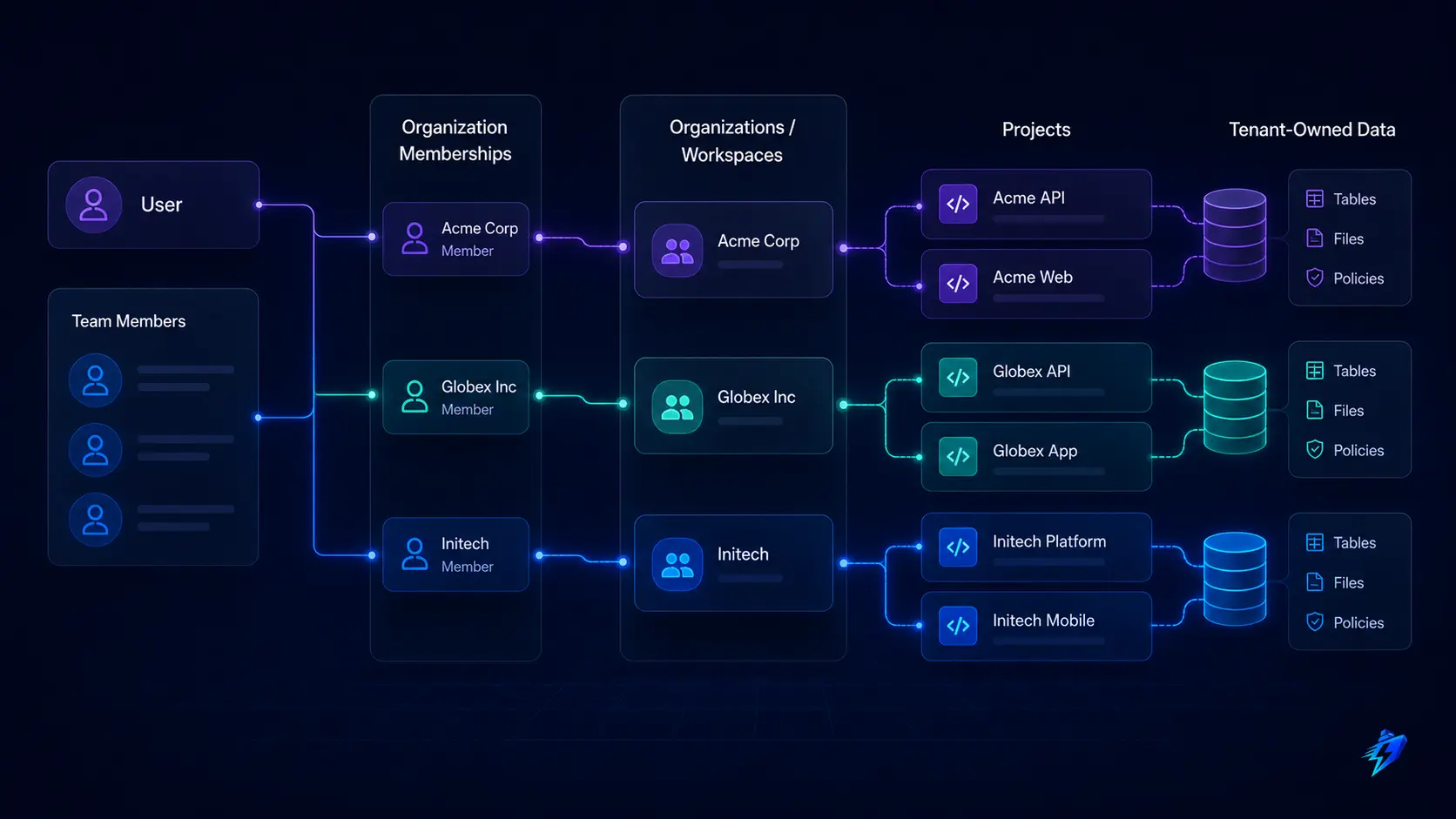
Before writing SQL, define the resource ownership chain. In a typical B2B SaaS:
user
  └── organization_members
        └── organization
              ├── projects
              ├── customers
              ├── API keys
              ├── invoices
              └── usage records
The central authorization fact is not usually “the current user created this row.” It is “the current user has an active membership in the organization that owns this row.”
That distinction affects future collaboration. If every table uses user_id ownership, adding teams later becomes a migration across your entire product. A stable organization_id boundary allows multiple users, roles, invitations, ownership transfers, and offboarding without changing every resource model.
A practical starting schema looks like this:
create table public.organizations (
  id uuid primary key default gen_random_uuid(),
  name text not null,
  created_by uuid not null references auth.users(id),
  created_at timestamptz not null default now()
);

create table public.organization_members (
  organization_id uuid not null
    references public.organizations(id) on delete cascade,
  user_id uuid not null
    references auth.users(id) on delete cascade,
  role text not null
    check (role in ('owner', 'admin', 'member')),
  joined_at timestamptz not null default now(),
  primary key (organization_id, user_id)
);

create table public.projects (
  id uuid primary key default gen_random_uuid(),
  organization_id uuid not null
    references public.organizations(id) on delete cascade,
  name text not null,
  status text not null default 'active'
    check (status in ('active', 'archived')),
  created_by uuid not null references auth.users(id),
  created_at timestamptz not null default now(),
  updated_at timestamptz not null default now()
);
Notice that projects stores organization_id directly. It does not force every policy to travel through several indirect relationships just to discover the tenant.
Also decide what membership means when a user is suspended, an invitation is pending, or a workspace is scheduled for deletion. In a mature schema, organization_members may need fields such as status, removed_at, or access_expires_at.
Your authorization helper should check the same state your product considers active.
Enable RLS and Define Privileges Explicitly
Tables created through some Supabase dashboard flows may have RLS enabled automatically, but SQL-created tables require deliberate review. Any table exposed through the Data API should be treated as unsafe until RLS, policies, and privileges have been checked.
Enable RLS:
alter table public.organizations enable row level security;
alter table public.organization_members enable row level security;
alter table public.projects enable row level security;
Then define operation-level privileges instead of assuming policies are the entire permission model:
revoke all on public.organizations from anon, authenticated;
revoke all on public.organization_members from anon, authenticated;
revoke all on public.projects from anon, authenticated;

grant select on public.organizations to authenticated;
grant select on public.organization_members to authenticated;

grant select, insert, delete on public.projects to authenticated;

grant update (name, status, updated_at)
  on public.projects
  to authenticated;
The column-level UPDATE grant is intentional. It prevents normal authenticated requests from changing organization_id or created_by, even if an update policy would otherwise allow the resulting row.
This closes a subtle gap. A policy can confirm that the user belongs to the destination organization, but your product may still forbid moving a project between organizations. Column privileges make immutable ownership fields structurally immutable to that role.
Supabase documents the interaction between row policies and column-level privileges. RLS controls rows; grants control operations and columns.
Build Small Authorization Helper Functions
Multi-tenant policies often need to ask the same questions repeatedly:
- Is the current user a member of this organization?
- Is the current user an owner or administrator?
- Is the membership active?
Copying a complex membership subquery into every policy makes the system hard to audit and can create performance or recursion problems. A carefully constrained helper function provides one reusable definition.
Create a non-exposed schema for authorization helpers:
create schema if not exists private;

revoke all on schema private from public;
grant usage on schema private to authenticated;
Now define membership helpers:
create or replace function private.is_organization_member(
  target_organization_id uuid
)
returns boolean
language sql
stable
security definer
set search_path = ''
as $$
  select exists (
    select 1
    from public.organization_members as member
    where member.organization_id = target_organization_id
      and member.user_id = (select auth.uid())
  );
$$;

create or replace function private.is_organization_admin(
  target_organization_id uuid
)
returns boolean
language sql
stable
security definer
set search_path = ''
as $$
  select exists (
    select 1
    from public.organization_members as member
    where member.organization_id = target_organization_id
      and member.user_id = (select auth.uid())
      and member.role in ('owner', 'admin')
  );
$$;

revoke all on function private.is_organization_member(uuid) from public;
revoke all on function private.is_organization_admin(uuid) from public;

grant execute on function private.is_organization_member(uuid)
  to authenticated;

grant execute on function private.is_organization_admin(uuid)
  to authenticated;
These functions use SECURITY DEFINER, so they execute with the function owner’s privileges. That can be useful when a policy needs to inspect the membership table without triggering recursive RLS evaluation, but it also makes the function security-sensitive.
A production-safe helper should have:
- a narrow purpose;
- a fixed search_path;
- fully qualified table names;
- no dynamic SQL;
- minimal parameters;
- restricted execution grants.
It should derive the current user from auth.uid() instead of accepting a caller-supplied user ID. Supabase also recommends keeping security-definer policy helpers outside exposed schemas.
Do not turn SECURITY DEFINER into a general shortcut. A function that accepts arbitrary table names, arbitrary SQL, or a user ID chosen by the caller can become a privilege-escalation surface.
Write Separate Policies for Each Operation
A single broad FOR ALL policy is attractive because it is short. It is rarely the clearest production design.
Reading, creating, editing, and deleting are different product capabilities. Express them separately so reviewers can understand what each operation permits.
SELECT: Members Can Read Projects in Their Organizations
create policy "Organization members can read projects"
on public.projects
for select
to authenticated
using (
  (select private.is_organization_member(organization_id))
);
The request can only see rows owned by an organization where the current user has membership.
Your application should still filter by the organization it is currently displaying:
const { data, error } = await supabase
  .from("projects")
  .select("id, name, status, created_at")
  .eq("organization_id", organizationId)
  .order("created_at", { ascending: false });
The .eq() filter does not replace RLS. It narrows the query so PostgreSQL can build a better plan and so the application requests only the tenant data it needs.
INSERT: Validate Both Membership and Row Ownership
For inserts, use WITH CHECK because PostgreSQL must validate the new row:
create policy "Organization members can create projects"
on public.projects
for insert
to authenticated
with check (
  (select private.is_organization_member(organization_id))
  and created_by = (select auth.uid())
);
This blocks a user from inserting into an organization they do not belong to or forging another user as the creator.
For higher-integrity fields, consider setting them inside a trusted RPC rather than accepting them from the client.
For example, an atomic create_organization() function can create the organization and its initial owner membership in one transaction. That prevents partially created workspaces and avoids asking the browser to coordinate privileged multi-table writes.
UPDATE: Check the Existing Row and Resulting Row
An update policy can use both USING and WITH CHECK:
create policy "Organization members can update projects"
on public.projects
for update
to authenticated
using (
  (select private.is_organization_member(organization_id))
)
with check (
  (select private.is_organization_member(organization_id))
);
USING determines whether the existing row is eligible to be updated. WITH CHECK determines whether the resulting row remains valid after the update.
The earlier column-level grant prevents the authenticated role from changing organization_id or created_by. That is stronger than assuming every future update query will remember to omit those fields.
Supabase notes another easy-to-miss detail: an update also needs a corresponding SELECT policy to work as expected. The official RLS guide explains the different roles of USING and WITH CHECK.
DELETE: Restrict Destructive Operations More Aggressively
Deleting a project may be an administrator-only action:
create policy "Organization admins can delete projects"
on public.projects
for delete
to authenticated
using (
  (select private.is_organization_admin(organization_id))
);
For important business data, hard deletion may not be the best interface. A soft-delete workflow can record deleted_at, deleted_by, and a recovery window.
The update still needs RLS, column restrictions, and application checks, but it gives the product a safer operational model.
Protect the Membership Table Itself
The membership table is part of the authorization system. Treat it like a high-risk table, not ordinary CRUD data.
A read policy might allow every member to see the organization roster:
create policy "Organization members can read membership"
on public.organization_members
for select
to authenticated
using (
  (select private.is_organization_member(organization_id))
);
Membership creation, role changes, removal, invitation acceptance, and ownership transfer are more complicated.
For example:
- a normal member must not promote themselves;
- an administrator may invite members but not appoint a new owner;
- the last owner must not remove themselves before transferring ownership;
- a user must not accept an invitation issued to a different identity;
- removing a member may need to revoke API tokens or active sessions.
RLS can enforce row access, but some multi-row invariants are better implemented through narrow database functions and transactions.
A trusted transfer_organization_ownership() RPC can lock the relevant membership rows, verify that the caller is the current owner, promote the destination user, and demote the previous owner atomically.
This leads to an important design principle:
Use RLS for durable row authorization. Use transactional functions for business operations that must validate and change several related rows together.
Connect RLS Correctly to Next.js Server-Side Auth
RLS only sees the correct user when the Supabase request carries that user’s access token.
For Next.js App Router applications, Supabase’s current server-side guidance uses cookie-based authentication and separate browser and server clients. The server client should receive the request’s authenticated session, while a proxy refreshes expired tokens when needed.
Supabase currently recommends getClaims() for verified identity checks in common server authorization flows and warns against relying on the user object returned by getSession() for authorization decisions. See the Supabase SSR client guide.
A Server Action should still establish an intentional application boundary:
"use server";

import { z } from "zod";
import { createClient } from "@/lib/supabase/server";

const renameProjectSchema = z.object({
  projectId: z.string().uuid(),
  name: z.string().trim().min(1).max(120),
});

export async function renameProject(input: unknown) {
  const parsed = renameProjectSchema.safeParse(input);

  if (!parsed.success) {
    return {
      ok: false,
      code: "INVALID_INPUT" as const,
    };
  }

  const supabase = await createClient();

  const { data: claimsData, error: claimsError } =
    await supabase.auth.getClaims();

  if (claimsError || !claimsData?.claims?.sub) {
    return {
      ok: false,
      code: "UNAUTHENTICATED" as const,
    };
  }

  const { data, error } = await supabase
    .from("projects")
    .update({
      name: parsed.data.name,
      updated_at: new Date().toISOString(),
    })
    .eq("id", parsed.data.projectId)
    .select("id, name")
    .maybeSingle();

  if (error) {
    console.error("project.rename_failed", {
      projectId: parsed.data.projectId,
      errorCode: error.code,
    });

    return {
      ok: false,
      code: "UPDATE_FAILED" as const,
    };
  }

  if (!data) {
    // Avoid revealing whether an inaccessible project exists.
    return {
      ok: false,
      code: "NOT_FOUND" as const,
    };
  }

  return {
    ok: true,
    project: data,
  };
}
This action validates input, verifies identity, makes a user-scoped query, and lets RLS decide whether the row is accessible. It does not accept an organizationId and then trust it as proof of membership.
Next.js also advises treating Server Actions and Route Handlers with the same security mindset as public-facing API endpoints. They need authentication and authorization checks even though their code lives on the server. The Next.js authentication guide makes that boundary explicit.
RLS provides defense in depth, but it should not become an excuse to return unclear errors, skip schema validation, or let unauthorized traffic reach expensive queries.
Keep User-Scoped and Service-Role Clients Separate
Supabase service-role and secret keys are designed for trusted backend operations. They bypass RLS and must never be exposed to the browser.
That means a service-role client should not become the default database utility for Server Components, Server Actions, or Route Handlers handling normal user requests.
Use separate modules with different purposes:
lib/supabase/client.ts        browser session client
lib/supabase/server.ts        server client scoped to the signed-in user
lib/supabase/admin.ts         service-role client for trusted backend jobs only
The admin module should be server-only, load its key from a protected environment variable, disable session persistence, and be imported only by reviewed code paths such as:
- verified billing webhook processing;
- scheduled reconciliation jobs;
- internal support operations;
- account deletion orchestration;
- migration or backfill scripts;
- trusted administrative workflows.
Even in those paths, bypassing RLS does not remove the need for authorization. It moves responsibility into the code that calls the admin client.
For example, a billing webhook may need service access because no end-user session exists. The handler must instead verify the provider signature, enforce idempotency, map the provider event to an internal customer, validate lifecycle transitions, and write a traceable event history.
Shipflash’s SaaS billing architecture guide covers that separate trust boundary.
A useful rule is:
User request plus user session means a user-scoped client. A system event plus independently verified system authority may justify a narrowly scoped admin client.
Be Careful With JWT-Based Roles and Team Lists
Supabase exposes auth.jwt() for reading JWT claims inside policies. Claims can be useful for coarse-grained roles, authentication assurance levels, or small and stable authorization facts.
They are not automatically the best source for dynamic organization membership.
User-editable metadata must not be trusted for authorization. Supabase distinguishes mutable user metadata from app metadata that normal users cannot directly change.
Even app metadata has a freshness limitation: a changed claim does not reach an already-issued JWT until that token is refreshed.
For a SaaS where membership can be revoked immediately, a database membership table is usually the safer source of truth. Otherwise, a removed user may retain access until the old token expires or refreshes.
Large arrays of organization IDs also increase JWT and cookie size. This becomes increasingly awkward for users who belong to many workspaces.
A balanced pattern is:
- keep global, slow-changing claims such as a platform-level support role in controlled app metadata;
- keep tenant membership and tenant-specific roles in database tables;
- require stronger authentication claims for unusually sensitive actions when appropriate;
- define how quickly authorization changes must take effect.
Common Supabase RLS Mistakes in Next.js SaaS Applications
Enabling RLS Without Reviewing Every Exposed Table
RLS enabled with no matching policy usually causes denied access. That is safer than a leak, but it can break production unexpectedly.
A policy created while RLS remains disabled is worse because the policy exists but is not enforcing anything.
Audit the public schema and every other exposed schema. Supabase’s Security Advisor includes checks for RLS disabled in public schemas, policies on tables where RLS is disabled, and RLS-enabled tables without policies.
Do not treat an empty dashboard warning panel as your only proof. Keep schema and policy expectations in automated tests.
Checking Authentication but Not Resource Authorization
This pattern is incomplete:
const user = await getCurrentUser();

if (!user) {
  throw new Error("Unauthorized");
}

return database.projects.findMany();
It proves that someone is signed in. It does not prove which projects they may read.
The corrected design scopes the query to the active tenant and relies on RLS as the final boundary. In direct database libraries that do not pass a Supabase user JWT, you must implement an equivalent authorization layer yourself.
Using a Service Client for Convenience
A developer encounters an RLS error, switches the query to a service-role client, and the feature starts working.
The application has not fixed authorization. It has disabled the database guardrail for that path.
The correct response is to determine whether:
- the session is missing;
- the policy is incorrect;
- the required grant is absent;
- the query is using the wrong client;
- the operation belongs in a reviewed system workflow.
Writing One Permissive Policy for Every Operation
A broad policy such as “members can do everything” hides important differences between reading, creating, editing, and deleting.
Separate policies expose intent. They also make it easier to restrict destructive actions, validate inserted ownership fields, and enforce post-update state.
Forgetting WITH CHECK
A USING condition controls which existing rows are eligible. It does not always express what the resulting inserted or updated row is allowed to become.
Use WITH CHECK for inserts and updates. Combine it with column-level privileges or a trigger when ownership fields must never change.
Putting Authorization Helpers in an Exposed Schema
A powerful security-definer function in an exposed schema can accidentally become callable through the Data API.
Keep policy helpers in a private schema, constrain their inputs, set the search path explicitly, qualify object names, and revoke default execution permissions.
Assuming Views Automatically Preserve RLS
Traditional PostgreSQL views commonly execute with the view owner’s privileges and can bypass the underlying RLS behavior.
On supported PostgreSQL versions, security_invoker = true can make a view obey the invoking role’s access rules.
Review every view that exposes tenant data:
create view public.active_projects
with (security_invoker = true)
as
select
  id,
  organization_id,
  name,
  created_at
from public.projects
where status = 'active';
Supabase highlights this behavior in its RLS documentation.
Testing Only the Happy Path
A test confirming that User A can read Organization A is incomplete.
You must also prove that User A:
- cannot read Organization B;
- cannot insert a row into Organization B;
- cannot transfer a row to another tenant;
- cannot promote themselves;
- cannot access protected data with a stale or missing session.
Security confidence comes from denied-operation evidence, not only successful screenshots.
Improve RLS Performance Before Tables Become Large
RLS adds authorization work to queries. Poorly designed policies can turn a simple lookup into repeated scans and joins.
Start with the columns used in policy predicates:
create index organization_members_user_org_idx
  on public.organization_members (user_id, organization_id);

create index projects_organization_id_idx
  on public.projects (organization_id);
The membership table’s primary key already supports lookups beginning with organization_id. The additional index supports queries that begin with user_id.
Supabase recommends several practical optimizations:
- Index columns referenced by policies.
- Wrap stable helper calls such as auth.uid() in select where appropriate.
- Specify target roles with TO authenticated or TO anon.
- Add matching filters to application queries instead of requesting the whole table.
- Avoid row-by-row joins that can be rewritten as set membership or safe helper functions.
Its published RLS guidance includes substantial benchmark differences for indexed predicates, selected helper calls, and explicit query filters. Treat those numbers as examples rather than guarantees for your schema, then measure your own workload.
A policy should also avoid unnecessary complexity.
When evaluating access requires five joins, JSON parsing, several functions, and a large OR expression on every row, reconsider the data model. A direct organization_id on tenant-owned resources is often both clearer and faster.
Use EXPLAIN (ANALYZE, BUFFERS) in a safe non-production environment with realistic data volume. Compare the plan with the expected tenant filter and inspect whether policy-related membership lookups use indexes.
Do not disable RLS in production to solve a performance problem. Optimize the policy, schema, indexes, and query shape.
Test RLS as a Permission Matrix
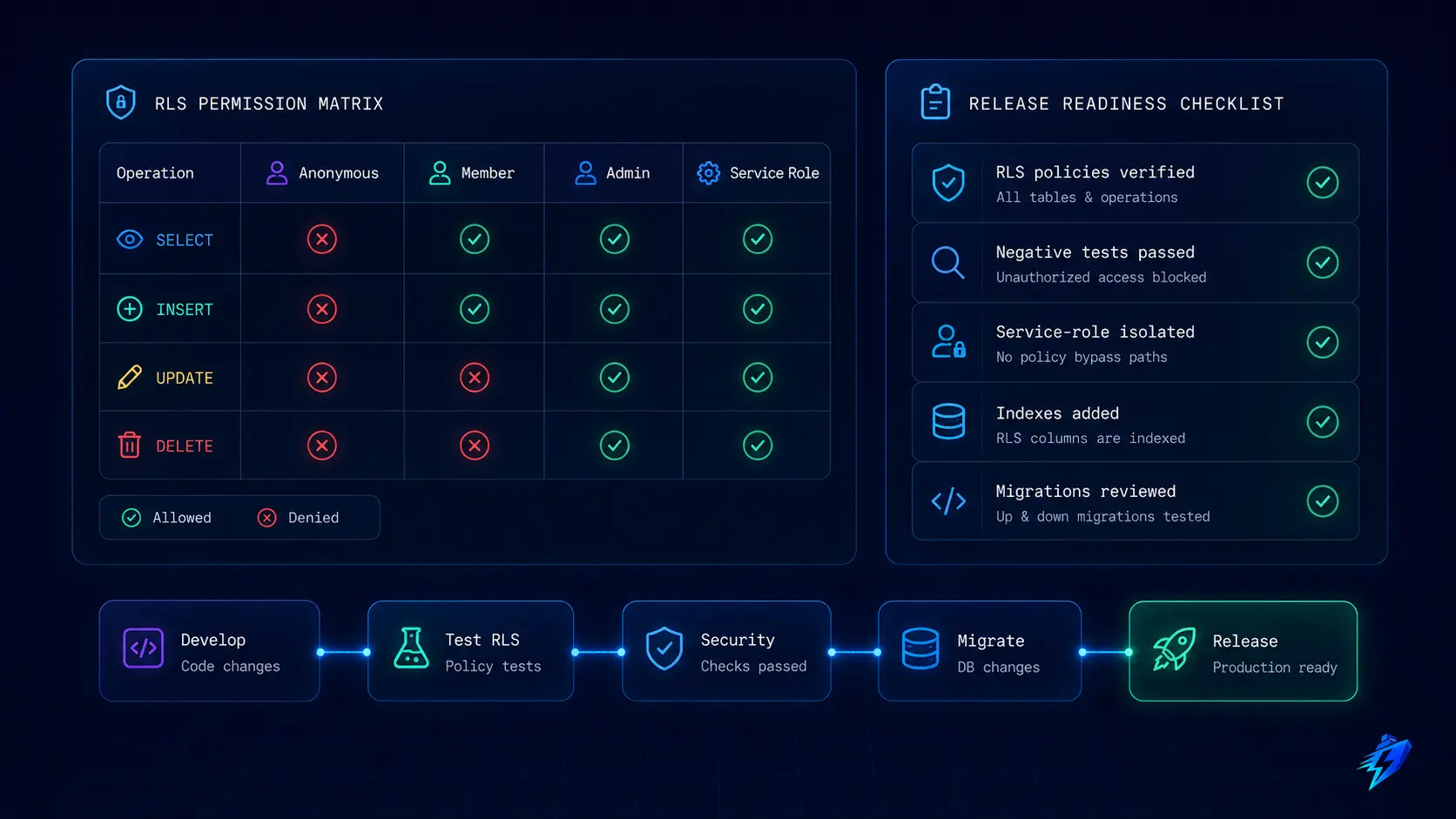
The minimum useful test model covers identities, tenants, operations, and expected outcomes.
| Identity | Operation | Resource | Expected result |
|---|---|---|---|
| Anonymous | Select | Organization A project | Denied or no rows |
| User A member | Select | Organization A project | Allowed |
| User A member | Select | Organization B project | No rows |
| User A member | Insert | Organization A project | Allowed |
| User A member | Insert | Organization B project | Rejected |
| User A member | Update | Organization B project | No mutation |
| User A member | Update | Change organization_id | Rejected by privilege |
| User A member | Delete | Organization A project | Rejected if not admin |
| Organization A admin | Delete | Organization A project | Allowed |
| Service role | Select | Any project | Allowed and tested separately |
There are two complementary testing levels.
Database Structure Tests
Supabase supports database tests through the CLI and pgTAP. Structural tests can confirm that expected policies exist and apply to the intended roles:
begin;

select plan(2);

select policies_are(
  'public',
  'projects',
  array[
    'Organization members can read projects',
    'Organization members can create projects',
    'Organization members can update projects',
    'Organization admins can delete projects'
  ]
);

select policy_roles_are(
  'public',
  'projects',
  'Organization members can read projects',
  array['authenticated']
);

select * from finish();

rollback;
Run database tests locally with:
supabase test db
Supabase’s database testing guide recommends automated testing for queries and RLS behavior, while its pgTAP documentation provides policy assertions.
Structural tests catch missing or renamed policies. They do not prove the expressions enforce the correct business boundary.
End-to-End Authorization Tests
Create real test users and tenants, authenticate clients as those users, and execute the same queries your application uses.
A useful integration test should:
- Create User A and User B.
- Create Organization A and Organization B.
- Make each user a member of only their own organization.
- Seed one project per organization.
- Query as User A and confirm only Organization A is returned.
- Attempt every forbidden mutation.
- Assert that no database state changed.
- Repeat with expired, malformed, and missing sessions.
- Verify that service-role behavior is isolated to explicit system tests.
When an unauthorized update affects zero rows, decide how your application will distinguish “not found” from “not accessible.”
Often, it should not reveal the difference. The test should verify the public behavior as well as the final database state.
Store Policies in Versioned Migrations
Editing a policy directly in the production dashboard creates configuration that is difficult to review and reproduce.
Keep tables, RLS enablement, grants, helper functions, and policies in version control. A migration should be readable as an authorization change, not an opaque schema dump.
A safe workflow is:
supabase migration new add_project_rls
supabase db reset
supabase test db
Then run application integration tests against the local stack before pushing the migration.
Supabase recommends a local migration workflow where database changes are captured in versioned SQL, reset locally to verify the complete chain, and deployed through migration tooling.
It also warns that generated diffs have limitations around certain RLS and privilege changes, so generated SQL must be reviewed rather than accepted blindly. See the database migrations guide and local development workflow.
For every policy change, reviewers should ask:
- Which identities gain or lose access?
- Which operation changes?
- Does the policy use the old row, the new row, or both?
- Can a user alter an ownership column?
- Does the policy depend on a stale JWT claim?
- Does a helper function bypass RLS?
- Are its schema and execution privileges safe?
- Which negative tests prove cross-tenant isolation?
- Does the query plan remain acceptable?
This review process works well with AI coding tools when the repository gives them explicit constraints. Shipflash’s Claude Code workflow for SaaS explains how repository context, review gates, tests, and production verification make AI-assisted changes safer.
Production RLS Release Checklist
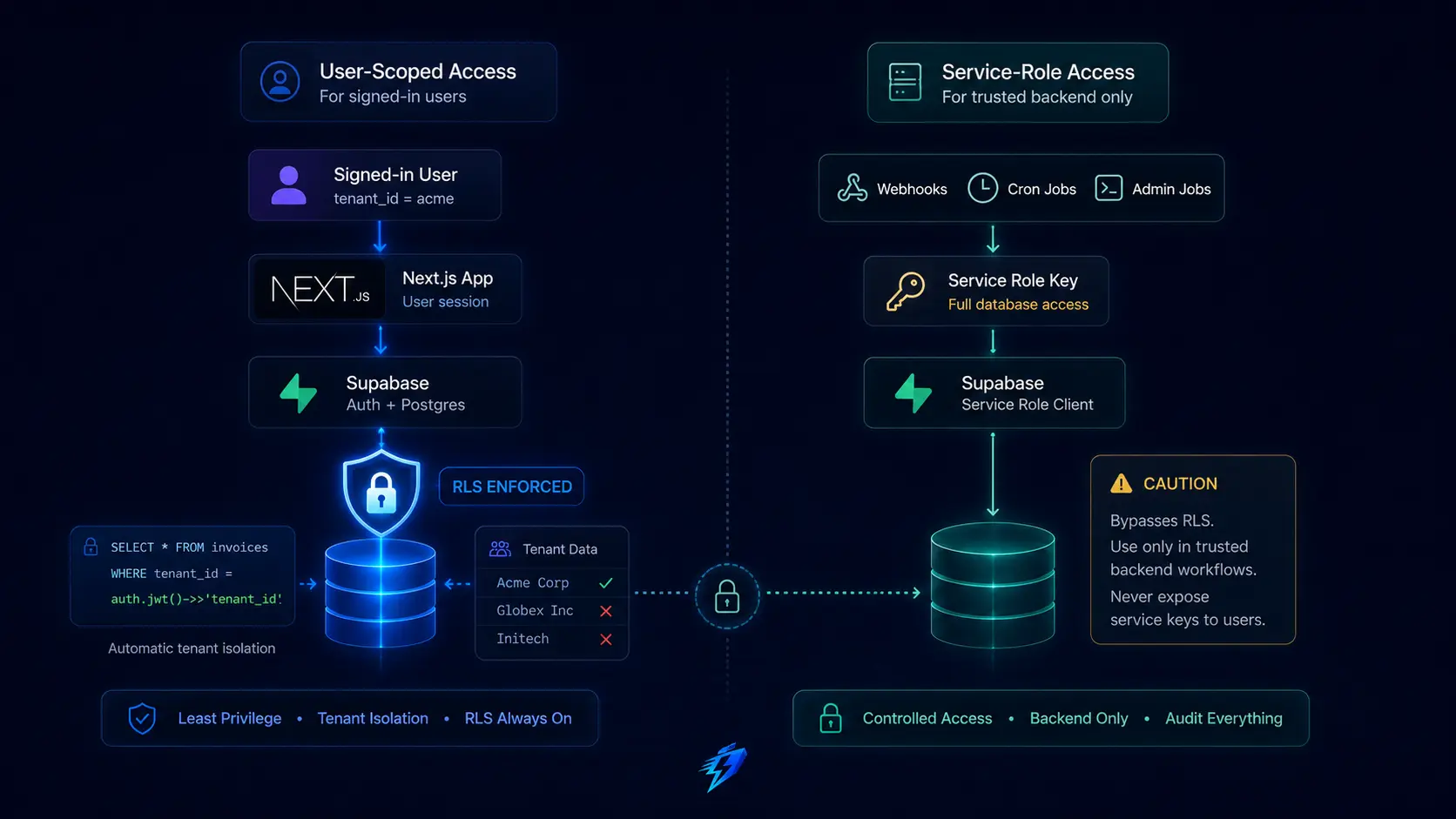
Use this as a final release gate rather than a substitute for design review.
- Every Data API-exposed table has an intentional RLS decision.
- RLS is enabled in the migration, not only in the dashboard.
- anon and authenticated grants follow least privilege.
- Sensitive ownership columns have restricted update privileges.
- Each operation has a clearly named policy.
- Insert policies validate tenant ownership with WITH CHECK.
- Update policies evaluate both existing and resulting rows.
- Delete permissions are narrower than ordinary edit permissions.
- Membership and role tables receive stricter review.
- User-scoped Next.js requests never use a service-role client.
- Service-role imports are isolated to trusted server-only modules.
- Security-definer functions live outside exposed schemas.
- Helper functions use a fixed search path and qualified names.
- JWT claims used for authorization are non-user-editable and freshness-aware.
- Tenant and membership predicate columns are indexed.
- Application queries include explicit tenant filters.
- Views exposing tenant data are reviewed for invoker security.
- Policy inventory tests run in CI.
- Cross-tenant negative tests run against real authenticated clients.
- Migration output is reviewed manually before deployment.
- Security and Performance Advisor warnings are resolved or documented.
- Logs identify authorization failures without leaking sensitive resource details.
A checklist cannot prove security, but it prevents common omissions from becoming invisible.
How RLS Fits a Production-Ready SaaS Foundation
A reliable SaaS does not rely on one perfect middleware function.
It combines authenticated sessions, database grants, RLS policies, server-side authorization, input validation, transactional workflows, idempotent webhooks, audit history, tests, observability, and controlled administrative access.
RLS is especially valuable because it keeps tenant isolation close to the data. A new dashboard page, AI-generated query, mobile client, or internal feature still meets the same database boundary when it uses a user-scoped Supabase session.
But the surrounding architecture determines whether that boundary remains understandable.
Policies need stable tenant IDs. Service operations need separate clients. Migrations need review. Tests need real identities. Logs need enough context to diagnose denied operations. Admin workflows need explicit authority.
Shipflash is built around that broader production model: a Next.js and Supabase foundation with authentication, tenant-aware access controls, billing systems, operational guardrails, tests, and an AI-friendly code structure.
The goal is not to hide RLS behind a starter template. It is to make the authorization model visible enough that founders and developers can extend it without silently weakening it.
Frequently Asked Questions About Supabase RLS
Is Supabase RLS enough to secure a Next.js SaaS?
No. RLS is a database authorization boundary, not a complete application security system.
You still need secure session handling, input validation, Server Action and Route Handler authorization, safe service-role usage, rate limiting, business-rule enforcement, audit logs, and testing.
Should every Supabase table have RLS enabled?
Every table exposed through an API-accessible schema should have an intentional RLS and privilege design.
Internal-only schemas can use different access controls, but they should not be exposed casually. Supabase specifically recommends enabling RLS on tables in exposed schemas.
Does the Supabase service-role key bypass RLS?
Yes. Service-role and secret keys are for trusted backend operations and must never be sent to the browser.
Queries made with that authority can bypass normal row policies, so the calling code becomes responsible for authorization.
What Is the Difference Between USING and WITH CHECK?
USING determines which existing rows a request may see or target.
WITH CHECK validates the new row produced by an insert or update. Production update policies often need both.
Why Does an RLS-Protected Update Return No Rows Instead of a Permission Error?
From the request’s perspective, a row filtered out by RLS may not be visible as an eligible update target.
Applications should handle zero-row results intentionally and usually avoid revealing whether an inaccessible resource exists.
Should Organization Roles Be Stored in JWT Claims or a Membership Table?
Use a membership table when roles change frequently, revocation must take effect quickly, or users can belong to many organizations.
Controlled JWT app metadata can work for small, stable, global claims, but tokens can remain stale until refreshed.
Can RLS Make Supabase Queries Slow?
Yes, especially when policies perform repeated joins or scan unindexed columns.
Index policy predicates, use explicit roles, filter application queries, simplify tenant relationships, and measure realistic query plans.
How Should I Test Multi-Tenant Isolation?
Test a matrix of anonymous users, members, non-members, administrators, and service clients across SELECT, INSERT, UPDATE, and DELETE operations.
Prioritize negative tests that prove one tenant cannot observe or mutate another tenant’s data.
Conclusion
Supabase Row Level Security is one of the strongest tools available for building tenant isolation into a Next.js SaaS, but its value depends on how deliberately it is used.
Start with a clear organization and membership model. Enable RLS on every exposed tenant table. Combine policies with least-privilege grants. Write separate rules for each operation. Keep ownership columns immutable to ordinary users. Use user-scoped Supabase clients for user requests and isolate service-role access to verified system workflows.
Then prove the model.
Test policy inventory, real authenticated behavior, denied cross-tenant access, migration reproducibility, and query performance.
The standard should not be “the correct user can load the page.” The standard should be:
Even when a route is called directly, an identifier is tampered with, a UI check is bypassed, or a future feature forgets an application-level membership condition, the database still refuses cross-tenant access.
That is the difference between RLS being enabled and tenant isolation being engineered.