
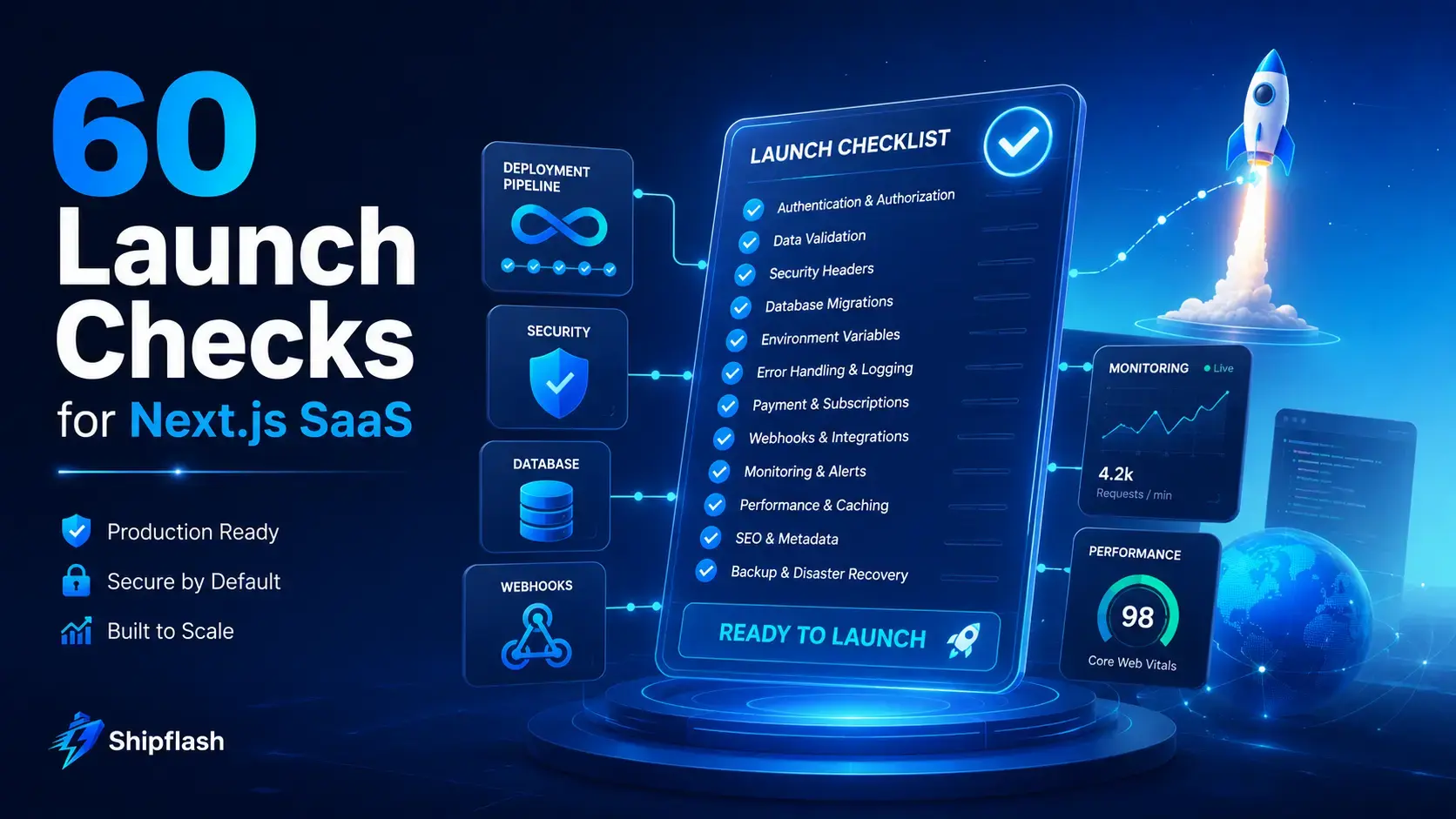
A Next.js application is not production-ready simply because pnpm build succeeds, the landing page looks polished, and a test payment works once.
A real SaaS launch creates a much larger promise. You are promising that users can sign in safely, access only the data they own, pay without losing their entitlements, receive important emails, recover from failed jobs, and continue using the product when traffic or operational complexity increases.
That promise must be verified.
This Next.js SaaS production checklist turns launch readiness into 60 testable checks covering your application, Supabase database, authentication, billing integration, email delivery, background jobs, security controls, performance, observability, SEO, and recovery procedures.
The goal is not to eliminate every possible failure. That would delay the launch forever. The goal is to identify failures that could expose data, charge customers incorrectly, break access, erase information, or leave you unable to understand what went wrong.
A production-ready Next.js SaaS is not an application with no bugs. It is an application whose critical behavior has been verified, whose failures are observable, and whose most important systems can recover safely.
For a broader explanation of the architectural systems behind this checklist, read the Shipflash guide to building a production-ready SaaS foundation with Next.js, Supabase, billing, and an AI-friendly codebase.
What Is a Next.js SaaS Production Checklist?
A Next.js SaaS production checklist is a release gate: a defined set of technical and operational conditions that must be satisfied before real users and real payments are allowed into the application.
It is different from a development task list.
A development task list asks whether a feature was implemented. A production checklist asks whether that feature behaves safely when the user is unauthorized, the payment provider retries an event, the database migration fails, an email bounces, or the deployment must be rolled back.
The current official Next.js production guide covers rendering, caching, security, metadata, Core Web Vitals, bundle analysis, and production builds. A SaaS release requires those framework checks plus application-specific verification for permissions, billing, database policies, asynchronous work, and operational recovery.
| Release area | Question you must answer | Acceptable evidence |
|---|---|---|
| Build integrity | Can the exact release commit build from a clean environment? | Passing CI build and immutable commit SHA |
| Authentication | Can the server verify who is making each protected request? | Auth integration tests and session traces |
| Authorization | Can users access only permitted resources and actions? | Negative role and ownership tests |
| Database security | Are exposed tables protected by RLS and appropriate grants? | Policy audit and automated database tests |
| Billing | Do provider events produce correct internal access? | Sandbox lifecycle tests and reconciliation output |
| Reliability | Can failed work retry without duplication or data corruption? | Retry tests, idempotency records, and operator tooling |
| Recovery | Can you restore data or roll back a faulty release? | Restore drill and documented rollback procedure |
| Discoverability | Can users and search engines find and understand public pages? | Metadata, sitemap, robots, structured data, and crawl checks |
A check should not be marked complete because someone remembers testing it. Attach evidence: a CI run, test output, screenshot, database query, provider event ID, monitoring result, or written exception.
How to Use This Checklist as a Release Gate
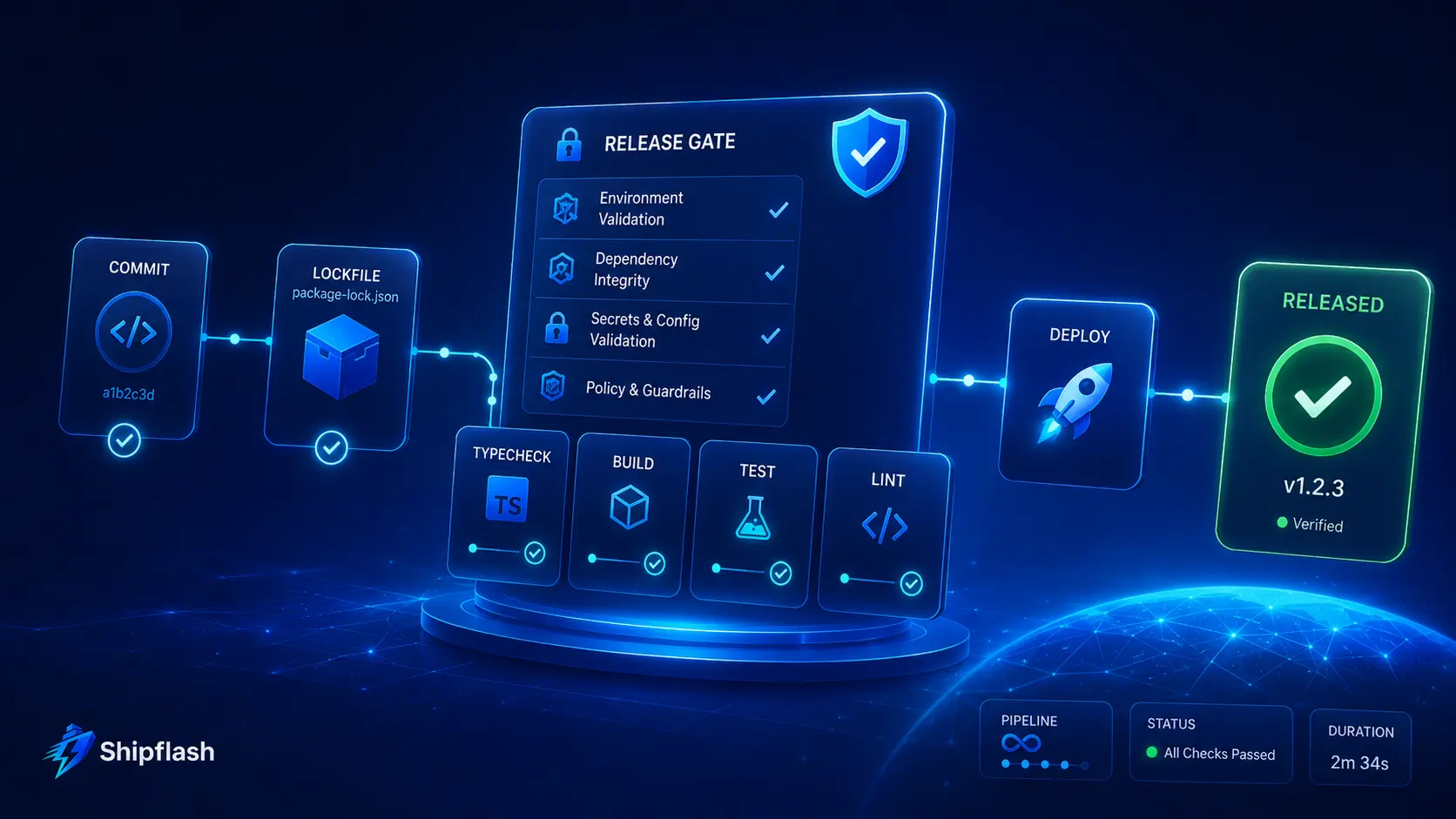
Assign every check one of four states:
- Pass: The requirement is satisfied and evidence is attached.
- Fail: The requirement is not satisfied and blocks the release.
- Exception: The risk is understood, accepted, documented, and assigned an owner.
- Not applicable: The application genuinely does not use the relevant system.
Do not use “probably fine” as a status.
A small team can keep the release record in GitHub, Linear, Notion, or a repository document. The tool matters less than the evidence. A lightweight release record might look like this:
release:
  version: "1.0.0"
  commit: "8f51a9c"
  candidate_url: "https://preview.example.com"
  reviewed_at: "2026-07-25"

checks:
  - id: AUTH-04
    name: "Server Actions enforce authorization"
    status: "pass"
    owner: "Ryan"
    evidence:
      - "CI authorization test run #182"
      - "tests/actions/workspace-settings.test.ts"

  - id: OPS-05
    name: "Database restore procedure tested"
    status: "exception"
    owner: "Ryan"
    reason: "Restore validated in staging; full production drill scheduled."
    expires_at: "2026-08-08"
Exceptions should expire. Otherwise, temporary launch compromises quietly become permanent architecture.
1. Build, Runtime, and Deployment Integrity
A reliable release begins before the application reaches the hosting platform. The repository, runtime, dependencies, environment variables, and CI pipeline must produce a repeatable artifact.
Verify the Exact Release Artifact
1. Run a clean production build.Build the application from a fresh checkout with no local caches, ignored files, or developer-specific environment state. Run the same package-manager and build commands that the deployment platform will use. A build that succeeds only on the original developer’s machine is not a valid release candidate.
At minimum, the clean pipeline should install from the lockfile, lint the code, type-check it, run critical tests, and execute the production build.
pnpm install --frozen-lockfile
pnpm lint
pnpm typecheck
pnpm test
pnpm build
Next.js explicitly recommends running a production build before launch so build-time errors can be caught before deployment. The production candidate should also be exercised using the production server rather than relying only on development mode.
2. Pin the supported runtime and package manager.Document the Node.js and package-manager versions expected by the application. Pinning prevents a hosting platform, contributor, or future CI runner from silently using a different major version.
Keep the version declarations aligned across package.json, CI configuration, local documentation, and the deployment platform. If Node 24 is required, a Node 22 CI job is not a useful representation of production.
3. Install dependencies from a committed lockfile.The release should use the dependency graph reviewed and tested in CI. Do not regenerate the lockfile during deployment or allow an unconstrained install to select newer transitive packages.
Review unexpected lockfile changes with the same care as source-code changes. A small package update can modify server behavior, browser bundles, build output, or native binaries even when your own code remains unchanged.
4. Validate environment variables before serving traffic.Missing or malformed environment variables should fail during build or startup, not when the first customer reaches a protected path.
Validate URLs, provider names, secret lengths, feature flags, and production-only restrictions centrally. Reject placeholders such as change-me, example-secret, or test credentials in production.
import { z } from "zod";

const serverEnvironmentSchema = z.object({
  NODE_ENV: z.enum(["development", "test", "production"]),
  APP_URL: z.string().url(),
  SUPABASE_URL: z.string().url(),
  SUPABASE_SECRET_KEY: z.string().min(24),
  BILLING_PROVIDER: z.enum(["stripe", "lemon_squeezy"]),
  BILLING_WEBHOOK_SECRET: z.string().min(16),
  RESEND_API_KEY: z.string().min(16),
});

export const serverEnvironment = serverEnvironmentSchema.parse({
  NODE_ENV: process.env.NODE_ENV,
  APP_URL: process.env.APP_URL,
  SUPABASE_URL: process.env.SUPABASE_URL,
  SUPABASE_SECRET_KEY: process.env.SUPABASE_SECRET_KEY,
  BILLING_PROVIDER: process.env.BILLING_PROVIDER,
  BILLING_WEBHOOK_SECRET: process.env.BILLING_WEBHOOK_SECRET,
  RESEND_API_KEY: process.env.RESEND_API_KEY,
});
Keep server-only validation in a module that cannot be imported into Client Components.
5. Confirm production and preview environments are separated.A preview deployment must not send real customer emails, mutate the production database, process live webhooks, or create real charges unless that behavior is explicitly controlled.
Use separate provider credentials, webhook destinations, databases, domains, and storage buckets. Labels such as TEST, STAGING, or PREVIEW should be visible in internal tools so an operator cannot mistake one environment for another.
6. Make CI enforce the release contract.Required checks should block merging or deployment when they fail. At minimum, protect the default branch with linting, type checking, unit tests, contract tests, migration validation, production build verification, and a focused end-to-end smoke suite.
The CI workflow must use the same build configuration as production. When the smoke tests consume an artifact built in an earlier job, they verify the artifact that is actually being considered for release instead of rebuilding a potentially different version.
2. Rendering, Routing, Caching, and Delivery
Next.js optimizes rendering and caching aggressively, but those optimizations are safe only when the application has classified its routes correctly.
A public marketing page, authenticated dashboard, billing portal callback, and webhook endpoint should not share the same rendering or caching assumptions. The official Next.js guidance recommends making deliberate decisions about static and dynamic rendering, caching, error handling, assets, and bundle size.
Audit Every Route Boundary
7. Classify each important route as public, authenticated, administrative, or machine-to-machine.Create a simple route inventory. Record who may call the route, what data it returns, whether it mutates state, and whether it may be cached.
This exercise often uncovers forgotten paths: export endpoints, preview routes, old API handlers, development utilities, image generators, cron jobs, or health checks that were created early and never reviewed.
8. Verify static and dynamic rendering intentionally.Do not let a route become static merely because the current implementation happens not to access request data. Likewise, do not force the entire product into dynamic rendering because one child component needs personalized information.
Inspect build output, response headers, and runtime behavior. Public content may benefit from static generation or revalidation, while account-specific pages should resolve current identity and permissions for every relevant request.
9. Prevent authenticated responses from entering a shared cache.A response containing session cookies, private user data, or account-specific content must never be reusable across customers.
Supabase warns that caching responses containing refreshed authentication cookies can cause one user’s session to be delivered to another user. Authenticated routes that refresh or depend on sessions must use an appropriate dynamic strategy and must be tested through the actual CDN and hosting path—not only on localhost.
10. Test Route Handlers as public HTTP endpoints.Every Route Handler should explicitly support only the required methods, validate inputs, return intentional status codes, and avoid exposing internal stack traces.
Test malformed JSON, oversized bodies, missing authentication, expired authentication, wrong roles, missing resources, duplicate requests, provider timeouts, and unsupported methods. A successful happy-path request covers only a small portion of the route’s real behavior.
11. Implement intentional error, not-found, unauthorized, and forbidden states.A production application should not replace every failure with a generic blank screen or redirect loop.
Users should understand whether they need to sign in, lack permission, followed an outdated URL, or encountered a temporary system problem. Internal logs can retain diagnostic detail, while public responses remain safe and actionable.
12. Audit client JavaScript, images, fonts, and third-party scripts.Review the largest client bundles and identify dependencies that can remain on the server, load lazily, or be removed.
Use framework image, font, and script features where they improve delivery, but do not assume automatic optimization makes every asset cheap. A large hero image, analytics bundle, editor dependency, or chart library can still dominate the experience. Next.js recommends pairing its automatic optimizations with bundle analysis and real performance measurement.
3. Authentication, Sessions, and Authorization
Authentication establishes who the user is. Authorization decides what that user may do.
Many SaaS vulnerabilities appear when those responsibilities are treated as the same check. A valid session does not automatically permit a user to update another account, read an administrative report, retry a billing event, or change workspace settings.
The official Next.js authentication guidance treats Server Actions and Route Handlers as public-facing endpoints that must perform their own authorization checks. It also recommends centralizing secure checks in a Data Access Layer and returning limited Data Transfer Objects.
Verify Identity at Every Trusted Boundary
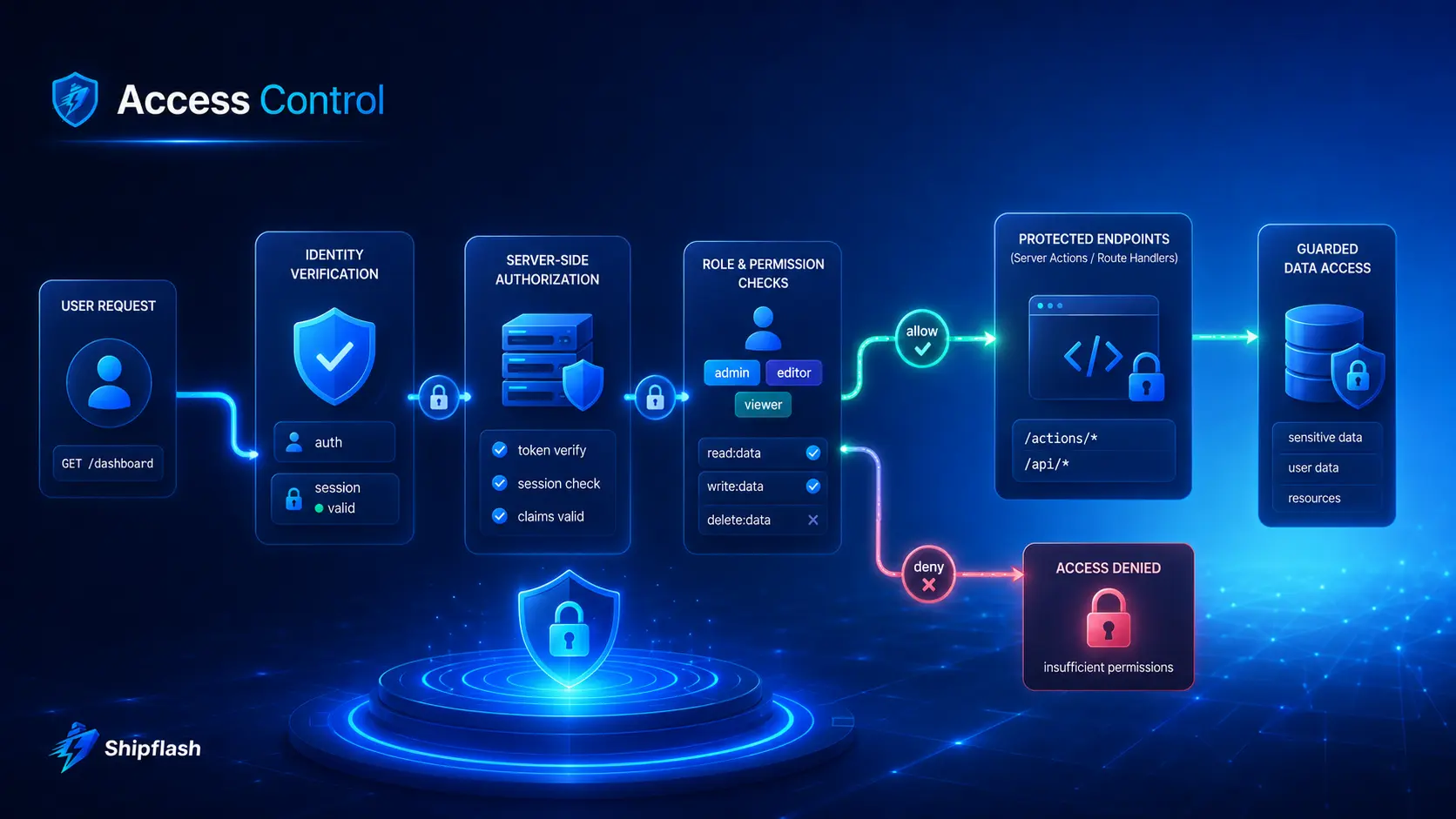
13. Confirm server-side sessions use the supported Supabase SSR flow.For a Next.js application using cookie-based Supabase authentication, verify that browser and server clients are separated correctly, session cookies refresh as expected, and authentication callbacks exchange codes safely.
Supabase’s SSR guidance recommends cookie-based sessions and PKCE for server-rendered applications. Test sign-in, refresh, expiration, logout, password recovery, account confirmation, and OAuth callbacks through the deployed domain.
14. Validate identity on the server before accessing protected data.Do not trust a client-provided user ID, email address, role, subscription status, or workspace ID.
Resolve identity from a verified session or token. Then derive the authorized resources from server-side data. Client state can improve the interface, but it cannot serve as the final security decision.
15. Centralize authorization in a Data Access Layer.Repeated inline checks drift over time. One route checks ownership, another checks only authentication, and a third trusts a role copied into form data.
Create reusable functions such as requireUser, requireAdmin, requireWorkspaceMembership, and requireResourceAccess. Keep them close to the server-side data functions they protect.
export async function requireWorkspaceRole(
  workspaceId: string,
  acceptedRoles: readonly ["owner" | "admin" | "member"][],
) {
  const user = await requireUser();

  const membership = await findWorkspaceMembership({
    workspaceId,
    userId: user.id,
  });

  if (!membership || !acceptedRoles.includes(membership.role)) {
    throw new Error("FORBIDDEN");
  }

  return { user, membership };
}
The interface may hide an admin button, but the mutation behind that button must still call the authorization function.
16. Protect every Server Action independently.Treat a Server Action as though an attacker can invoke it without rendering your page first.
Validate the input, authenticate the caller, authorize the requested resource, execute the mutation, and return a deliberately limited result. Do not assume a hidden form field, server-rendered page, or absent button protects the action.
"use server";

export async function updateWorkspaceName(input: unknown) {
  const parsed = updateWorkspaceSchema.parse(input);

  await requireWorkspaceRole(parsed.workspaceId, ["owner", "admin"]);

  await updateWorkspace({
    workspaceId: parsed.workspaceId,
    name: parsed.name,
  });

  return { success: true };
}
17. Protect Route Handlers, exports, and internal APIs independently.A dashboard page may be protected while its CSV export route remains public. The same problem can affect invoice downloads, customer lookups, image proxies, audit logs, impersonation tools, and webhook replay endpoints.
Test each route directly without navigating through the interface. Verify 401 for missing identity, 403 for insufficient permission, and a safe 404 where revealing resource existence would leak information.
18. Add negative authorization tests.Positive tests confirm that an owner can update their workspace. Negative tests confirm that a member cannot perform an owner action and that a user from workspace A cannot access workspace B.
Build an authorization matrix covering roles, operations, and resource ownership. OWASP recommends automating authorization evaluation during releases because permission regressions frequently appear as features evolve.
4. Supabase Database, RLS, and Migration Safety
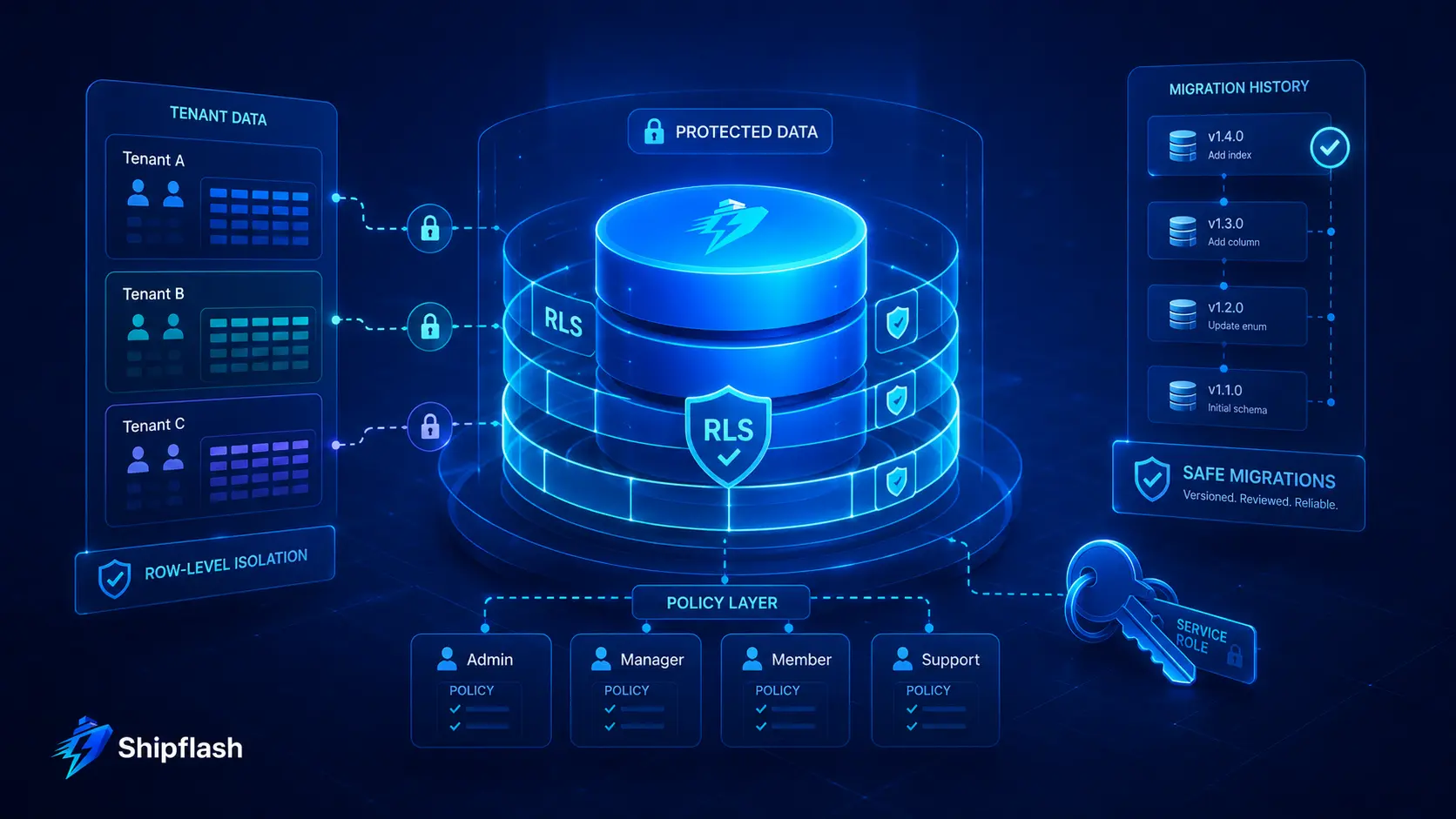
Next.js authorization protects your application layer. Supabase Row Level Security protects data when a query reaches Postgres through an unexpected application path, a browser client, a new endpoint, or a future refactor.
These layers should reinforce each other rather than replace each other.
For a deeper implementation guide, read Supabase Row Level Security for Next.js SaaS, which covers policies, grants, service-role boundaries, tenant isolation, testing, and common mistakes.
Verify Database Access, Not Just Application Behavior
19. Enable RLS on every exposed table that requires protection.Inventory the schemas available through the Supabase Data API. For each exposed table, confirm whether anonymous or authenticated clients should have access.
Supabase states that RLS should be enabled on tables in exposed schemas such as public. Tables created through raw SQL require special attention because they may not inherit the dashboard’s safer defaults.
A basic audit query can make missing coverage visible:
select
  n.nspname as schema_name,
  c.relname as table_name,
  c.relrowsecurity as rls_enabled,
  c.relforcerowsecurity as rls_forced
from pg_class c
join pg_namespace n on n.oid = c.relnamespace
where c.relkind = 'r'
  and n.nspname in ('public', 'storage')
order by n.nspname, c.relname;
Review the result rather than assuming every table should share one blanket rule.
20. Test policies for each role and operation.A table with RLS enabled can still be unsafe when its policies are too broad.
Test SELECT, INSERT, UPDATE, and DELETE separately for anonymous users, authenticated users, privileged application roles, and service operations. Verify both the rows visible to the caller and the rows they may modify.
21. Audit Postgres grants alongside RLS policies.RLS controls which rows a permitted role can access. Grants control whether that role can perform the operation at all.
Do not grant every operation to anon and authenticated and expect policies to carry the entire security model. Remove privileges that the application does not require, especially writes to configuration, billing, operational, audit, or administrative tables.
22. Keep service-role and secret keys server-only.A service credential can bypass normal data restrictions and therefore must never enter a Client Component, browser bundle, public environment variable, analytics payload, error report, or repository.
Supabase’s RLS documentation warns that service keys must not be exposed to customers. Treat them as high-impact credentials with limited access, documented ownership, and a tested rotation procedure.
23. Review SECURITY DEFINER functions and privileged RPCs.A privileged function executes with the function owner’s authority and can become a bypass around otherwise correct policies.
Set a safe search_path, fully qualify referenced objects, restrict execution grants, validate every parameter, and keep privileged behavior narrowly scoped. Do not expose a generic administrative RPC when a purpose-specific operation would be safer.
24. Rebuild the database from migrations and detect schema drift.A release is not reproducible when production contains manual changes that do not exist in version control.
Reset a clean local or preview database from the migration history, apply seeds intended for that environment, generate application types, and run database tests. Supabase tracks applied migrations and recommends a migration-based deployment workflow; preview branches can be used to validate schema changes before they reach production.
5. Billing, Entitlements, and Webhook Reliability
A checkout session is not a billing system.
A SaaS billing system must interpret subscriptions, one-time purchases, invoices, refunds, disputes, cancellations, renewals, usage, credits, and delayed provider events. It must then translate provider state into an internal answer:
What may this customer use right now?
The Shipflash guide to SaaS billing architecture explains this separation between product catalog, provider state, internal entitlements, and event history in greater depth.
Verify the Full Customer Lifecycle
25. Separate test and live billing credentials completely.Confirm that production uses live API keys, live product identifiers, live webhook secrets, and the intended merchant account.
Check every price and product mapping. A test price ID embedded in a production catalog may not fail until the first real checkout. Display environment and provider status in an internal diagnostics surface so operators can confirm the active configuration quickly.
26. Verify webhook signatures using the untouched request body.A webhook endpoint must prove that the request came from the provider before it changes billing state or grants access.
Stripe requires the raw request body for signature verification. Parsing or modifying the body before verification can invalidate the signature. Use the endpoint-specific secret, reject missing or invalid signatures, and keep secrets distinct across environments.
27. Make event processing idempotent.Billing providers can retry events, and your own queue or operator tooling may replay them.
Create a durable event ledger with a unique provider event or delivery identifier. Claim the event transactionally before applying its effects. If it was already processed, return success without repeating the mutation.
export async function POST(request: Request) {
  const rawBody = await request.text();
  const signature = request.headers.get("stripe-signature");

  if (!signature) {
    return new Response("Missing signature", { status: 400 });
  }

  const event = stripe.webhooks.constructEvent(
    rawBody,
    signature,
    serverEnvironment.STRIPE_WEBHOOK_SECRET,
  );

  const claim = await claimBillingEvent({
    provider: "stripe",
    eventId: event.id,
    eventType: event.type,
  });

  if (claim.status === "already_processed") {
    return new Response("ok");
  }

  await enqueueBillingEvent({ eventId: claim.id });

  return new Response("ok");
}
Stripe also supports idempotency keys for safely retrying outbound API mutations. Webhook deduplication and outbound API idempotency solve related but different problems; production systems commonly need both.
28. Do not depend on webhook ordering.An invoice event may arrive before a subscription update, or a duplicate delivery may arrive after the customer’s state has changed again.
Stripe does not guarantee that events will be delivered in creation order and recommends handling duplicate events. Design handlers around durable identifiers and current provider state rather than assuming a perfect chronological sequence.
29. Derive access through internal entitlements.Do not scatter checks such as subscription.status === "active" throughout the product.
Create an internal entitlement contract that accounts for the product’s actual rules: grace periods, lifetime purchases, trials, prepaid credits, unpaid invoices, scheduled cancellation, administrative grants, refunds, and provider differences.
The rest of the application should ask the entitlement layer whether a capability is available. This keeps business rules consistent and makes future billing-provider changes manageable.
30. Test the lifecycle beyond successful checkout.Run sandbox scenarios for:
- New purchase or subscription activation
- Renewal
- Failed payment
- Recovery after failed payment
- Plan change
- Scheduled cancellation
- Cancellation at period end
- Immediate cancellation
- Full and partial refund
- Dispute
- Duplicate event
- Delayed event
- Missing event followed by reconciliation
Stripe’s subscription documentation exposes multiple events that can affect provisioning and access. Your tests should verify the internal outcome, not merely confirm that the endpoint returned 200.
6. Email, Cron Jobs, Queues, and Operational Work
Transactional systems often work during a manual test but fail under retries, provider limits, deployment interruptions, or temporary outages.
Email, cron jobs, and queues need durable state. A try/catch and a console log are not enough when the task affects authentication, billing, customer communication, or data maintenance.
Verify Asynchronous Work End to End
31. Authenticate the sending domain with SPF and DKIM.Send production email from a domain you control and verify its DNS records before launch.
Resend requires domain ownership and uses SPF and DKIM records to authorize and authenticate sending. It recommends using a dedicated subdomain when you want to isolate sending reputation and clarify the subdomain’s purpose.
32. Add and monitor DMARC deliberately.After SPF and DKIM are working, publish an appropriate DMARC policy and review reports.
Begin with a policy suitable for your current visibility and gradually strengthen it after confirming legitimate senders are aligned. DMARC helps receiving systems decide how to handle messages that fail authentication and helps reduce domain spoofing.
33. Test every transactional template using production-like data.Verify sign-up confirmation, password recovery, billing notifications, invitations, contact acknowledgements, and operational alerts.
Check that links use the canonical production origin, tokens are not truncated, plain-text versions remain readable, unsupported variables fail safely, and missing optional data does not create broken sentences.
Also test the email on narrow screens and common light and dark interfaces. An email that technically sends but hides its button or displays an incorrect domain still fails its purpose.
34. Persist outbound messages before sending.For important notifications, create an outbox or delivery record before calling the provider.
Store the template, recipient, logical message type, related resource, attempt count, provider identifier, final state, and last error. This makes delivery observable and allows retries without reconstructing business context from logs.
Do not automatically retry permanent errors such as invalid recipients forever. Separate transient failures from terminal failures.
35. Secure cron and machine-triggered endpoints.Cron routes should reject unauthorized callers before they query the database or start expensive work.
Use a dedicated secret, signed request, platform identity mechanism, or another machine-authentication control. Reject missing, malformed, placeholder, or incorrectly scoped credentials. Avoid placing operational secrets in query strings, where they can leak into logs and analytics.
Long-running cron work should also use leases or claims so two overlapping invocations do not process the same records concurrently.
36. Make stalled work visible and recoverable.A queue or cron system needs more than pending and complete.
Record retry time, attempt count, last error code, lease expiration, last successful execution, and terminal state. Provide an operator path to inspect and retry failed work safely. A job that silently remains pending for three days is not resilient merely because the database row still exists.
7. Abuse Prevention, Privacy, and Application Hardening
Security is not a one-time audit at the end of development. It is the combined behavior of input validation, authorization, secrets, headers, dependency management, logs, and operational controls.
OWASP’s secure-code guidance highlights secure defaults, environment separation, resource limits, secret handling, safe error responses, security headers, dependency management, monitoring, and audit trails as part of deployment readiness.
Reduce Avoidable Exposure
37. Apply rate limits to expensive and abuse-prone actions.Prioritize authentication attempts, password resets, contact forms, waitlists, email sends, exports, AI operations, uploads, checkout creation, and public search endpoints.
A useful rate limit identifies the actor appropriately. Depending on the route, this may involve user ID, workspace, IP address, email address, API key, or a combination.
Decide how records expire and how blocked requests are observed. A rate-limit table that grows forever creates a new operational problem.
38. Add bot protection where anonymous automation creates real cost.CAPTCHA or challenge systems are not necessary on every form. Use them where scripted abuse can create accounts, send emails, fill your database, consume paid APIs, or overwhelm an operator.
Keep server-side validation and rate limits even when a browser challenge is present. A client-side widget should not become the only control protecting the endpoint.
39. Configure security headers and a practical Content Security Policy.Review CSP, frame restrictions, MIME sniffing protection, referrer policy, permissions policy, and transport security.
A CSP should reflect the scripts, styles, images, frames, and connections your application actually uses. Avoid weakening it with broad wildcard sources merely to silence browser errors. Next.js provides current guidance for nonce-based and other CSP approaches, including their rendering and performance implications.
40. Limit request bodies and validate uploads.Set reasonable limits for Server Actions, Route Handlers, webhook payloads, forms, and file uploads.
Validate file type from content where possible rather than trusting the filename or browser-provided MIME type. Restrict dimensions, size, extensions, and storage paths. Generate server-side object names instead of accepting arbitrary paths from the client.
Next.js includes a default Server Action body limit intended to reduce resource abuse, but any changed limit should be deliberate and route-appropriate.
41. Redact secrets and personal data from logs.Do not log session tokens, authorization headers, passwords, reset links, provider secrets, raw payment payloads, or full sensitive records.
Structure logs around identifiers and outcomes: request ID, user ID when appropriate, workspace ID, operation, status, duration, provider event ID, and sanitized error classification.
OWASP recommends least-privilege secret access, auditing, rotation, and explicit protection against secrets leaking through source code, configuration, or CI output.
42. Scan dependencies and secrets before release.Run a dependency vulnerability scan, secret scan, and repository review for accidentally committed environment files, credentials, private keys, database dumps, exported customer data, or debug artifacts.
When a secret has entered version control, deleting it from the latest commit is not sufficient. Revoke or rotate it first. Assume that any committed credential may have been copied.
8. Database Resilience, Capacity, and Performance
Performance work should focus on the user journeys that create load and business risk, not on chasing a perfect homepage score while authenticated queries remain slow.
A SaaS release needs acceptable latency, bounded resource usage, working backups, and a recovery process that has been exercised at least once.
Test the System Under Realistic Conditions
43. Confirm that backups exist for the selected plan.Understand the actual backup behavior of your Supabase plan rather than assuming every environment provides the same retention and download options.
Supabase documents daily backups for eligible paid plans and recommends that free-tier projects create regular exports. Point-in-Time Recovery is available when a shorter recovery point is required.
Document the maximum acceptable amount of data loss, known as the recovery point objective, and the maximum acceptable downtime, known as the recovery time objective.
44. Perform a restore drill.A backup is not proven until you can restore it and verify the result.
Restore into a safe environment, reconnect the application, confirm authentication relationships, inspect critical tables, and run smoke tests. Record the procedure, permissions required, expected downtime, and any systems that need reconfiguration afterward.
Do not perform your first restore while customers are waiting for an incident to end.
45. Inspect slow and high-frequency database queries.Review query plans, indexes, row estimates, policy filters, ordering, pagination, and repeated round trips.
A query that works with 20 seed rows may scan thousands of records after launch. Index columns used frequently for ownership, foreign keys, filtering, ordering, webhook identifiers, queue state, and RLS predicates.
RLS itself adds work to queries, so policy expressions and supporting indexes must be reviewed together. Supabase explicitly calls attention to the performance impact of policies on larger scans.
46. Verify connection strategy and regional placement.Place the application and database in compatible regions where possible. Confirm that the connection mode suits serverless, persistent, migration, and administrative workloads.
Do not use a direct database connection everywhere simply because it works locally. Serverless concurrency can create many simultaneous connections, so pooling configuration and provider limits must be understood before load increases.
47. Load-test complete business journeys.Test more than GET /.
Useful scenarios include:
| Scenario | What to measure |
|---|---|
| Sign-up and session creation | Latency, auth errors, email generation, rate limits |
| Authenticated dashboard load | Database time, query count, cache behavior |
| Checkout creation | Provider latency, duplicate submissions, error recovery |
| Webhook burst | Signature verification, queue depth, duplicate handling |
| Content publish | Validation, cache invalidation, public visibility |
| Admin export | Memory, execution time, row limits, authorization |
| Concurrent account updates | Race conditions, lost updates, transaction behavior |
Run tests against production-like infrastructure with safe data. Increase concurrency gradually and watch database connections, function duration, memory, queue lag, error rates, and provider limits.
48. Define capacity and cost warning thresholds.Track the resources most likely to constrain your architecture: database size, active connections, function execution, bandwidth, image transformation, email volume, storage, queue depth, log ingestion, and third-party API consumption.
Alerts should fire before the service reaches a hard limit. A product can remain technically available while an uncontrolled usage spike creates an unexpected bill or consumes the quota needed for paying customers.
9. Observability, Health Checks, and Incident Readiness
When a launch fails, the first operational question is not “Do we have logs?”
It is “Can we identify which user journey failed, where it failed, what state changed, and whether retrying it is safe?”
Observability must connect browser activity, server requests, database operations, provider events, and asynchronous jobs.
Make Failures Explainable
49. Propagate a request or correlation ID.Generate or accept a safe request ID at the application boundary and include it in structured logs, server errors, asynchronous messages, and provider-related records.
When a webhook enqueues a job, retain both the application request ID and provider event ID. When a user reports an error, a support-safe reference code can help locate the relevant trace without exposing internal details.
50. Use structured logs with stable fields.A searchable log event is more useful than a sentence assembled from several values.
{
  "level": "error",
  "event": "billing.webhook.failed",
  "request_id": "req_01J...",
  "provider": "stripe",
  "provider_event_id": "evt_...",
  "event_type": "invoice.paid",
  "error_code": "ENTITLEMENT_UPDATE_FAILED",
  "attempt": 2,
  "duration_ms": 184
}
Define a small vocabulary for recurring events. Keep field names consistent across routes, cron jobs, and workers.
51. Capture server and client errors with release context.Error monitoring should identify the deployment, route, runtime, browser where relevant, and sanitized user or workspace context.
Upload source maps securely when your monitoring setup requires them, verify that they are associated with the correct release, and ensure that sensitive source or environment data is not exposed publicly.
52. Separate liveness from readiness.A liveness endpoint answers whether the process is running. A readiness endpoint answers whether the service can perform critical work, which may involve checking dependencies.
Do not place expensive database queries behind a public readiness URL that anyone can call repeatedly. Protect sensitive or costly checks with a dedicated machine credential or platform-level restriction, reject unauthorized callers before touching dependencies, and keep the response free of infrastructure secrets.
53. Configure actionable alerts and synthetic checks.Alert on symptoms requiring a response: sustained error rate, failed checkout creation, webhook backlog, cron failure, email failure surge, database saturation, readiness failure, or unusual authorization denials.
Avoid paging on every isolated exception. Alerts should include the affected environment, first observed time, relevant identifiers, dashboard link, and a recommended first diagnostic step.
Synthetic checks should exercise a small number of critical public and authenticated paths rather than only confirming that the home page returns 200.
54. Prepare rollback and incident runbooks.Document how to disable a feature, stop a worker, pause a cron job, rotate a secret, roll back an application release, revert a migration safely, restore data, replay an event, and communicate an incident.
Record who has access to each system. An emergency procedure that depends on an unavailable account owner or undocumented local command is not operationally ready.
10. UX, Accessibility, SEO, Legal, and Launch Control
A secure backend can still fail its launch when users cannot complete the primary journey, search engines cannot index public pages, or support and account-management paths are missing.
The final release gate should verify the product from the perspective of a new visitor, customer, returning user, administrator, and crawler.
Verify the Experience Outside the Developer Workflow
55. Run end-to-end tests for the critical customer journeys.A focused production smoke suite should cover the smallest set of flows whose failure would make the product unusable or commercially unsafe.
Examples include sign-up, sign-in, logout, password recovery, dashboard access, protected redirects, checkout initiation, billing return, portal access, content visibility, and a representative administrative operation.
Keep destructive or charge-producing tests controlled by explicit environment flags and isolated provider accounts.
56. Test keyboard access, labels, focus, and error recovery.Navigate important flows without a mouse. Confirm visible focus, logical order, usable dialogs, associated form labels, descriptive buttons, and announcements for validation errors.
A form should preserve valid user input after one field fails. Loading and disabled states must not trap keyboard users or cause duplicate submissions.
Accessibility is easier to maintain when automated checks run in CI, but manual keyboard and screen-reader sampling remains valuable for critical paths.
57. Measure Core Web Vitals using lab and field data.Run Lighthouse or an equivalent lab tool against the production build, then collect real-user measurements after launch.
The current Core Web Vitals focus on Largest Contentful Paint, Interaction to Next Paint, and Cumulative Layout Shift. Google’s recommended “good” thresholds are 2.5 seconds or less for LCP, 200 milliseconds or less for INP, and 0.1 or less for CLS at the 75th percentile.
Do not optimize only the landing page. Measure sign-in, dashboard, settings, content, and billing surfaces that customers use repeatedly.
58. Verify metadata, canonical URLs, sitemap, robots rules, and sharing previews.Public pages should have intentional titles, descriptions, canonical URLs, Open Graph metadata, and crawl directives.
Generate a sitemap containing canonical, indexable URLs. Keep private dashboards, authentication utilities, previews, and duplicate parameterized pages out of the index.
Google explains that sitemaps help communicate new and updated canonical URLs, while robots and noindex controls serve different purposes. A page blocked by robots.txt may prevent crawlers from seeing its noindex directive, so the controls must be tested together.
Next.js provides Metadata APIs and file conventions for metadata, sitemaps, robots files, and social images. Verify the generated HTML and public assets rather than assuming the configuration object produces the intended result.
59. Publish accurate legal, privacy, support, and account-management information.Provide the policies and support channels appropriate for the data, regions, and providers involved in your product.
Users should be able to understand who operates the service, how to request help, how billing works, how cancellation works, and what happens to their account data. Where the product promises data export or deletion, test the operational process instead of publishing a policy that the team cannot yet fulfill.
Do not copy another company’s legal pages without adapting them to your actual product and jurisdiction. Obtain qualified legal advice where necessary.
60. Use a controlled rollout and monitor the first real traffic.A release is not complete when the deployment succeeds.
Begin with a limited audience, invite-only group, staged percentage, feature flag, or controlled announcement when possible. Watch authentication, checkout, webhook processing, email delivery, database load, error rates, queue depth, support messages, and customer behavior.
Define the thresholds that trigger a pause or rollback before the announcement begins. A rollback decision is much harder when the team is trying to invent the criteria during an incident.
What Should Block a Next.js SaaS Launch?
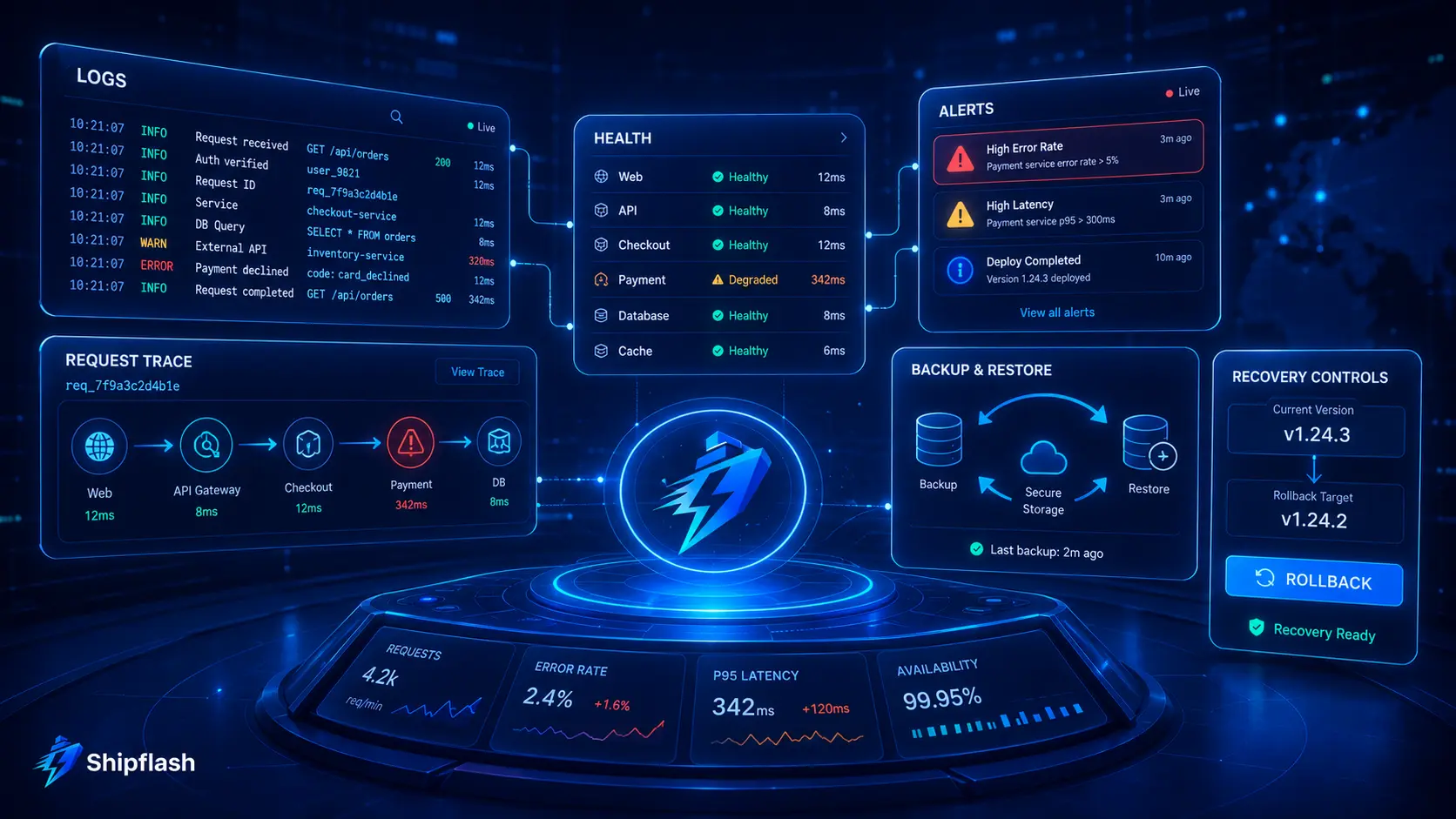
A launch should be blocked when a known issue creates a credible risk of unauthorized data access, incorrect charges, lost customer access, irreversible data loss, or an incident the team cannot observe and contain.
Use severity rather than perfectionism to make the decision.
| Severity | Examples | Release decision |
|---|---|---|
| Critical | Cross-account data access, exposed secret, unsigned billing webhook, destructive migration risk | Block immediately |
| High | Incorrect entitlement state, broken recovery flow, missing backup, unbounded privileged endpoint | Block unless removed from scope |
| Medium | Non-critical email formatting issue, incomplete dashboard analytics, slow secondary page | Launch only with owner and dated remediation |
| Low | Minor visual inconsistency, optional enhancement, internal copy improvement | May launch and track normally |
A known issue should not be downgraded merely because fixing it is inconvenient. Evaluate the possible customer impact, exploitability, reversibility, detectability, and scope.
At the same time, do not let low-risk polish delay evidence-backed learning from real customers. The purpose of a release gate is to distinguish foundational risk from ordinary product iteration.
Build a Release Evidence Pack
For each production candidate, collect a compact evidence pack that another person could review without relying on memory.
| Artifact | What it proves |
|---|---|
| Commit SHA and build run | The exact source version passed required checks |
| Environment validation output | Required configuration exists and production restrictions pass |
| Migration validation | The schema can be recreated and migrated safely |
| Authorization test report | Roles and resource boundaries reject forbidden operations |
| Billing lifecycle results | Purchases and provider events produce correct access |
| Backup and restore record | Critical data can be recovered |
| Load-test summary | Key paths operate within known resource limits |
| Monitoring screenshots | Errors, queues, health, and alerts are visible |
| Rollback notes | The team can reverse the deployment |
| Accepted exceptions | Remaining risks have owners and expiration dates |
Store the pack with the release, not in a temporary chat message or an individual developer’s local folder.
The evidence does not need to become a large compliance project. It needs to be specific enough that the team can answer, “Why did we believe this release was safe?”
Final Launch Decision
The difference between a prototype and a production SaaS is not the number of features. It is whether the application maintains trustworthy behavior when the environment stops being ideal.
A production-ready release should:
- Build reproducibly
- Verify identity and authorization on the server
- Enforce data access at the database layer
- Process billing events idempotently
- Recover failed asynchronous work
- Protect secrets and public endpoints
- Restore critical data
- Expose meaningful operational signals
- Remain usable and discoverable
- Support a controlled rollback
You do not need a large engineering organization to implement these controls. You need clear boundaries, a repeatable release process, and evidence for the systems that create the greatest customer risk.
This is also where a structured foundation saves the most time. Starting from an application in which authentication, billing, administrative operations, notifications, testing, observability, and security boundaries already have defined homes reduces the amount of foundational work that must be reinvented for every product.
That does not make launch verification optional. It makes the verification more systematic.
Shipflash is built for founders, developers, indie hackers, and vibe coders who want to move quickly without allowing the codebase to become an untestable prototype. Explore Shipflash to start from a production-oriented Next.js and Supabase foundation, then use this checklist to verify the product-specific behavior only your SaaS requires.
For teams moving from AI-generated prototypes into real customer operations, the related guide on vibe coding a SaaS from prototype to production explains why code ownership, maintainability, testing, and operational guardrails become more important after the first version appears to work.