
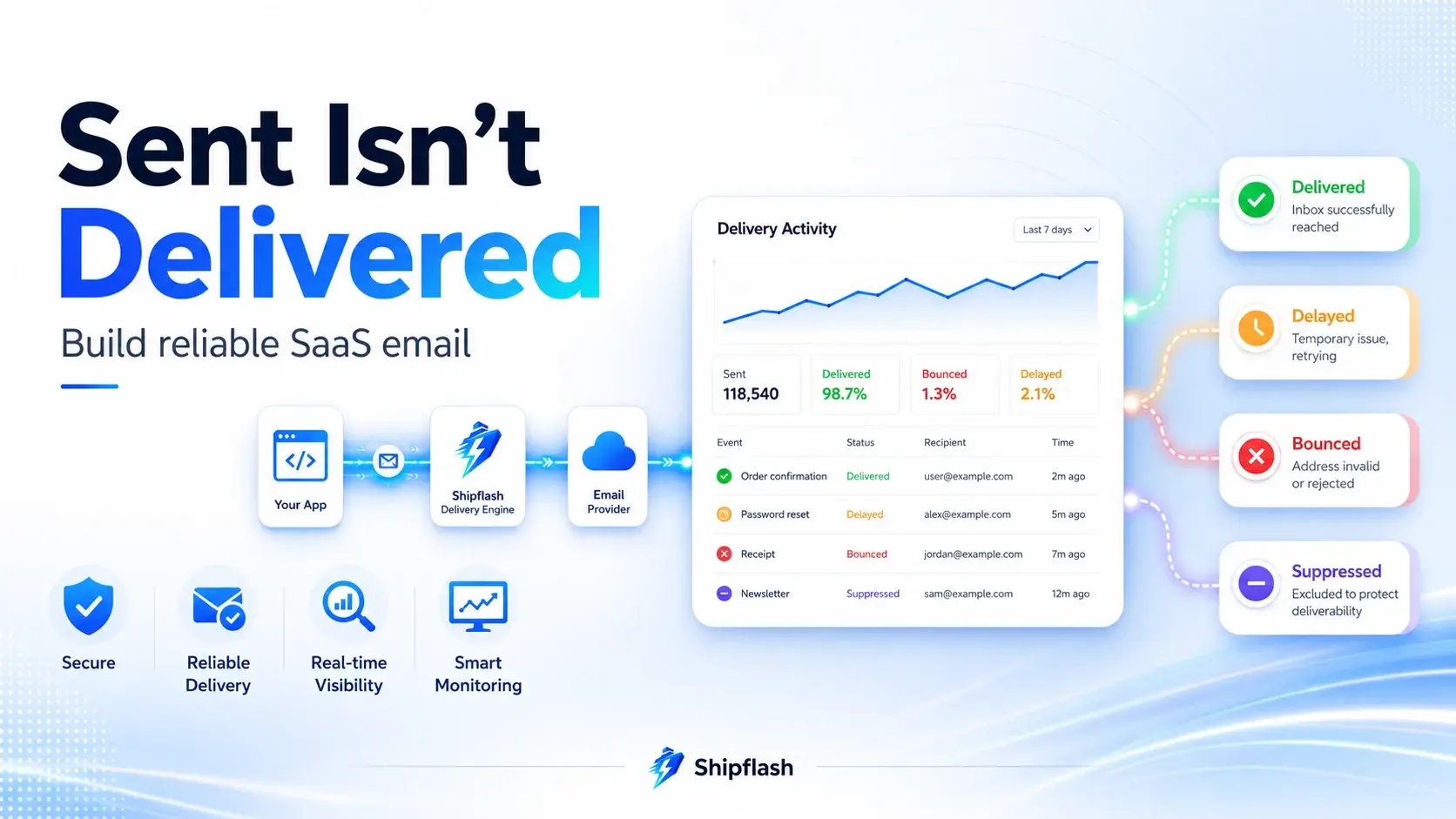
Your application can receive a successful response from an email API while the customer still receives nothing.
The message may be waiting in a queue. The receiving server may delay it. A mailbox provider may reject it. The address may already be suppressed. The message may reach the recipient’s server but land in spam. Your application may also retry an uncertain request and send the same password-reset or payment email twice.
That gap between calling an email provider and producing a trustworthy customer outcome is where transactional email reliability begins.
Transactional email reliability is the ability to create, send, observe, retry, suppress, and audit system-generated email without silently losing messages or repeatedly sending the same one.
It applies to email verification, password resets, magic links, receipts, failed-payment notices, account invitations, security alerts, usage warnings, and every other message tied to a customer action or product state.
A reliable system does not merely know that it called an API. It can answer five operational questions:
- Why was this email created?
- Was it accepted by the provider?
- What happened after acceptance?
- Should the system retry it?
- What can an operator do when delivery fails?
Those questions connect email delivery to the broader production systems described in the Shipflash guide to building a production-ready SaaS foundation. Email is not a decorative feature layered on top of the product. For many SaaS applications, it is part of authentication, billing, security, and customer support.
“Sent” Is Not the Same as “Delivered”
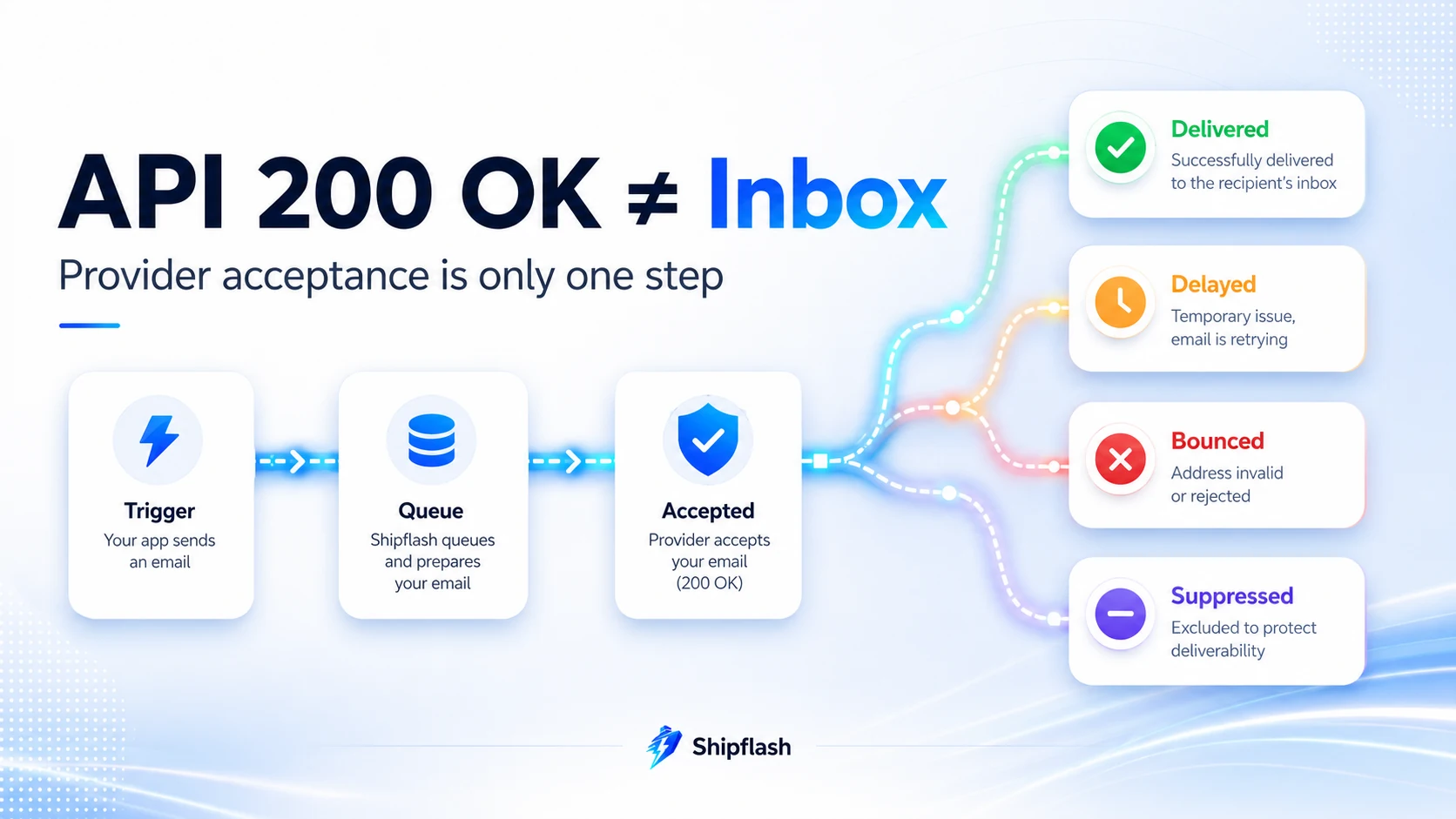
The first mistake in transactional email systems is treating every successful API response as proof that the user received the message.
A provider typically distinguishes between several stages. For example, Resend documents email.sent as a successful API request that the provider will attempt to deliver. Its email.delivered event means the message reached the recipient’s mail server. Other events include delayed delivery, failure, bouncing, complaints, and suppression. A delivered event therefore confirms server acceptance, not necessarily inbox placement or human attention. See the official Resend email event reference for the current event definitions.
| Status | What it should mean inside your application |
|---|---|
| Queued | The application has durably recorded that an email should be sent. |
| Sending | A worker has claimed the message and is attempting provider delivery. |
| Provider accepted | The provider returned a message ID and accepted responsibility for the next delivery step. |
| Delivered | The recipient’s mail server accepted the message. This does not prove inbox placement. |
| Delayed | The receiving system temporarily deferred delivery. |
| Bounced | The recipient’s server rejected the message. |
| Complained | The recipient reported the message as spam. |
| Suppressed | The system intentionally skipped sending because the address should not receive more mail. |
| Failed | The message could not be processed and requires a retry, correction, or operator decision. |
The distinction matters most during support incidents.
When a customer says, “I requested a password reset but nothing arrived,” an API log showing 200 OK is not enough. Support needs to determine whether the reset request created an outbox record, whether the provider accepted it, whether a delivery event arrived, whether the address bounced, and whether the customer’s address had already been suppressed.
A trustworthy email system preserves the evidence needed to explain what happened after the user clicked the button.
Think of Email as a Delivery Pipeline
A transactional email is the result of a sequence of systems, not one API call.
Customer or system action
        ↓
Business event
        ↓
Transactional outbox
        ↓
Background delivery worker
        ↓
Email provider
        ↓
Recipient mail server
        ↓
Inbox, spam folder, delay, or rejection
        ↓
Provider webhook events
        ↓
Local delivery history and operator tools
Reliability depends on every boundary in that pipeline.
The application must record the original business event. The delivery worker must tolerate temporary failures. The provider request must be safe to retry. Webhooks must be authenticated and deduplicated. Bounces and complaints must affect future sending. Operators need enough context to investigate or replay a message without editing production data manually.
A polished template cannot compensate for a missing outbox. Strong SPF and DKIM configuration cannot compensate for sending the same receipt three times. A provider dashboard cannot replace a local record connecting the message to the customer, billing event, or security action that created it.
Start With the Sending Domain, Not the Email Template
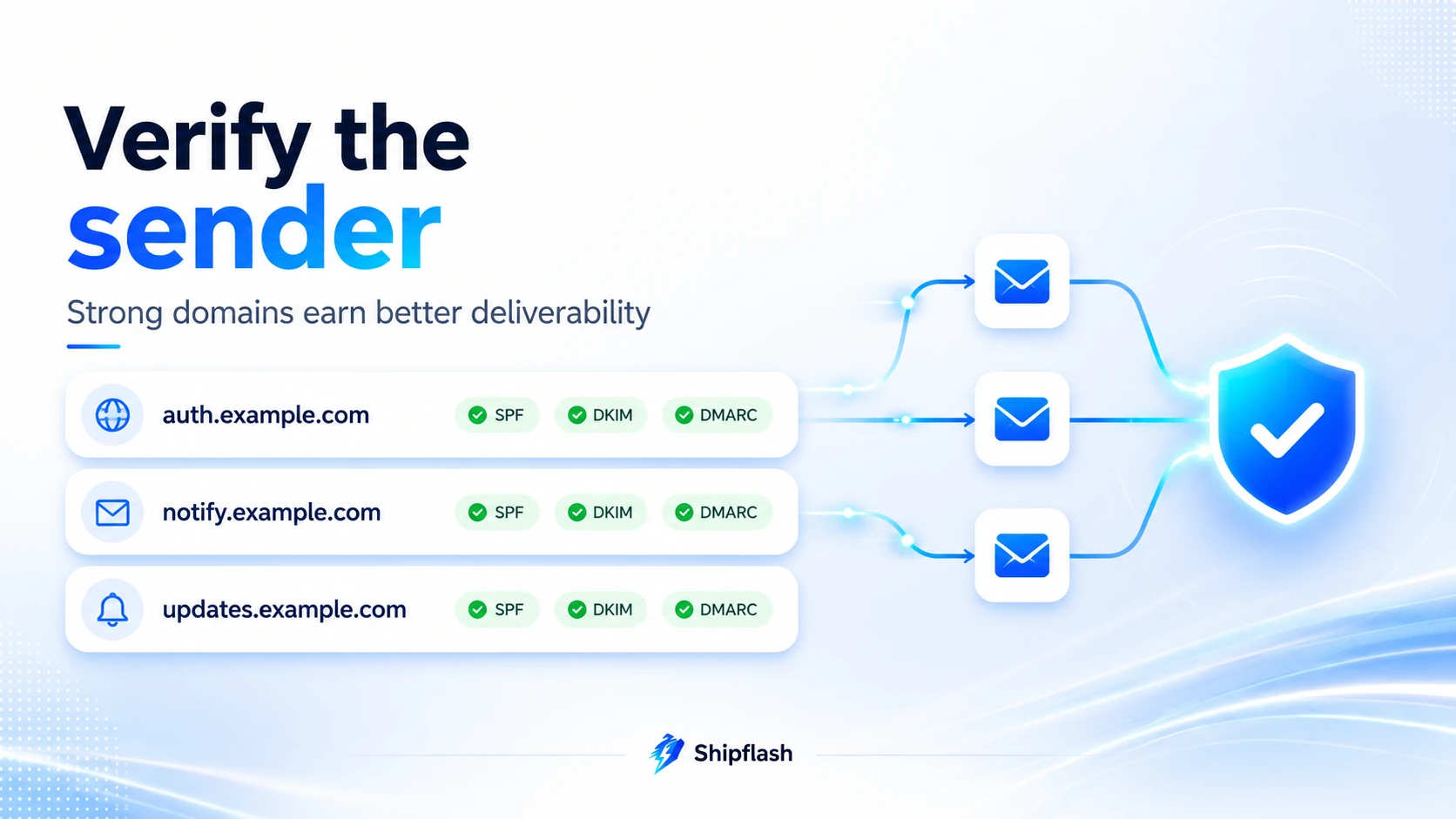
Deliverability begins before the first template is written.
Your sending domain tells mailbox providers who is responsible for the message. Authentication records help receiving systems verify that the infrastructure sending the email is authorized to represent that domain.
The three core mechanisms are:
SPF identifies which sending infrastructure is authorized to send mail for a domain.
DKIM adds a cryptographic signature that allows recipients to verify that an authorized domain signed the message and that relevant content was not modified in transit.
DMARC evaluates alignment between the visible From domain and the domains authenticated by SPF or DKIM. It also gives domain owners a policy and reporting mechanism for authentication failures.
Google requires all senders to Gmail accounts to use SPF or DKIM, TLS, valid DNS configuration, RFC-compliant messages, and low spam rates. Senders exceeding 5,000 messages per day to Gmail accounts must use SPF, DKIM, and DMARC, with alignment between the visible sender and an authenticated domain. Google also requires one-click unsubscribe for marketing and subscribed messages at that volume. The requirements are maintained in Google’s official email sender guidelines.
Yahoo similarly requires authentication, low complaint rates, valid DNS configuration, and RFC compliance. Its bulk-sender requirements include SPF, DKIM, DMARC, alignment, and easy unsubscribe for marketing or subscribed messages. Yahoo’s documentation explicitly distinguishes promotional messages from transactional messages such as order confirmations and password resets. Review the current Yahoo sender requirements and recommendations before changing production sending configuration.
Separate Transactional and Marketing Reputation
Do not send every category of email through the same identity simply because the provider allows it.
A practical early-stage setup may look like this:
| Email stream | Example identity | Typical messages |
|---|---|---|
| Authentication | auth.example.com | Verification links, password resets, magic links |
| Product notifications | notify.example.com | Account alerts, reports, invitations, operational notices |
| Marketing | updates.example.com | Newsletters, announcements, promotions |
A small SaaS does not need a different subdomain for every template. Excessive fragmentation can create unnecessary configuration and spread low sending volume across too many identities. The important boundary is usually between mission-critical transactional email and optional marketing email.
Resend recommends using a subdomain to isolate sending reputation and communicating intent, while Supabase recommends separating authentication and marketing email so damage to one stream does not affect the other. Supabase specifically gives examples such as auth.example.com for authentication and marketing.example.com for marketing messages.
The links inside an email should also look consistent with the identity sending it. A password-reset email from auth.example.com that sends the user through unrelated tracking and redirect domains creates more opportunities for distrust and filtering. Resend’s deliverability guidance recommends matching links with the sending domain, publishing DMARC, supplying a plain-text version, keeping message size controlled, and using dedicated subdomains to separate sending purposes.
Authentication Email Needs Production SMTP
Authentication email is often where a prototype first encounters real delivery constraints.
Supabase provides a default SMTP service to help developers test email confirmation, passwordless login, invitations, and password resets. Its documentation clearly states that the default service is restricted, best-effort, and not intended for production.
At the time of writing, Supabase documents a limit of two messages per hour for its default SMTP service. After custom SMTP is configured, a starting limit of 30 messages per hour is applied until it is adjusted for the application’s needs. These values can change, so check the current Supabase custom SMTP documentation before launch.
This creates several production requirements that are easy to miss:
Your application must use a verified sending domain. The provider credentials must be configured separately for production and non-production environments. Authentication rate limits must support expected launch traffic. Redirect URLs inside verification and reset emails must point to the correct environment. Failed auth emails must be diagnosable without exposing tokens or personal data in logs.
Supabase also provides a Send Email Auth Hook for teams that need more control, including queueing messages, smoothing traffic spikes, applying additional filtering, or routing through more than one delivery service. That option can be valuable when authentication email must share the same operational controls as the rest of the product’s notification system.
Do Not Send Critical Email Directly From the Request
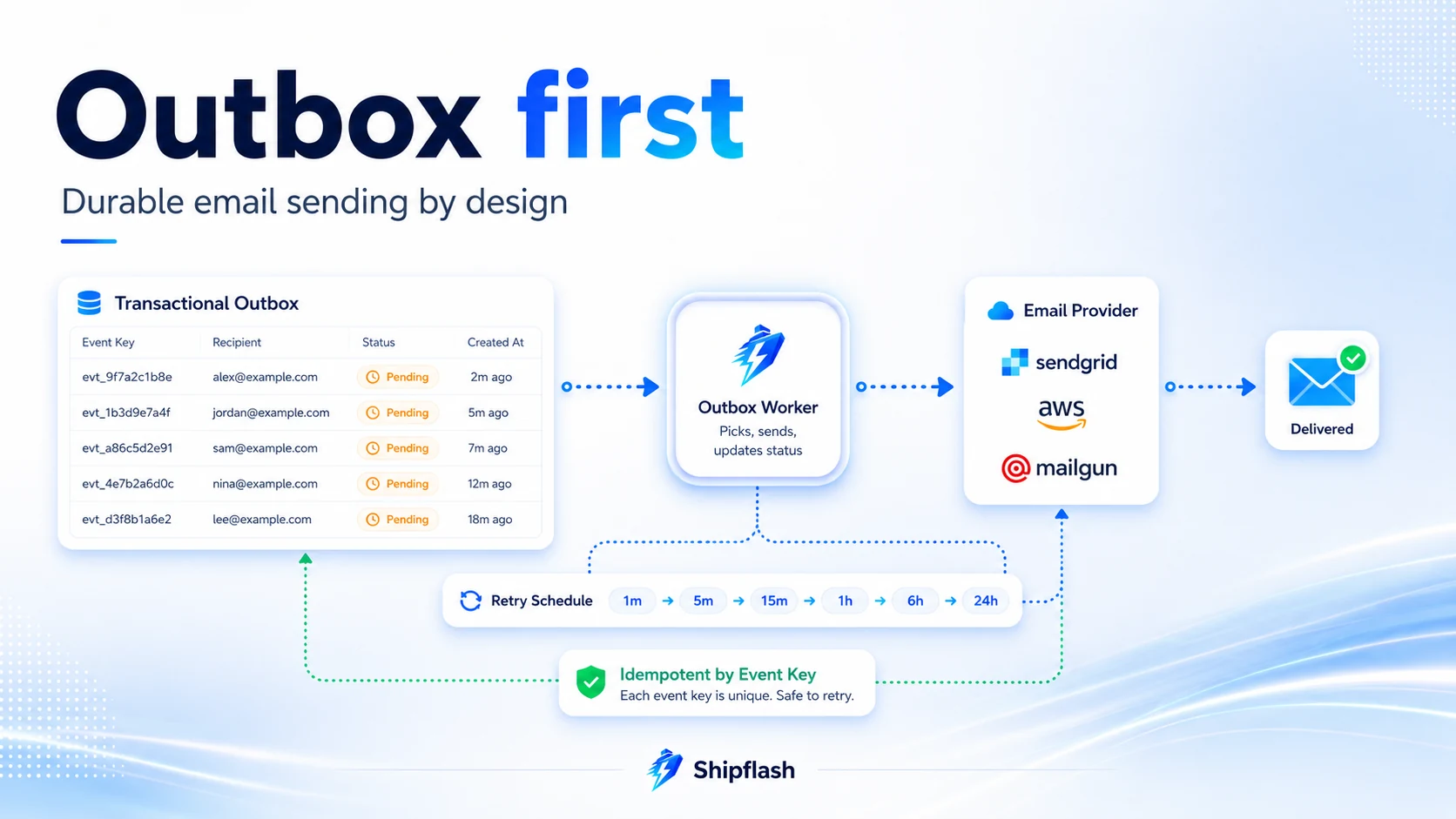
A common implementation sends email inside the same request that creates the underlying business change.
await createOrder();
await sendReceiptEmail();
return success();
This looks simple but creates an ambiguous failure boundary.
Suppose the provider accepts the receipt, but the network connection closes before your application receives the response. The request may be retried. The order already exists, but the application does not know whether the first receipt was sent. Retrying may produce a duplicate. Refusing to retry may leave the customer without a receipt.
The inverse failure is also possible. The order transaction may commit, but the serverless function may stop before the email request is made. The customer sees a successful payment while no receipt is ever created.
A transactional outbox reduces this ambiguity by recording the intent to send email in durable application storage. A background worker sends the message afterward.
create table public.email_outbox (
  id uuid primary key default gen_random_uuid(),

  event_key text not null unique,
  template_key text not null,
  template_version integer not null,

  recipient_email text not null,
  template_data jsonb not null,

  status text not null default 'pending'
    check (
      status in (
        'pending',
        'processing',
        'sent',
        'delivered',
        'failed',
        'bounced',
        'complained',
        'suppressed'
      )
    ),

  attempt_count integer not null default 0,
  next_attempt_at timestamptz not null default now(),

  provider text,
  provider_message_id text,

  last_error_code text,
  last_error_message text,

  created_at timestamptz not null default now(),
  processing_started_at timestamptz,
  sent_at timestamptz,
  delivered_at timestamptz,
  failed_at timestamptz
);

create index email_outbox_pending_idx
  on public.email_outbox (next_attempt_at, created_at)
  where status in ('pending', 'failed');
The event_key should represent the business reason for the message, not the delivery attempt. Examples include:
user-verification/8d63...
password-reset-request/12c1...
invoice-paid/in_123...
workspace-invitation/invite_456...
A unique constraint on this key prevents separate application paths from accidentally creating the same logical email twice.
Outbox writes and delivery-state changes should be restricted to trusted server-side code. Do not expose a public insert policy that allows browser clients to create arbitrary notification jobs. The same service-boundary principles discussed in the Shipflash guide to Supabase Row Level Security for Next.js SaaS apply to notification tables.
The worker that drains this table is a background-job problem. It needs controlled concurrency, retry scheduling, stale-job recovery, observability, and a safe way to replay failed work. Those execution choices are covered in greater depth in What Should Run in the Background? Queues, Cron Jobs, and Retries for Next.js SaaS.
Make Every Provider Request Idempotent
A durable outbox prevents the application from forgetting that an email needs to be sent. It does not, by itself, eliminate uncertain provider requests.
The worker may time out after the provider accepts a message. A deployment may interrupt the process before the local row is updated. Two workers may briefly contend for the same record. An operator may press retry while an automatic attempt is still running.
The provider request should therefore include a stable idempotency key.
Resend supports idempotency keys for individual and batch email requests. The provider keeps a key for 24 hours and returns the original result when the same request is repeated with that key. Its documentation recommends keys based on a meaningful event and entity identifier. See the official Resend idempotency key guide.
const { data, error } = await resend.emails.send(
  {
    from: "Shipflash <notifications@notify.example.com>",
    to: [message.recipientEmail],
    subject: rendered.subject,
    html: rendered.html,
    text: rendered.text,
  },
  {
    idempotencyKey: message.eventKey,
  },
);

if (error) {
  throw new EmailProviderError(error.name, error.message);
}

if (!data?.id) {
  throw new Error("Email provider returned no message ID");
}

await markOutboxMessageSent({
  outboxId: message.id,
  provider: "resend",
  providerMessageId: data.id,
});
Provider idempotency should supplement your own unique event key rather than replace it. Resend’s documented retention window is 24 hours, while your application may need to prevent duplication weeks or months later. The local event key is the long-term business guarantee; the provider key protects uncertain network and worker retries within the delivery window. This is an architectural inference based on the provider’s documented key retention.
Retry Failures According to Their Meaning
“Retry failed emails” is incomplete advice.
Some failures are temporary. Others will never improve without changing the message, address, or configuration. Treating every failure the same creates duplicate traffic, damages reputation, and hides configuration bugs.
| Failure | Recommended handling |
|---|---|
| Network timeout or lost response | Retry with the same idempotency key. |
| Provider rate limit | Retry after the provider’s delay or a controlled backoff. |
| Provider 5xx error | Retry with exponential backoff and an attempt limit. |
| Invalid API payload | Mark failed and alert; retries will repeat the same error. |
| Unverified sending domain | Stop the stream and alert an operator. |
| Invalid recipient or hard bounce | Suppress the address; do not continue retrying. |
| Temporary mailbox or server rejection | Allow controlled retry behavior without rapid repeated attempts. |
| Spam complaint | Suppress the address and investigate the message stream. |
| Template rendering failure | Fail before calling the provider and preserve the rendering error. |
Resend separates permanent, transient, and undetermined bounces. Permanent bounces indicate that the recipient’s server rejected the message and it will not be delivered. Transient bounces cover conditions that may improve, such as a full mailbox or a temporary server problem.
A retry policy should therefore use both the error category and the number of previous attempts. A typical application-level sequence might retry after one minute, five minutes, thirty minutes, two hours, and several hours before moving the message to a terminal failure state.
Add random jitter when many messages may fail together. Without jitter, an outage can cause every failed job to retry at the same moment, creating another traffic spike immediately after the provider begins recovering.
Also record when the next attempt is eligible. Do not rely on a process sleeping inside a serverless execution. Persisting next_attempt_at allows any healthy worker to continue the schedule after a deployment or runtime interruption.
Webhooks Turn Provider Activity Into Product State
The send response only tells you what happened at the provider boundary. Delivery, delay, bounce, complaint, and suppression information normally arrives later through webhook events.
Your webhook endpoint should perform four operations:
- Read the original request body.
- Verify the provider signature.
- Persist the event once.
- Return a successful response quickly.
Processing the entire event synchronously before returning creates unnecessary risk. If a database query, analytics call, or notification side effect takes too long, the provider may consider the webhook failed and deliver it again.
Resend signs webhook requests and requires verification against the raw request body. Parsing the body and serializing it again can change the bytes and break signature verification. Its official webhook verification guide documents the signing headers and raw-body requirement.
import { NextResponse } from "next/server";
import { Resend } from "resend";

const resend = new Resend(process.env.RESEND_API_KEY);

export async function POST(request: Request) {
  const payload = await request.text();

  const id = request.headers.get("svix-id");
  const timestamp = request.headers.get("svix-timestamp");
  const signature = request.headers.get("svix-signature");

  if (!id || !timestamp || !signature) {
    return NextResponse.json(
      { error: "Missing webhook signature headers" },
      { status: 400 },
    );
  }

  let event: unknown;

  try {
    event = resend.webhooks.verify({
      payload,
      headers: {
        id,
        timestamp,
        signature,
      },
      webhookSecret: process.env.RESEND_WEBHOOK_SECRET!,
    });
  } catch {
    return NextResponse.json(
      { error: "Invalid webhook signature" },
      { status: 400 },
    );
  }

  await persistWebhookEventOnce({
    provider: "resend",
    providerEventId: id,
    payload: event,
  });

  return NextResponse.json({ received: true });
}
The providerEventId should have a unique database constraint. Webhook delivery is generally at-least-once rather than exactly-once, so duplicate events must be safe.
After the raw event has been stored, a separate processor can update the matching outbox row, add a suppression, raise an alert, or record a delivery metric.
Resend retries unsuccessful webhook deliveries with exponential backoff and supports manual replays from its dashboard. It may also disable an endpoint that continues failing. That makes local deduplication essential: a replayed event should repair missing state, not apply the same transition twice.
Keep a Local Event History
Overwriting a single status column loses valuable evidence.
Suppose a message moves through these states:
sent → delivery_delayed → delivered
If you only store delivered, you lose the fact that the customer experienced a delay. If the same destination repeatedly produces delays, that history may reveal a provider, domain, or mailbox-specific problem.
Store both a current projection and an append-only event history.
create table public.email_delivery_events (
  id uuid primary key default gen_random_uuid(),

  provider text not null,
  provider_event_id text not null,
  provider_message_id text,

  event_type text not null,
  event_payload jsonb not null,

  occurred_at timestamptz,
  received_at timestamptz not null default now(),

  unique (provider, provider_event_id)
);

create index email_delivery_events_message_idx
  on public.email_delivery_events (
    provider,
    provider_message_id,
    received_at
  );
The current outbox status makes dashboards and support queries fast. The event table preserves the evidence needed for debugging, replay, reporting, and reconciliation.
Do not store full message bodies in every event unless there is a clear operational requirement. Transactional emails can contain names, account details, invoices, reset URLs, and other sensitive content. Store the minimum context needed to operate the system, redact secrets from errors, and define retention periods rather than keeping event payloads indefinitely.
Bounces and Complaints Must Change Future Sending
A hard bounce is not merely a failed delivery metric. It is a signal that the application should stop sending to that address.
Continuing to send to recipients who permanently reject messages harms sender reputation. The same applies when a user marks a message as spam.
Resend automatically maintains suppressions for permanent bounces, complaints, and manually suppressed addresses. Its suppressions apply across the account’s domains and subdomains. The provider also exposes webhook events that can be used to synchronize suppression state into an application database.
Relying exclusively on a provider-owned suppression list creates a portability problem, however. If you change providers, you still need to know which addresses must not receive email.
A local suppression record might contain:
recipient_email
reason
source_provider
source_message_id
suppressed_at
reviewed_at
removed_at
Before enqueueing a message, the application can check whether the address is suppressed. An operator may remove a suppression only after confirming that the address was corrected, ownership changed, or the original reason no longer applies.
Not every mailbox provider exposes complaint events in the same way. Resend notes that Gmail and Google Workspace do not return complaint events through its suppression mechanism. Gmail’s Postmaster Tools can provide broader domain-level information about spam rate, authentication, reputation, encryption, and delivery errors when sufficient traffic exists.
Version Templates Like Application Code
Transactional templates affect security, billing, support, and product behavior. Treating them as unversioned strings makes incidents difficult to reconstruct.
For every outbox message, record the template key and the version used to render it.
template_key: password-reset
template_version: 4
If version five later introduces a broken URL, you can identify exactly which messages were affected. Versioning also makes gradual rollout, rollback, localization, and provider migration safer.
A production template should normally provide both HTML and plain text. The visible sender name should be stable. The subject should describe the actual action without manufactured urgency. Links should use the product’s HTTPS domains, and security-sensitive links should have clear expiry behavior.
Avoid embedding important information only inside images. Email clients block or alter images, and recipients using assistive technology still need meaningful content. Buttons should have descriptive labels such as “Reset your password” rather than “Click here.”
Tracking also deserves an explicit decision. Open tracking is not required for most security and billing messages, and open data can be unreliable. Click tracking may rewrite URLs through a tracking domain. For a password reset or email verification flow, fewer redirects and a clear product-owned destination can be more valuable than engagement analytics.
Monitor Customer Outcomes, Not API Calls
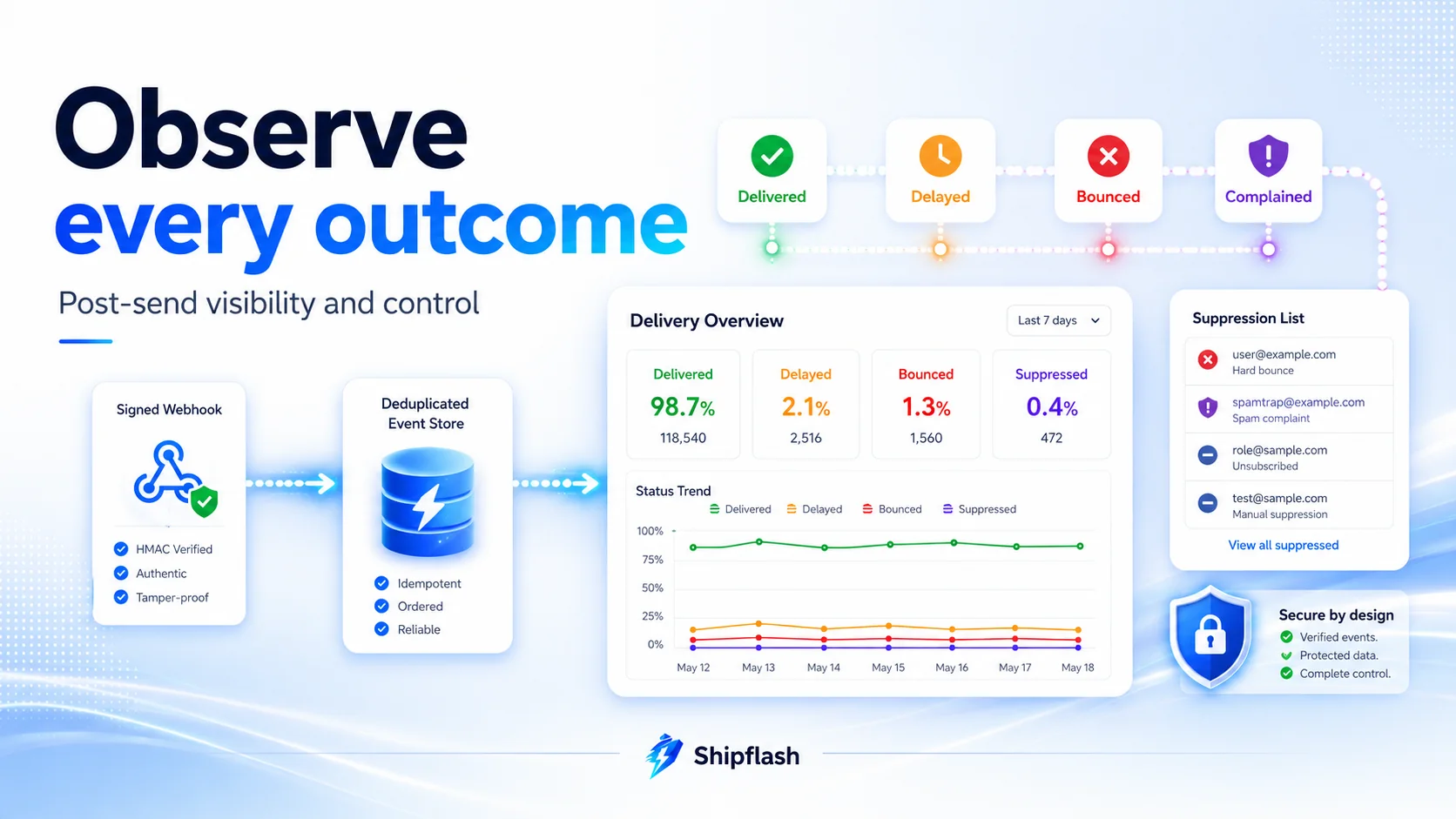
A graph of successful provider API calls is not an email reliability dashboard.
Useful operational metrics include:
| Metric | What it reveals |
|---|---|
| Outbox enqueue rate | Whether expected business events are creating email work |
| Oldest pending message | Whether the delivery worker is falling behind |
| Enqueue-to-send latency | How long customers wait before the provider request |
| Provider acceptance rate | Whether requests are being accepted |
| Delivery rate | How many accepted messages reach recipient servers |
| Delay rate | Whether providers or recipient systems are deferring messages |
| Permanent bounce rate | Whether address quality or reputation is declining |
| Complaint rate | Whether recipients consider the messages unwanted |
| Suppression rate | How often the system intentionally stops sending |
| Webhook processing lag | Whether provider outcomes are reaching application state |
| Retry exhaustion rate | How many messages require operator attention |
| Template rendering failures | Whether a deployment broke a message before delivery |
Alert thresholds should reflect the message type.
A ten-minute delay in a weekly account summary may be acceptable. A ten-minute delay in a login code or password-reset message may produce support requests and repeated attempts. Security alerts may require even stronger expectations.
Monitor the streams separately so high-volume, low-urgency notifications do not hide failures in authentication or billing email.
Google’s Postmaster Tools can help larger senders inspect domain reputation, spam rates, authentication, encryption, and delivery errors. Google notes that its dashboard data is not real time and may be incomplete when sending volume is low, so it should supplement rather than replace your application and provider telemetry. See the official Postmaster Tools dashboard documentation.
Make Support Investigations Traceable
Consider a customer who reports that their password-reset email never arrived.
An operator should be able to search by customer or recipient and see a timeline such as:
14:02:03  Password reset requested
14:02:03  Outbox message created
14:02:04  Delivery worker claimed message
14:02:04  Provider accepted message: 49a3999c...
14:02:09  Provider reported delivery delay
14:07:31  Provider reported delivered
For a different address, the timeline may show:
14:02:03  Password reset requested
14:02:03  Message skipped
14:02:03  Recipient suppressed after previous hard bounce
That second result changes the support response. Repeatedly pressing “resend” will not solve the problem. The customer may have entered an invalid address, changed domains, or regained access to a mailbox that previously rejected delivery.
The operator interface should show the relevant customer, message type, template version, provider message ID, current status, attempt count, timestamps, suppression reason, and sanitized error details.
Manual retry actions should require confirmation. They should also create an audit event containing who triggered the retry, why it was necessary, and which logical message was affected.
Reconcile Missing Events
Webhooks are a primary source of delivery state, but they should not become the only recovery path.
An endpoint can be misconfigured. A deployment can return errors. A secret can be rotated incorrectly. The provider may retry, but persistent endpoint failure can still leave local state behind.
A reconciliation job can periodically find messages that were accepted by the provider but have not received an event within an expected interval. Depending on provider capabilities, the job may query message status, flag the record for review, or compare provider exports with the application database.
The goal is not to pretend every message can be proven to reach an inbox. The goal is to identify gaps between provider state and local state before a customer discovers them first.
This is similar to billing reconciliation. Webhooks provide near-real-time updates, while a scheduled comparison catches drift caused by missed or incorrectly processed events. The same reliability model is discussed in Shipflash’s guide to SaaS billing architecture, entitlements, and reconciliation.
Test the Failure Paths Before Launch
Sending one successful test email to your own Gmail address proves very little.
A production test plan should exercise the entire lifecycle.
| Scenario | Evidence to verify |
|---|---|
| Email verification | Correct destination, expiry, redirect, and account state |
| Password reset | One usable link and no duplicate messages after retries |
| Workspace invitation | Correct inviter, workspace, role, and expiration |
| Billing receipt | Correct customer, currency, amount, and invoice reference |
| Failed payment | Correct subscription context without exposing provider internals |
| Duplicate business event | Only one logical email is created |
| Provider timeout | Retry uses the same idempotency key |
| Provider rate limit | Message remains queued and retries later |
| Invalid address | Bounce is recorded and recipient becomes suppressed |
| Webhook replay | Duplicate event does not duplicate state changes |
| Invalid webhook signature | Endpoint rejects the request |
| Missing webhook | Reconciliation or an alert identifies stale state |
| Template failure | Message fails before sending and includes a diagnosable error |
| Deployment during processing | Stale processing lease can be reclaimed safely |
Run the tests across multiple mailbox providers and devices. Check plain-text rendering, dark mode, long names, missing optional data, long URLs, forwarded messages, and localization if the product supports multiple languages.
Test production DNS and production provider configuration before a public announcement. A staging environment using a sandbox domain does not prove that production SPF, DKIM, DMARC, redirects, rate limits, and secrets are correct.
The release should also include a documented rollback and support procedure. The broader Next.js SaaS production checklist can help connect these email checks with deployment, security, observability, backups, and post-launch monitoring.
Can an Email Provider Guarantee Inbox Placement?
No email provider can guarantee that every accepted message will appear in the primary inbox.
The provider controls its sending infrastructure and can report interactions with recipient mail servers. The receiving mailbox provider controls filtering, throttling, rejection, spam placement, and presentation to the user. User-level rules can also redirect or block a message.
You can improve the probability of successful delivery through authentication, responsible sending practices, clean recipient data, stable reputation, clear content, and careful monitoring. You cannot turn inbox placement into a deterministic application response.
That is why a reliable product should avoid telling users, “The email has arrived.” A more accurate interface is:
We sent the email. Check your inbox and spam folder. You can request another message after a short delay.
The application should rate-limit repeated requests while preserving idempotency. Otherwise, an impatient customer can create several valid reset links or multiple identical verification messages, making the experience more confusing.
Keep Provider Portability Without Hiding Every Useful Feature
A provider adapter can reduce migration cost, but a lowest-common-denominator abstraction can also hide important capabilities.
Your application’s canonical email model should own:
logical event key
recipient
template and version
message purpose
current delivery state
attempt history
provider message ID
delivery events
suppression state
timestamps
The provider adapter should translate that model into Resend, Amazon SES, Postmark, or another delivery service.
Provider-specific capabilities can remain explicit. For example, an adapter may report whether it supports idempotency keys, suppression APIs, event retrieval, batch sending, or manual replay. The application can then use those features without treating them as universal.
Portability means the product retains its customer and delivery history when the provider changes. It does not mean pretending that every provider behaves identically.
How Shipflash Approaches Transactional Email Operations
Shipflash is built around the idea that customer-facing features also need operator-facing systems.
Its production-ready SaaS foundation includes Resend in the supported stack and brings communications into the product’s operational workspace. Publicly documented Shipflash capabilities include notification templates, delivery logs, status metrics, webhook processing, automatic retries, and operator retry controls. That creates a starting point for understanding message state without depending only on a provider dashboard.
You still need to configure your provider, sending domain, production secrets, templates, rate limits, and product-specific notification rules. Shipflash does not remove those decisions. It gives them a structured place to live alongside authentication, billing, customers, settings, audit logs, and other systems that affect the same workflows.
For founders and small teams, that operational connection is important. A customer complaint rarely belongs to only one system. “I did not receive my receipt” may involve a billing event, customer record, notification job, provider response, webhook event, and suppression entry.
When those systems are connected, support can investigate the customer outcome rather than switching between disconnected dashboards and editing records directly in SQL.
Transactional Email Production Release Gate
Before treating transactional email as launch-ready, require evidence for each of these conditions:
| Release gate | Required evidence |
|---|---|
| Sending identity | SPF and DKIM pass for the production domain |
| Domain policy | DMARC is published and reports are monitored |
| Stream separation | Transactional and marketing reputation are appropriately separated |
| Production delivery | Auth and product email use production-capable provider configuration |
| Durable creation | Critical messages are written to an outbox before delivery |
| Duplicate prevention | Logical event keys and provider idempotency are implemented |
| Controlled retries | Temporary and permanent failures follow different policies |
| Webhook security | Signatures are verified from the raw request body |
| Event deduplication | Provider event IDs have uniqueness protection |
| Suppression handling | Bounces and complaints prevent repeated sending |
| Operational visibility | Delivery state, attempts, and sanitized errors are searchable |
| Alerting | Queue age, delivery failures, webhook lag, and complaints have alerts |
| Reconciliation | Missing or stale delivery state can be detected |
| Template safety | HTML, plain text, links, expiry, and rendering edge cases are tested |
| Support workflow | Operators can investigate and retry without direct database edits |
| Launch verification | Real production flows have been tested across mailbox providers |
A release gate turns “we integrated an email API” into evidence that the product can create, deliver, observe, and recover its most important customer messages.
Reliable Email Is a Product System
Transactional email reliability is not achieved by choosing a reputable provider and calling its API from a server action.
It requires a verified sending identity, durable message intent, safe retries, authenticated webhooks, local delivery history, suppression handling, monitoring, reconciliation, and operator workflows.
The difference becomes visible when something goes wrong.
In a fragile system, the team sees a successful API log and tells the customer to check their spam folder.
In a reliable system, the team can trace the original event, identify the provider message, explain the delivery state, see whether the address bounced or was suppressed, and take a controlled corrective action.
That is the standard transactional email should meet before a SaaS depends on it for access, money, security, and customer trust.