
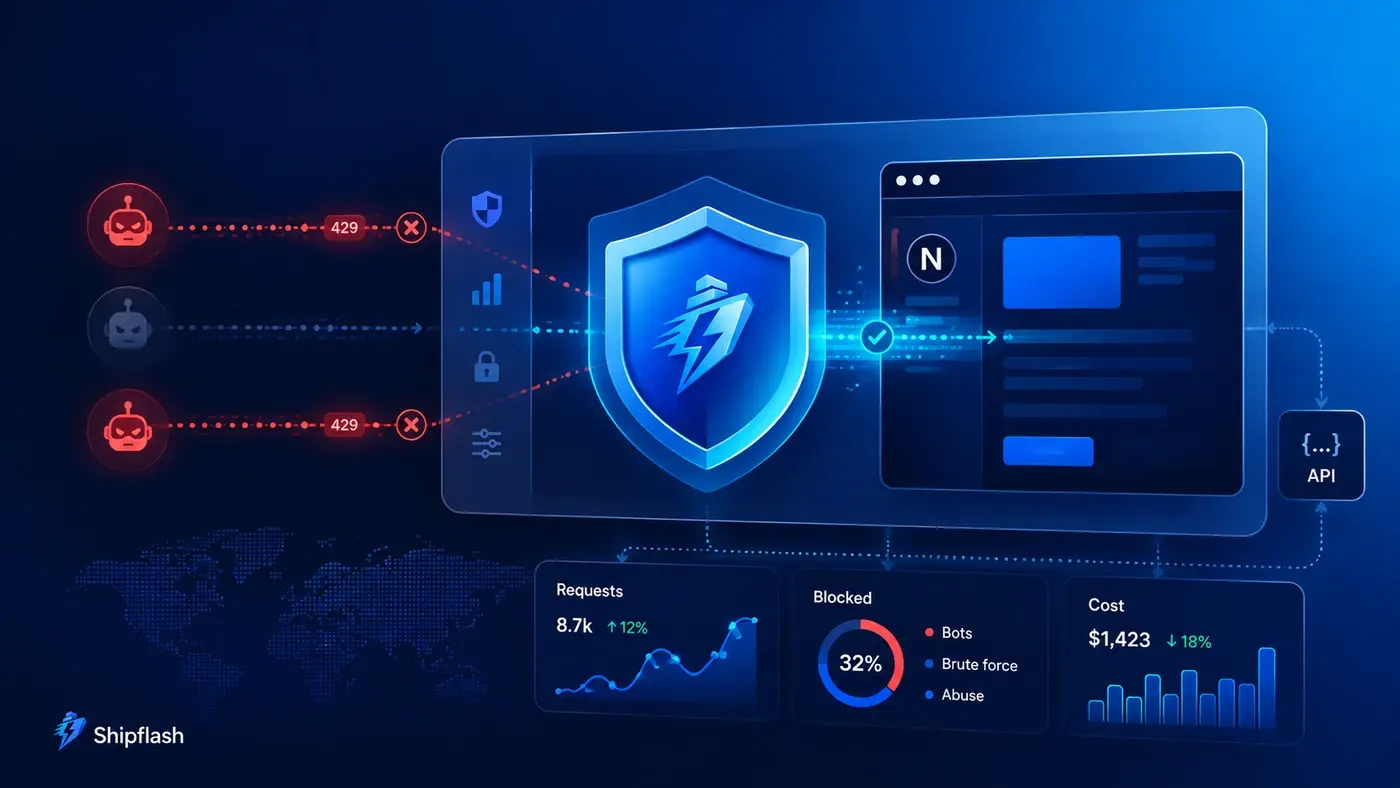
Your first abuse incident may not look like an attack.
It might look like thousands of password-reset emails being triggered overnight. It could be a script creating disposable accounts, a customer accidentally retrying an expensive request in a loop, or a single API key generating a larger infrastructure bill than every legitimate customer combined.
The application may remain online. The dashboard may still load. From the outside, nothing appears broken.
Behind the scenes, however, your SaaS is paying for every database query, authentication request, email, serverless invocation, file transformation, payment-provider call, and AI token.
That is why abuse prevention is not only a security concern. It is also an availability, reliability, customer-experience, and cost-control problem.
OWASP classifies unrestricted resource consumption as a major API security risk because unbounded requests can exhaust compute, storage, memory, third-party services, or financial resources. Its recommendations include limiting payload sizes, request frequency, operation frequency, and external-provider spending.
The best rate-limiting strategy for a Next.js SaaS is layered: stop obvious abuse at the network edge, enforce actor-aware limits inside the application, apply plan and cost quotas before expensive work, and monitor the result for false positives and new attack patterns.
A single requestsPerMinute counter is not enough.
Rate Limiting Is Only One Part of Abuse Prevention
Several controls are often grouped together under “rate limiting,” even though they solve different problems.
Understanding those differences prevents a common architecture mistake: using one mechanism to answer every security and product question.
| Control | Question it answers | Example |
|---|---|---|
| Authentication | Who is making the request? | Is there a valid user session or API key? |
| Authorization | Is this actor permitted to perform the action? | Can this user export customer data? |
| Rate limit | How quickly may the actor repeat the action? | Ten requests per minute |
| Concurrency limit | How many operations may run simultaneously? | Two active exports per account |
| Usage quota | How much may the actor consume during a billing period? | 5,000 AI generations per month |
| Cost budget | How much financial exposure is acceptable? | $20 of provider usage per workspace per day |
| Idempotency | Should a repeated request produce another side effect? | One checkout session per operation key |
| Bot challenge | Does the request appear to come from a legitimate human? | Turnstile verification on suspicious signups |
A user can remain below a short-term rate limit while still exhausting a monthly allowance. A bot can rotate IP addresses. An authenticated customer can unintentionally create a retry loop. A request can be authorized but too expensive to execute repeatedly.
Production protection comes from combining these controls rather than expecting one of them to carry the entire system.
This separation should be part of the broader architecture of a production-ready SaaS foundation, not added only after the first unexpected bill or abuse incident.
Where Abuse Enters a Next.js SaaS
Attackers usually target actions that create side effects, reveal account information, or make your application spend money.
That includes obvious endpoints such as login and signup, but also ordinary product functionality that becomes dangerous at scale.
Authentication abuse
Authentication flows are attractive because they are public and frequently trigger downstream work.
A password-reset request may perform an authentication-provider call and send an email. Signup may create a database record, enqueue a confirmation message, run fraud checks, and initialize product data. An anonymous-sign-in endpoint can create database users even when no one intends to use the account.
Supabase applies built-in limits to its Auth endpoints and supports configurable CAPTCHA protection, but those controls protect Supabase Auth operations—not every custom Route Handler, Server Action, database query, or product workflow in your application.
Form and lead-generation abuse
Contact forms, waitlists, feedback forms, referrals, invitation flows, and newsletter signups are inexpensive individually.
They become expensive when a bot submits them thousands of times.
The direct costs may include email delivery, database growth, moderation work, CRM records, notifications, analytics events, and support time. Spam also damages the quality of your operational data, making legitimate customer signals harder to find.
Expensive product operations
AI generation, media processing, PDF creation, bulk exports, data enrichment, scraping, search, and external API calls can translate one incoming HTTP request into substantial downstream work.
These routes need more than request counting. They need operation-level cost weights, concurrency limits, plan quotas, payload restrictions, and maximum execution bounds.
Checkout and billing abuse
A checkout endpoint may create payment-provider sessions, customer records, tax calculations, or portal links.
Repeated requests can generate duplicate provider objects, hit provider rate limits, create inconsistent local records, or make support investigations more difficult. The right defense combines authorization, application-level rate limiting, and idempotency.
A reliable implementation should follow the same principles described in SaaS billing architecture: webhooks, entitlements, reconciliation, and reliable access control.
Automated retry abuse
Not every abusive pattern is malicious.
A broken client, browser extension, background worker, webhook sender, or internal job can retry an operation hundreds of times. When every retry also triggers more retries, a temporary failure becomes a self-amplifying incident.
This is why rate limiting must be designed alongside the retry, lease, idempotency, and dead-letter patterns explained in What Should Run in the Background? Queues, Cron Jobs, and Retries for Next.js SaaS.
Build Abuse Prevention in Four Layers
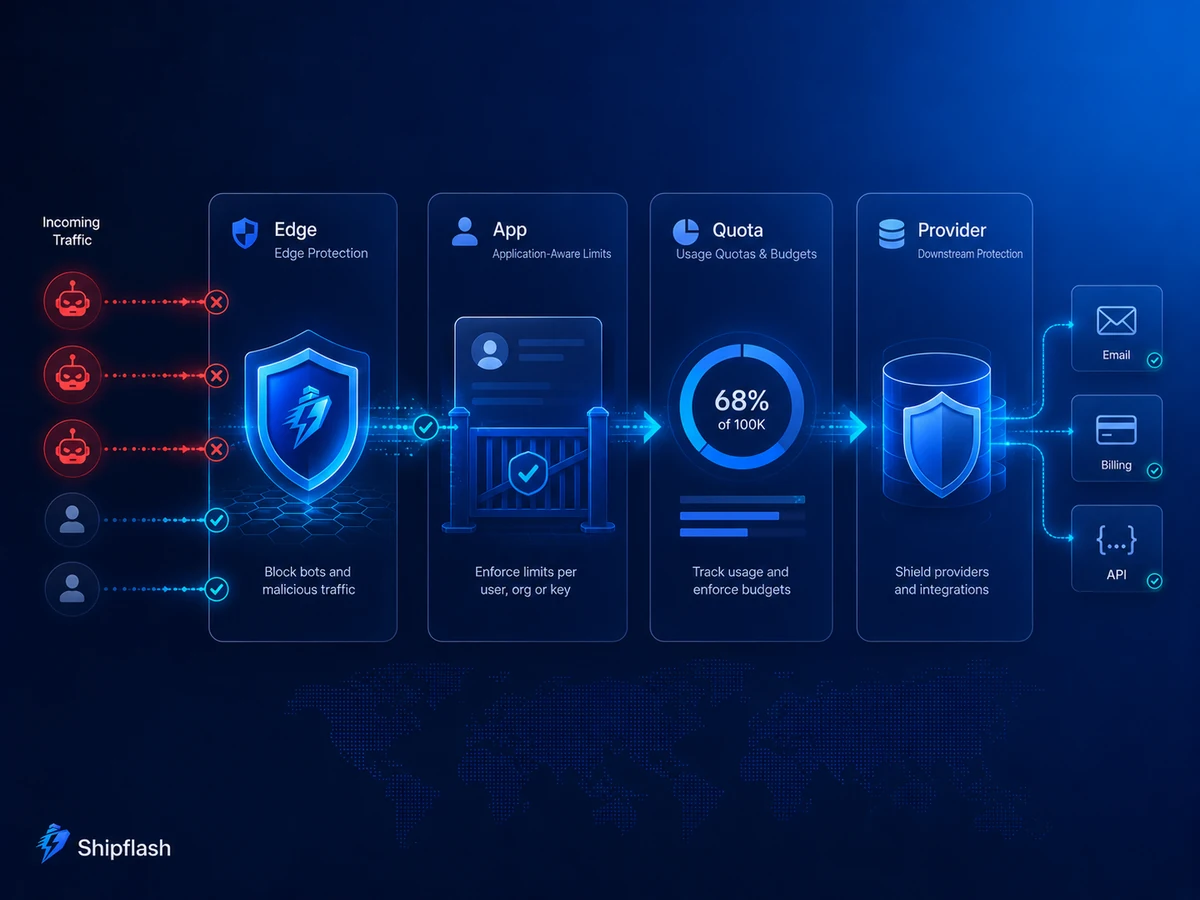
A practical SaaS architecture uses different controls at different points in the request path.
Each layer has information the others do not.
Layer 1: Stop Obvious Abuse at the Edge
Your hosting or CDN firewall sees a request before it consumes your application runtime, opens a database connection, or calls a third-party provider.
This makes the edge a good place for broad protections such as:
- Denying known malicious sources
- Challenging suspicious traffic
- Limiting extreme bursts against a path
- Restricting unexpected methods
- Blocking oversized or malformed requests
- Applying emergency rules during an incident
Vercel WAF supports rules that log, deny, challenge, or rate limit matching traffic. Vercel recommends initially running rules with a logging action, observing real traffic, and only then changing the action to challenge, deny, or rate limit.
Cloudflare’s rate-limiting rules similarly let you select matching expressions, counting characteristics, request periods, thresholds, mitigation actions, and timeouts.
Edge limits are useful, but they cannot usually answer questions such as:
- Which subscription plan does this user have?
- Has this workspace exhausted its monthly allowance?
- Is the action unusually expensive?
- Is the request part of a trusted internal workflow?
- Has an idempotency key already been processed?
Those decisions belong inside the application.
Broad edge rules should also avoid accidentally limiting normal public page requests or verified search crawlers. Cloudflare specifically warns that applying rate-limiting rules to verified bots may affect SEO. Scope most aggressive rules to mutation endpoints, authentication paths, uploads, and expensive API routes rather than every request on the domain.
Layer 2: Enforce Actor-Aware Application Limits
The application understands the authenticated user, workspace, API key, product plan, route, and requested operation.
That makes it the right place for limits such as:
- Per-user requests
- Per-workspace consumption
- Per-API-key usage
- Per-feature limits
- Plan-specific allowances
- Resource ownership checks
- Cost-weighted operations
- Concurrent job limits
Next.js recommends implementing rate limiting in the application in addition to using protections available from the hosting provider. Its security guidance also states that Route Handlers and Server Actions should be treated as public-facing endpoints with their own authentication and authorization checks.
Do not assume an action is protected because the only visible button lives inside an authenticated page. Server Functions can be reached through direct POST requests, so every mutation must independently verify the caller and the resource being changed.
Layer 3: Apply Business and Plan Quotas
Rate limits control pace. Quotas control total consumption.
A Pro customer might be allowed to perform requests faster than a free customer while still having a monthly allowance. An internal administrator might bypass a customer-facing burst limit but still need an audit trail and a safety ceiling.
Useful quota dimensions include:
| Dimension | Example |
|---|---|
| Per request | Maximum 10 images in one generation |
| Per minute | Maximum 20 generation requests |
| Concurrent | Maximum 2 active generation jobs |
| Per day | Maximum 2,000 enrichment operations |
| Billing period | Maximum 50,000 API units |
| Monetary | Maximum estimated provider spend of $50 per day |
| Resource | Maximum 100 active webhook destinations |
| Storage | Maximum 10 GB of customer uploads |
Plan enforcement should happen before expensive work starts.
Checking a quota after the AI provider, database export, or email batch has already completed may produce accurate usage records, but it does not prevent the cost.
Layer 4: Respect Downstream Provider Limits
Your application is not the final system in the request chain.
Supabase, Stripe, Resend, AI providers, storage services, and other APIs apply their own limits. Your SaaS must treat those limits as expected operational conditions rather than surprising exceptions.
Stripe, for example, can return 429 responses for rate or concurrency limits and recommends exponential backoff with randomness to avoid a thundering-herd retry pattern.
Provider protection should include:
- Bounded concurrency
- Exponential backoff with jitter
- Maximum retry attempts
- Idempotency keys
- Per-provider circuit breakers
- Queue-based smoothing
- Provider-specific alerts
- A fallback or degradation policy
Without these controls, a local retry mechanism can make an upstream provider incident worse.
Choose the Right Rate-Limiting Algorithm
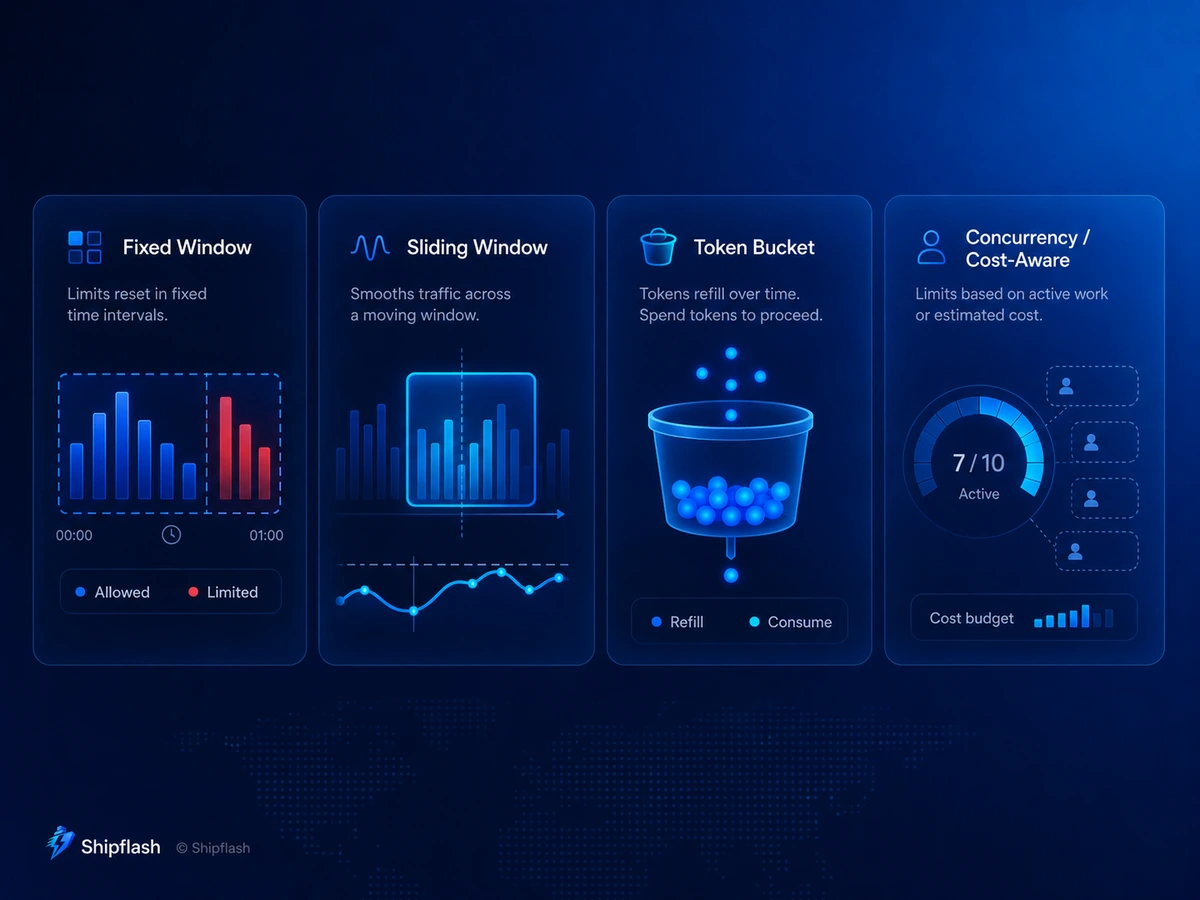
The best algorithm depends on whether you prioritize simplicity, smooth traffic, controlled bursts, strict fairness, or cost weighting.
Redis documents fixed-window, sliding-window, and token-bucket patterns for distributed rate limiting. A shared store is important when requests may be handled by multiple application instances.
| Algorithm | How it behaves | Best suited for | Main tradeoff |
|---|---|---|---|
| Fixed window | Counts requests inside a fixed period | Simple forms and coarse limits | Allows bursts around window boundaries |
| Sliding window | Measures activity across a moving period | Login, reset, and customer API limits | More storage and computation |
| Token bucket | Tokens refill over time and requests consume them | APIs that should allow controlled bursts | Requires careful capacity and refill settings |
| Leaky bucket | Processes requests at a controlled outgoing rate | Queue or provider traffic smoothing | May delay legitimate bursts |
| Concurrency semaphore | Limits active operations rather than request count | Exports, AI jobs, media processing | Requires reliable lease cleanup |
| Cost-weighted budget | Deducts different units per operation | AI, search, enrichment, and external APIs | Requires a maintainable cost model |
Fixed window
A fixed-window limiter might allow 100 requests between 10:00 and 10:01.
The weakness is the boundary. A client could make 100 requests at 10:00:59 and another 100 at 10:01:01, producing 200 requests in roughly two seconds.
That may still be acceptable for low-risk contact forms or broad edge protection.
Sliding window
A sliding window looks backward from the current request instead of resetting every client at the same clock boundary.
This produces smoother enforcement and is generally easier to reason about for authentication and customer API limits.
The tradeoff is additional state and implementation complexity.
Token bucket
A token bucket gives each actor a capacity and a refill rate.
For example, a bucket may hold 20 tokens and refill at one token every three seconds. A user who has been idle can make a short burst, but sustained traffic is restricted to the refill rate.
This works well for interactive products where legitimate users sometimes make several requests quickly. Redis describes token bucket as a way to allow bursts while maintaining a long-term average rate.
Concurrency limits
Request frequency does not capture how long work remains active.
Ten lightweight reads may be harmless. Two simultaneous database exports might overwhelm the system.
A concurrency limiter reserves a slot before work begins and releases it after completion. Production implementations must also handle crashed workers, timed-out jobs, and abandoned leases so a failed process does not permanently consume a slot.
Cost-weighted budgets
Expensive routes should not treat every operation equally.
A short text generation, a high-resolution image, a large export, and a full-site crawl have different costs. Instead of counting each as one request, assign units based on estimated resource consumption.
For example:
estimated_units =
  base_operation_cost
  + requested_output_tokens × token_weight
  + uploaded_megabytes × upload_weight
  + generated_images × image_weight
The exact formula matters less than enforcing a bounded, understandable budget before external work begins.
Choose a Key That Represents the Real Actor
A limiter is only as effective as the key it counts.
IP addresses are useful before authentication, but they are imperfect identities. Offices, universities, mobile networks, and carrier-grade NAT can place many legitimate users behind one public IP. Attackers can use proxies, VPNs, botnets, or IPv6 rotation.
Authenticated user IDs are more stable, but they do not protect public routes before login.
A practical key hierarchy looks like this:
| Request context | Recommended primary key | Useful secondary dimensions |
|---|---|---|
| Anonymous form | Trusted client IP | Path, challenge state, normalized email hash |
| Login | Trusted client IP and account identifier | Failure count, device signal |
| Authenticated feature | User ID | Workspace ID, route, plan |
| Shared workspace allowance | Workspace or account ID | User ID, feature |
| Public API | API key ID | Endpoint, customer account |
| AI operation | Workspace ID | User ID, model, operation type |
| Upload | User or workspace ID | File type, total bytes |
| Background task | Job type and resource ID | Provider, customer, retry attempt |
Use a combination when the risk justifies it.
For password resets, limiting only by IP allows one client to target thousands of email addresses. Limiting only by email lets a bot target one account through rotating IPs. Combining both makes bypass more difficult while preserving reasonable access for legitimate users.
Do not blindly trust forwarded headers
Headers such as X-Forwarded-For can be forged when the application is directly exposed or the proxy chain is not controlled.
Use the client-address mechanism documented by your hosting provider, and only trust forwarding headers inserted or sanitized by infrastructure you control.
Supabase supports forwarding an end-user IP for Auth rate limiting through Sb-Forwarded-For, but the feature must be explicitly enabled and used with a secret API key. That secret must remain server-side.
A Practical Next.js Route-Handler Pattern
The following example shows the order of operations for an expensive authenticated endpoint.
The storage and authentication adapters are intentionally separated from the Route Handler so the same policy can be tested and reused across endpoints.
import { NextResponse } from 'next/server'
import { z } from 'zod'

import { getSession } from '@/lib/auth/get-session'
import { getTrustedClientIp } from '@/lib/security/client-ip'
import { consumeRateLimit } from '@/lib/security/rate-limit'
import { consumeUsageBudget } from '@/lib/usage/consume-budget'
import { generateReport } from '@/lib/reports/generate-report'

const requestSchema = z.object({
  projectId: z.string().uuid(),
  format: z.enum(['pdf', 'csv']),
})

type Rejection = {
  reason: string
  retryAfterSeconds: number
}

function rateLimitedResponse(rejection: Rejection) {
  return NextResponse.json(
    {
      error: {
        code: 'RATE_LIMITED',
        message: 'Too many requests. Please try again later.',
        retryAfterSeconds: rejection.retryAfterSeconds,
      },
    },
    {
      status: 429,
      headers: {
        'Retry-After': String(rejection.retryAfterSeconds),
        'Cache-Control': 'no-store',
      },
    },
  )
}

export async function POST(request: Request) {
  const clientIp = getTrustedClientIp(request)

  // Coarse protection before database- or provider-heavy work.
  const anonymousBurst = await consumeRateLimit({
    namespace: 'report-export:ip',
    key: clientIp,
    capacity: 20,
    refillTokens: 20,
    refillIntervalSeconds: 60,
  })

  if (!anonymousBurst.allowed) {
    return rateLimitedResponse({
      reason: 'ip_burst',
      retryAfterSeconds: anonymousBurst.retryAfterSeconds,
    })
  }

  const session = await getSession(request)

  if (!session?.user) {
    return NextResponse.json(
      { error: { code: 'UNAUTHENTICATED' } },
      { status: 401 },
    )
  }

  const userBurst = await consumeRateLimit({
    namespace: 'report-export:user',
    key: session.user.id,
    capacity: 3,
    refillTokens: 3,
    refillIntervalSeconds: 60 * 60,
  })

  if (!userBurst.allowed) {
    return rateLimitedResponse({
      reason: 'user_burst',
      retryAfterSeconds: userBurst.retryAfterSeconds,
    })
  }

  const contentLength = Number(request.headers.get('content-length') ?? 0)

  if (contentLength > 16_384) {
    return NextResponse.json(
      { error: { code: 'PAYLOAD_TOO_LARGE' } },
      { status: 413 },
    )
  }

  const parsed = requestSchema.safeParse(await request.json())

  if (!parsed.success) {
    return NextResponse.json(
      {
        error: {
          code: 'INVALID_REQUEST',
          details: parsed.error.flatten(),
        },
      },
      { status: 400 },
    )
  }

  const budget = await consumeUsageBudget({
    accountId: session.user.accountId,
    feature: 'report-export',
    units: parsed.data.format === 'pdf' ? 3 : 1,
  })

  if (!budget.allowed) {
    return NextResponse.json(
      {
        error: {
          code: 'USAGE_LIMIT_REACHED',
          message: 'Your report-export allowance has been reached.',
        },
      },
      { status: 403 },
    )
  }

  const report = await generateReport({
    projectId: parsed.data.projectId,
    format: parsed.data.format,
    requestedBy: session.user.id,
  })

  return NextResponse.json({ data: report })
}
Three details matter here.
First, the coarse limit runs before expensive authentication, database, or provider work.
Second, the authenticated limit uses a stable user identity rather than relying only on an IP address.
Third, exhausting a product allowance is returned as a separate business error instead of pretending that every rejection is a temporary request-rate problem.
The limiter itself must use shared, durable state. A module-level Map or process-local counter is unreliable in a serverless environment because different requests may reach different instances, and state may disappear when an instance is recycled. Next.js documentation notes that some hosting environments deploy Route Handlers as isolated functions that cannot share request state.
CAPTCHA Is an Escalation Layer, Not a Complete Defense
CAPTCHA and bot challenges are helpful when a request appears suspicious or targets a public form.
They do not replace server-side limits.
A bot can skip your frontend and submit directly to the endpoint. A valid human can still accidentally generate excessive traffic. Some automated systems can solve challenges, while aggressive challenges can frustrate legitimate customers.
Cloudflare states that Turnstile protection is incomplete unless the server validates the token through Siteverify. Turnstile tokens expire after five minutes and are single-use, so replayed or expired tokens should be rejected.
A server-side validation helper can look like this:
type TurnstileResult = {
  success: boolean
  hostname?: string
  action?: string
  'error-codes'?: string[]
}

export async function verifyTurnstile(options: {
  token: string
  remoteIp?: string
  expectedHostname: string
  expectedAction: string
}): Promise<boolean> {
  const secret = process.env.TURNSTILE_SECRET_KEY

  if (!secret) {
    throw new Error('TURNSTILE_SECRET_KEY is not configured')
  }

  const body = new URLSearchParams({
    secret,
    response: options.token,
  })

  if (options.remoteIp) {
    body.set('remoteip', options.remoteIp)
  }

  const response = await fetch(
    'https://challenges.cloudflare.com/turnstile/v0/siteverify',
    {
      method: 'POST',
      body,
      signal: AbortSignal.timeout(4_000),
      cache: 'no-store',
    },
  )

  if (!response.ok) {
    return false
  }

  const result = (await response.json()) as TurnstileResult

  return (
    result.success === true &&
    result.hostname === options.expectedHostname &&
    result.action === options.expectedAction
  )
}
Use CAPTCHA where it provides meaningful risk reduction:
- Signup and anonymous account creation
- Password-reset requests
- Contact and waitlist forms
- Repeated failed authentication attempts
- Suspicious referral or invitation activity
- High-risk public submissions
Avoid placing it in front of every request. Challenges add latency, accessibility considerations, another external dependency, and possible conversion friction.
Supabase supports Cloudflare Turnstile and hCaptcha for sign-in, signup, and password-reset flows.
Configure Supabase Auth Limits—Then Protect the Rest of the Application
Supabase Auth includes rate limits for operations such as email-triggering endpoints, OTPs, verification, token refreshes, MFA, and anonymous sign-ins.
Some limits are configurable in the Supabase dashboard or through its Management API. Supabase also documents a token-bucket model for IP-limited Auth operations.
These protections are valuable, but they do not cover:
- Custom Next.js Route Handlers
- Server Actions
- Contact forms
- Waitlist endpoints
- Checkout-session creation
- AI generation
- File processing
- Search or export routes
- Internal administrative actions
- Calls to other providers
Treat Supabase’s built-in limits as one provider-level layer.
Your application still needs its own policy around who may perform an operation, how frequently it may run, how expensive it may become, and how the result is recorded.
Authorization remains separate. For database access, use Row Level Security, explicit grants, safe service-role boundaries, and negative authorization testing as described in Supabase Row Level Security for Next.js SaaS.
Add Cost Controls Before Expensive Provider Calls
A request limit protects request volume. It does not automatically protect cost.
Ten requests can still be expensive when each request asks an AI provider for a large context window, generates multiple images, scans thousands of records, or sends a large email batch.
Cost-aware endpoints should usually enforce four separate constraints:
Maximum work per request
Bound input size and requested output.
Examples include maximum prompt length, maximum uploaded bytes, maximum generated images, maximum export rows, maximum recipients, and maximum search depth.
Short-term burst limits
Prevent sudden traffic spikes from overwhelming the application or provider.
A token bucket or sliding window is often suitable.
Concurrent-operation limits
Stop one user or account from running many long operations at the same time.
This is particularly important for exports, media processing, crawling, and AI jobs.
Period and monetary budgets
Enforce daily, monthly, or billing-period allowances.
Where provider pricing is variable, maintain an estimated cost ledger or normalized usage-unit system. Configure provider-side spending limits or billing alerts whenever the provider supports them.
OWASP recommends setting spending limits for service-provider integrations and configuring billing alerts when direct limits are unavailable.
Starting Limits for Common SaaS Endpoints
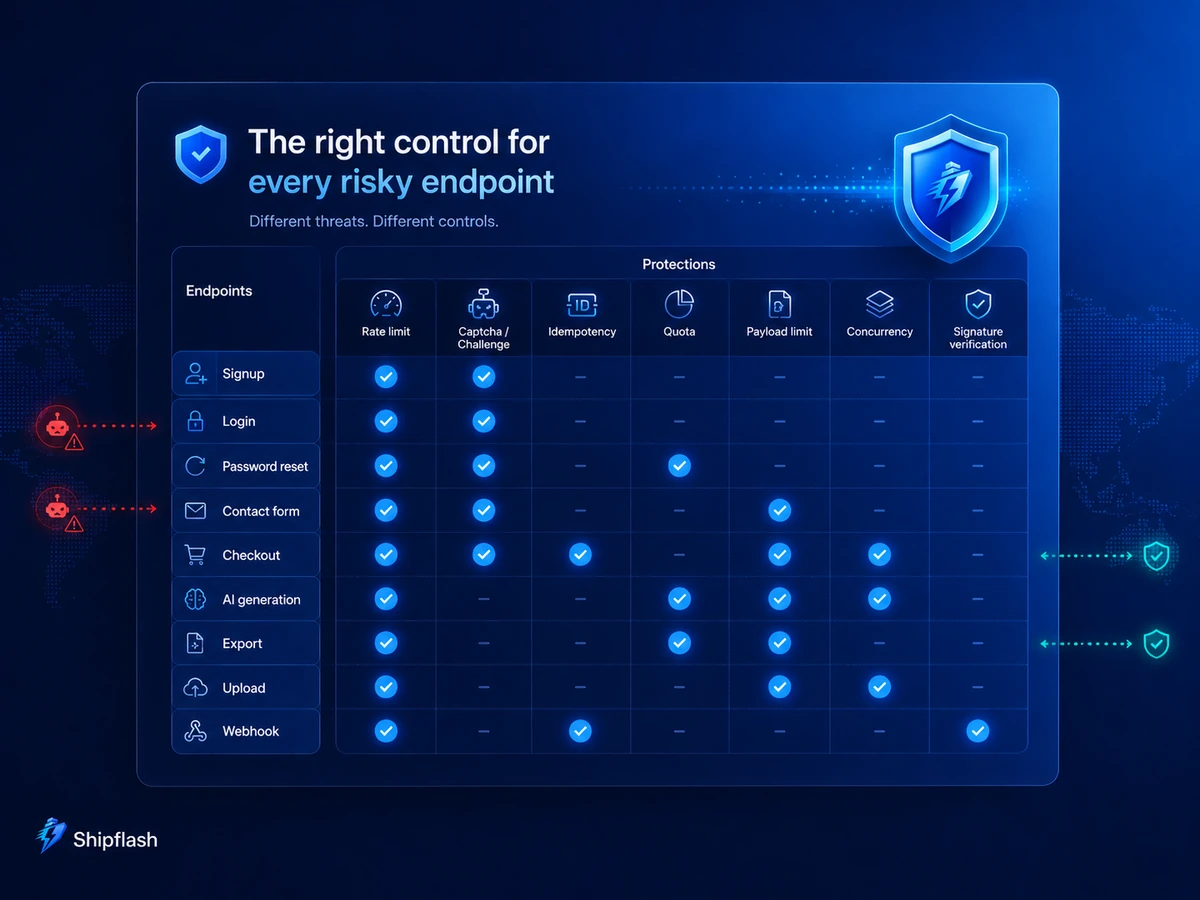
There is no universal perfect threshold.
The correct number depends on normal customer behavior, product design, account value, provider costs, and the impact of false positives.
The following numbers are starting points for testing—not permanent values to copy blindly.
| Endpoint | Suggested starting control | Additional protection |
|---|---|---|
| Signup | 5 attempts per 10 minutes per IP | Email-identity limit and Turnstile |
| Login | 20 attempts per 5 minutes per IP | Per-account failure limit and generic errors |
| Password reset | 10 per hour per IP and 3 per hour per email | Always return a neutral response |
| Contact or waitlist | 5 submissions per 10 minutes per IP | Turnstile, field validation, spam scoring |
| Checkout creation | 10 per minute per user | Idempotency key and existing-session reuse |
| Customer portal | 5 per minute per user | Authentication and account ownership |
| AI generation | Token bucket per user or workspace | Daily budget, input bounds, concurrency limit |
| Export | 3 per hour per user | Background job and one active export |
| File upload | Requests and total bytes per account | File-type, size, and storage quotas |
| Webhook receiver | Provider-aware concurrency | Signature, payload limit, idempotency, replay safety |
Do not silently turn these examples into permanent security policy.
Run your edge rules in observation mode, measure legitimate peaks, inspect support cases, and tune the numbers around actual behavior.
Treat Webhooks Differently
Webhook endpoints are public, but they should not be protected exactly like login or contact forms.
A payment or email provider may deliver bursts, retry failed events, or send requests from changing infrastructure. An aggressive IP limit can discard legitimate lifecycle events and create state drift.
The primary webhook defenses should be:
- Cryptographic signature verification
- Strict payload-size limits
- Supported content types
- Unique provider-event IDs
- Idempotent processing
- Bounded concurrency
- Safe retry behavior
- Durable event history
- Reconciliation for missed events
A coarse emergency limit may still be useful, but it should be based on measured provider behavior and should not replace signature verification.
If processing requires slow follow-up work, acknowledge the valid webhook promptly and move the remaining work into a durable background workflow.
Return Useful 429 Responses
The HTTP 429 Too Many Requests status exists specifically for rate limiting.
RFC 6585 recommends including an explanation of the condition and allows a Retry-After header that tells the client how long to wait.
A useful response looks like this:
HTTP/1.1 429 Too Many Requests
Content-Type: application/json
Cache-Control: no-store
Retry-After: 42
{
  "error": {
    "code": "RATE_LIMITED",
    "message": "Too many requests. Please try again shortly.",
    "retryAfterSeconds": 42
  }
}
Do not use 429 for every rejected request.
Use:
- 401 when authentication is missing or invalid
- 403 when the actor is authenticated but not permitted
- 413 when the payload is too large
- 422 or 400 for invalid input
- 429 when a temporary request-rate policy is exceeded
- A documented product error when a billing-period allowance is exhausted
This distinction helps clients react correctly and makes operational metrics more useful.
Prevent Retry Storms
A rate limit can create more traffic when clients respond badly.
For example, ten clients receive a 429 and retry immediately. They receive another 429, retry again, and keep every instance busy rejecting the same requests.
Clients and background workers should:
- Respect Retry-After when present.
- Use exponential backoff.
- Add random jitter.
- Stop after a bounded number of attempts.
- Avoid retrying permanent validation or authorization errors.
- Preserve idempotency for side-effecting requests.
Stripe recommends exponential backoff and randomness when handling provider limits, specifically to avoid synchronized retries.
Retries should also consume an explicit retry budget. A job should not remain eligible for infinite attempts simply because every individual delay is valid.
Define What Happens When the Limiter Fails
Your rate-limit store can become slow or unavailable.
You need a deliberate failure policy.
Fail closed
Reject the request when the limiter cannot confirm allowance.
This may be appropriate for highly expensive anonymous operations, administrative actions, or endpoints with severe abuse potential.
The downside is that a limiter outage becomes a product outage.
Fail open
Allow the request when the limiter is unavailable.
This preserves customer access but temporarily removes protection. It may be acceptable for low-cost authenticated actions with strong downstream quotas.
Degrade safely
Use a fallback protection such as an edge rule, local emergency threshold, disabled expensive feature, or queue with reduced concurrency.
This is often a better production policy than universally failing open or closed.
Record every fallback decision. Otherwise, an outage may remove your protection without anyone noticing.
Monitor Abuse Controls as Product Infrastructure
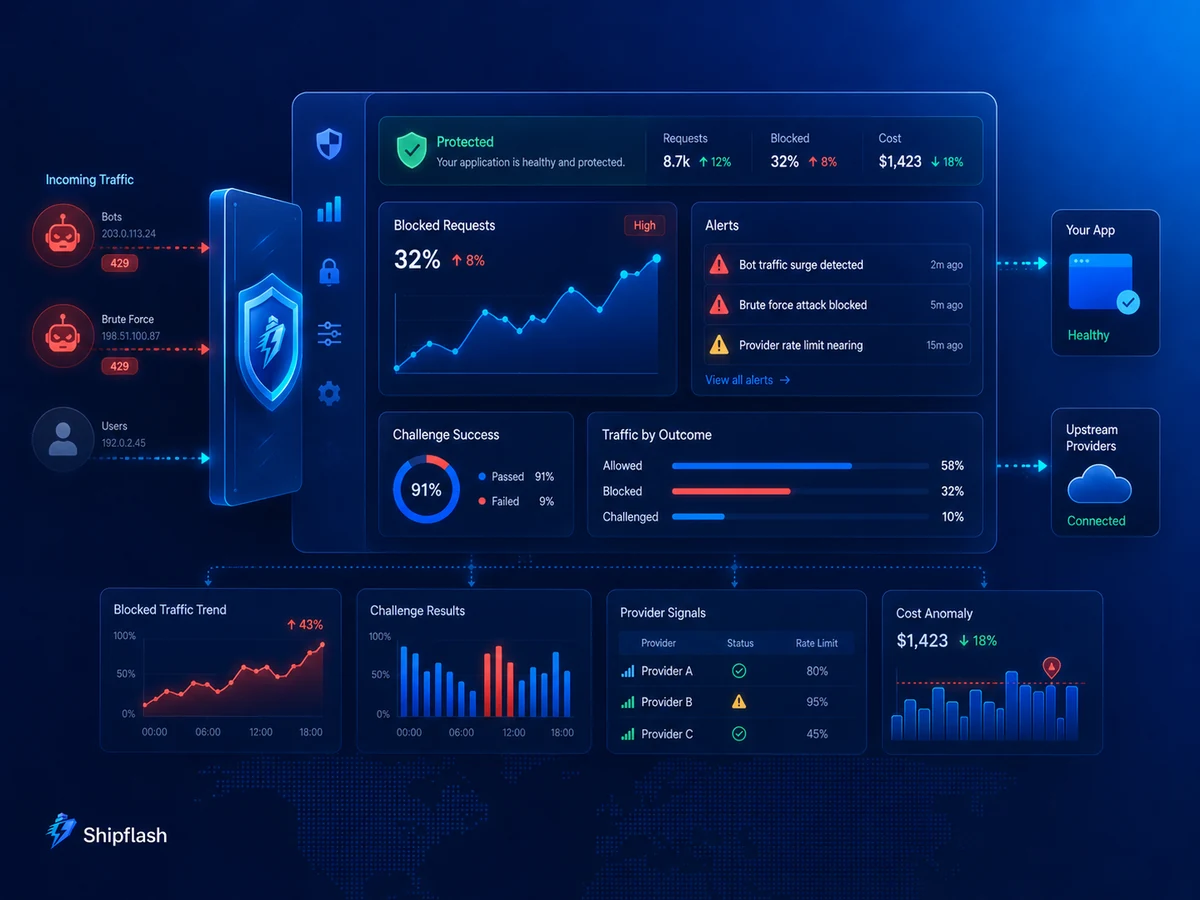
A limiter that rejects requests but produces no useful telemetry is difficult to tune and dangerous to trust.
Record enough context to understand the decision without exposing secrets or unnecessary personal data.
Useful structured fields include:
request_id
route
http_method
limiter_namespace
decision
reason
limit
remaining
reset_at
actor_type
user_id
account_id
plan
ip_hash
challenge_result
estimated_cost_units
provider
duration_ms
Avoid logging raw passwords, authorization headers, CAPTCHA tokens, provider secrets, or complete request bodies. IP addresses and account identifiers should be handled according to your privacy and retention requirements; hashing an identifier reduces exposure but does not automatically remove every privacy obligation.
Useful metrics include:
| Metric | What it reveals |
|---|---|
| Allowed versus blocked requests | Whether the threshold is active or too aggressive |
| Unique blocked actors | Broad attack versus one noisy client |
| 429 rate by endpoint | Where legitimate or abusive pressure occurs |
| CAPTCHA failure rate | Bot traffic or implementation problems |
| Challenge completion rate | Customer friction and false positives |
| Provider 429 responses | Downstream saturation or poor retry control |
| Estimated spend by account | Cost anomalies |
| Concurrent operations | Resource pressure |
| Support complaints after blocking | False-positive impact |
Alerts should focus on changes rather than raw totals.
A sudden increase in password-reset blocks, generation costs, challenge failures, or provider rate-limit responses is usually more actionable than a dashboard showing cumulative blocked requests.
Test the Controls Before Attackers Do
Abuse protection needs automated tests and controlled production verification.
The most valuable tests are not limited to “the sixth request returns 429.”
| Test | Evidence of a passing implementation |
|---|---|
| Sequential threshold | Requests are allowed until the documented threshold |
| Concurrent requests | Atomic counters prevent simultaneous bypass |
| Window boundary | Bursts cannot unexpectedly double the intended capacity |
| Distributed instances | Limits remain consistent across application instances |
| Spoofed headers | Client-supplied forwarding headers do not bypass identity |
| Shared-network simulation | Legitimate users behind one IP are not locked out unnecessarily |
| Expired challenge | Expired Turnstile tokens are rejected |
| Replayed challenge | A reused token cannot authorize another action |
| Provider 429 | Backoff and bounded retries activate |
| Duplicate checkout | Idempotency prevents duplicate side effects |
| Store outage | The endpoint follows its documented fallback policy |
| Rejected request | No email, provider call, or database mutation occurs afterward |
| Reset behavior | Access returns when the cooldown expires |
| Plan difference | Higher allowances are applied only to eligible accounts |
Include these controls in the release process alongside the broader checks in the Next.js SaaS Production Checklist.
Roll Out Limits Without Blocking Real Customers
The greatest risk during implementation is not usually technical failure. It is choosing a threshold without understanding normal behavior.
A safer rollout follows a measured sequence.
First, inventory every public, mutating, computationally expensive, or provider-backed endpoint. Record what the request can create, reveal, consume, or trigger.
Next, measure normal request rates and legitimate bursts. Separate anonymous, authenticated, internal, and automated traffic.
Then deploy edge and application rules in logging mode. Vercel recommends observing log-only firewall rules before changing them to enforcement actions.
After that, enforce the highest-risk routes first: signup, password reset, contact forms, anonymous creation, AI generation, uploads, and bulk exports.
Finally, review blocks, support reports, conversion impact, and provider costs. Thresholds should be versioned configuration rather than unexplained constants scattered through Route Handlers.
Common Rate-Limiting Mistakes
Keeping counters in application memory
This fails when a serverless platform runs multiple instances or recycles them.
Use a shared, atomic store or a hosting-platform limiter.
Using the same limit for every endpoint
A public blog page, login attempt, report export, and AI generation do not have the same cost or risk.
Limiting only by IP address
IP-only controls punish shared networks and are vulnerable to address rotation.
Combine the IP with stable identities when available.
Trusting client-provided forwarding headers
A forged header can create unlimited identities or make another user appear abusive.
Trust only infrastructure-controlled address information.
Validating CAPTCHA only in the browser
Attackers call the endpoint directly and skip the widget.
Always verify the token on the server through Siteverify.
Blocking webhooks with generic IP rules
Provider infrastructure changes and legitimate retry bursts may be discarded.
Prioritize signatures, idempotency, payload bounds, and provider-aware controls.
Retrying every error
Authorization, validation, quota, and malformed-request failures do not become successful through repetition.
Retry only transient conditions.
Applying limits after expensive work
Rejecting the response after the provider call protects neither capacity nor cost.
Reserve or validate the allowance first.
Forgetting internal and administrative routes
Admin actions can create large exports, email batches, refunds, synchronizations, or destructive operations.
Trusted users still need safety limits, confirmations, permissions, and audit logs.
Frequently Asked Questions
Does Next.js include automatic rate limiting?
Next.js provides the application primitives for Route Handlers and Server Actions, but your product still needs an application or hosting-layer rate-limiting implementation. The current Next.js Backend for Frontend guide recommends implementing rate limiting in the backend and enabling any limiting features offered by the host.
Is Vercel WAF enough for a SaaS application?
Vercel WAF is useful for edge-level traffic protection, broad path rules, challenges, and request-rate enforcement.
It does not replace application authorization, account quotas, plan allowances, cost budgets, database policies, idempotency, or product-specific limits.
Is Cloudflare Turnstile a replacement for rate limiting?
No.
Turnstile helps determine whether a request has completed a bot challenge. Rate limiting controls how frequently an actor can perform an operation. Sensitive public forms often benefit from both.
Should authenticated users still be rate limited?
Yes.
Authenticated accounts can be compromised, shared, automated, misconfigured, or used in ways that exceed a plan’s intended capacity. Authenticated limits should usually use the user, account, API key, or workspace as the primary identity rather than only the client IP.
Should webhook endpoints return 429?
Only when the provider’s retry behavior is understood and the limit is designed around it.
A generic limit can create more retries or cause important lifecycle events to arrive late. Webhook protection should begin with signature verification, payload bounds, idempotency, concurrency control, and reconciliation.
What status code should a rate-limited endpoint return?
Use 429 Too Many Requests for temporary request-rate enforcement and include Retry-After when you can provide a meaningful cooldown.
Use a different response for authentication, authorization, invalid payloads, or exhausted product allowances.
Build for Abuse Before Growth Exposes It
Abuse prevention is not one middleware function.
It is a set of boundaries around identity, request pace, concurrency, payload size, product allowances, provider costs, retries, and side effects.
The strongest implementation does not ask only:
How many requests should this IP be allowed to make?
It asks:
Who is making this request, what are they allowed to do, how expensive is the operation, how often should it run, what happens if it is repeated, and how will we know when the policy is wrong?
That is the difference between a limiter added after an incident and a system designed for production.
Shipflash is built around this production-minded approach: a maintainable Next.js and Supabase foundation with authentication, billing, admin operations, communications, tests, and operational guardrails already structured so founders and developers can spend less time rebuilding the same SaaS infrastructure.
Start fast—but make sure growth, automation, and hostile traffic cannot turn every successful request into an uncontrolled cost.