
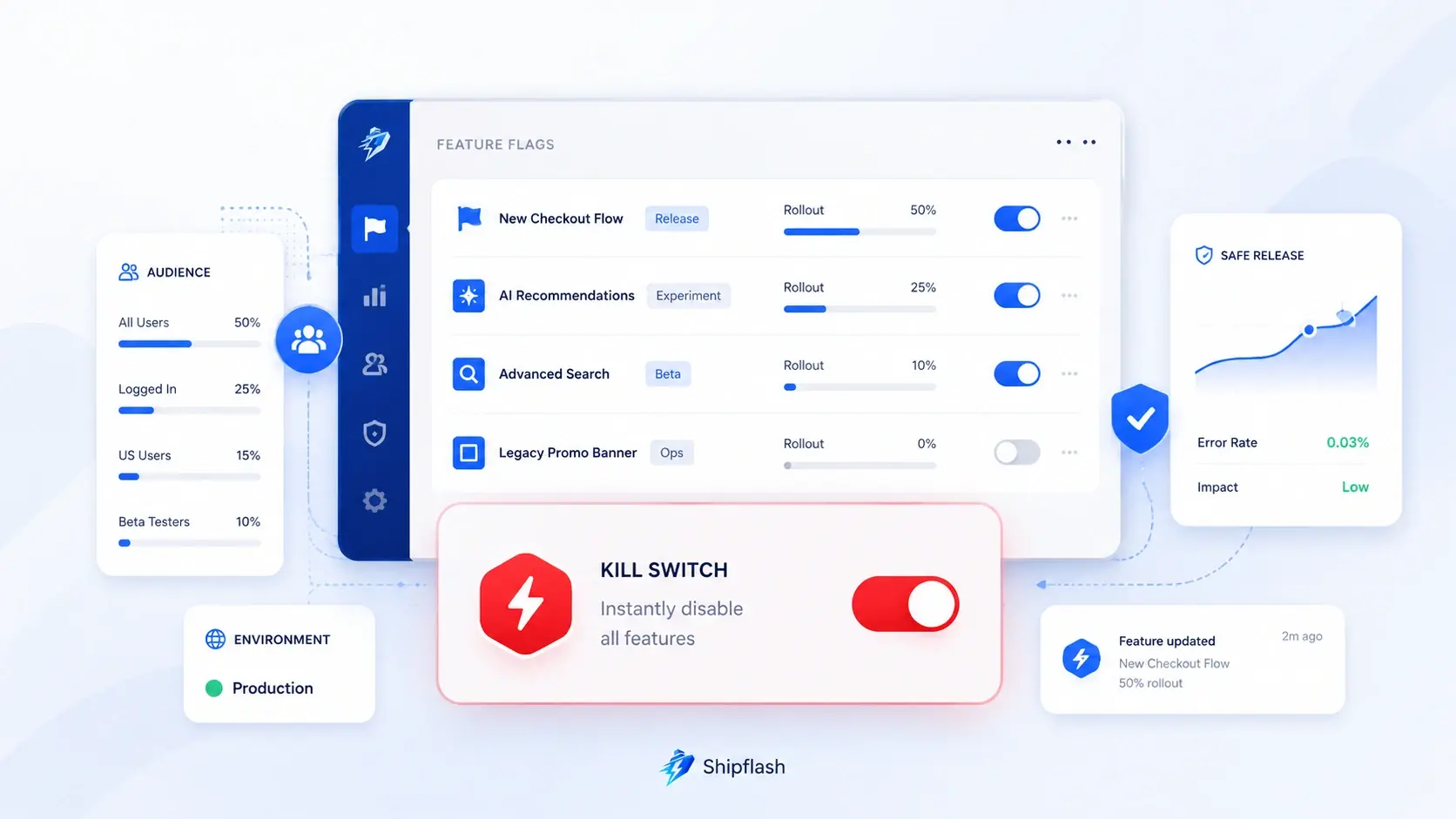
Deploying a feature and releasing it to customers do not have to be the same event.
A feature flag changes that operating model.
The code can reach production while the feature remains disabled. The team can enable it for internal accounts, expose it to a small percentage of customers, monitor the results, and expand the rollout only when the evidence supports doing so. If something breaks, an operational kill switch can disable the risky behavior without waiting for another build.
OpenFeature describes feature flags as runtime controls that change application behavior without modifying and redeploying source code. That definition sounds simple, but a production implementation requires more than wrapping a component in an if statement. The flag needs a safe default, an evaluation strategy, an owner, an audit trail, tests for every meaningful state, and a plan for eventual removal. OpenFeature’s vendor-neutral specification provides a useful model for separating application-level flag evaluation from the underlying provider.
The practical purpose of a feature flag is not to help you ship unfinished code carelessly. It is to limit the blast radius of a change while you gather enough evidence to release it confidently.
What Is a Feature Flag in a Next.js SaaS?
A feature flag is a runtime decision that selects one application behavior over another.
A basic Boolean flag might decide whether a new dashboard is visible:
export default async function DashboardPage() {
  const showNewDashboard = await evaluateFeatureFlag(
    "new-dashboard",
    {
      userId: "user_123",
    },
  );

  return showNewDashboard
    ? <NewDashboard />
    : <ExistingDashboard />;
}
The code for both versions may already exist in production. The flag determines which path the current request uses.
More advanced flags can return strings, numbers, or structured values:
const billingProvider = await evaluateConfigFlag(
  "billing-provider",
  {
    defaultValue: "stripe",
  },
);

const uploadLimitMb = await evaluateNumberFlag(
  "upload-limit-mb",
  {
    defaultValue: 10,
  },
);
That flexibility is useful, but it creates an important design boundary: not every setting should become a feature flag.
A feature flag is appropriate when the value controls a rollout, experiment, operational response, temporary migration, or intentionally dynamic product behavior. Stable application configuration, secrets, authorization rules, and billing records need their own sources of truth.
Feature Flags Separate Deployment From Release
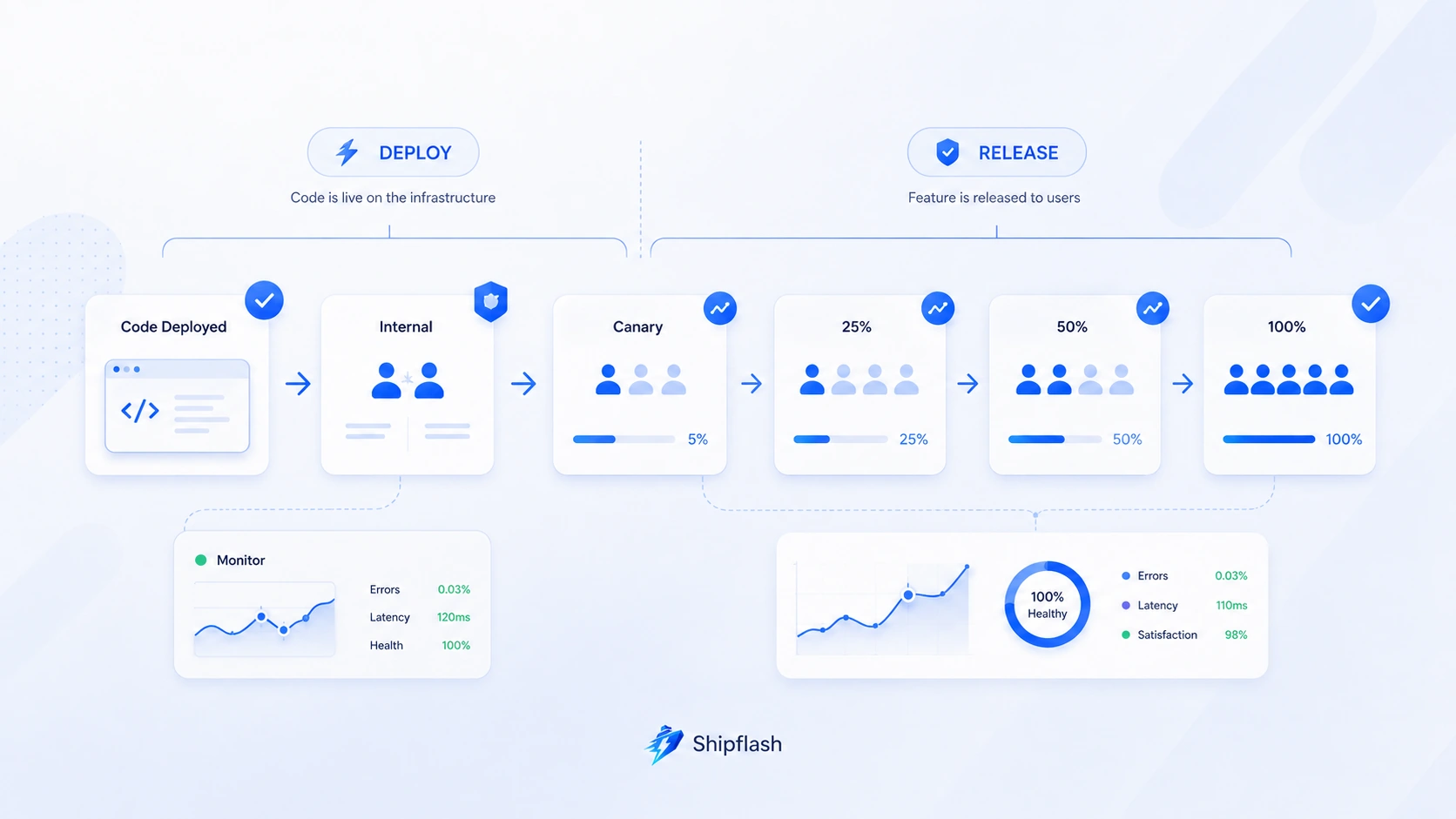
A deployment answers:
Is the new code running in production?
A release answers:
Which customers are allowed to experience the new behavior?
When those events are coupled, every deployment carries the full risk of the feature it contains. When they are separated, production deployment becomes one step in a controlled release process.
Consider a redesigned checkout flow. Without a flag, deploying it immediately replaces the existing checkout for every customer. With a flag, the team can deploy both implementations and proceed through deliberate release stages:
| Stage | Audience | Purpose |
|---|---|---|
| Disabled | No customers | Verify the deployment without exposing the behavior |
| Internal | Team and test accounts | Test production integrations and real infrastructure |
| Canary | 1–5% | Detect obvious production failures with limited impact |
| Controlled rollout | 10–50% | Compare reliability and business outcomes |
| General availability | 100% | Complete the launch after success criteria are met |
| Cleanup | All customers on one path | Remove the temporary flag and obsolete code |
This is safer than treating a successful build as evidence that the feature is ready for every customer. Build success proves that the code compiled. It does not prove that the change works under real data, provider behavior, traffic patterns, or customer workflows.
Feature flags therefore complement—not replace—the release gates in a Next.js SaaS production checklist.
The Six Flag Types a SaaS Team Should Distinguish
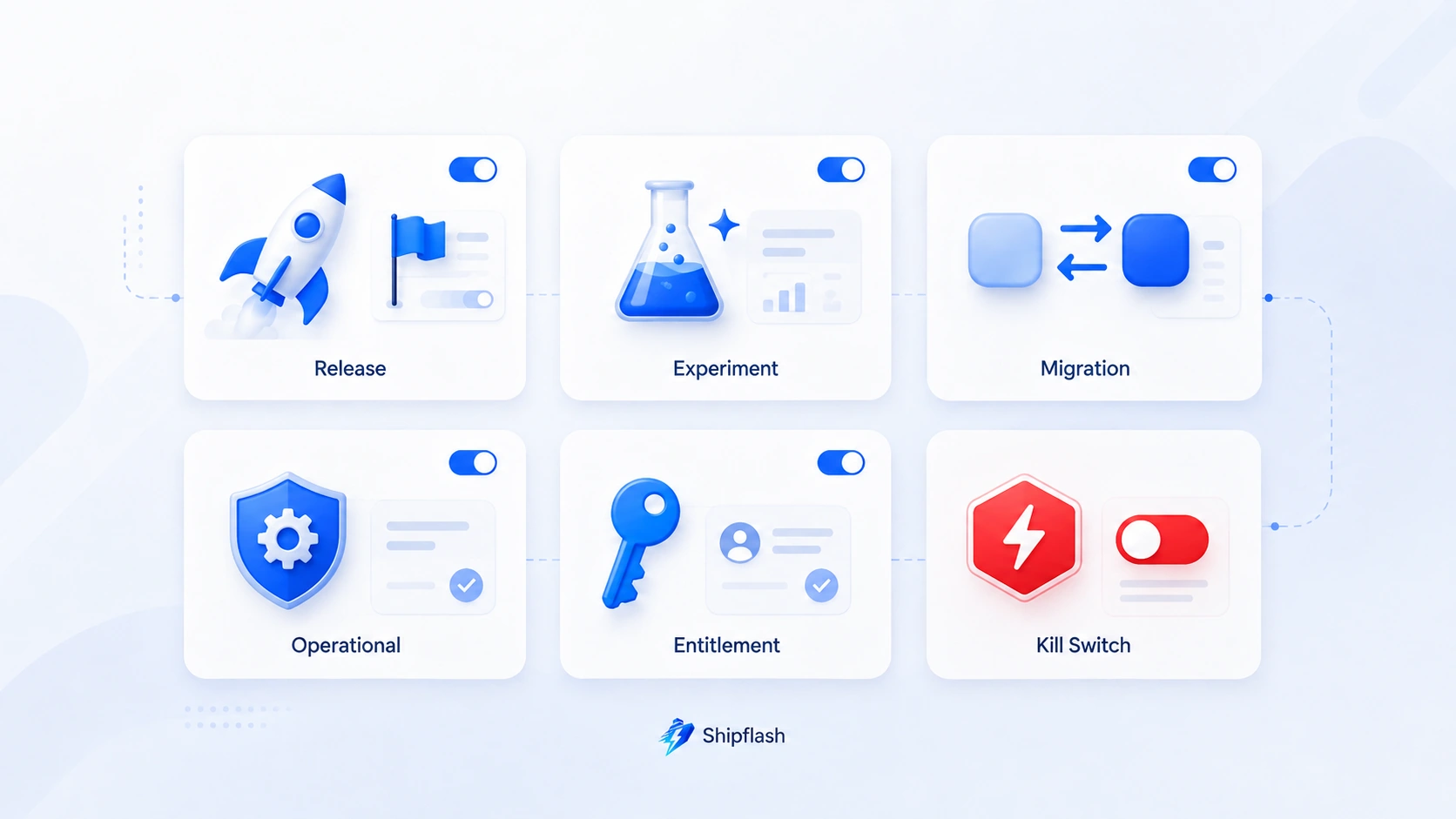
Using one generic concept of “enabled” or “disabled” makes feature flags difficult to govern. The expected lifespan, failure behavior, and cleanup process depend on why the flag exists.
LaunchDarkly’s current guidance distinguishes several flag use cases, including release, operational, experimentation, migration, entitlement, and kill-switch flags. It also distinguishes temporary flags from permanent operational controls. Its flag creation guide is useful even when you use a different provider or build your own system.
| Flag type | Typical purpose | Expected lifespan | Example |
|---|---|---|---|
| Release flag | Gradually introduce a new feature | Days or weeks | New customer dashboard |
| Operational flag | Change system behavior during an incident | Potentially permanent | Pause outbound email processing |
| Experiment flag | Compare product variants | Until the experiment concludes | Two onboarding flows |
| Migration flag | Move between implementations safely | Temporary | Old query path versus optimized query path |
| Entitlement-related flag | Control availability inside an eligible plan or cohort | Often long-lived | Early-access reporting module |
| Kill switch | Disable a risky integration or workflow quickly | Permanent control, rarely activated | Disable AI generation during provider instability |
These categories should influence how the flag is designed.
A release flag needs an expiry date and cleanup issue. A kill switch needs a deliberately tested fallback. An experiment flag needs stable cohort assignment. A migration flag needs verification that both old and new paths remain compatible during the transition.
Feature Flags Are Not Authorization
A hidden button is not a security boundary.
Suppose a flag hides an administrative export feature:
{canUseAdminExport ? <ExportButton /> : null}
The corresponding Server Action or Route Handler must still perform normal authorization:
export async function exportCustomers() {
  const actor = await requireAuthenticatedUser();
  await requireAdminRole(actor);

  const enabled = await evaluateFeatureFlag(
    "admin-customer-export",
    {
      userId: actor.id,
    },
  );

  if (!enabled) {
    throw new Error("Feature unavailable");
  }

  return createCustomerExport();
}
The role check answers whether the user is authorized to perform the operation. The flag answers whether the operation is currently available.
A user must not gain access merely because they can manipulate client-side state, override a browser flag, or call the endpoint directly.
Feature Flags Are Not Billing Entitlements
A subscription entitlement answers whether the customer purchased or earned access to a capability.
A feature flag answers whether a particular implementation or controlled release is active.
Those decisions can interact, but they should not be stored as one Boolean:
const canUseAdvancedReports =
  entitlement.hasAdvancedReports &&
  featureFlag.advancedReportsAvailable;
Billing state should come from a reliable internal entitlement model that is updated through verified provider events and reconciliation. The feature flag can then control an early-access rollout, operational suspension, or replacement implementation.
Treating feature flags as the source of truth for paid access makes billing harder to reconcile and easier to bypass. The distinction is explained more deeply in Shipflash’s guide to SaaS billing architecture, entitlements, and reliable access control.
A Production Feature Flag Needs More Than a Key and a Boolean
A useful flag definition should communicate enough information for another developer or operator to understand its purpose without reverse-engineering every code reference.
A small typed registry can provide that contract:
export type FeatureFlagType =
  | "release"
  | "operational"
  | "experiment"
  | "migration"
  | "kill-switch";

export type FeatureFlagDefinition = {
  description: string;
  type: FeatureFlagType;
  defaultValue: boolean;
  owner: string;
  createdAt: string;
  expiresAt?: string;
};

export const featureFlags = {
  "new-checkout": {
    description: "Controls the redesigned checkout flow.",
    type: "release",
    defaultValue: false,
    owner: "billing",
    createdAt: "2026-08-01",
    expiresAt: "2026-09-30",
  },
  "pause-email-delivery": {
    description: "Stops workers from sending queued transactional email.",
    type: "kill-switch",
    defaultValue: false,
    owner: "platform",
    createdAt: "2026-08-01",
  },
  "use-new-customer-query": {
    description: "Routes customer searches through the optimized query.",
    type: "migration",
    defaultValue: false,
    owner: "operations",
    createdAt: "2026-08-01",
    expiresAt: "2026-08-31",
  },
} as const satisfies Record<string, FeatureFlagDefinition>;

export type FeatureFlagKey = keyof typeof featureFlags;
This registry does several things:
- It prevents arbitrary flag names from spreading through the codebase.
- It makes defaults explicit.
- It gives every flag an owner.
- It distinguishes temporary flags from permanent operational controls.
- It gives cleanup automation enough metadata to identify overdue flags.
The registry does not need to store the current rollout state. That value can come from a database or external provider. The code-owned definition describes what the application expects; the runtime source describes how the flag is currently configured.
Evaluate Important Flags on the Server
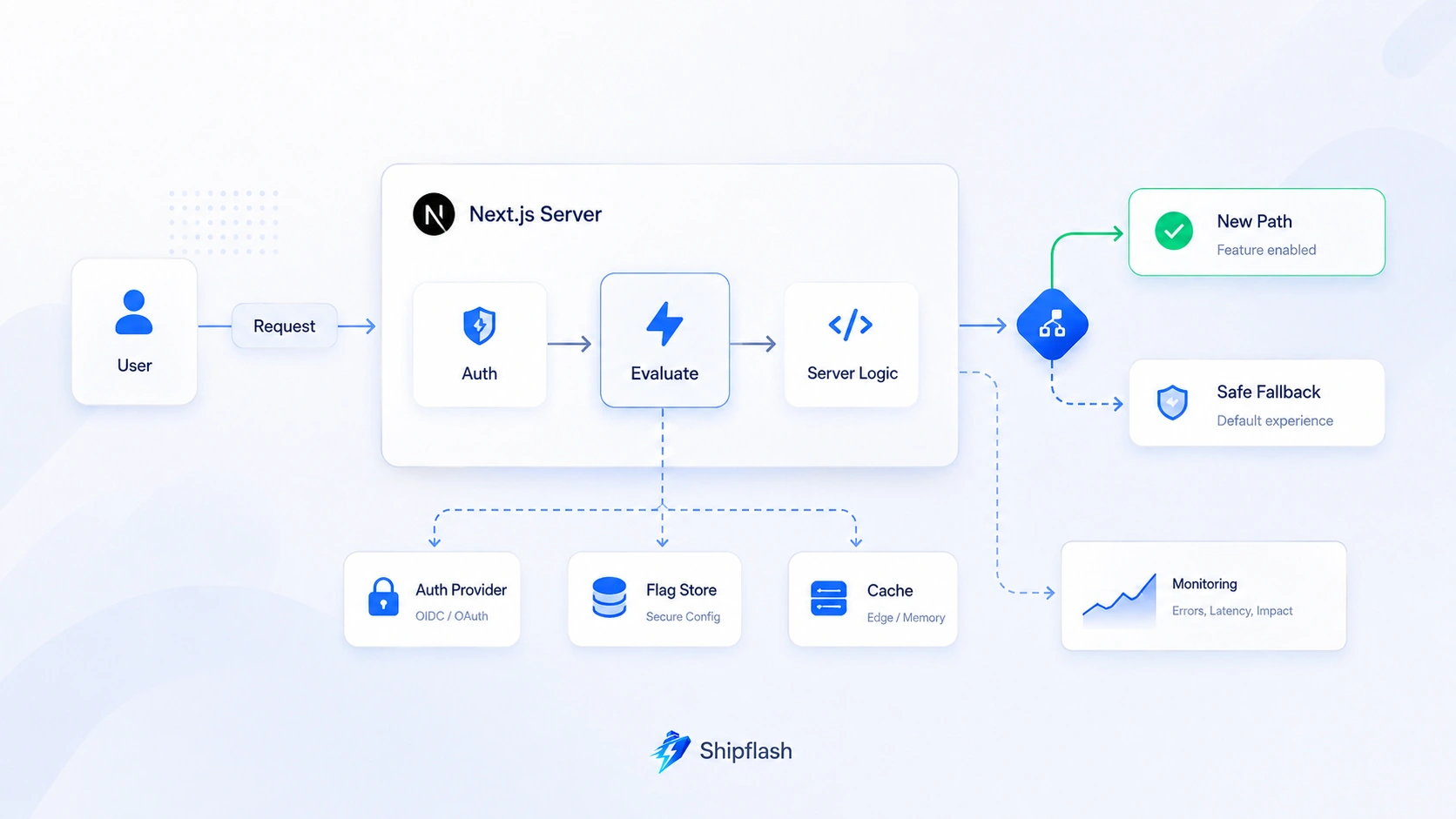
Client-side evaluation is convenient for cosmetic changes, but server-side evaluation is usually the safer default for account capabilities, billing workflows, data access, expensive provider calls, and operational controls.
Server-side evaluation prevents the browser from becoming the authority for sensitive behavior. It also avoids rendering the wrong version first and correcting it after a client-side SDK loads.
PostHog recommends local evaluation or server-side bootstrapping when flags sit on important paths, partly to avoid additional network latency and visible client-side flicker. Its production flag guidance and server-side local evaluation documentation explain these tradeoffs.
A Next.js flag evaluator can keep provider details outside components:
import "server-only";

import {
  featureFlags,
  type FeatureFlagKey,
} from "@/lib/feature-flags/registry";
import { getFeatureFlagConfig } from "@/lib/feature-flags/store";
import { logger } from "@/lib/observability/logger";

export type FeatureFlagContext = {
  userId?: string;
  anonymousId?: string;
  environment?: "development" | "preview" | "production";
};

export async function evaluateFeatureFlag(
  key: FeatureFlagKey,
  context: FeatureFlagContext,
): Promise<boolean> {
  const definition = featureFlags[key];

  try {
    const configuration = await getFeatureFlagConfig(key);

    if (!configuration) {
      return definition.defaultValue;
    }

    if (!configuration.enabled) {
      return false;
    }

    if (configuration.rolloutPercentage >= 100) {
      return true;
    }

    const stableId = context.userId ?? context.anonymousId;

    if (!stableId) {
      return definition.defaultValue;
    }

    return isIncludedInRollout({
      flagKey: key,
      stableId,
      percentage: configuration.rolloutPercentage,
    });
  } catch (error) {
    logger.error("feature_flag_evaluation_failed", {
      flagKey: key,
      error,
    });

    return definition.defaultValue;
  }
}
The UI receives the evaluated result:
import { evaluateFeatureFlag } from "@/lib/feature-flags/evaluate";
import { requireCurrentUser } from "@/lib/auth/require-current-user";

export default async function CheckoutPage() {
  const user = await requireCurrentUser();

  const useNewCheckout = await evaluateFeatureFlag(
    "new-checkout",
    {
      userId: user.id,
      environment: "production",
    },
  );

  return useNewCheckout
    ? <NewCheckout user={user} />
    : <ExistingCheckout user={user} />;
}
This keeps provider SDK calls, fallbacks, telemetry, and rollout logic out of page components.
Understand the Next.js Caching Boundary
A globally evaluated flag can often be cached briefly. A user-targeted flag cannot safely reuse another user’s result.
If evaluation depends on a session, cookie, account, request header, or other request-specific information, treat it as request-specific work. Next.js currently documents cookies() as a Dynamic API because its value cannot be known before the request. Using it in a page or layout changes that route’s rendering behavior. Review the current Next.js cookies documentation before placing personalized flag evaluation inside a cached scope.
Do not cache this:
// Unsafe conceptually: the cache key does not include the user.
const isEnabled = cache(async () => {
  const user = await getCurrentUser();
  return evaluateFeatureFlag("new-checkout", {
    userId: user.id,
  });
});
Instead, evaluate once at a request boundary and pass the result downward. When caching provider configuration, cache the configuration itself—not the final personalized decision—unless every targeting input is part of the cache key.
Use Stable Percentage Rollouts
A percentage rollout should not select a new random group on every request.
This implementation is unstable:
return Math.random() * 100 < rolloutPercentage;
A customer might see the new checkout on one request and the old checkout on the next. That breaks multi-step workflows, corrupts experiment data, and makes support reports difficult to reproduce.
Use deterministic bucketing based on a stable identifier and flag key:
import { createHash } from "node:crypto";

type RolloutInput = {
  flagKey: string;
  stableId: string;
  percentage: number;
};

export function isIncludedInRollout({
  flagKey,
  stableId,
  percentage,
}: RolloutInput): boolean {
  if (percentage <= 0) return false;
  if (percentage >= 100) return true;

  const digest = createHash("sha256")
    .update(`${flagKey}:${stableId}`)
    .digest();

  const bucket = digest.readUInt32BE(0) % 10_000;
  const threshold = Math.round(percentage * 100);

  return bucket < threshold;
}
Including the flag key prevents every 10% rollout from selecting exactly the same customers. Using a stable account or user identifier keeps the assignment consistent.
For logged-out visitors, a signed anonymous identifier can provide continuity. Do not use sensitive personal information as the bucketing input.
Choose the Safe Default Before the Incident
Every evaluation can fail.
The provider may be unavailable. A database read can time out. Configuration may be malformed. An SDK might not initialize. The requested flag may not exist. A stale cache may survive longer than expected.
The fallback cannot be an afterthought because it becomes production behavior precisely when part of the system is already unhealthy.
| Flag | Recommended fallback | Reason |
|---|---|---|
| New dashboard | Existing dashboard | Preserve the known customer path |
| New checkout | Existing checkout | Avoid blocking revenue |
| Experimental search | Existing search | Preserve core product functionality |
| Pause email delivery | Continue queueing, stop sending only when explicitly enabled | Avoid silently losing messages |
| New database read path | Existing query | Preserve correctness during migration |
| Expensive AI enhancement | Disabled | Protect cost and latency |
| Authorization decision | Normal authorization policy | A flag must never become the access-control fallback |
The correct fallback is not always false.
A kill switch such as pause-email-delivery is inactive when its value is false. If the flag provider fails and the evaluator automatically returns true, email delivery could stop during an unrelated provider outage. Its safe default is therefore false.
A flag named enable-new-checkout also defaults to false, but for a different reason: the existing checkout remains the known path.
Name flags so the Boolean meaning is obvious. Double negatives such as disable-do-not-send-email make incident response unnecessarily dangerous.
A Kill Switch Needs a Complete Fallback Path
A kill switch is valuable only when disabling the feature leaves the system in a valid state.
Imagine that a third-party AI provider becomes slow or begins returning errors. A kill switch can disable generation:
const aiGenerationDisabled = await evaluateFeatureFlag(
  "disable-ai-generation",
  {
    environment: "production",
  },
);

if (aiGenerationDisabled) {
  return {
    status: "unavailable",
    message: "AI generation is temporarily unavailable.",
  };
}
That is not enough if the UI continues showing an active button, background jobs keep retrying, credits are still deducted, and support cannot identify which requests were affected.
The complete response should define:
| System area | Kill-switch behavior |
|---|---|
| UI | Disable the action and explain that it is temporarily unavailable |
| API | Reject new work with a predictable error code |
| Queue | Stop claiming new jobs or move them to a delayed state |
| Billing | Do not consume credits for work that did not start |
| Observability | Emit a structured event when the switch blocks work |
| Operations | Show the active switch, owner, reason, and activation time |
Permanent operational switches should be tested during normal development. Waiting for an incident to discover that the disabled path crashes is worse than not having the switch at all.
Store Runtime Configuration in the Right Place
A small SaaS has several reasonable storage options.
Environment Variables
Environment variables are suitable for coarse controls that rarely change:
ENABLE_NEW_CHECKOUT=false
They are easy to understand but commonly require a new deployment or configuration restart. They also lack percentage targeting, per-user rules, expiry dates, and a useful audit history unless the hosting platform provides those controls.
Environment variables are a reasonable starting point for one or two emergency controls. They become difficult to operate as the flag set grows.
Database-Backed Flags
A Supabase-backed application can store global flag configuration in Postgres:
create table public.feature_flags (
  key text primary key,
  enabled boolean not null default false,
  rollout_percentage numeric(5, 2) not null default 0
    check (
      rollout_percentage >= 0
      and rollout_percentage <= 100
    ),
  description text not null,
  flag_type text not null
    check (
      flag_type in (
        'release',
        'operational',
        'experiment',
        'migration',
        'kill-switch'
      )
    ),
  owner text not null,
  expires_at timestamptz,
  updated_at timestamptz not null default now(),
  updated_by uuid
);

revoke all on table public.feature_flags
from anon, authenticated;
The table should not be writable directly from the browser. Reads and changes should go through trusted server-side operations with explicit permissions.
A database implementation gives you control over your data model and integrates naturally with an existing admin dashboard. It also means you own cache invalidation, rollout logic, access controls, audit events, UI safety, and provider availability.
Vercel Flags and Edge Config
For applications already committed to Vercel, the Flags SDK provides a Next.js-oriented flag definition and evaluation pattern. Its Next.js quickstart demonstrates framework-level flag definitions and local session overrides through the Vercel Toolbar.
Vercel Edge Config is a globally distributed store designed for frequently read, infrequently updated data, including feature flags and operational configuration. It can be read from middleware and functions without querying the primary application database. The current Edge Config documentation describes feature flags, experiments, redirects, and similar controls as primary use cases.
This approach can be attractive when low-latency global reads and Vercel-native operations matter more than infrastructure portability.
Product Analytics Platforms
PostHog can connect rollouts with product events, cohorts, experiments, session replays, and error signals. Its feature flag system supports percentage releases, targeting conditions, local evaluation, and phased rollouts. PostHog’s feature flag overview and phased rollout guide explain this integrated model.
This is useful when the question is not merely “Did the application throw errors?” but also “Did the released cohort complete onboarding, purchase, activate, or retain more successfully?”
Dedicated Feature Management Platforms
Dedicated platforms such as LaunchDarkly provide targeting, approvals, environments, audit histories, lifecycle controls, code references, and mature governance features.
That depth becomes valuable when many teams modify flags, regulated changes require approvals, or the organization needs strict separation between developers and production operators. The tradeoffs are additional cost, provider dependency, and more operational surface area.
OpenFeature as an Abstraction Layer
OpenFeature is not a feature flag provider. It is a vendor-neutral evaluation API with provider adapters.
Using an abstraction can reduce code-level lock-in:
const enabled = await flagClient.getBooleanValue(
  "new-checkout",
  false,
  {
    targetingKey: user.id,
  },
);
The application calls a stable interface while a provider resolves the value. OpenFeature’s provider model allows an adapter to wrap a commercial SDK, internal service, REST API, or locally stored configuration.
This matters most when portability is a real requirement. Adding an abstraction before you have one flag and one provider can be unnecessary complexity.
Feature Flag Provider Decision Matrix
| Approach | Best fit | Main advantage | Main limitation |
|---|---|---|---|
| Environment variables | Very small products with rare changes | Minimal implementation | Usually requires redeployment and lacks targeting |
| Supabase or database table | Teams wanting repository-owned operations | Full control and existing infrastructure | You own evaluation, caching, audit, and cleanup |
| Vercel Flags and Edge Config | Vercel-hosted Next.js products | Framework and platform integration | Greater platform coupling |
| PostHog | Products already using PostHog analytics | Rollouts connected to product outcomes | Flag operations depend on analytics infrastructure |
| LaunchDarkly | Larger teams needing governance | Mature targeting, approvals, and lifecycle management | Additional cost and vendor surface |
| OpenFeature with a provider | Teams with genuine portability needs | Stable vendor-neutral application API | Still requires a real provider and operational system |
The best choice is the least complex option that meets your current operational requirements without blocking the next realistic stage of growth.
A founder-operated SaaS with five flags may be well served by a protected database table and audit log. A larger product with several teams changing flags daily may need approvals, environments, code references, and automated cleanup.
Protect the Flag Administration Surface
A feature flag dashboard is a production control plane.
Someone who can enable a new checkout for every customer, stop email delivery, change a billing provider, or expose an unfinished admin operation can affect the entire product without deploying code.
Flag changes should therefore require:
- Explicit administrative authorization
- Confirmation for high-impact changes
- A reason for operational and emergency changes
- An immutable audit event
- Clear visibility into the previous and resulting values
A change record might contain:
type FeatureFlagAuditEvent = {
  flagKey: string;
  actorId: string;
  previousValue: unknown;
  nextValue: unknown;
  reason: string;
  environment: "preview" | "production";
  requestId: string;
  createdAt: string;
};
For dangerous actions, a typed confirmation can reduce accidental changes:
Type ENABLE NEW CHECKOUT FOR 100% to continue
The operations interface should also show whether the flag is temporary, when it expires, which team owns it, and where it is referenced.
These controls fit naturally into the broader model described in the SaaS admin operations playbook: production administration should provide controlled workflows, not direct database editing disguised as a dashboard.
Connect Rollouts to Evidence
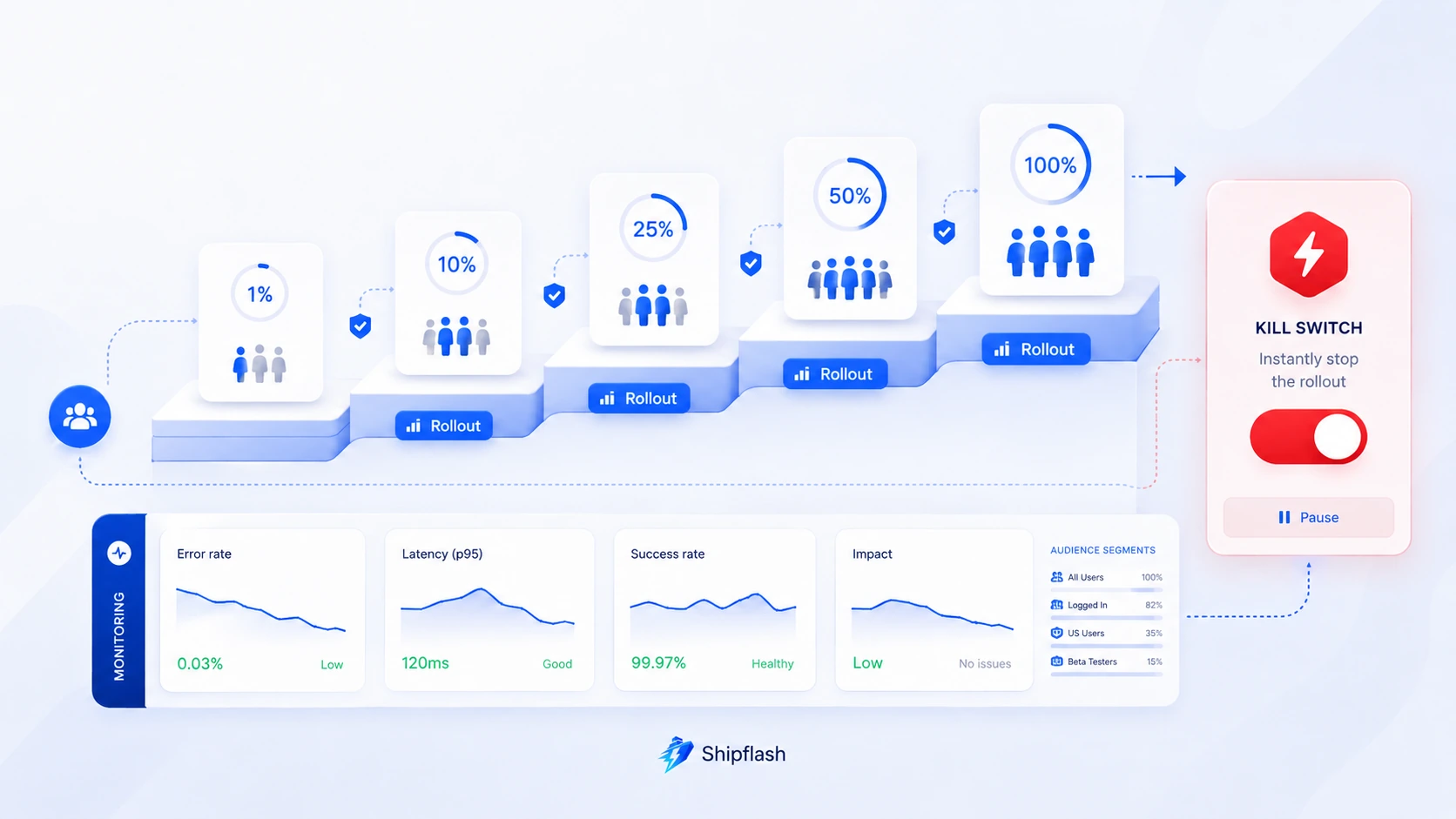
A percentage selector is not a release strategy.
Before enabling a flag, define what success and failure look like. For a new checkout, that might include:
| Signal | Release question |
|---|---|
| Server error rate | Does the new path produce more failures? |
| Checkout completion | Are customers completing payment? |
| Webhook processing | Are successful purchases reaching internal entitlements? |
| Latency | Is the new path materially slower? |
| Support reports | Are customers encountering confusing states? |
| Reconciliation drift | Do provider and internal billing records still agree? |
The rollout should pause automatically or operationally when a meaningful guardrail crosses its threshold.
A practical rollout sequence might be:
- Enable the flag for named internal accounts.
- Verify logs, traces, provider events, and database state.
- Release to 1% of eligible customers.
- Compare guardrails with the existing path.
- Expand gradually while monitoring the same signals.
- Hold at 100% before deleting the fallback implementation.
The hold period at 100% matters. Immediate cleanup removes your fastest rollback path before the new behavior has survived a normal operating window.
Test Every Meaningful Flag State
Feature flags multiply the number of runtime paths.
A component with one Boolean flag has two variants. Two interacting flags can create four combinations. Three flags can create eight. Allow flags to accumulate indiscriminately and the number of possible states becomes difficult to reason about.
You do not need an end-to-end test for every mathematical combination. You do need intentional coverage for every business-critical path.
Unit Tests
Test the evaluation and bucketing logic:
import { describe, expect, it } from "vitest";

import { isIncludedInRollout } from "./rollout";

describe("isIncludedInRollout", () => {
  it("always returns false at zero percent", () => {
    expect(
      isIncludedInRollout({
        flagKey: "new-checkout",
        stableId: "user-1",
        percentage: 0,
      }),
    ).toBe(false);
  });

  it("always returns true at one hundred percent", () => {
    expect(
      isIncludedInRollout({
        flagKey: "new-checkout",
        stableId: "user-1",
        percentage: 100,
      }),
    ).toBe(true);
  });

  it("keeps assignment stable", () => {
    const input = {
      flagKey: "new-checkout",
      stableId: "user-42",
      percentage: 25,
    };

    expect(isIncludedInRollout(input))
      .toBe(isIncludedInRollout(input));
  });
});
Integration Tests
Verify provider failures and malformed configuration:
it("uses the registered default when the store fails", async () => {
  featureFlagStore.get.mockRejectedValue(
    new Error("database unavailable"),
  );

  await expect(
    evaluateFeatureFlag("new-checkout", {
      userId: "user-1",
    }),
  ).resolves.toBe(false);
});
Authorization Tests
Call protected actions directly with the flag enabled and disabled. Confirm that unauthorized users remain unauthorized in both cases.
End-to-End Tests
Keep focused browser coverage for revenue-critical and account-critical paths:
test("existing checkout remains usable when new checkout is disabled", async ({
  page,
}) => {
  await setTestFlag(page, "new-checkout", false);
  await page.goto("/checkout");

  await expect(
    page.getByRole("heading", {
      name: "Complete your purchase",
    }),
  ).toBeVisible();
});

test("new checkout completes a test purchase", async ({
  page,
}) => {
  await setTestFlag(page, "new-checkout", true);
  await page.goto("/checkout");

  await expect(
    page.getByTestId("new-checkout"),
  ).toBeVisible();
});
A release flag is not complete when the enabled path passes. It is complete when both paths are tested, the rollout succeeds, the old path is removed, and the flag is archived.
Treat Flag Removal as Part of the Feature
Temporary flags become technical debt when they outlive their purpose.
Old flags create nested conditions, preserve obsolete implementations, expand test combinations, confuse incident response, and make it possible to accidentally reactivate behavior the application no longer supports.
LaunchDarkly’s lifecycle guidance recommends identifying flags that are serving one variation, no longer being evaluated, or ready for code removal. Its documentation also warns that an obsolete fallback can become dangerous if an SDK failure unexpectedly returns that old value. The technical-debt guide provides a useful lifecycle model for any implementation.
A temporary flag should move through an explicit lifecycle:
Proposed
  ↓
Implemented
  ↓
Internal
  ↓
Rolling out
  ↓
Fully released
  ↓
Ready for code removal
  ↓
Archived
The definition of done should include:
- The selected behavior is now permanent.
- The obsolete path has been deleted.
- Tests for the removed path are gone.
- The flag key is no longer referenced.
- Runtime configuration is archived.
- The audit history remains available.
Assigning an expiry date at creation makes this easier:
"new-checkout": {
  type: "release",
  owner: "billing",
  expiresAt: "2026-09-30",
}
A scheduled report can warn when temporary flags approach or pass their expiry dates. CI can also search the registry for expired definitions and fail or warn when cleanup is overdue.
Use Migration Flags for Safer Database and Architecture Changes
Feature flags are especially useful when code and data cannot change atomically.
Suppose a new customer-search implementation depends on a new index and query. The safe process is not:
- Deploy the migration.
- Replace the query.
- Hope production behaves like staging.
A migration flag supports an expand-and-contract workflow:
- Add the compatible schema or index.
- Deploy code containing both query paths.
- Enable the new path for internal traffic.
- Compare correctness, latency, and resource use.
- Expand the rollout.
- Make the new path permanent.
- Remove the old query and temporary flag.
- Remove obsolete schema only after compatibility is no longer required.
The database change still requires normal migration discipline. The flag limits application-level exposure; it does not make destructive schema changes reversible.
Use Shipflash’s Supabase migration workflow for Next.js SaaS alongside migration flags so schema compatibility, RLS, grants, generated types, backfills, and post-deployment verification remain part of the release.
Common Feature Flag Mistakes
Evaluating Sensitive Flags Only in the Browser
Browser evaluation is visible and manipulable. Use it for presentation changes, not as the only control for paid access, administrative operations, protected data, or expensive server-side work.
Using Flags Instead of Fixing the Release Process
Flags cannot compensate for missing tests, unsafe migrations, absent observability, or unverified webhooks. They reduce exposure; they do not make broken behavior correct.
Launching Without a Baseline
A team cannot determine whether a 10% rollout is healthy if it never measured the existing path. Capture baseline errors, latency, completion rates, and support volume before the release begins.
Letting Flags Depend on Each Other
Deep flag dependencies make outcomes difficult to predict:
if (
  newCheckout &&
  newPricing &&
  !legacyBilling &&
  experimentalTax
) {
  // Which combinations are actually supported?
}
Prefer one flag around a coherent release boundary. Where dependencies are unavoidable, document and test the supported combinations.
Deleting the Old Path Too Early
Reaching 100% does not instantly prove the new path is safe under every recurring job, billing cycle, traffic pattern, or provider event. Keep a deliberate observation period before removing the fallback.
Never Removing the Old Path
The opposite failure is leaving both implementations forever. Once the observation period is complete, delete the obsolete code and archive the flag.
A Practical Feature Flag Release Checklist
Before the rollout begins, verify that:
- The flag has an owner, type, description, default, and expiry date.
- Enabled, disabled, and provider-failure paths are tested.
- Server-side authorization remains independent from the flag.
- Success metrics and rollback thresholds are defined.
- Operators can disable the change quickly and see an audit trail.
During rollout, verify that assignment is stable, observability distinguishes the variants, and the exposed cohort is increasing intentionally rather than through an accidental configuration change.
After rollout, hold the stable state for an appropriate operating window, remove the old implementation, delete code references, and archive the runtime configuration.
Building Feature Flags Into a Production-Minded SaaS Foundation
Feature flags are most effective when they connect to the rest of the application’s production systems.
A rollout should be visible in structured logs. A billing-related release should be observable through webhooks and reconciliation. A dangerous flag change should produce an audit event. An operational kill switch should appear in the admin workspace. Tests should be able to override flags deterministically. Temporary flags should generate cleanup work rather than disappearing into the codebase.
These are architectural relationships, not isolated SDK features.
That is why feature flags belong inside a broader production-ready SaaS foundation. The value is not the toggle itself. The value is having the permissions, logs, tests, operational controls, billing state, and maintainable feature boundaries that make the toggle safe to use.
Shipflash is built around that production-minded approach: start past repetitive infrastructure, keep important application behavior understandable, and give founders and developers clearer places to operate the product after launch.
Frequently Asked Questions About Next.js Feature Flags
What is a feature flag in Next.js?
A feature flag is a runtime value that lets a Next.js application choose between different behaviors without requiring a new code deployment for every change. It can control a component, server workflow, provider integration, gradual rollout, experiment, migration, or operational kill switch.
Should Next.js feature flags be evaluated on the server or client?
Evaluate flags on the server when they affect authorization-adjacent behavior, paid capabilities, data access, billing, expensive operations, provider calls, or operational controls. Client-side evaluation is appropriate for low-risk presentation changes and interactions where briefly exposing the flag value is acceptable.
Can environment variables be used as feature flags?
Yes. Environment variables work for simple global flags that change infrequently. They become limiting when you need percentage rollouts, user targeting, immediate changes, audit history, expiry dates, or operator-friendly controls.
What should happen if the feature flag provider is unavailable?
The application should return an explicit, tested default. The correct default depends on the feature. A new checkout commonly falls back to the existing checkout, while an optional AI enhancement may fall back to disabled. Authorization must continue using the normal authorization policy rather than a feature-flag fallback.
Are feature flags a replacement for authorization?
No. A feature flag controls availability or implementation selection. Authorization decides whether a user may perform an action or access a resource. Protected Server Actions, Route Handlers, and database operations must enforce authorization even when the corresponding UI is hidden.
How long should a feature flag remain in the codebase?
A temporary release or migration flag should remain only long enough to complete the rollout, observe the new behavior under normal operation, and remove the old implementation safely. Give temporary flags an owner and expiry date when they are created.
What is the difference between a feature flag and a kill switch?
A release flag gradually introduces new behavior. A kill switch disables risky behavior quickly during an incident. Release flags are usually temporary. Kill switches may remain as permanent operational controls, but their fallback paths still need regular testing.
Final Takeaway
Feature flags make releases safer when they are treated as production controls rather than convenient conditionals.
The flag should be evaluated in the right place, return a safe default, preserve authorization boundaries, assign customers consistently, emit useful telemetry, and give operators a fast way to limit damage. Temporary flags need owners and removal dates. Permanent kill switches need complete and tested fallback behavior.
Implemented this way, feature flags let a Next.js SaaS deploy confidently without forcing every customer to absorb the risk of every change at once.
You still ship the code.
You simply stop betting the entire release on it.