
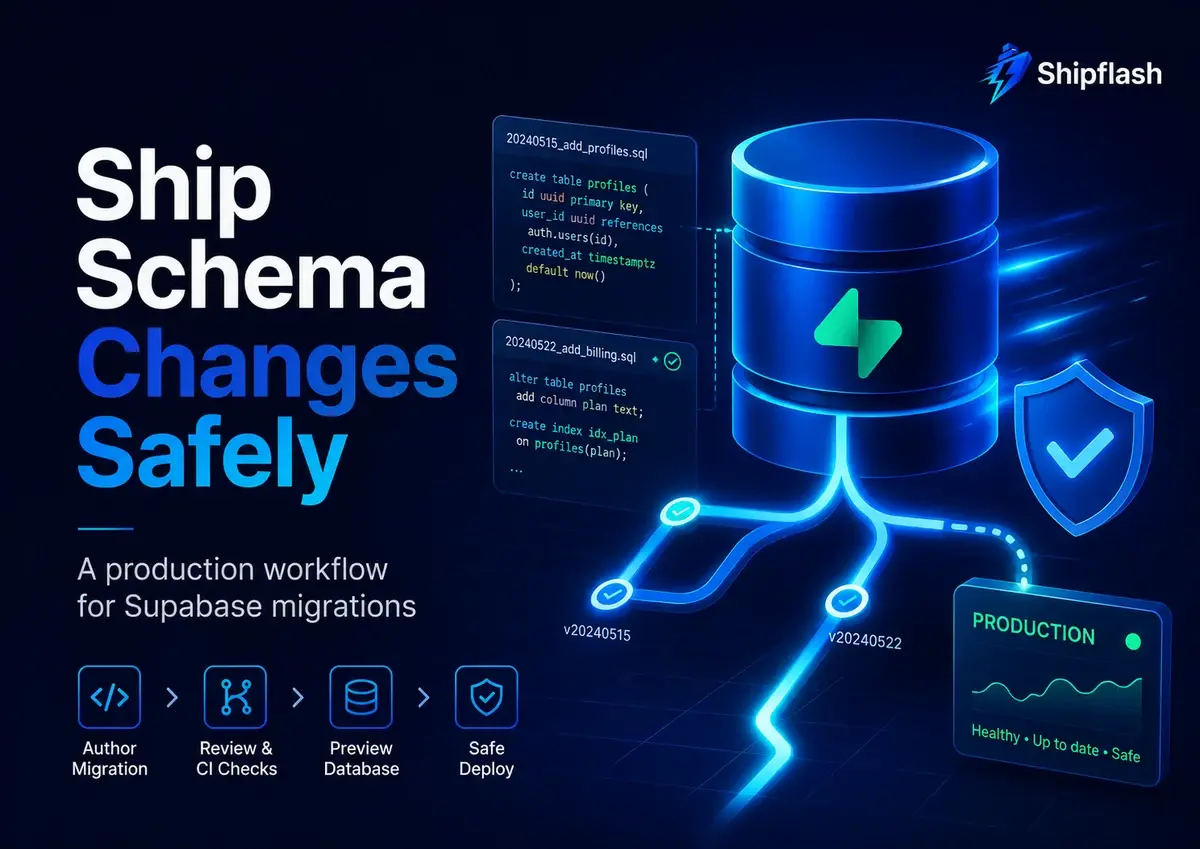
Your first database migration is usually easy.
You create a table, add a column, run a command, refresh the dashboard, and see the new schema. Nothing is using the database yet, so almost any migration strategy appears to work.
Production changes the rules.
Once customers are signing in, background jobs are running, billing webhooks are arriving, and multiple versions of your application may temporarily exist at the same time, a migration is no longer just a SQL file. It becomes a coordinated production release.
A harmless-looking ALTER TABLE can wait behind a long-running transaction. A new NOT NULL constraint can reject data written by the previous application version. A column rename can break a serverless instance that has not finished draining. A migration can succeed structurally while silently removing an RLS policy, changing a grant, or leaving generated TypeScript types out of date.
A safe Supabase migration workflow treats the database schema as versioned application code. Create changes locally, replay the complete history from an empty database, test permissions and application contracts, validate the migration in an isolated environment, deploy through one controlled pipeline, and verify the live system after the SQL finishes.
That workflow does not make database changes risk-free. It makes their risks visible, reviewable, and recoverable.
Why Supabase Database Migrations Break in Production
Most failed migrations are not caused by invalid SQL. Invalid SQL usually fails quickly and clearly.
The more dangerous failures happen when technically valid SQL interacts with live data, existing transactions, old application versions, authorization rules, or operational workloads.
| Migration risk | What looks harmless | What can happen in production | Safer approach |
|---|---|---|---|
| Application-schema mismatch | Renaming or removing a column | Old application instances continue querying the previous schema | Use expand-and-contract releases |
| Table locking | Adding an index or constraint | Writes queue behind the migration and request latency rises | Analyze lock behavior and fail quickly on lock contention |
| Large data changes | Updating every existing row | The deploy runs for minutes, creates load, or holds locks | Run a separate resumable backfill |
| Authorization drift | Creating or replacing a table | RLS, grants, views, or function privileges no longer match the intended access model | Test permissions as part of the migration |
| Generated-type drift | Changing a column or enum | TypeScript compiles against stale database definitions | Regenerate and compare types in CI |
| False rollback confidence | Writing a down migration | New production data cannot safely fit the old schema | Prefer compatibility and forward fixes |
| Migration-history drift | Editing production manually | Git and the remote migration table disagree | Diagnose before using migration repair |
Supabase records applied migrations in supabase_migrations.schema_migrations. The CLI compares that remote history with the files in supabase/migrations when deciding what to apply. Supabase explicitly recommends keeping remote schema changes inside version-controlled migration files once a migration workflow has been established.
The central problem is therefore not simply, “Will this SQL run?”
The production question is:
Can this change run while existing data, existing customers, existing jobs, and the previous application version are still active?
What Does a Production-Safe Supabase Migration Workflow Look Like?
A reliable workflow has ten stages:
| Stage | Required outcome |
|---|---|
| 1. Create | The schema change exists in a clearly named migration file |
| 2. Review | Generated or handwritten SQL has been inspected by a human |
| 3. Replay | Every migration can rebuild a clean local database |
| 4. Test | Database structure, RLS, grants, functions, and expected queries are verified |
| 5. Synchronize | Generated TypeScript definitions match the new schema |
| 6. Validate the application | The Next.js application works against the migrated database |
| 7. Rehearse | The change runs in staging or an isolated preview environment |
| 8. Deploy | One controlled CI/CD job applies migrations in order |
| 9. Verify | Schema, permissions, application flows, and operational signals are checked |
| 10. Contract | Old columns or compatibility paths are removed only in a later release |
The individual commands are not the difficult part. The safety comes from preserving this sequence.
Make Migration Files the Source of Truth
A production database should not be the only place where its schema exists.
Every meaningful schema change should be represented in the repository so another developer—or an automated CI environment—can reconstruct the database without relying on remembered dashboard clicks.
A typical Supabase project keeps database assets together:
supabase/
├── config.toml
├── migrations/
│   ├── 20260701090000_initial_schema.sql
│   ├── 20260708121500_add_billing_events.sql
│   └── 20260715103000_add_customer_lifecycle_state.sql
├── seed.sql
└── tests/
    └── database/
        ├── schema.test.sql
        ├── rls.test.sql
        └── billing.test.sql
Migration files belong in Git because they describe how the application’s persistent state evolves. A pull request can then review code, schema, authorization, and operational impact together.
This is especially important in a production-ready SaaS foundation, where authentication, billing, customer records, notifications, and administrative workflows all depend on a shared database contract.
Supabase supports making schema changes through a local Studio instance and capturing the result with supabase db diff, or writing the SQL manually in a migration file. Its documentation warns against making uncaptured schema changes directly on the remote production database because doing so bypasses migration history and can cause synchronization failures later.
Do Not Hide Unexpected Schema Drift
Commands such as IF EXISTS and IF NOT EXISTS are useful in some operational scripts, but using them indiscriminately inside migrations can conceal an unexpected database state.
Consider this migration:
alter table public.customers
  add column if not exists lifecycle_state text;
If the column already exists with the wrong type, unexpected default, or incorrect permissions, the migration may continue without exposing the mismatch.
For a version-controlled migration, failing loudly is often safer:
alter table public.customers
  add column lifecycle_state text;
An unexpected failure forces the deployment to stop so the actual schema can be investigated. That is usually preferable to recording a migration as successful while leaving production in an unknown state.
Idempotency is essential for background jobs, webhook handlers, and replayable repair scripts. Migration files serve a different purpose: they should describe a known transition from one specific schema version to the next.
Build and Replay Every Migration Locally
A migration should not be considered valid merely because it ran once against a developer database.
Your local database may contain manual experiments, temporary policies, or objects that are not represented in migration files. The real test is whether the repository can reconstruct the intended database from zero.
A practical local loop looks like this:
supabase start

supabase migration new add_customer_lifecycle_state

# Edit the generated SQL file.

supabase db reset
supabase db lint --local --fail-on error
supabase test db

supabase gen types \
  --lang typescript \
  --local \
  > src/types/database.types.ts
supabase db reset recreates the local database and reapplies migrations and seed data. This catches missing dependencies, incorrect ordering, accidental reliance on dashboard-only changes, and migrations that work only against one developer’s current state. Supabase’s local workflow recommends replaying migrations this way and regenerating database types whenever the schema changes.
Supabase also provides supabase db lint for identifying database-function and schema errors, while supabase test db runs database tests through pgTAP. The lint command can return a non-zero exit code for warnings or errors, making it suitable for CI release gates.
Inspect Generated Diffs Before Committing Them
A generated migration is a draft, not an approval.
When you make changes through local Studio and run:
supabase db diff -f add_customer_lifecycle_state
inspect the output for:
- Unexpected grants or revokes
- Functions or views being recreated
- Dropped policies
- Ownership changes
- Unnecessary formatting noise
- Objects emitted in the wrong dependency order
- Destructive statements you did not intend to produce
Supabase notes that schema-diff output can require manual changes, particularly where object dependencies or default privileges are involved.
The generated SQL should explain the change clearly enough that a reviewer can answer three questions:
- What database behavior changes?
- What existing application behavior could break?
- What evidence proves the change is safe?
Test Database Behavior, Not Only Schema Syntax
A table can exist while the application remains broken.
The column might have the wrong type. A policy might block legitimate users. A function might be executable by an unintended role. A trigger might run twice. A view might expose a column that its underlying table correctly protects.
Schema tests should therefore check both structure and behavior.
A small pgTAP test can verify that expected objects exist:
begin;

select plan(2);

select has_table(
  'public',
  'customers',
  'customers table should exist'
);

select has_column(
  'public',
  'customers',
  'lifecycle_state',
  'customers.lifecycle_state should exist'
);

select * from finish();

rollback;
Supabase’s database-testing workflow supports pgTAP tests stored under supabase/tests and executed with:
supabase test db
Supabase also recommends application-level database tests where queries are performed through a Supabase client, which is particularly useful for testing authenticated behavior and RLS policies.
Test RLS with Positive and Negative Cases
An authorization test suite should prove both sides of every important boundary.
It is not enough to prove that an authorized customer can read a record. You must also prove that another customer cannot read, update, or delete it.
For a migration that changes a protected table, test at least:
| Test case | Expected result |
|---|---|
| Signed-out client reads private records | No rows or an authorization failure |
| Authorized customer reads owned record | Record is returned |
| Customer reads another customer’s record | No record is returned |
| Customer updates owned record | Update succeeds |
| Customer updates another customer’s record | Update is rejected |
| Service-role operation performs an approved internal task | Operation succeeds |
| Ordinary authenticated role calls a privileged internal function | Call is rejected |
This matters whenever a migration creates a table, replaces a view, changes ownership, modifies a function, or alters a column referenced by an existing policy.
For a deeper authorization model, use the Supabase Row Level Security guide for Next.js SaaS alongside the migration workflow.
Treat Generated TypeScript Types as a Schema Contract
Supabase can generate TypeScript definitions directly from a local or remote database schema.
supabase gen types \
  --lang typescript \
  --local \
  > src/types/database.types.ts
These definitions reflect tables, views, relationships, nullable columns, generated columns, and database functions exposed through the API. Regenerating them after a migration helps the Next.js codebase discover schema changes during type checking instead of after deployment.
The stronger safeguard is verifying generated types in CI:
supabase gen types \
  --lang typescript \
  --local \
  > /tmp/database.types.ts

diff -u \
  src/types/database.types.ts \
  /tmp/database.types.ts
When the files differ, the pull request should fail until the committed definitions are updated.
Supabase’s official GitHub Actions guidance uses the same principle: generate types from the test database and fail the workflow when the generated output differs from the repository.
Generated types do not replace migration tests. A type definition cannot tell you that an RLS policy is too permissive, a backfill will lock millions of rows, or an old application version still expects the previous schema.
They enforce one valuable contract: the application and database must agree about structure.
Use Expand-and-Contract for Breaking Schema Changes
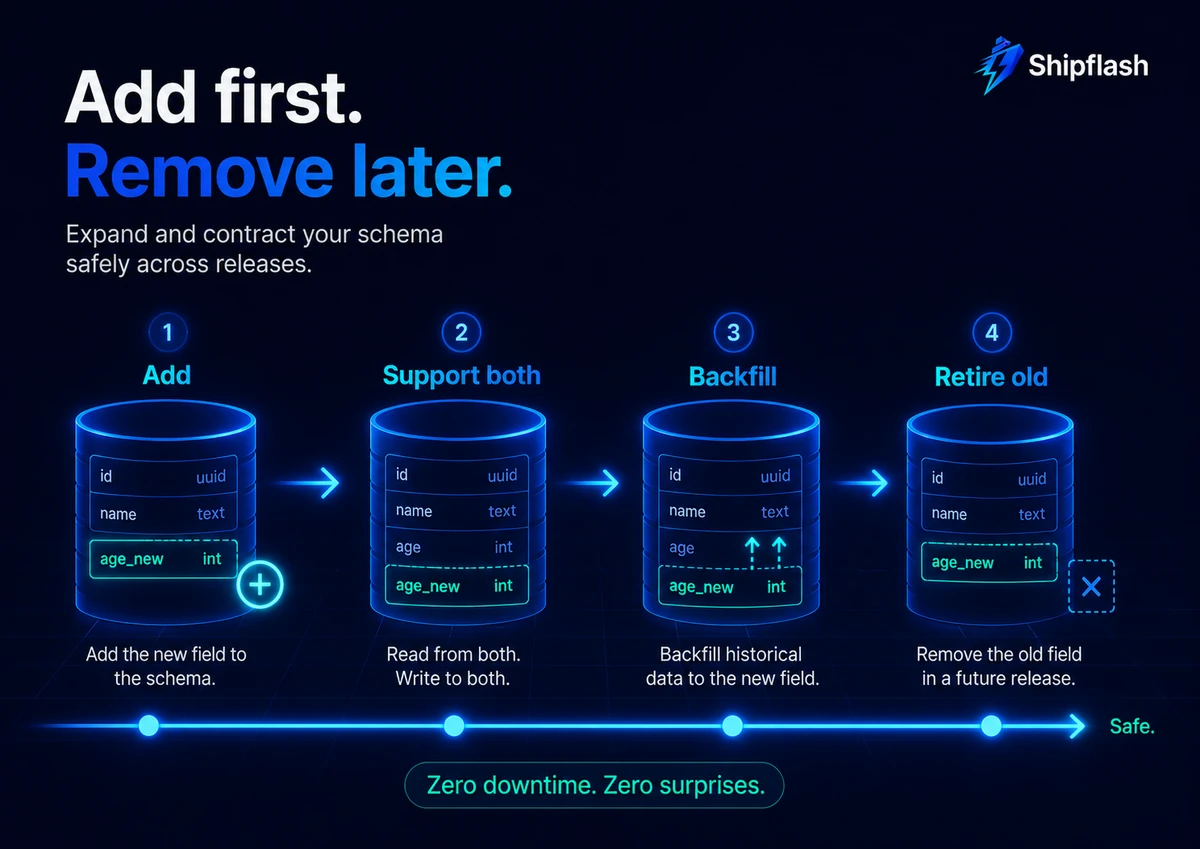
The safest production migration is usually additive.
Adding a nullable column can allow old and new application versions to operate simultaneously. Renaming or deleting an existing column usually cannot.
Suppose the application currently reads profiles.display_name, but the desired field is full_name.
This one-step migration is dangerous:
alter table public.profiles
  rename column display_name to full_name;
The new application may work immediately, but an older serverless instance, background job, scheduled task, or browser session can still request display_name.
A safer migration spans multiple releases.
Release One: Expand the Schema
Add the new field without removing the old one:
alter table public.profiles
  add column full_name text;
Deploy application code that:
- Writes both display_name and full_name
- Reads full_name when present
- Falls back to display_name for older records
The database now supports both application contracts.
Release Two: Backfill and Enforce the New Contract
Copy historical data into the new field using a controlled backfill:
update public.profiles
set full_name = display_name
where full_name is null;
For a small table, that statement may be acceptable. For a large or frequently updated table, run the backfill in batches rather than embedding one massive update in the deployment migration.
After the backfill, deploy code that treats full_name as the primary field while continuing to maintain compatibility temporarily.
Release Three: Contract the Schema
Only after old application instances, jobs, and fallback paths are gone should you remove the legacy column:
alter table public.profiles
  drop column display_name;
The safe sequence is:
Add → support both → backfill → switch reads → stop old writes → observe → remove.
This pattern requires more patience than an immediate rename, but it prevents the application and database from demanding synchronized, instantaneous deployment.
Separate Schema Migrations from Data Backfills
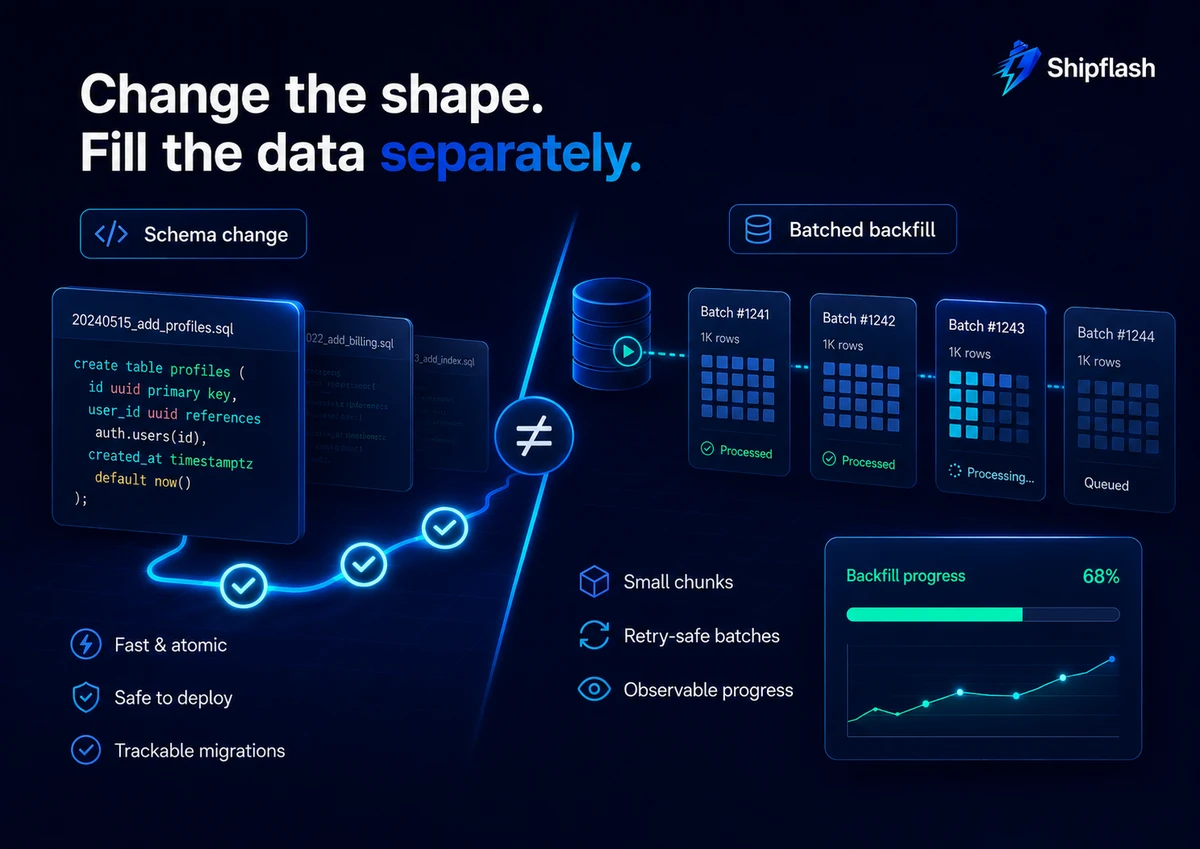
A schema migration changes the shape or rules of the database.
A backfill changes existing records so they satisfy the new shape or rules.
Combining both into one large transaction can make deployments unpredictable. A single update over a large table may create heavy write-ahead logging, increase replication or storage load, hold row locks, delay other work, and make the migration duration depend on production data volume.
Instead, design backfills as bounded production jobs.
A resumable batch might look like this:
with batch as (
  select id
  from public.customers
  where lifecycle_state is null
  order by id
  limit 500
  for update skip locked
)
update public.customers as customer
set lifecycle_state = 'active'
from batch
where customer.id = batch.id
returning customer.id;
The worker can repeat that query until no rows remain.
A production backfill should be:
- Idempotent: Reprocessing a row produces the same valid result.
- Bounded: Each run processes a limited number of records.
- Resumable: Progress survives a deployment or worker restart.
- Observable: Processed, failed, and remaining counts are visible.
- Throttled: It does not overwhelm normal customer traffic.
- Compatible: New writes already populate the new field correctly.
For a reliable execution model, apply the patterns from queues, cron jobs, and retries for Next.js SaaS.
Do Not Add a Strict Constraint Before the Data Is Ready
Suppose the new lifecycle_state column must eventually contain only approved values.
The first migration can add the column and a check constraint without immediately validating existing rows:
set lock_timeout = '5s';

alter table public.customers
  add column lifecycle_state text;

alter table public.customers
  add constraint customers_lifecycle_state_check
  check (
    lifecycle_state in (
      'lead',
      'active',
      'paused',
      'closed'
    )
  )
  not valid;
The application begins writing valid values, and the backfill updates historical rows.
A later migration validates the constraint:
alter table public.customers
  validate constraint customers_lifecycle_state_check;
After verification, another migration can enforce NOT NULL when the application and data are ready.
Breaking one logical change into multiple deployable stages is not unnecessary ceremony. It prevents a release from requiring every record and every application process to change at exactly the same moment.
Analyze PostgreSQL Locks Before Deployment
A migration does not need to execute slowly to cause downtime.
It can spend most of its time waiting for a lock. Once obtained, that lock can force requests behind it to wait as well, producing a sudden queue of blocked operations.
Many ALTER TABLE operations require strong table-level locks. The exact lock depends on the operation, but teams should assume that structural changes deserve lock analysis rather than treating them as harmless metadata updates. PostgreSQL’s documentation describes the lock requirements and warns that validating constraints or scanning large tables can interfere with concurrent updates.
A short lock_timeout can help the migration fail instead of waiting indefinitely:
set lock_timeout = '5s';
set statement_timeout = '2min';
These values are examples, not universal defaults. Choose limits based on the expected operation, table size, deployment environment, and recovery plan.
The important behavior is intentional failure. If a migration cannot obtain its required lock within the agreed window, it should stop and be rescheduled or redesigned rather than quietly creating an outage.
Build Large Indexes Deliberately
A regular PostgreSQL index build permits reads but can block writes on the target table.
PostgreSQL provides CREATE INDEX CONCURRENTLY to allow inserts, updates, and deletes to continue during index creation:
create index concurrently customers_lifecycle_state_idx
  on public.customers (lifecycle_state);
Concurrent index creation takes longer, performs additional work, and has important failure and transaction restrictions. PostgreSQL does not allow CREATE INDEX CONCURRENTLY inside a transaction block. Supabase’s index documentation also recommends concurrent creation for large live tables where blocking writes would be unacceptable.
Do not paste this statement blindly into a multi-statement migration.
First verify how the current migration runner executes that file. When a non-transactional index operation is required, treat it as a distinct controlled deployment step, monitor its progress, and verify that the resulting index is valid before depending on it.
For small tables or pre-launch databases, a regular index build may be simpler and faster. “Concurrent” should be chosen because production writes must remain available, not because the keyword appears more advanced.
Include RLS, Grants, Functions, and Views in the Migration Review
Database migrations are authorization changes whenever they affect an API-exposed object.
Creating a new table without defining its intended access model leaves the implementation incomplete. Replacing a view can change which columns are exposed. Recreating a function can change its owner, execution privileges, or security behavior. Adding a new foreign key can introduce a path that existing policies were not designed to protect.
A migration that creates a customer-facing table should answer:
| Authorization question | Evidence |
|---|---|
| Should RLS be enabled? | Explicit enable row level security statement |
| Which roles can access the object? | Reviewed grants and revokes |
| Which rows can each role read? | Select-policy tests |
| Which rows can each role modify? | Insert, update, and delete tests |
| Can internal functions bypass normal policies? | Documented owner and execution boundary |
| Does a service-role path exist? | Restricted, tested server-only operation |
| Are policies still efficient? | Indexed policy predicates and query-plan review |
Do not rely on the Next.js interface to hide protected operations. Server Actions and Route Handlers remain callable application boundaries, and the database must enforce the authorization model independently.
Rehearse Migrations in an Isolated Environment
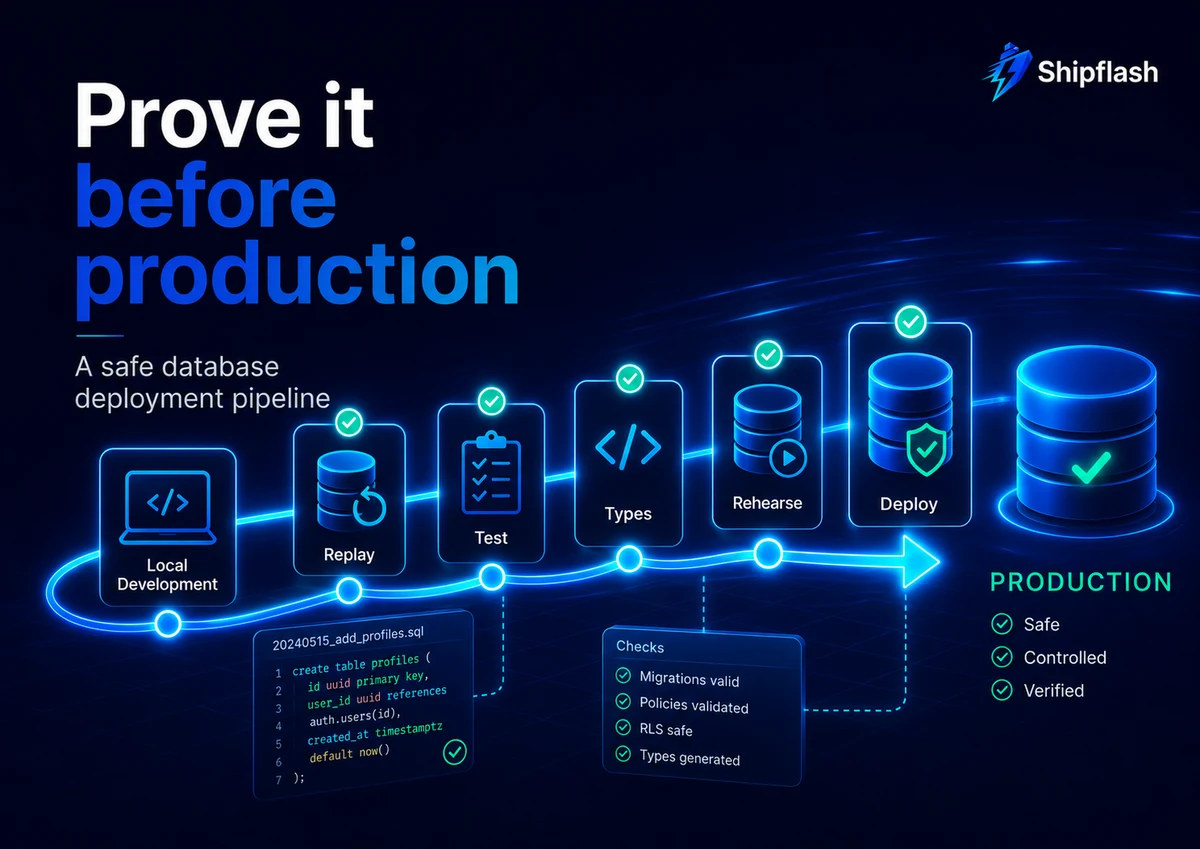
A local database proves that the migration history can replay. It does not reproduce production data size, connection patterns, long-running transactions, or realistic traffic.
Before deploying a meaningful migration, run it against staging or an isolated preview environment with representative schema and test data.
Supabase supports separate development, staging, and production environments through multiple projects or isolated branches. Supabase Branching can create independent environments with their own database, API credentials, Auth settings, and storage configuration, allowing schema and application changes to be tested before production. New branches do not automatically contain production data, which helps prevent sensitive customer data from being copied into development environments.
The rehearsal should answer more than “Did the command finish?”
Measure:
- Migration duration
- Lock-wait behavior
- Database CPU and I/O changes
- Query latency during the operation
- Backfill throughput
- Application compatibility before and after the migration
- RLS and grant behavior
- Generated-type compatibility
- Whether the verification and repair commands work as expected
Synthetic staging data should include edge cases, not only happy-path rows. Include null values, old enum-like values, orphaned references, large text fields, archived records, and any state that could violate the new rule.
Deploy Production Migrations Through One CI/CD Path
Production schema changes should not depend on which developer happens to have the correct CLI configuration on their laptop.
Supabase recommends using CI/CD to deploy production migrations rather than pushing them manually from a local machine. Its environment guide uses separate project credentials and GitHub Actions workflows for staging and production.
A compact production workflow can look like this:
name: Deploy database migrations

on:
  push:
    branches:
      - main
    paths:
      - "supabase/**"
  workflow_dispatch:

permissions:
  contents: read

concurrency:
  group: production-database
  cancel-in-progress: false

jobs:
  migrate:
    runs-on: ubuntu-latest
    environment: production

    env:
      SUPABASE_ACCESS_TOKEN: ${{ secrets.SUPABASE_ACCESS_TOKEN }}
      SUPABASE_DB_PASSWORD: ${{ secrets.PRODUCTION_DB_PASSWORD }}
      SUPABASE_PROJECT_ID: ${{ secrets.PRODUCTION_PROJECT_ID }}

    steps:
      - uses: actions/checkout@v4

      - uses: supabase/setup-cli@v1
        with:
          version: latest

      - name: Link production project
        run: supabase link --project-ref "$SUPABASE_PROJECT_ID"

      - name: Preview pending migrations
        run: supabase db push --dry-run

      - name: Apply pending migrations
        run: supabase db push

      - name: Verify migration history
        run: supabase migration list
For maximum reproducibility, pin the Supabase CLI version after validating it in your project rather than allowing an unreviewed CLI update to reach production automatically.
GitHub environments can protect production credentials, restrict deployment branches, and require approval before a job runs. Concurrency groups prevent two production database deployment jobs from running simultaneously.
Keep Validation and Deployment Separate
The pull-request workflow should prove that the migration is safe to merge:
name: Database migration checks

on:
  pull_request:
    paths:
      - "supabase/**"
      - "src/**"

permissions:
  contents: read

jobs:
  validate:
    runs-on: ubuntu-latest

    steps:
      - uses: actions/checkout@v4

      - uses: supabase/setup-cli@v1
        with:
          version: latest

      - name: Start local Supabase
        run: supabase start

      - name: Replay all migrations
        run: supabase db reset

      - name: Lint database objects
        run: supabase db lint --local --fail-on error

      - name: Run database tests
        run: supabase test db

      - name: Verify generated database types
        run: |
          supabase gen types \
            --lang typescript \
            --local \
            > /tmp/database.types.ts

          diff -u \
            src/types/database.types.ts \
            /tmp/database.types.ts
Your repository can then add type checking, Vitest, contract tests, and selected Playwright journeys after the database validation.
The production workflow should apply an already-reviewed artifact. It should not be the first environment in which the migration is compiled, replayed, or tested.
Verify Production After supabase db push
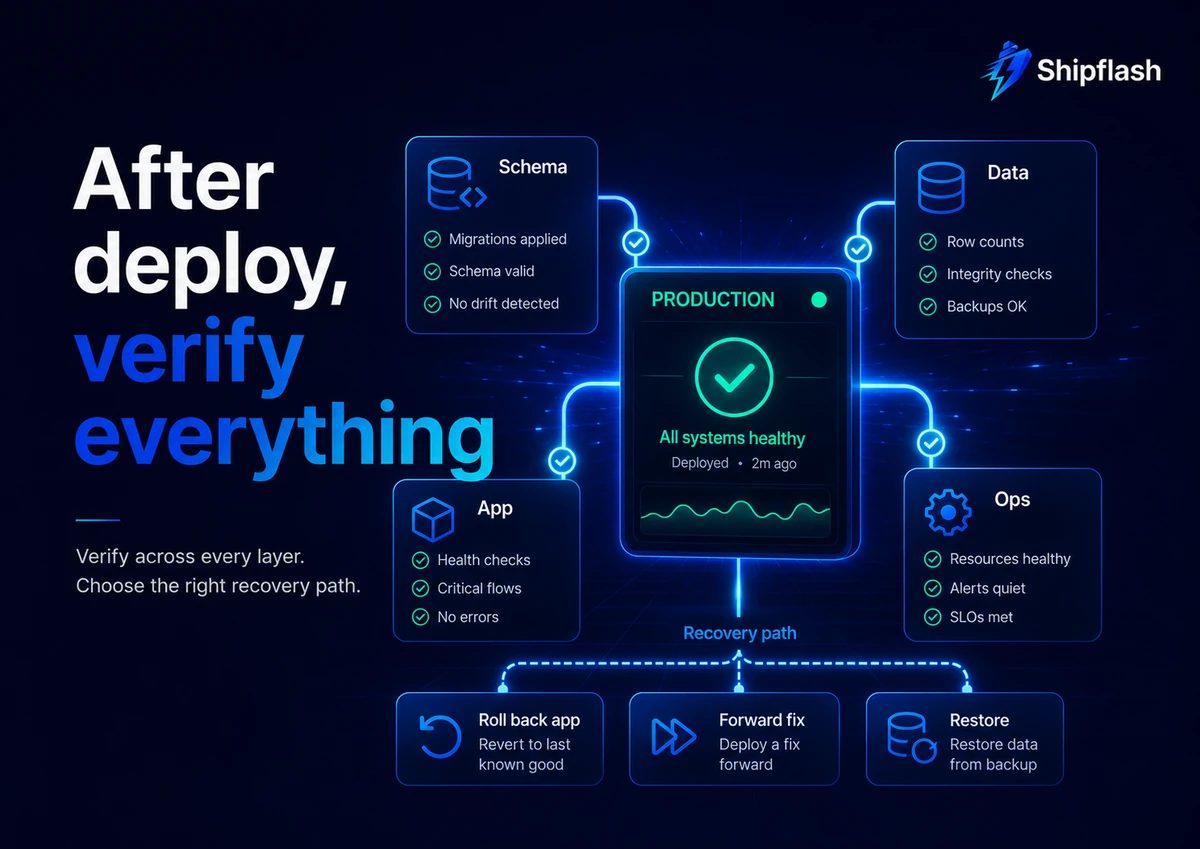
A successful db push means the migration command completed. It does not prove the product is healthy.
Post-deployment verification should cover five layers:
| Verification layer | What to check |
|---|---|
| Migration history | Local and remote migration versions agree |
| Schema | Expected columns, constraints, indexes, functions, policies, and grants exist |
| Data | Backfill state and constraint assumptions are correct |
| Application | Critical authenticated, billing, and admin flows work |
| Operations | Error rate, lock waits, query latency, queue depth, and database load remain normal |
Start by comparing migration history:
supabase migration list
Then run focused production-safe checks rather than broad manual exploration.
For example:
select
  count(*) filter (where lifecycle_state is null) as remaining,
  count(*) as total
from public.customers;
Validate at least one critical customer journey through the deployed application:
- Sign in.
- Read an authorized record.
- Perform the write affected by the migration.
- Confirm another user cannot access that record.
- Check associated jobs, webhooks, or notifications.
- Inspect production logs for new database errors.
Use the Next.js SaaS production checklist as the broader release gate around build integrity, authorization, billing, email, observability, deployment, and rollback readiness.
Roll Back, Forward-Fix, or Restore?
“Every migration must have a down migration” sounds safe, but reversibility and recoverability are not the same thing.
Consider a migration that changes a column from nullable to required. After the new application begins writing data under that assumption, reverting the database and application may require transforming new records back into a format the old code understands.
A SQL reversal can be syntactically possible while operationally unsafe.
Use the recovery action that matches the failure.
| Failure | Preferred response |
|---|---|
| New application code is broken, but the additive schema remains backward-compatible | Roll back the application |
| A migration added the wrong index, view, policy, or constraint without losing data | Ship a reviewed forward-fix migration |
| A backfill produced incorrect but identifiable values | Pause the worker and run an idempotent repair |
| Migration files and remote history disagree | Inspect supabase migration list, compare the actual schema, and reconcile deliberately |
| Destructive migration caused data loss or corruption | Stop affected writes, begin incident response, and evaluate backup or point-in-time recovery |
| A compatibility period is incomplete | Keep both schema paths and delay the contract migration |
Supabase provides supabase migration repair for correcting migration-history records when the tracking table does not represent the actual database state. The command marks a migration as applied or reverted in history; it does not execute or undo the migration SQL itself. Use it only after verifying the real schema.
Backups Are Not a Substitute for Safe Migrations
Supabase manages database backups and offers point-in-time recovery options depending on project configuration. These systems protect against data loss, but restoration is an incident-recovery operation—not a normal rollback button.
Before a destructive or high-risk migration, confirm:
- Whether backups are enabled
- The available retention window
- Whether point-in-time recovery is configured
- Who can initiate a restoration
- How long recovery could take
- What writes would be lost between the recovery point and the incident
- How the application will be handled during restoration
A backup you have never inspected, tested, or assigned an owner is not yet a complete recovery plan.
Be Careful with Remote Reset Commands
The default local command:
supabase db reset
rebuilds the local development database.
The linked variant:
supabase db reset --linked
targets the linked remote project and is destructive. Supabase documents it for disposable development or staging environments and explicitly warns against using it on production.
A useful team safeguard is to make production linking difficult to do casually:
- Keep production database credentials only in the protected CI environment.
- Use visibly distinct project names for local, staging, and production.
- Restrict production dashboard access.
- Require an approval for production migration jobs.
- Avoid distributing the production database password to every developer.
- Print the target project reference in deployment logs before applying changes.
The best protection against the wrong command is not another warning comment. It is an environment design in which ordinary development credentials cannot destroy production.
A Migration Review Gate for Next.js and Supabase
Before approving a database migration, require concrete evidence for each question.
| Review question | Evidence required |
|---|---|
| Can the database be rebuilt from the repository? | Successful clean supabase db reset |
| Has generated SQL been inspected? | Human-reviewed migration diff |
| Does the old app still work with the new schema? | Compatibility test or expand-and-contract plan |
| Does the new app work before the old schema is removed? | Staging or preview verification |
| Could the operation block reads or writes? | Lock analysis and timeout strategy |
| Does it modify a large amount of data? | Separate backfill plan with batch size and progress tracking |
| Are RLS and grants still correct? | Positive and negative authorization tests |
| Do generated types match? | Clean CI type-generation diff |
| Can the change be rehearsed safely? | Isolated staging or branch deployment |
| Is production deployment serialized? | CI concurrency group or equivalent |
| What happens if deployment fails? | Written forward-fix, app rollback, or restore decision |
| How will success be verified? | Post-deploy queries, application checks, and operational signals |
| Is destructive cleanup delayed? | Separate contract migration after compatibility observation |
A migration should not be approved because it is small.
It should be approved because its compatibility, locking, authorization, data, deployment, and recovery behavior are understood.
Common Questions About Supabase Database Migrations
Should I run supabase db push from my local machine?
For early development, a local push can be convenient. For production, a controlled CI/CD pipeline is safer because it centralizes credentials, records deployment history, prevents simultaneous migration jobs, and can require approval. Supabase recommends CI/CD for production migration deployment.
Should developers edit the production database through Supabase Studio?
Once migrations are the source of truth, production schema changes should go through version-controlled migration files. Direct remote changes bypass the repository’s history and can cause the local files and remote migration state to diverge.
Does supabase db reset affect production?
The ordinary command targets the local database. supabase db reset --linked targets the linked remote project and destroys its data before replaying migrations. The linked command should only be used with disposable development or staging environments, never production.
Should every migration have a reverse migration?
Every migration needs a recovery plan, but not every migration can be safely reversed after production begins writing data under the new model. Additive compatibility, forward-fix migrations, resumable data repairs, application rollback, and tested backups are often safer than assuming every schema transition can simply be undone.
When should I use supabase migration repair?
Use it only when migration history is incorrect but you have independently verified the actual database schema. The command edits the migration tracking record; it does not apply or reverse the underlying SQL.
Do I need a separate staging database?
A separate staging project or isolated Supabase branch is strongly preferable for meaningful production changes. It provides a place to rehearse migration order, application compatibility, generated types, authorization behavior, and deployment automation without modifying production.
The Safest Migration Is a Compatibility Plan
A production database migration is not finished when the SQL command returns successfully.
It is finished when:
- The repository can recreate the schema.
- The old and new application versions remain compatible during deployment.
- Existing data satisfies the new model.
- RLS, grants, functions, and views enforce the intended boundaries.
- Generated types and application queries agree with the database.
- Locking behavior stays inside an acceptable operational window.
- The deployment is recorded and serialized.
- Production verification proves that customer workflows still work.
- The team knows whether a failure requires an application rollback, a forward fix, a data repair, or a restore.
The safest workflow can be summarized in one line:
Expand first, verify continuously, migrate data separately, and remove old contracts only after production no longer depends on them.
That philosophy extends beyond database migrations. It is how a maintainable SaaS foundation should treat authentication, billing, webhooks, background work, and every other system whose failure can affect real customers.
Shipflash is built around that production-oriented approach: start with structured SaaS systems that can be understood, tested, operated, and extended instead of assembling disconnected snippets that only work until the first difficult release.