
A Next.js SaaS can run perfectly today and still contain an assumption that becomes wrong a few months from now.
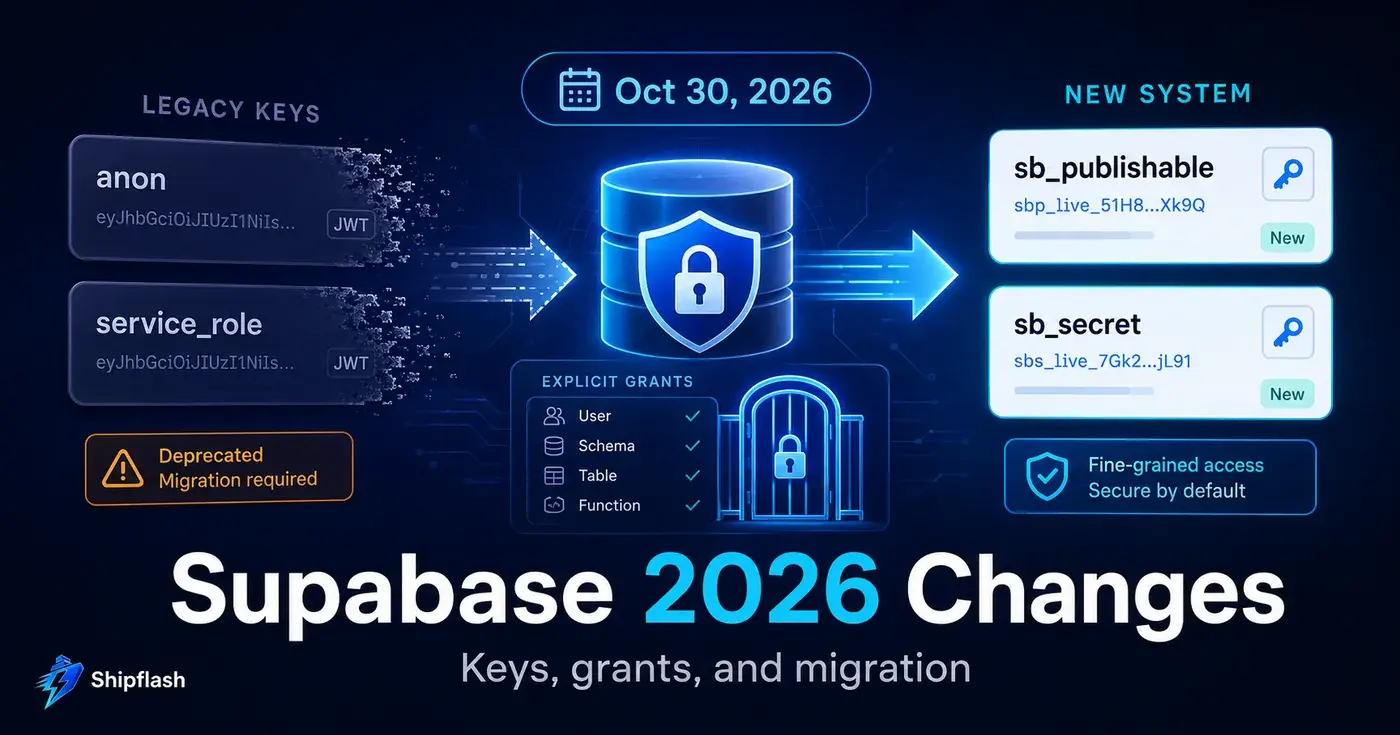
In 2026, Supabase is changing two parts of its platform that sit underneath a large number of production applications.
The first is the API-key model. The legacy JWT-based anon and service_role API keys are being replaced by publishable keys such as sb_publishable_... and secret keys such as sb_secret_.... Supabase says the legacy API keys will be deprecated by the end of 2026.
The second change affects database exposure. On October 30, 2026, existing hosted Supabase projects will move to a model where newly created objects in the public schema are not automatically granted access through the Data API. Instead, access becomes explicit.
These sound like configuration changes.
They are really architecture changes.
A frontend key stored in the wrong variable, an Edge Function still expecting a JWT-shaped service key, a forgotten pg_net request, or a migration that creates a perfectly valid RLS policy but forgets its GRANT can turn a routine deployment into authentication failures or 42501 permission denied errors.
The good news is that neither transition requires a big-bang rewrite.
Supabase supports gradual migration. The goal is to make the transition while both old and new paths can still be tested—not after customer traffic discovers what your migration missed.
What exactly is changing in Supabase in 2026?
There are two migrations to think about separately.
| Change | Old assumption | New model | Important timing |
|---|---|---|---|
| API keys | anon and service_role JWTs double as API keys | sb_publishable_... for public clients and sb_secret_... for trusted backends | Legacy keys deprecated by end of 2026 |
| Data API grants | New public objects receive broad default privileges automatically | New objects require deliberate grants to Data API roles | Enforced for existing hosted projects October 30, 2026 |
| RLS | RLS controls row access | RLS still controls row access | No fundamental change |
| Auth user sessions | Supabase Auth issues user JWTs | Supabase Auth continues issuing user JWTs | Separate from API-key migration |
| JWT signing | Legacy shared JWT secret | New signing-key system available | Separate migration from API keys |
The distinction matters.
Supabase is not removing the Postgres anon, authenticated, or service_role roles. Those roles continue to appear in grants and RLS policies.
What is being deprecated is the old JWT-based API-key mechanism that exposes long-lived anon and service_role keys.
That means code such as this:
SUPABASE_ANON_KEY=<long JWT>
SUPABASE_SERVICE_ROLE_KEY=<long JWT>
is moving toward a model more like:
NEXT_PUBLIC_SUPABASE_PUBLISHABLE_KEY=sb_publishable_...
SUPABASE_SECRET_KEY=sb_secret_...
The names of your environment variables are your choice. The important change is what the values represent and where they may safely be used.
Supabase's official API-key migration guide maps the old and new models directly.
Will October 30, 2026 suddenly break existing Supabase tables?
No. Existing tables keep their current grants.
This is one of the easiest parts of the announcement to misunderstand.
When the new Data API behavior reaches existing projects on October 30, Supabase does not remove grants from every table your production application already uses. Existing objects retain their current permissions.
The change affects the defaults used when new objects are created afterward.
A new table in public that previously became reachable through PostgREST automatically may now exist perfectly well in Postgres while remaining inaccessible through supabase-js until the appropriate role receives an explicit GRANT.
So the failure may not appear on October 30 itself.
It may appear three weeks later when somebody ships a migration:
create table public.projects (
  id uuid primary key default gen_random_uuid(),
  user_id uuid not null references auth.users(id),
  name text not null
);
The migration succeeds.
The table exists.
Then the application calls:
await supabase.from("projects").select("*");
and production responds with a permission error.
That is why the real migration target is not the database you already have.
It is your schema-change workflow.
Change #1: Migrate from legacy anon and service_role API keys
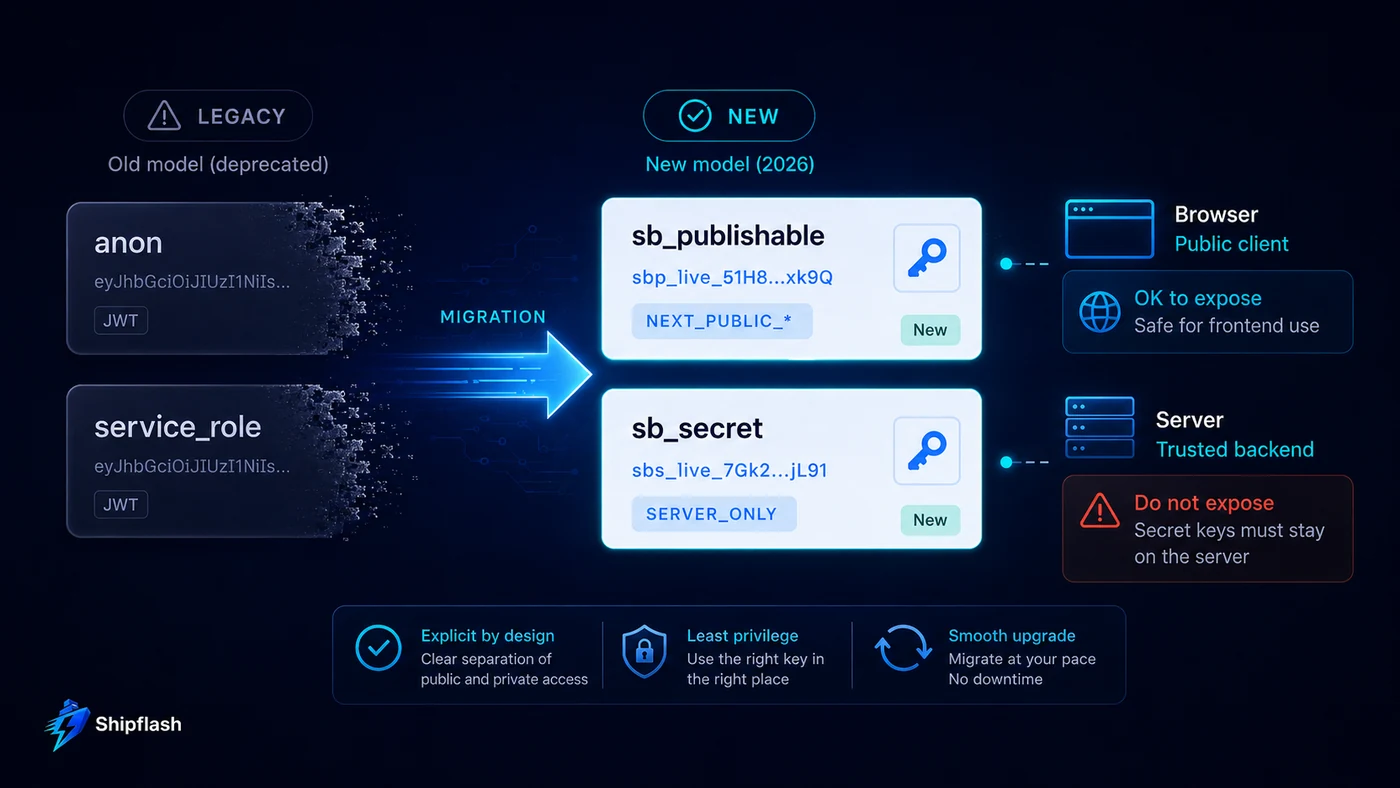
For most Next.js applications, the key mapping is straightforward.
| Legacy API key | New API key | Typical location |
|---|---|---|
| anon | Publishable key | Browser client, public frontend bundle |
| service_role | Secret key | Server-only code, workers, trusted backend components |
Supabase allows both generations of keys to remain active during migration. Creating the new publishable and secret keys does not automatically revoke the legacy keys, which gives you room to migrate one caller at a time.
That coexistence period is valuable. Use it.
Migrate the browser client first
A browser Supabase client can move from a legacy anon API key to the new publishable key without changing the fundamental RLS model.
For example:
import { createClient } from "@supabase/supabase-js";

export const supabase = createClient(
  process.env.NEXT_PUBLIC_SUPABASE_URL!,
  process.env.NEXT_PUBLIC_SUPABASE_PUBLISHABLE_KEY!,
);
Publishable keys are intentionally safe to expose as project-identification credentials. They do not replace authorization.
When a user is authenticated, their Supabase Auth session still supplies the user identity that RLS can evaluate. Your database security therefore still depends on correct policies and least-privilege grants—not on hiding the publishable key. Supabase explicitly recommends RLS for exposed tables and warns that secret/service-role credentials must never be exposed to the frontend.
If you need to revisit that boundary, the Shipflash guide to Supabase Row Level Security for Next.js SaaS goes deeper into policies, grants, service access, and negative authorization testing.
Move privileged clients to sb_secret_...
Trusted server code should move away from the legacy service_role API key and use a secret key.
A dedicated server client might look like this:
import { createClient } from "@supabase/supabase-js";

export const supabaseAdmin = createClient(
  process.env.NEXT_PUBLIC_SUPABASE_URL!,
  process.env.SUPABASE_SECRET_KEY!,
  {
    auth: {
      persistSession: false,
      autoRefreshToken: false,
    },
  },
);
A Supabase secret key remains highly privileged. It can access data with service-level privileges and bypass RLS, so the new prefix does not make careless exposure less dangerous.
It belongs only in trusted server environments.
The useful improvement is operational: Supabase lets you create multiple named secret keys for different backend components. Instead of making billing reconciliation, cron processing, administration, and unrelated workers all depend on one difficult-to-rotate credential, you can progressively reduce the blast radius of a key rotation.
The migration gets harder outside ordinary Next.js requests
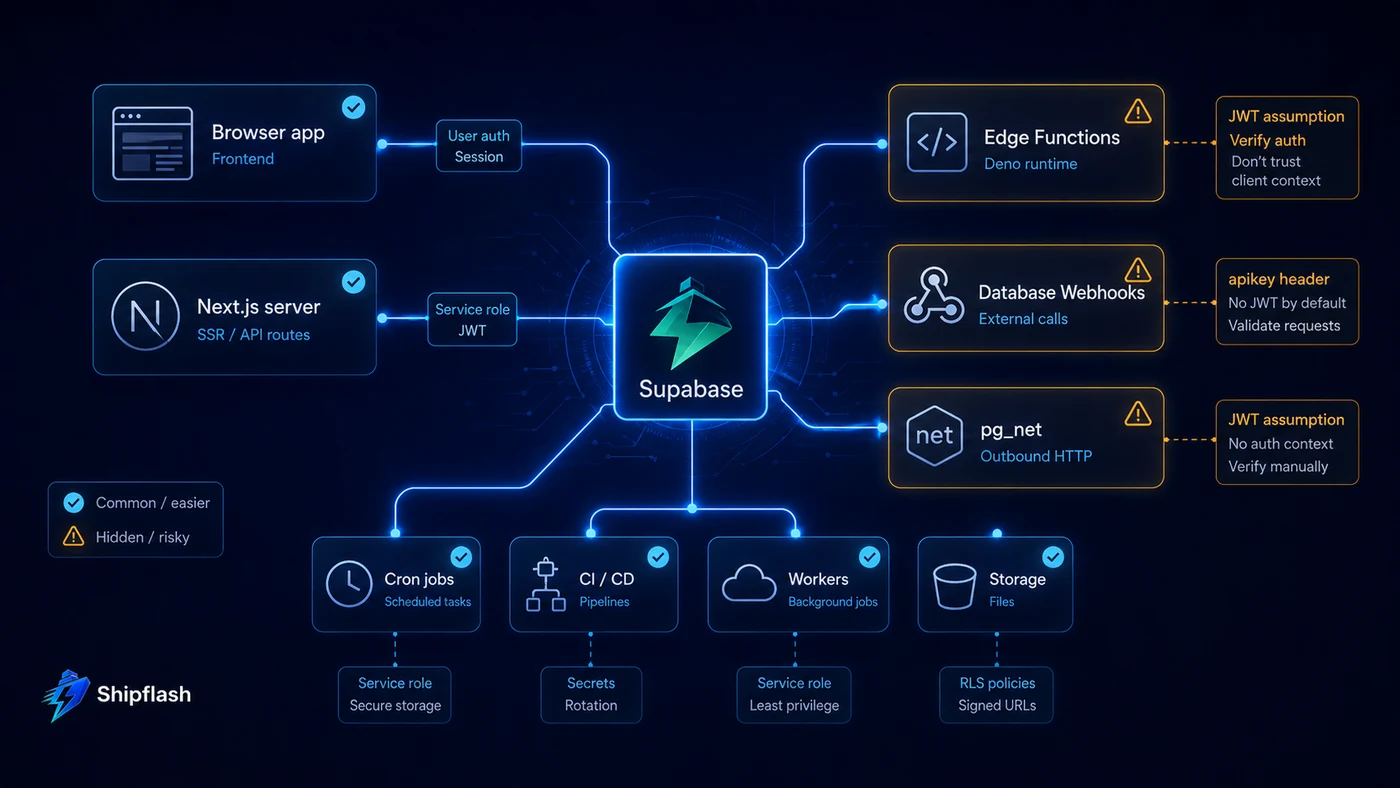
Changing two environment variables is not the difficult part.
The difficult part is finding every system that treats the old service_role value like a JWT.
That distinction matters because an sb_secret_... value is not a JWT.
Database Webhooks and pg_net need special attention
Older integrations may send the legacy service key through an HTTP header such as:
Authorization: Bearer <legacy-service-role-jwt>
That worked partly because the old API key itself was a JWT.
A new Supabase secret key should instead be sent through the apikey header when it is being used as the API key. Supabase specifically calls out Database Webhooks and pg_net as migration surfaces where this difference matters.
Conceptually, the request changes from:
Authorization: Bearer <legacy service-role API key>
to:
apikey: sb_secret_...
Do not hardcode the new secret into SQL simply because the old implementation did something similar.
If Postgres needs access to the credential, Supabase recommends storing sensitive values through Vault rather than leaving a privileged key in ordinary SQL or webhook configuration.
Edge Functions are another compatibility trap
Edge Functions deserve their own migration test.
Supabase's current migration documentation notes that the built-in verify_jwt behavior does not treat the new publishable and secret API keys the same way as the legacy JWT-shaped keys.
If an Edge Function uses the new key model, Supabase documents two approaches: handle authorization inside the function with the relevant verification configuration, or adopt its newer server tooling for the authorization boundary. Simply disabling verification without replacing it with application-level authorization would turn a migration fix into a security regression.
This is the recurring theme of the whole migration:
Compatibility changes should never be “fixed” by weakening the security boundary that exposed the incompatibility.
Inventory every place a Supabase key can hide
A reliable API-key migration starts with an inventory, not a search-and-replace.
| Surface | What to check |
|---|---|
| Browser client | Legacy public key references and NEXT_PUBLIC_* variables |
| Next.js server code | Admin clients and server-only modules |
| Route Handlers | Explicit Supabase client initialization |
| Server Actions | Imported service clients |
| Cron jobs | Deployment secrets and scheduled workers |
| Billing reconciliation | Long-lived server credentials |
| Background workers | Independent environment configuration |
| Edge Functions | Legacy environment variables and authorization behavior |
| Database Webhooks | HTTP headers |
| pg_net calls | Authorization versus apikey use |
| CI/CD | Test, migration, preview and production secrets |
| Local development | .env.local and tooling |
| Deployment platform | Preview/staging/production variable scopes |
| External integrations | Services calling Supabase directly |
The point is not that every application uses all of these.
The point is that the least visible caller is often the one that makes a key rotation look successful until three days later.
A monthly reconciliation job does not prove anything during a five-minute smoke test.
Neither does an old mobile build, an infrequently used admin route, or an integration that only executes after a payment failure.
Keep the legacy keys active while you deliberately exercise these paths. Only deactivate them after you can explain what every Supabase credential in the system is responsible for. Supabase's migration documentation explicitly supports running old and new keys side-by-side during this transition.
API-key migration and JWT-signing migration are not the same thing
This is another area where similar terminology creates unnecessary confusion.
The new publishable and secret keys change how your application identifies itself to Supabase's APIs.
Supabase Auth still issues JWTs for user sessions.
Supabase also has a separate JWT Signing Keys system that replaces the old shared JWT-secret model with independently rotatable signing keys. That system supports asymmetric keys and public-key verification through JWKS.
So there are two independent questions:
How does my application authenticate itself to Supabase APIs?
That is the publishable/secret API-key migration.
How are my users' authentication JWTs signed and verified?
That is the signing-key migration.
Supabase explicitly describes them as separate migrations. Moving to sb_publishable_... and sb_secret_... does not automatically mean you have completed the Auth signing-key transition.
Treating them separately makes rollback and verification far easier.
Change #2: Data API access is becoming explicit
The second breaking change is arguably more important for long-term SaaS architecture.
Supabase's Data API works on top of Postgres permissions.
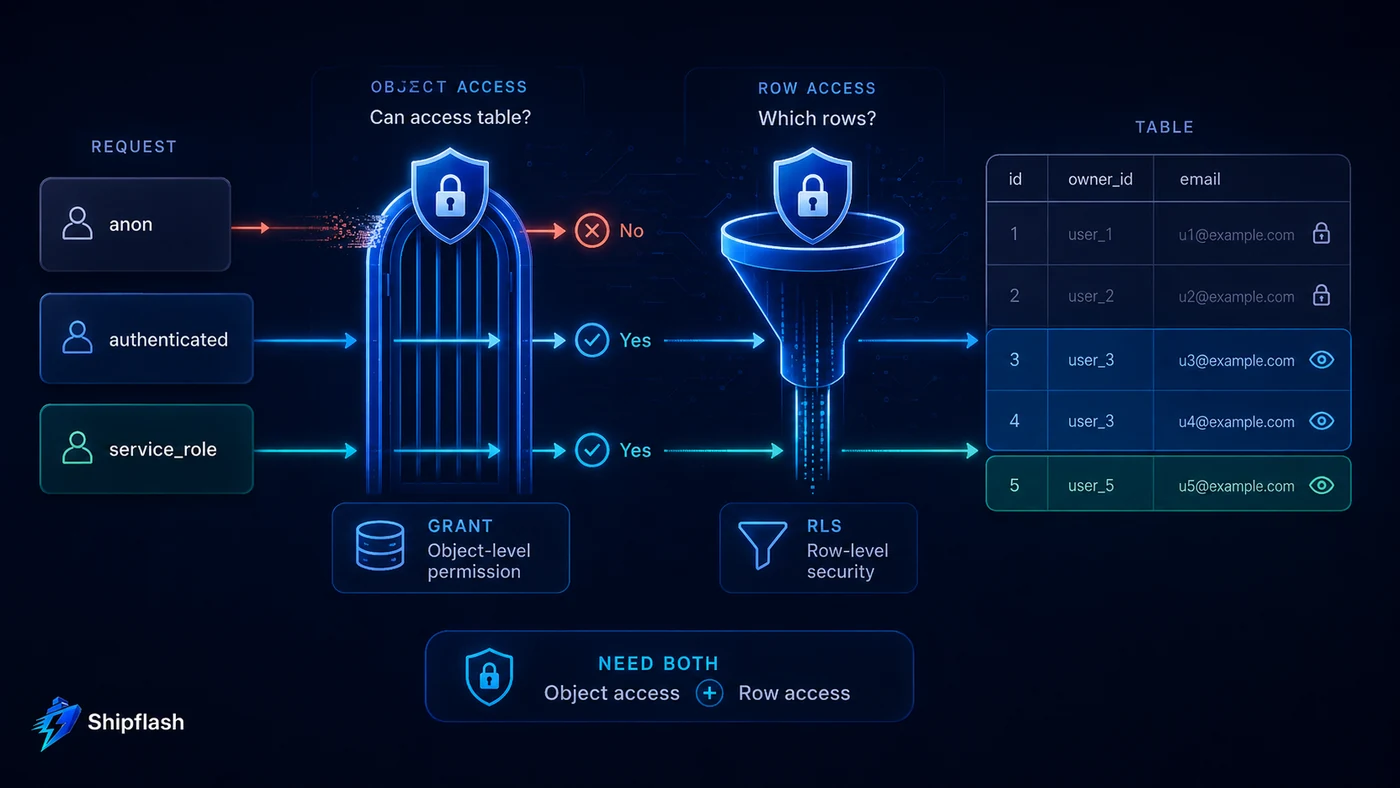
Two different security mechanisms answer two different questions:
| Security layer | Question it answers |
|---|---|
| PostgreSQL GRANT | Is this role allowed to access this database object at all? |
| Row Level Security | Which rows may this role access? |
You need both.
A table can have an excellent RLS policy and still be unreachable because the role lacks SELECT.
A table can also have a broad SELECT grant and still remain safe at the row level if correctly designed RLS policies restrict what each authenticated user may read.
Conversely, giving a role a grant to a table without enabling the appropriate row-level protections can expose far more data than intended.
Supabase's current security documentation explicitly describes grants and RLS as complementary controls, not alternatives.
What a 2026-ready Supabase migration should look like
Imagine a SaaS feature that stores projects owned by authenticated users.
The database migration should not stop after creating the table:
create table public.projects (
  id uuid primary key default gen_random_uuid(),
  user_id uuid not null references auth.users(id),
  name text not null,
  created_at timestamptz not null default now()
);
Make access intentional:
grant select, insert, update, delete
on table public.projects
to authenticated;

grant select, insert, update, delete
on table public.projects
to service_role;
Then establish row-level protection:
alter table public.projects
enable row level security;
And finally encode the user boundary:
create policy "users can read their projects"
on public.projects
for select
to authenticated
using (user_id = (select auth.uid()));
Writing the grant into the migration is important even if your current project still applies automatic defaults.
It makes the expected API surface visible in code.
A reviewer no longer has to infer whether a table happens to be accessible because of project-wide defaults. The migration states which roles should reach it.
This is exactly the kind of database change that benefits from a disciplined deployment process. The Shipflash guide on shipping Supabase database migrations without breaking production covers local validation, schema review, CI gates, RLS checks, type drift, staging, and post-deploy verification in more depth.
Explicit grants should not become “grant everything”
There is a dangerous way to adapt to this breaking change:
grant all on all tables in schema public to anon, authenticated;
That makes many permission errors disappear.
It also destroys much of the benefit of moving to explicit grants.
The better question is not:
“What grant makes this request work?”
It is:
“Which role should perform this operation?”
For a typical SaaS, the answer may look more like this:
| Object | anon | authenticated | service_role |
|---|---|---|---|
| Public pricing data | SELECT | SELECT | Needed operations |
| User profile | None or limited public read | User-scoped CRUD | Administrative access |
| Waitlist endpoint | Narrow insert path | Depends on design | Administrative access |
| Billing projection | None | Usually narrow read | Billing operations |
| Audit events | None | Usually limited/no direct write | Operational access |
| Internal job table | None | None | Worker-only access |
| Public RPC | EXECUTE only if intentionally public | As required | As required |
| Admin RPC | None | Narrow privileged role/path | Trusted backend |
This is where the 2026 change can improve your architecture instead of merely creating migration work.
Every GRANT becomes a reviewable statement of intent.
What happens on October 30 if you do nothing?
For an existing hosted project, the most likely failure sequence is surprisingly mundane.
Your current application continues working because existing tables retain their grants.
A developer—or an AI coding agent—later adds a table in public.
The migration completes successfully.
The generated TypeScript types may look fine.
The table appears in the dashboard.
RLS may even be enabled.
Then your application calls the Data API and receives PostgreSQL error 42501, indicating the role lacks the required permission. Supabase documents that its Data API can return a grant-specific hint in this situation.
That is why testing only database migration success is no longer enough.
Your release gate needs to exercise the API path that production actually uses.
Why this matters even more for AI-assisted SaaS development
This change is particularly relevant to vibe-coded and AI-assisted applications.
An AI agent can create a valid SQL migration in seconds.
That does not mean the agent understands your intended security boundary.
Supabase explicitly cited AI tools, scripts, and automated table creation when explaining the move toward deliberate Data API exposure. Explicit grants make access decisions visible in migrations rather than inheriting invisible platform defaults.
Consider a coding agent adding:
customer_exports
The agent knows the dashboard needs the new feature.
It may not know whether the table should be accessible to anon, ordinary authenticated customers, support staff, an internal worker, or only a server-side administrative flow.
Under an implicit-exposure model, a missing decision can accidentally become permission.
Under an explicit model, a missing decision becomes an error.
For production software, an obvious failure is often safer than invisible over-permission.
That philosophy also applies well beyond Supabase. If AI is helping build your product, the surrounding repository needs reviewable security boundaries rather than expecting the model to reconstruct them from context every time.
Should you opt into explicit grants before October 30?
For many actively developed SaaS applications, adopting the behavior in a test or staging environment before the deadline is the safer migration path.
Supabase documents SQL for revoking the old default privileges so that newly created objects stop receiving automatic grants. The important detail is that these statements change defaults for future objects; they do not rewrite the grants on the tables you already have.
Supabase's current documented pattern includes defaults for tables, functions, and sequences:
alter default privileges for role postgres in schema public
  revoke select, insert, update, delete
  on tables
  from anon, authenticated, service_role;

alter default privileges for role postgres in schema public
  revoke execute
  on functions
  from anon, authenticated, service_role;

alter default privileges for role postgres in schema public
  revoke usage, select
  on sequences
  from anon, authenticated, service_role;

alter default privileges for role postgres in schema public
  revoke execute
  on functions
  from public;
Do not paste a default-privilege change into production simply because an article says the deadline is coming.
Enable the behavior in an isolated environment first, reset the database from migrations, and find the assumptions while the consequences are cheap.
The objective is to answer a simple question:
Can a fresh copy of this application recreate exactly the Data API permissions production expects without relying on historical Supabase defaults?
If the answer is yes, October 30 becomes far less interesting.
Functions need the same level of attention
Tables get most of the attention because they are where developers first encounter RLS.
Postgres functions can be more sensitive.
Supabase notes that functions in existing projects can receive EXECUTE privileges through default permissions, and RLS does not apply to a function in the same way it applies to table rows. Supabase therefore recommends granting function execution deliberately and reviewing SECURITY DEFINER functions especially carefully.
If an RPC should only be available to authenticated users:
revoke execute
on function public.rebuild_customer_summary(uuid)
from public, anon;

grant execute
on function public.rebuild_customer_summary(uuid)
to authenticated;
If it should never be called by customer-facing clients, do not make it reachable merely because keeping all RPCs exposed feels simpler.
An RPC that performs privileged work is an API endpoint whether or not it has a React component attached to it.
Build grants into the definition of “migration complete”
Database migration review should now answer more than “does the SQL execute?”
A useful production standard is:
| Verification | Evidence you want |
|---|---|
| Schema created | Migration succeeds from clean database |
| Intended role granted | Expected Data API request succeeds |
| Unintended role denied | Negative request fails |
| RLS enabled | Database inspection/test confirms it |
| Policy correct | User A cannot access User B's row |
| Function access narrow | Unauthorized role receives permission error |
| Generated types current | CI detects no schema/type drift |
| Application path healthy | Integration or E2E test exercises real request |
| Rollback/forward fix understood | Team knows recovery path |
The negative cases matter as much as the positive ones.
A test that proves the owner can read a project is useful.
A test that proves another authenticated user cannot read it is the security test.
For a broader approach to choosing unit, database, integration, contract, and browser tests, see How to Test a SaaS Before Customers Do.
A zero-downtime migration sequence for a Next.js SaaS
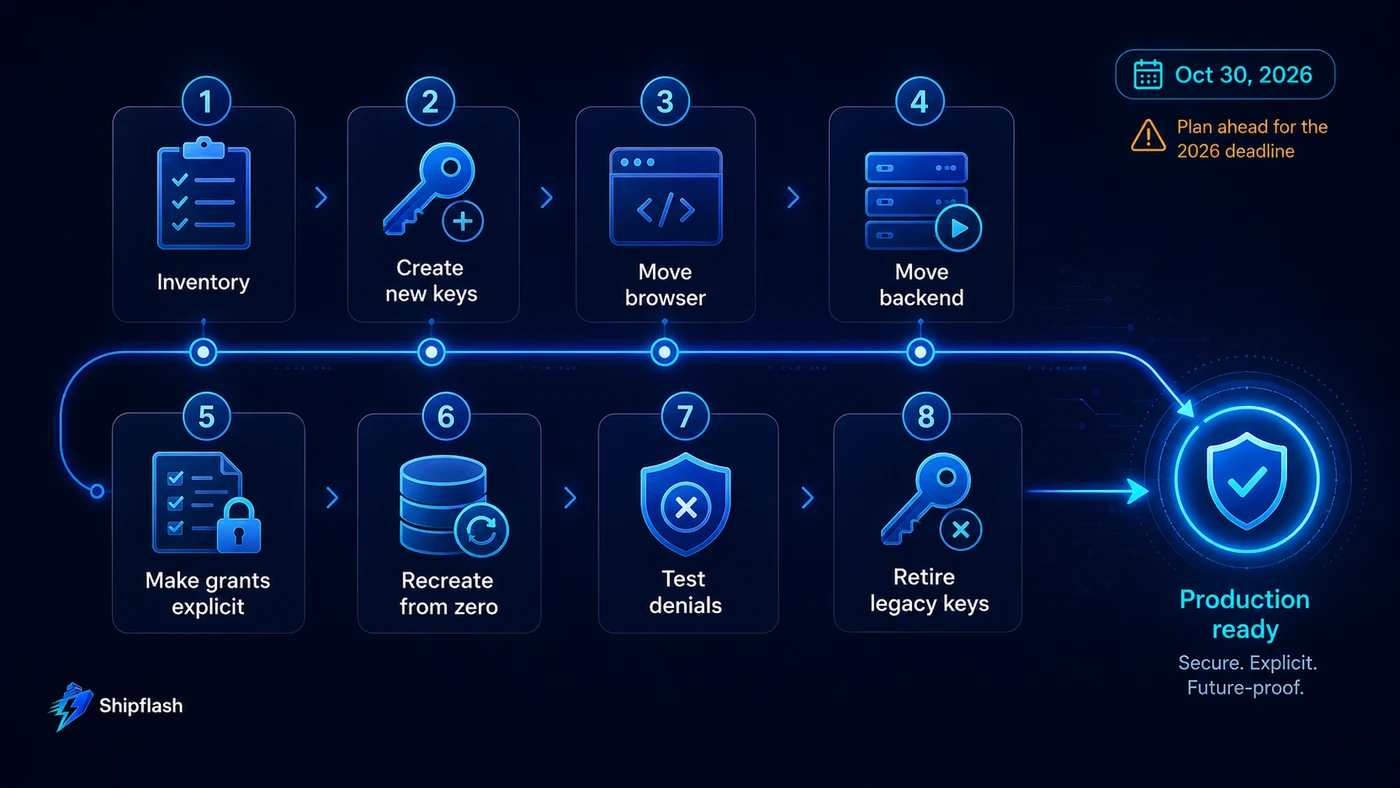
Do not combine every 2026 Supabase change into one deployment.
A lower-risk migration separates the transitions.
Phase 1: Map the current architecture
Record where your public key, service key, Data API clients, Edge Functions, Database Webhooks, scheduled jobs, CI jobs, and direct Postgres connections live.
Also identify whether database objects are created exclusively through migrations or whether developers, scripts, AI agents, and dashboard tools create schema changes independently.
This inventory tells you where assumptions about the old platform model actually exist.
Phase 2: Create new Supabase API keys
Create a publishable key and at least one secret key while the legacy keys remain active.
Do not deactivate anything yet.
Move ordinary browser clients to the publishable key and deploy.
Exercise signup, login, authenticated reads, writes, password recovery, and any other critical customer flow.
Phase 3: Move trusted backend callers
Switch server-side clients, scheduled jobs, workers, and administration paths to secret keys.
Treat pg_net, Database Webhooks, and Edge Functions as separate compatibility tests rather than assuming they behave like a Next.js server process.
At this stage, billing and other asynchronous operations deserve extra attention because their failures may not be visible in the primary UI.
Phase 4: Make database access explicit
Update migrations so every newly exposed object includes intentional grants alongside RLS and policies.
Do this even if production still has the old automatic defaults.
Your repository should already describe the future access model before the platform requires it.
Phase 5: Recreate from zero
Run the entire migration history against an isolated project or local environment configured with the stricter defaults.
This is one of the strongest tests available because a long-lived production database contains years of accumulated privileges that can hide missing migration statements.
A clean database has no historical accidents to rescue the build.
Phase 6: Exercise negative authorization
Test the application as anonymous, authenticated, cross-user, and privileged server callers.
A migration is not verified merely because the happy path works.
Phase 7: Adopt the stricter Data API default early
Once migrations work correctly in the isolated environment, adopt the same behavior in staging.
Continue normal feature development there long enough to expose forgotten assumptions.
Then apply the change deliberately to production rather than discovering it when the platform rollout reaches the project.
Phase 8: Deactivate legacy API keys
Only after the new keys have survived normal operation should the legacy API keys be disabled.
Supabase supports reactivation if a missed caller is discovered, which makes controlled deactivation considerably safer than rotating a shared legacy JWT secret during an incident.
The failure modes worth testing before production
| Failure | What it usually means | Correct direction |
|---|---|---|
| 42501 permission denied after new table | Missing object-level grant | Grant only required role/operation |
| User can reach table but sees no rows | RLS policy blocks request | Debug policy/session, not grant |
| Invalid JWT after changing service key | New secret key treated like old JWT | Review header and caller behavior |
| Edge Function suddenly unauthorized | Old verification assumption | Revisit Edge Function auth model |
| Database Webhook stops working | Legacy bearer-key pattern remained | Migrate headers/secret handling |
| Browser contains sb_secret_... | Secret boundary violated | Remove immediately and rotate |
| Fresh database works differently from production | Historical grants hiding migration gaps | Make permissions declarative |
| Fix requires broad GRANT ALL | Access model has not been defined | Model least privilege first |
| Old key can never be disabled | Caller inventory incomplete | Trace every integration |
This is the point where a production checklist becomes useful rather than ceremonial.
Shipflash's Next.js SaaS Production Checklist covers the larger release boundary around authentication, database security, billing, webhooks, testing, observability, backups, deployment, and rollback.
Do direct Postgres connections need this Data API migration?
Not in the same way.
Supabase states that the October Data API exposure change targets access through its generated REST/GraphQL layer and client libraries that use it.
If your trusted backend connects to Postgres directly with a connection string, that connection uses PostgreSQL's own role and connection permissions rather than the Data API role path being changed here.
A mixed architecture is therefore possible:
Browser
   ↓
Supabase Data API
   ↓
publishable key + user JWT
   ↓
GRANT + RLS

Trusted server
   ↓
Direct Postgres connection
   ↓
database role permissions
Another SaaS might use Supabase Data API from both browser and server.
Neither model is universally correct.
What matters is knowing which security boundary each request actually crosses.
Should you disable the Data API completely?
Possibly, but only if your architecture does not use it.
Supabase allows applications that exclusively use direct database connections or other trusted server paths to disable the Data API.
Do not disable it simply because explicit grants require more work.
For many Next.js + Supabase products, direct authenticated browser access backed by RLS is one of the platform's most useful architectural properties.
The better decision is to expose only what the application intentionally needs.
How Shipflash thinks about this kind of platform change
A production SaaS foundation should make infrastructure changes like this boring.
Keys should have clear ownership.
Privileged credentials should stay behind server boundaries.
Database migrations should describe not only schema but intended access.
RLS and application authorization should be testable.
Fresh environments should reconstruct production behavior from version-controlled code rather than undocumented dashboard history.
And when a provider changes a default, the application should have a small number of well-defined integration boundaries to update instead of dozens of scattered assumptions.
That is also why Shipflash is structured as a SaaS foundation rather than a collection of isolated snippets: the goal is to give founders, developers, indie hackers, and AI-assisted builders a cleaner place to adapt production systems as the underlying stack evolves. Shipflash currently uses Next.js and Supabase as part of that foundation.
Frequently Asked Questions
Are Supabase anon and service_role going away in 2026?
The legacy JWT-based anon and service_role API keys are being deprecated in favor of publishable and secret keys. The underlying PostgreSQL roles named anon, authenticated, and service_role still matter for grants and database authorization.
What replaces NEXT_PUBLIC_SUPABASE_ANON_KEY?
For frontend applications, use a Supabase publishable key such as sb_publishable_.... Your own environment-variable name can differ, but public client code should use the publishable credential rather than a secret key.
What replaces the Supabase service_role API key?
Trusted backend code should migrate to a Supabase secret key such as sb_secret_.... Secret keys remain privileged and bypass RLS, so they must never be exposed in browser code.
Will existing tables lose Data API access on October 30, 2026?
No. Existing tables keep their existing grants. The change means that newly created objects in public will no longer automatically receive the Data API privileges older projects historically relied on.
Do I need both GRANT and RLS?
Yes when an object is intentionally exposed through the Data API. GRANT determines whether the Postgres role can reach the object; RLS determines which rows that role can access.
Why am I getting Supabase error 42501 after creating a new table?
Under the stricter permission model, it commonly means the requesting role lacks a required Postgres privilege. Check the table's grants before weakening or rewriting a correct RLS policy. Supabase's Data API documentation describes permission-denied responses and grant hints for this case.
Do I have to migrate JWT signing keys at the same time?
No. Supabase treats API-key migration and JWT-signing-key migration as separate changes. Separating them usually gives you a smaller blast radius and clearer rollback path.
Can old and new Supabase API keys run at the same time?
Yes. Supabase supports running the new publishable/secret keys alongside legacy keys during migration, allowing callers to move gradually before the legacy keys are deactivated.
Conclusion
The most important Supabase change in 2026 is not a new key prefix.
It is a shift toward making security decisions explicit.
Publishable and secret keys separate API credentials from the legacy shared JWT model.
Explicit Data API grants make database exposure visible in migrations instead of inheriting a permissive historical default.
Neither change should require a risky production rewrite.
Create the new keys while the old ones still work. Move one caller at a time. Treat Edge Functions and database-originated requests as separate compatibility boundaries. Put grants beside tables, RLS, and policies in version-controlled migrations. Recreate the database from zero. Test users who should be denied. Then adopt the stricter behavior before a platform deadline adopts it for you.
As of August 13, 2026, the date that deserves attention is October 30, 2026, when the new Data API default is scheduled to reach existing hosted Supabase projects. The legacy API-key migration has a broader end-of-2026 deprecation window.
If your application can be rebuilt from an empty database and a clean environment using only the permissions, policies, keys, and configuration stored in the repository, these changes become routine maintenance.
If it cannot, the migration is giving you something more valuable than compatibility work.
It is showing you which parts of production still depend on invisible state.