
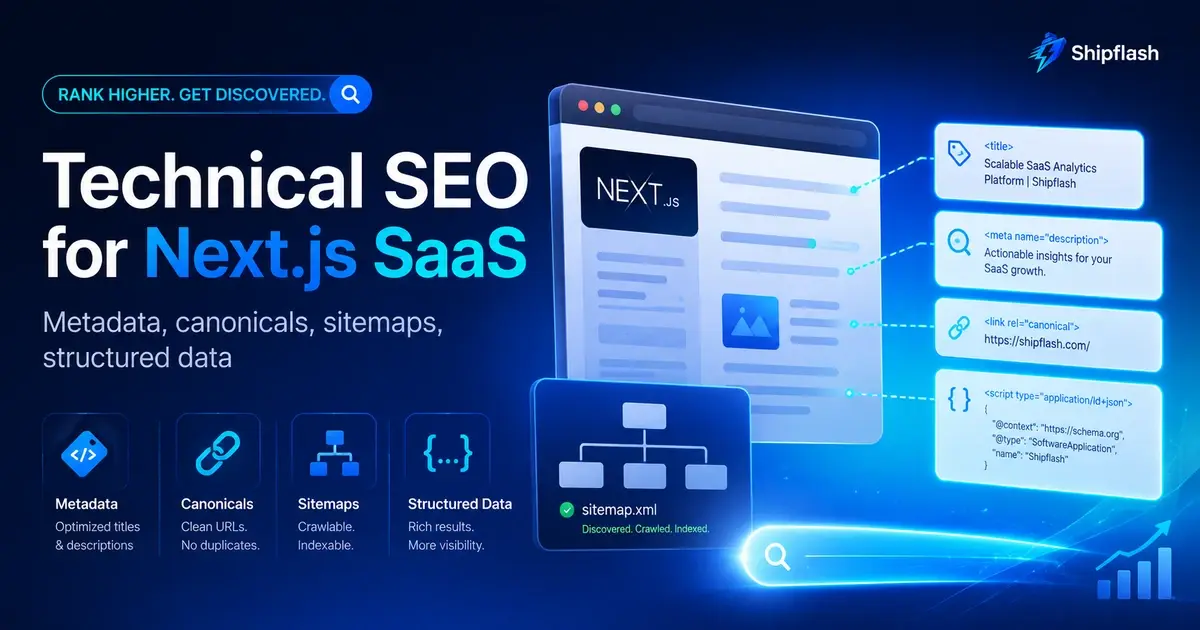
Your SaaS can have excellent content, a polished landing page, useful documentation, and dozens of carefully written blog posts—and still struggle to appear consistently in search.
The problem may have nothing to do with writing.
Google first has to discover the URL, access it, understand what the page represents, decide which version is canonical, render enough of its content, and determine whether the page should be indexed at all.
A mistake anywhere in that chain can make good content difficult to find.
This becomes especially easy to get wrong in a modern Next.js SaaS. A single application might contain a homepage, pricing pages, documentation, comparison pages, dynamically generated blog posts, authenticated dashboards, API endpoints, onboarding flows, preview deployments, account settings, internal search results, and temporary campaign URLs.
They should not all behave the same way in search.
Technical SEO for a Next.js SaaS is the system that determines which public pages search engines can discover, understand, index, consolidate, and present correctly.
It is not just a title and description object.
A reliable setup combines route policy, canonical URLs, metadata, robots controls, sitemaps, server-rendered content, meaningful HTTP responses, structured data, internal links, images, and ongoing validation.
That also matters beyond traditional blue-link search. Google says pages appearing as supporting links in AI Overviews or AI Mode still need to be indexed and eligible for normal Google Search; there is no separate technical requirement specifically for those AI features.
The goal of technical SEO is not to make every route indexable. It is to make the right pages unambiguous.
What Does Technical SEO Mean for a Next.js SaaS?
Technical SEO is the part of search optimization concerned with whether search engines can reliably crawl, render, interpret, and index a website.
For a Next.js SaaS, that normally means answering several questions for every public route:
Is this page supposed to appear in search?
What is its canonical URL?
Can a crawler reach its important content?
Does it return the right HTTP response?
Does its title and description accurately represent the page?
Should the URL appear in a sitemap?
Is there structured data that genuinely describes the visible content?
Can another useful page on the site link to it through a normal crawlable link?
The important word is system.
If these decisions are made independently inside dozens of page components, inconsistencies eventually appear. A pricing page receives the wrong canonical. A deleted article still returns 200. A dashboard accidentally becomes indexable. A sitemap claims every page changed today. Preview deployments point canonicals at themselves. Query parameters create duplicate URLs.
That is why technical SEO belongs in the architecture of a production SaaS rather than being applied as a publishing checklist at the end.
The broader principle is similar to the one behind a production-ready SaaS foundation: repetitive infrastructure becomes safer when the rules are centralized instead of being rediscovered for each feature.
Start With Route Indexability, Not Metadata
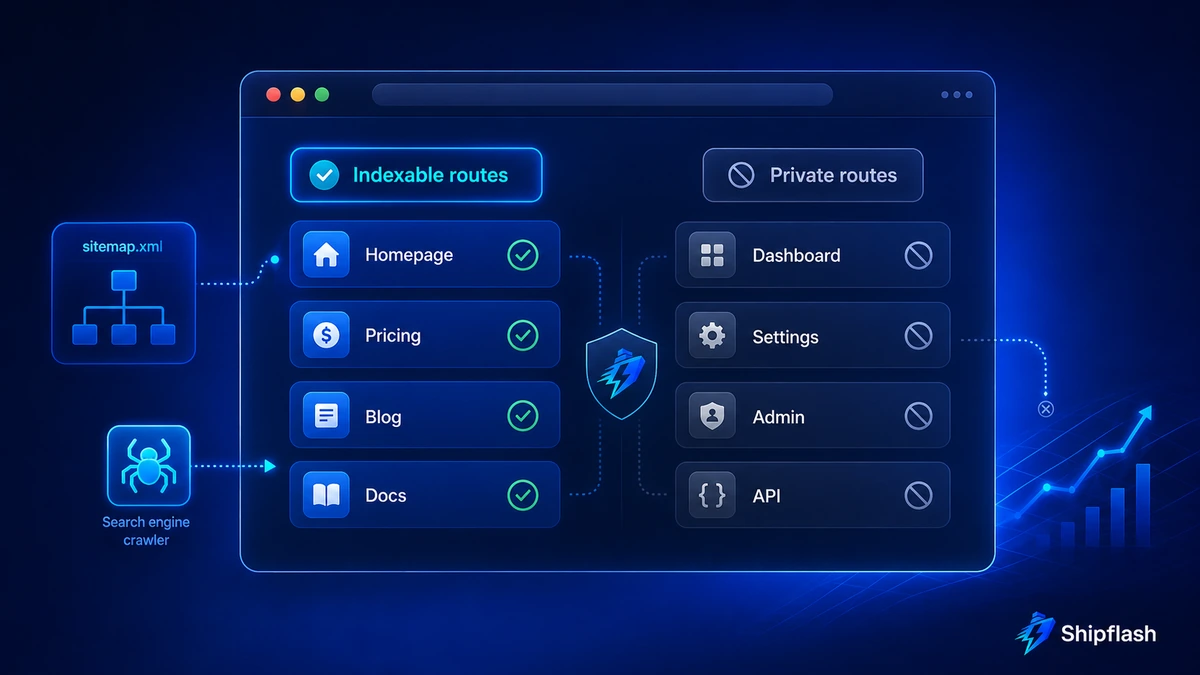
Before writing a single meta description, classify your routes.
A SaaS application usually contains both acquisition surfaces and application surfaces. Search engines generally need broad access to the first group and little or no index access to the second.
Consider a route policy like this:
| Route type | Example | Index? | Sitemap? | Typical canonical |
|---|---|---|---|---|
| Homepage | / | Yes | Yes | Self |
| Pricing | /pricing | Yes | Yes | Self |
| Features | /features | Yes | Yes | Self |
| Blog article | /blog/[slug] | Yes | Yes | Self |
| Documentation | /docs/[slug] | Usually | Usually | Self |
| Comparison page | /compare/shipflash-vs-x | Yes | Yes | Self |
| Public case study | /case-studies/[slug] | Yes | Yes | Self |
| Login | /login | Usually no | No | Self or omitted |
| Signup | /signup | Usually no | No | Self or omitted |
| Dashboard | /dashboard/* | No | No | None needed |
| Account settings | /settings/* | No | No | None needed |
| Internal search results | /search?q= | Usually no | No | Depends on design |
| API | /api/* | No | No | Not applicable |
| Preview environment | Vercel preview URL | No | No | Production URL if exposed |
There is no universal rule saying every login or signup page must be noindex. The decision should reflect whether the page provides standalone search value.
The important part is that the decision is explicit.
A production application should be able to answer:
route
→ indexability policy
→ canonical policy
→ sitemap eligibility
→ metadata strategy
→ structured-data strategy
When these rules agree with one another, crawlers receive one coherent story.
When they disagree, indexing becomes harder to reason about.
Canonical URLs Are an Architecture Decision
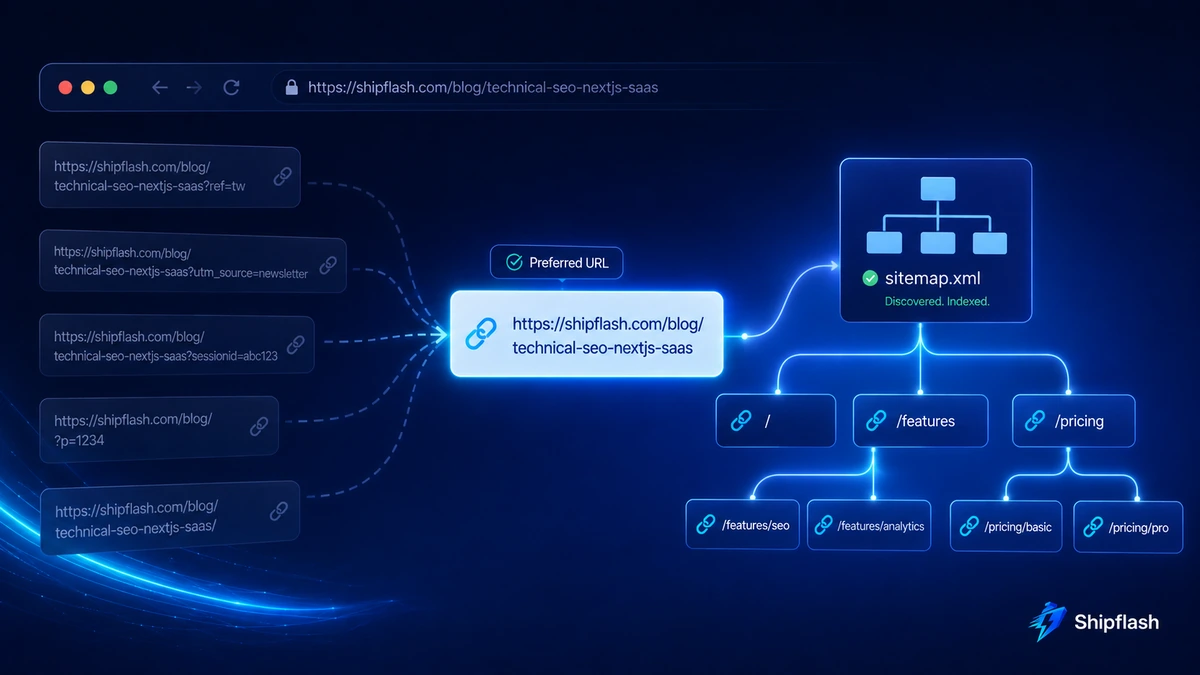
A canonical URL tells search engines which URL you prefer as the representative version when substantially similar content can be reached through more than one URL.
Google treats canonical declarations as signals rather than absolute commands. Redirects and rel="canonical" are strong signals, while sitemap inclusion is weaker; combining consistent signals increases the likelihood that your preferred URL is selected.
This matters because SaaS applications create duplicates surprisingly easily.
A page might be accessible as:
https://example.com/pricing
https://example.com/pricing/
https://example.com/pricing?ref=twitter
https://example.com/pricing?utm_source=newsletter
https://www.example.com/pricing
Those URLs may show exactly the same underlying product page.
Your SEO architecture should decide which one represents the resource.
Use metadataBase as the root of your URL system
Next.js provides metadataBase so relative metadata URLs can resolve against one canonical application origin.
A root layout can establish that boundary:
import type { Metadata } from "next";

export const metadata: Metadata = {
  metadataBase: new URL("https://shipflash.dev"),
  title: {
    default: "Shipflash",
    template: "%s | Shipflash",
  },
  description:
    "A production-ready SaaS foundation for founders and developers.",
};
Then an individual page can define a canonical path without rebuilding an absolute URL manually:
export const metadata: Metadata = {
  title: "Pricing",
  alternates: {
    canonical: "/pricing",
  },
};
For dynamic content, generate the canonical from the stable content identifier:
export async function generateMetadata({
  params,
}: {
  params: Promise<{ slug: string }>;
}): Promise<Metadata> {
  const { slug } = await params;
  const post = await getPublishedPost(slug);

  return {
    title: post.seoTitle ?? post.title,
    description: post.metaDescription,
    alternates: {
      canonical: `/blog/${post.slug}`,
    },
  };
}
The current Next.js Metadata API supports both static metadata and generateMetadata for route-dependent values.
The deeper rule is more important than the syntax:
Canonical URLs should be generated from your content model, not from whatever URL happened to arrive in the request.
Tracking parameters, referral codes, filter state, temporary query strings, and preview-domain hostnames should not quietly redefine the identity of your content.
Treat Metadata as Product Data, Not Decorative Copy
Metadata determines how a page describes itself to browsers, crawlers, social platforms, and other consumers.
In a Next.js App Router application, there are three useful layers:
| Layer | Best use |
|---|---|
| Root metadata | Site-wide defaults and branding |
| Static route metadata | Stable pages such as pricing or about |
| generateMetadata | Dynamic blog, docs, comparison, product, or case-study pages |
Next.js can generate the relevant head tags from these APIs, while file-based conventions can handle assets such as favicons, Open Graph images, robots files, and sitemaps.
A useful metadata model for content should normally have separate fields for:
type SeoFields = {
  seoTitle: string;
  metaDescription: string;
  canonicalPath: string;
  ogTitle?: string;
  ogDescription?: string;
  ogImage?: string;
  noIndex?: boolean;
};
Why separate these fields from the visible article title?
Because the jobs are different.
An article H1 may use personality and narrative framing:
Google Can’t Rank What It Can’t Understand:
Technical SEO for Next.js SaaS
The SEO title can be more search-oriented:
Next.js SEO: Technical SEO for SaaS in the App Router
Neither has to awkwardly imitate the other.
Google also does not promise to display your <title> exactly as written. Its title-link system can use the document title, prominent visual heading, Open Graph title, anchor text, and other page signals when constructing a result title. Keeping these elements descriptive and reasonably aligned therefore reduces ambiguity.
Metadata is a strong hint.
The page itself still has to make sense.
Robots.txt and Noindex Solve Different Problems
One of the most persistent technical SEO mistakes is treating robots.txt and noindex as interchangeable.
They are not.
| Control | Primary job |
|---|---|
| robots.txt | Controls crawler access to paths |
| robots meta tag | Controls indexing/serving behavior for an accessible page |
| Authentication | Protects private resources from unauthorized users |
| Sitemap | Helps discovery of URLs you want crawled |
| Canonical | Signals the preferred representative URL |
If you want Google to see a noindex instruction on a page, Google must generally be able to crawl that page and read the instruction.
Blocking a URL in robots.txt is therefore not a substitute for a proper indexability policy.
For genuinely private SaaS routes, authentication remains the real security boundary. Search directives are not access control.
Next.js supports a generated robots.ts file:
import type { MetadataRoute } from "next";

export default function robots(): MetadataRoute.Robots {
  return {
    rules: {
      userAgent: "*",
      allow: "/",
      disallow: [
        "/api/",
        "/dashboard/",
        "/settings/",
        "/admin/",
      ],
    },
    sitemap: "https://shipflash.dev/sitemap.xml",
  };
}
Next.js documents robots.ts as a metadata file convention for generating robots.txt.
Be careful not to over-engineer it.
A public blog article normally does not need a custom crawler rule. The highest-value work is making sure your public content stays crawlable while clearly private or low-value surfaces do not become part of your search footprint.
Your Sitemap Should Describe Reality
A sitemap is not a list of every route your application knows how to render.
It should represent canonical URLs that you actually want search engines to discover.
For a SaaS with dynamic content, that often means pulling directly from published records:
import type { MetadataRoute } from "next";

export default async function sitemap(): Promise<MetadataRoute.Sitemap> {
  const posts = await getPublishedPosts();

  const staticPages: MetadataRoute.Sitemap = [
    {
      url: "https://shipflash.dev",
    },
    {
      url: "https://shipflash.dev/pricing",
    },
    {
      url: "https://shipflash.dev/features",
    },
  ];

  const blogPages: MetadataRoute.Sitemap = posts.map((post) => ({
    url: `https://shipflash.dev/blog/${post.slug}`,
    lastModified: post.updatedAt,
  }));

  return [...staticPages, ...blogPages];
}
Two details matter here.
First, use absolute canonical URLs.
Second, make lastModified represent a real significant change to the resource.
Google explicitly says it ignores sitemap <priority> and <changefreq> values. It can use <lastmod> when the value is consistently accurate and represents a meaningful page update, such as a change to the main content, structured data, or links.
That means this is a poor implementation:
lastModified: new Date()
if the content has not actually changed.
Every sitemap request would claim that everything was freshly updated.
A more trustworthy system stores or derives meaningful timestamps from the content itself.
Split sitemaps when the content model grows
A small SaaS can comfortably use one sitemap.
Larger sites may benefit from separate sitemap groups:
/sitemap.xml
/sitemaps/pages.xml
/sitemaps/blog.xml
/sitemaps/docs.xml
/sitemaps/compare.xml
This separation makes large collections easier to inspect and measure.
Google limits an individual sitemap to 50,000 URLs or 50 MB uncompressed, and sitemap indexes can be used when content exceeds those boundaries.
Next.js also supports multiple sitemap generation through nested sitemap files or generateSitemaps.
Most early-stage SaaS products will never hit the raw URL limit.
Splitting can still be useful operationally because it lets you see whether your blog, documentation, or comparison content has a specific indexing problem instead of mixing everything together.
Make the Important Content Available Without Fragile Client Rendering
Next.js makes it easy to build highly interactive interfaces.
That does not mean every public page should depend on client-side JavaScript to create its primary content after load.
Google can render JavaScript, but its own guidance still notes that server-side rendering or pre-rendering is a good approach for users and crawlers, and not every bot necessarily executes JavaScript.
For public SaaS pages, the safest default is simple:
Use Server Components for the main content whenever possible.
Use Client Components for the parts that genuinely require browser state or interaction.
A pricing page might render its plans, headings, explanations, FAQs, and internal links on the server while using a small client component for a monthly/annual toggle.
A blog page should not render an empty shell and then fetch the article exclusively in useEffect.
A documentation page should not hide its meaningful content behind an interaction that a crawler may never perform.
Technical SEO works best when the useful page already exists in the HTML response or can be reliably rendered without requiring a fragile chain of client-side operations.
Status Codes Matter as Much as the Page Design
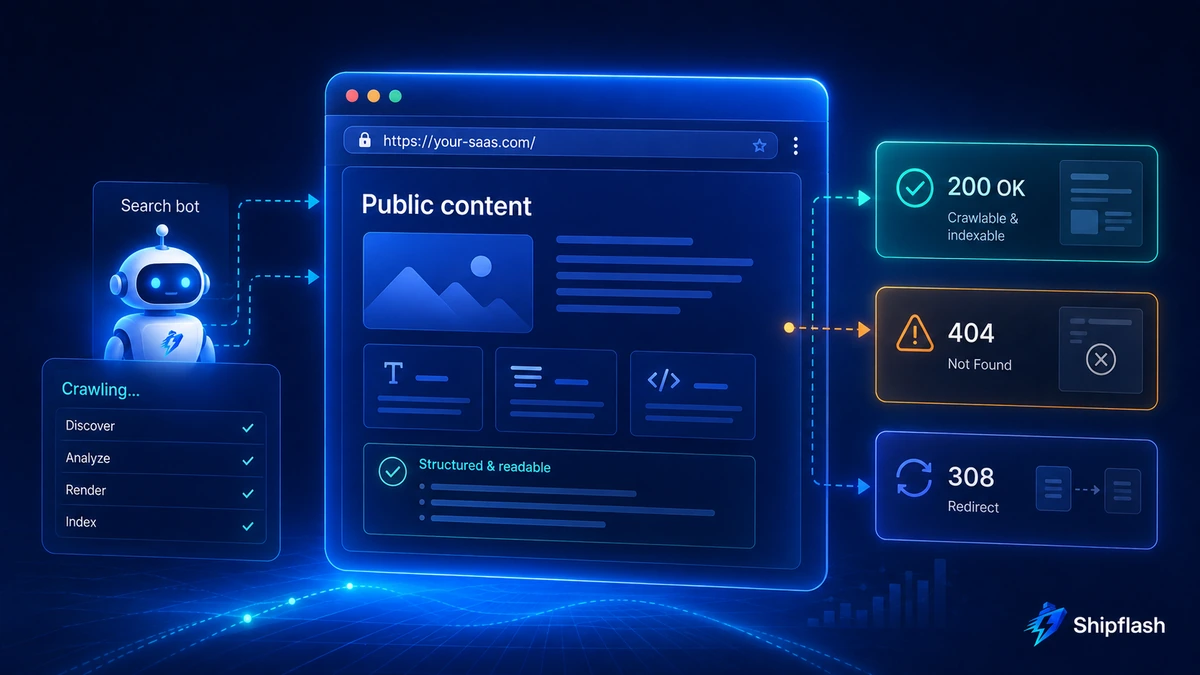
Suppose someone visits:
/blog/article-that-does-not-exist
The page displays:
Article not found.
But the server responds:
200 OK
Humans recognize an error.
A crawler receives a successful resource.
Google refers to pages that look like errors while returning a success status as soft 404s, and these pages can be excluded from Search.
Next.js provides notFound() and not-found conventions for missing resources. Its exact status behavior can vary in streaming situations, so production routes should be tested rather than assumed correct.
Redirects deserve the same care.
If an old URL has permanently moved:
/blog/old-slug
→
/blog/new-slug
use a permanent redirect.
Next.js provides permanentRedirect, which normally emits a 308 Permanent Redirect outside special contexts. Temporary redirect() behavior is different and should not be used merely because it is convenient.
The crawler should be able to distinguish:
working page
missing page
temporarily moved page
permanently moved page
unauthorized resource
server failure
without interpreting the visual design.
Structured Data Should Describe the Page, Not Decorate It
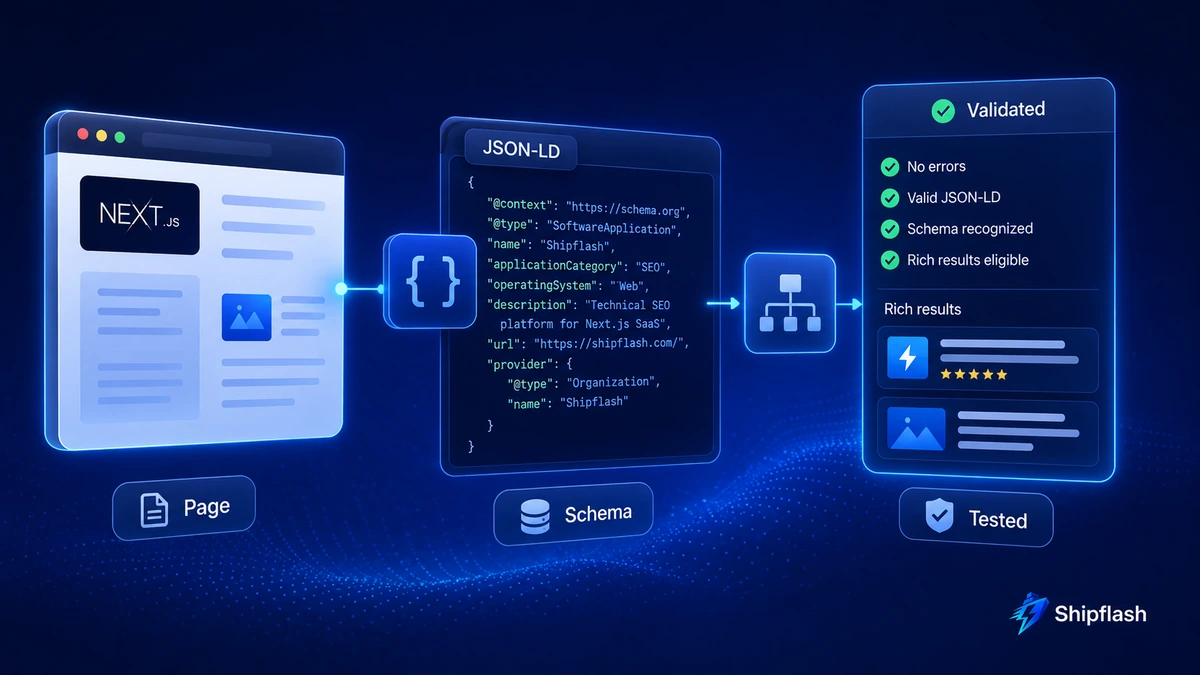
Structured data gives machines explicit information about what a page represents.
Google describes structured data as standardized information that helps it understand page content and can make pages eligible for certain rich-result experiences. Correct markup does not guarantee that a rich result will actually appear.
For a SaaS site, a practical schema map might look like this:
| Surface | Possible structured data |
|---|---|
| Homepage | Organization, possibly relevant website/entity markup |
| SaaS/product page | SoftwareApplication when the page satisfies applicable guidance |
| Blog article | Article / appropriate article subtype |
| Hierarchical content | BreadcrumbList |
| Comparison article | Usually Article plus appropriate breadcrumbs |
| Documentation | Depends on actual content; do not invent a rich-result type |
The rule is simple:
Markup what the page genuinely contains.
Do not attach schema because the name sounds useful.
Google maintains its own supported structured-data gallery and recommends relying on Search Central documentation for Google-specific behavior rather than assuming every schema.org type produces a Google Search feature.
Render JSON-LD safely in Next.js
Next.js currently recommends rendering JSON-LD through a <script type="application/ld+json"> element.
Because ordinary JSON.stringify() does not sanitize potentially dangerous strings, its documentation recommends escaping characters such as < when untrusted or dynamic values can reach the payload.
A reusable component might look like this:
type JsonLdProps = {
  data: Record<string, unknown>;
};

export function JsonLd({ data }: JsonLdProps) {
  const json = JSON.stringify(data).replace(/</g, "\\u003c");

  return (
    <script
      type="application/ld+json"
      dangerouslySetInnerHTML={{ __html: json }}
    />
  );
}
Then a blog article can create its data from the same source used to render the page:
const articleJsonLd = {
  "@context": "https://schema.org",
  "@type": "Article",
  headline: post.title,
  description: post.excerpt,
  datePublished: post.publishedAt,
  dateModified: post.updatedAt,
  mainEntityOfPage: `https://shipflash.dev/blog/${post.slug}`,
  author: {
    "@type": "Person",
    name: post.author.name,
  },
};
The visible article and machine-readable description should agree.
If the schema says the article was written by one person while the page says another, you have created ambiguity instead of clarity.
Do not add FAQ schema just because you have an FAQ section
FAQ sections are useful for readers and can help an article answer specific queries clearly.
That does not mean every SaaS blog should automatically add FAQPage structured data.
Google reduced regular FAQ rich-result visibility to well-known authoritative government and health sites. For ordinary SaaS publishers, adding FAQ structured data solely to chase expanded SERP results provides little reason to expect a visible FAQ treatment.
Write the FAQ because the answers are useful.
Use structured data only where it accurately represents a supported page type and has a defensible purpose.
Internal Linking Is Part of Technical Discovery
A sitemap helps discovery, but it should not be the only path to your important content.
Google recommends standard crawlable links to help it discover pages.
For a SaaS site, this means public content should form a real information architecture.
Your production-readiness content can link to deeper implementation guides. A scalability guide can point readers toward related performance topics. A technical SEO guide can connect back to the broader launch process.
For example, technical SEO should be treated as one release dimension inside a broader Next.js SaaS production checklist, not as a replacement for security, billing, testing, monitoring, and operational readiness.
Performance also overlaps with crawlability and user experience, but scaling requires a much wider architecture than SEO alone. If database performance, caching, serverless concurrency, or connection limits become the bottleneck, see the Shipflash guide to scaling Next.js and Supabase SaaS.
Notice that those links describe what the reader will find.
That is more useful than anchors such as:
click here
read more
this article
learn more
Internal links should help people navigate concepts.
Crawler discovery is a benefit of building that useful structure correctly.
Open Graph Images Are Not Google Rankings, but They Still Matter
SEO does not stop when a result reaches Google.
People share URLs in Slack, Discord, LinkedIn, X, WhatsApp, communities, and private messages. A poor social preview can weaken the same distribution that eventually produces branded searches, referrals, links, and returning users.
Next.js supports route-level opengraph-image and twitter-image files as either static images or dynamically generated routes.
For a dynamic blog, that means each article can produce a consistent preview without manually exporting dozens of assets.
The important properties are straightforward:
clear title
recognizable brand
readable typography
correct aspect ratio
relevant visual
stable URL
appropriate alt description
Do not confuse OG metadata with image SEO, though.
For images you want Google to understand directly, Google recommends standard HTML image elements, relevant surrounding context, useful alt text, and accessible image URLs. It can discover normal <img src> images but does not treat CSS background images the same way for image indexing.
Technical SEO for AI Search Starts With Normal Search Eligibility
AEO and GEO often get presented as if they require a completely separate website architecture.
For Google’s own generative search experiences, that is misleading.
Google says there are no additional technical requirements for appearing as a supporting link in AI Overviews or AI Mode beyond being indexed, eligible for a Search snippet, and following the usual Search requirements and best practices.
That does not mean content structure is irrelevant.
Pages become easier for both humans and retrieval systems to interpret when they contain:
clear definitions,
descriptive headings,
direct answers near the relevant question,
specific examples,
stable entities and terminology,
evidence and primary sources,
and enough context that a passage still makes sense when retrieved independently.
That is not an excuse to manufacture hundreds of artificial Q&A blocks.
It is good explanatory writing.
Google’s people-first guidance explicitly recommends substantial, complete information, original analysis, clear sourcing, and content that leaves readers feeling they have learned enough to accomplish their goal. It also says Google does not have a preferred word count.
The technical side of GEO therefore looks remarkably familiar:
crawlable
→ indexable
→ understandable
→ well structured
→ trustworthy
→ useful
There is no geo.ts file to add to your App Router.
Build SEO Around the Public Content Model
A strong implementation makes SEO properties part of content publishing.
Imagine a CMS record:
type PublicPage = {
  slug: string;
  title: string;
  excerpt: string;
  seoTitle: string;
  metaDescription: string;
  publishedAt: Date;
  updatedAt: Date;
  status: "draft" | "published" | "archived";
  canonicalPath: string;
  ogImagePath: string;
};
One record can then drive:
page content
metadata
canonical
sitemap URL
sitemap lastmod
Open Graph output
Article structured data
internal publishing state
This is substantially safer than maintaining those pieces independently.
If an article becomes a draft, one publishing transition can remove it from the public query used by the page and sitemap.
If its slug changes, the old slug can be registered as a redirect.
If its content receives a significant update, updatedAt changes and the sitemap follows.
If the SEO title changes, the visible page can remain untouched.
The content system becomes the source of truth.
A Practical SaaS Search Architecture
A small production SaaS does not need a complicated SEO platform.
It needs predictable behavior.
| Surface | Rendering | Index policy | Sitemap | Schema | Notes |
|---|---|---|---|---|---|
| Homepage | Server/static | Index | Yes | Organization | Primary brand entity |
| Pricing | Server/static | Index | Yes | Only if appropriate | Stable canonical |
| Features | Server/static | Index | Yes | Page-dependent | Descriptive copy |
| Docs | Server/static/dynamic | Index selected docs | Yes | Page-dependent | Avoid thin generated routes |
| Blog | Server/static/dynamic | Published only | Yes | Article | Content-derived dates |
| Comparisons | Server/static | Index quality pages | Yes | Article/Breadcrumb as applicable | Avoid programmatic thin pages |
| Login/signup | Server/client | Usually noindex | No | No | Conversion utility, not search content |
| Dashboard | Authenticated | No | No | No | Security boundary is auth |
| Admin | Authenticated | No | No | No | Never rely on robots for security |
| API | Server | No | No | No | Machine endpoint |
| Preview | Any | No | No | No | Prevent accidental indexation |
The architecture is intentionally boring.
Boring is valuable when the alternative is debugging why 15,000 unwanted URLs appeared in Search Console.
How to Diagnose a Page That Is Not Appearing in Google
When a page does not rank, it is tempting to immediately rewrite the content.
First establish whether Google can actually process the page correctly.
A useful diagnostic sequence is:
- Open the exact canonical URL and verify that it returns the expected content without authentication, browser-only state, or client-side failure.
- Inspect the rendered HTML for the title, canonical, robots directive, headings, important body content, and crawlable links.
- Confirm that the server returns the correct HTTP status.
- Check that robots.txt does not block required resources or the URL itself.
- Confirm that the page is not accidentally noindex.
- Verify that the canonical points to the intended URL and that no stronger conflicting signals exist.
- Confirm that the canonical URL appears in the appropriate sitemap and that its lastmod is truthful.
- Use Google Search Console URL Inspection to compare the declared canonical, Google-selected canonical, indexing state, and rendered page.
- Validate applicable structured data with Google’s Rich Results Test.
- Only after the technical path is healthy should you assume that the remaining problem is relevance, quality, competition, authority, or search demand.
Google specifically recommends URL Inspection when diagnosing canonical and indexing issues, and structured-data implementations should be tested with the Rich Results Test.
This ordering saves time.
Content changes cannot fix an accidental noindex.
More backlinks cannot repair a canonical pointing at the wrong domain.
A better headline does not make a private route crawlable.
Put Technical SEO Into CI
The best time to find an SEO regression is before deployment.
Important public routes can be tested just like authentication, billing, or API behavior.
A lightweight Playwright test could verify critical metadata:
import { test, expect } from "@playwright/test";

test("pricing page exposes canonical SEO metadata", async ({ page }) => {
  const response = await page.goto("/pricing");

  expect(response?.status()).toBe(200);

  await expect(page).toHaveTitle(/pricing/i);

  await expect(
    page.locator('link[rel="canonical"]')
  ).toHaveAttribute(
    "href",
    "https://shipflash.dev/pricing"
  );

  await expect(
    page.locator('meta[name="robots"]')
  ).not.toHaveAttribute("content", /noindex/i);
});
You can also test invariants rather than every word.
For example:
every published blog post has one canonical
every canonical uses the production origin
draft posts are absent from the sitemap
dashboard routes do not appear in the sitemap
every sitemap URL returns a successful public page
deleted slugs return 404 or permanent redirects
JSON-LD parses as valid JSON
SEO titles are never empty
OG images resolve successfully
This belongs naturally beside the other launch gates in a production-ready Next.js SaaS checklist.
SEO regressions are production regressions when acquisition depends on search.
Common Next.js SaaS SEO Mistakes
| Mistake | Why it causes trouble | Better approach |
|---|---|---|
| Adding metadata but never defining route indexability | Private or low-value routes leak into search | Create a route policy first |
| Canonical built from the incoming request | Tracking and preview URLs become identity signals | Generate from stable production content |
| Putting every route in the sitemap | Search engines receive low-value/private URLs | Include canonical indexable URLs only |
| Setting every lastmod to now | Sitemap freshness stops representing reality | Use significant content update dates |
| Adding priority and changefreq everywhere | Google ignores them | Focus on correct URLs and lastmod |
| Blocking a page in robots and expecting Google to read noindex | The crawler may never see the directive | Use the correct control for the job |
| Client-only primary content | Rendering becomes unnecessarily dependent on JavaScript | Server-render public content where practical |
| Returning 200 for missing content | Creates soft-404 behavior | Return meaningful status codes |
| Creating schema for every possible type | Markup stops accurately describing visible content | Use supported, relevant schema only |
| Publishing thousands of templated comparison pages | Technical correctness cannot compensate for thin value | Publish substantial differentiated pages |
| Letting previews use production SEO config | Temporary domains may become crawlable duplicates | Explicitly disable preview indexation |
| Treating SEO as a launch-only task | Future features silently break assumptions | Add automated regression checks |
Frequently Asked Questions
Is Next.js good for SEO?
Yes. Next.js provides server rendering, static generation, a Metadata API, sitemap and robots conventions, Open Graph image generation, redirects, structured-data support through normal React rendering, and other primitives needed for a technically sound public site.
SEO performance still depends on how those primitives are used. A Next.js application can be technically excellent or badly misconfigured.
Does Next.js automatically handle SEO?
It handles many implementation mechanics, but not your SEO decisions.
Next.js cannot decide which SaaS routes deserve indexing, what the canonical content model should be, whether two pages are duplicates, whether an article is substantial, which schema accurately represents a page, or whether a sitemap timestamp is truthful.
Those remain product and architecture decisions.
Should every Next.js page have a canonical URL?
Every important indexable public page should have a clear canonical strategy.
A self-referencing canonical is often useful for stable public content because it states the preferred URL directly. Authenticated application routes do not require the same SEO treatment because they should not be search landing pages in the first place.
Should I add every page to sitemap.ts?
No.
Your sitemap should generally contain canonical URLs you want search engines to discover and consider for indexing.
Dashboard pages, admin tools, API routes, drafts, temporary URLs, most internal search results, and other non-search surfaces do not belong there.
Do I need separate SEO optimization for AI Overviews or AI Mode?
Google currently says no additional technical requirement is needed specifically for its AI features. A supporting page still needs to be indexed, eligible for Search snippets, and follow normal Google Search requirements and best practices.
Clear explanations, useful structure, strong sourcing, and original depth are still valuable because they improve the underlying content.
Does structured data improve rankings?
Structured data helps search engines understand what a page represents and can make eligible pages available for certain rich-result experiences.
Google does not state that simply adding schema guarantees higher ranking, and valid structured data does not guarantee a rich result.
Use it to describe real content accurately, not as a ranking hack.
Should I use priority and changefreq in a Next.js sitemap?
Not for Google.
Google says it ignores both values. Accurate canonical URLs and truthful <lastmod> values are more useful.
How often should my sitemap lastmod change?
When the page changes significantly.
A meaningful update may include changes to primary content, structured data, or important links. Do not automatically change every page to the current timestamp whenever the sitemap is generated.
Technical SEO Should Make Your SaaS Easier to Understand
The best technical SEO setup is not the one with the most configuration.
It is the one where every public URL has an obvious purpose.
A crawler can reach it.
The server returns the right status.
The main content is available.
The metadata describes the page.
The canonical identifies the preferred URL.
The sitemap reflects reality.
Structured data describes visible entities.
Relevant pages link to one another.
Private product surfaces stay private.
And deployment checks prevent those rules from silently breaking later.
That foundation is valuable whether a visitor discovers your SaaS through a traditional Google result, an image result, a shared link, an AI-generated search experience, or a future discovery interface.
Google cannot rank what it cannot reliably understand.
And your engineering team cannot maintain SEO that exists as dozens of unrelated exceptions.
Treat search visibility like the rest of production architecture: define the rules once, connect them to the content model, test the important invariants, and keep the system predictable as the product grows.