
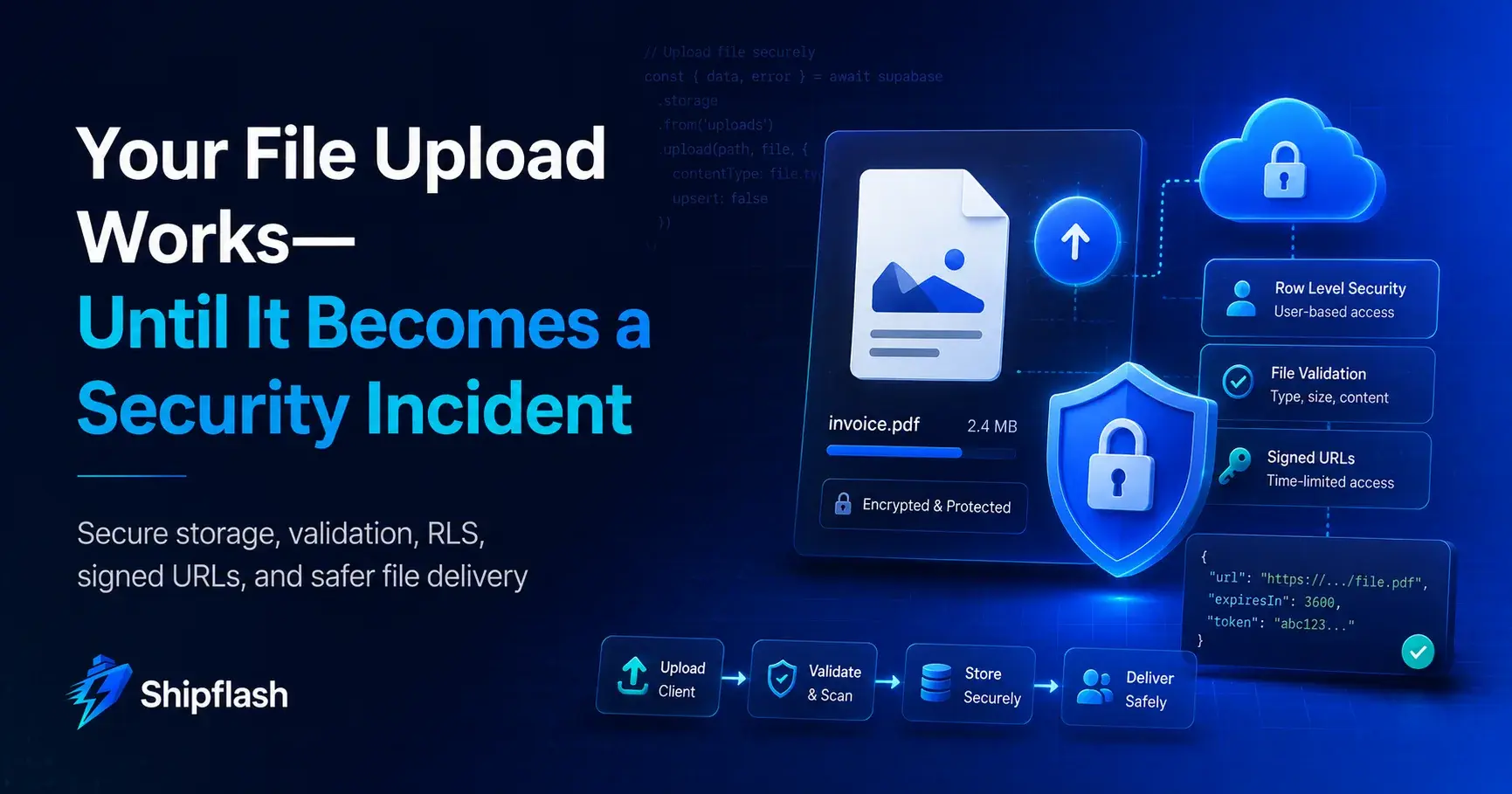
A file picker, an upload button, and one call to object storage can make file uploads feel finished.
They are not.
The difficult part begins after the first successful upload.
Can one user retrieve another user's document by changing a path? Can someone upload a 500 MB file to an endpoint intended for profile pictures? What happens when a browser claims an executable is an image? Can a failed upload leave abandoned objects that cost money forever? Can a customer continue opening a sensitive document through an old shared URL after their access changes?
Those are not edge cases once a SaaS accepts customer-controlled files.
For a production Next.js application using Supabase, secure file storage should be treated as a lifecycle with authorization boundaries, not as a single upload() call.
The short answer: A secure upload architecture controls who may upload, what may be uploaded, where the object is stored, who may retrieve it, what happens before it becomes trusted, how failures are recovered, and how the object is eventually replaced or deleted.
Supabase Storage gives you useful primitives for this architecture: private and public buckets, Postgres Row Level Security, bucket-level MIME and size restrictions, signed URLs, standard uploads, resumable TUS uploads, and authenticated downloads. But those primitives still need to be combined around the actual risk of your product.
If the authorization layer itself is unfamiliar, start with Shipflash's guide to Supabase Row Level Security for a Next.js SaaS. The same principle applies here: authentication tells you who the user is; authorization decides whether that identity may touch a specific resource.
Why File Uploads Create More Risk Than Normal Form Data
Normal form input usually becomes structured data. A name becomes text. A preference becomes an enum. A quantity becomes an integer.
A file is different.
It can be several bytes or several gigabytes. It can contain active content. Its extension can disagree with its contents. Its metadata can lie. Another component may parse it later. It may be delivered directly to other customers. It can consume storage, bandwidth, CPU, queue capacity, and third-party scanning costs.
OWASP therefore recommends defense in depth for file uploads: allow only required file types, distrust the client-provided Content-Type, generate storage filenames rather than trusting user-controlled names, enforce file-size limits, authorize uploaders, and inspect potentially dangerous content when the risk warrants it.
The important architectural lesson is that upload acceptance and file trust are two different decisions.
Your application might accept a PDF into an isolated location so that it can be scanned. That does not mean the PDF should immediately become downloadable by another customer.
That distinction becomes especially important for attachments, identity documents, support uploads, generated exports, resumes, invoices, contracts, and anything that another backend service will parse.
Start by Classifying the File, Not by Choosing an Upload API
Before deciding whether to use a Next.js Route Handler, a direct Supabase upload, or TUS, classify what the application is storing.
An avatar and a confidential contract should not automatically use the same policy.
| File type | Typical exposure | Recommended default |
|---|---|---|
| Public avatar | Intentionally public after approval | Separate public bucket or controlled public delivery |
| Product screenshot | Often public | Public bucket when disclosure is intentional |
| Customer attachment | Customer-specific | Private bucket |
| Invoice or receipt | Sensitive account data | Private bucket |
| Export archive | Potentially highly sensitive | Private bucket with short-lived access |
| Imported CSV | Untrusted input that will be parsed | Private quarantine before processing |
| PDF or document attachment | Potentially malicious/untrusted | Private quarantine when risk justifies scanning |
| Internal operational file | Staff-restricted | Private bucket with server-side authorization |
Supabase buckets are private by default. In a private bucket, downloads remain subject to authorization through RLS or can be exposed temporarily through a signed URL. Public buckets intentionally make retrieval public to anyone who has the asset URL, although mutations such as uploads and deletes still have access controls.
That makes private storage a sensible default whenever you would be uncomfortable with the object's URL appearing in a public chat, browser history sync, analytics event, support screenshot, or leaked application log.
A Production File Upload Has More Than One State
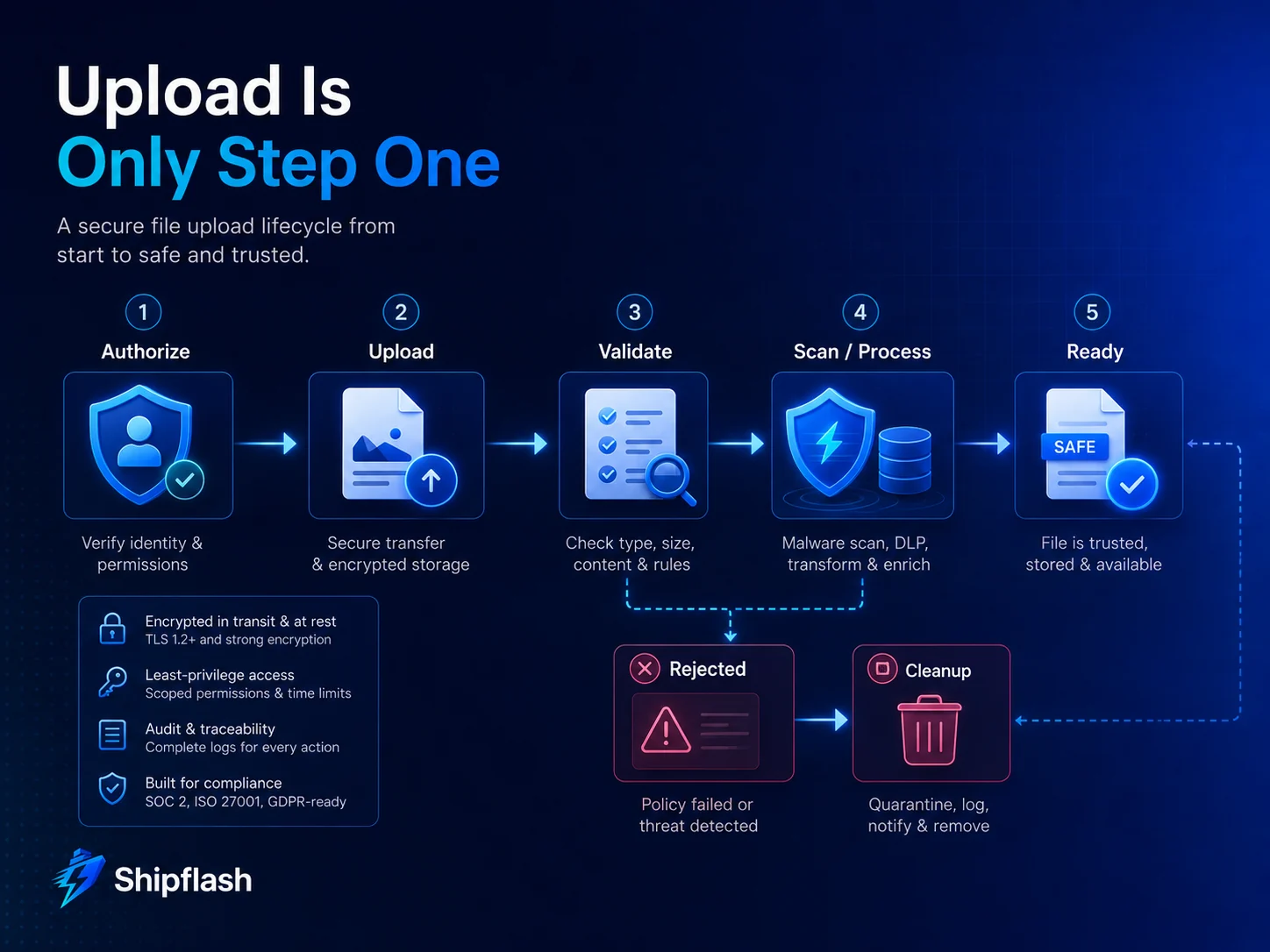
One of the easiest mistakes is modeling an uploaded object as either "exists" or "doesn't exist."
A production system usually needs more information.
Consider an import feature where a customer uploads a CSV. The browser successfully transfers the object, but parsing later fails. Or an attachment reaches storage, but malware scanning has not completed. Or an image is accepted but still needs resizing.
The object exists, but it is not ready.
A small database record can make that lifecycle explicit:
create type upload_status as enum (
  'pending_upload',
  'uploaded',
  'processing',
  'ready',
  'rejected',
  'deleted'
);

create table public.upload_assets (
  id uuid primary key default gen_random_uuid(),
  user_id uuid not null references auth.users(id),
  bucket text not null,
  object_path text not null unique,
  original_name text,
  declared_mime_type text,
  detected_mime_type text,
  size_bytes bigint,
  status upload_status not null default 'pending_upload',
  rejection_reason text,
  created_at timestamptz not null default now(),
  ready_at timestamptz
);
The Storage object contains the bytes.
The database record contains the application meaning of those bytes.
That separation gives you somewhere to store processing status, ownership, quotas, audit information, validation results, or the relationship between the object and a domain entity.
More importantly, your application can refuse to use a file until its state becomes ready.
An uploaded object should not silently become trusted merely because storage returned 200 OK.
Choose the Upload Path Based on Size, Trust, and Processing Requirements
There is no single best upload path for every SaaS.
A practical architecture normally uses one of three patterns.
| Pattern | Best fit | Primary tradeoff |
|---|---|---|
| Browser → Supabase Storage | Small/medium files with straightforward authorization | Less opportunity to inspect bytes before storage |
| Browser → signed upload → Supabase | Direct transfer while server controls destination | Pre-upload metadata validation still cannot prove file contents |
| Browser → Next.js → Storage | Smaller files requiring synchronous inspection/transformation | Your application server handles the file bandwidth and memory |
| Browser → TUS/Supabase | Larger files or unstable connections | More upload-state and retry complexity |
Next.js Route Handlers use the Web Request and Response APIs and can read FormData, so they are useful when your application genuinely needs a server-controlled request boundary.
But proxying every large upload through your Next.js application means the bytes travel through infrastructure whose primary purpose is serving application requests.
For direct Supabase uploads, the standard upload method is designed for smaller files. Supabase currently recommends resumable TUS uploads for files above roughly 6 MB or when network stability and progress recovery matter. TUS allows an interrupted transfer to continue instead of restarting from byte zero.
That gives us a useful rule:
Keep authorization in your application, but do not force all file bytes through your application when object storage can safely receive them directly.
Secure Direct Uploads by Controlling the Destination First
Imagine a profile attachment feature.
The browser asks your backend for permission to upload. Your backend authenticates the request, checks the account's quota and business rules, generates a non-guessable destination, records a pending asset, and returns a signed upload capability.
The browser then uploads directly to Storage.
A simplified Next.js Route Handler could look like this:
import { NextResponse } from "next/server";
import { randomUUID } from "node:crypto";

const MAX_FILE_SIZE = 5 * 1024 * 1024;

const ALLOWED_TYPES = new Map([
  ["image/jpeg", "jpg"],
  ["image/png", "png"],
  ["application/pdf", "pdf"],
]);

export async function POST(request: Request) {
  const user = await requireAuthenticatedUser();

  const body = await request.json();

  const size = Number(body.size);
  const declaredType = String(body.type ?? "");

  const extension = ALLOWED_TYPES.get(declaredType);

  if (!extension) {
    return NextResponse.json(
      { error: "Unsupported file type" },
      { status: 400 }
    );
  }

  if (!Number.isFinite(size) || size <= 0 || size > MAX_FILE_SIZE) {
    return NextResponse.json(
      { error: "Invalid file size" },
      { status: 400 }
    );
  }

  const assetId = randomUUID();
  const objectPath = `${user.id}/${assetId}.${extension}`;

  await createPendingAsset({
    id: assetId,
    userId: user.id,
    objectPath,
    declaredMimeType: declaredType,
    expectedSizeBytes: size,
  });

  const { data, error } = await supabaseAdmin.storage
    .from("user-uploads")
    .createSignedUploadUrl(objectPath);

  if (error) {
    throw error;
  }

  return NextResponse.json({
    assetId,
    objectPath,
    token: data.token,
    path: data.path,
  });
}
Supabase signed upload URLs are currently valid for two hours. They allow a client to upload to the approved path without receiving your privileged server credential.
Notice what the endpoint does not do.
It does not trust a customer-supplied destination such as:
/users/another-user-id/private-document.pdf
The server generates the path.
It also does not expose a Supabase service-role or secret key to the browser. Supabase explicitly warns that service-role and secret keys bypass RLS and must remain on trusted backend infrastructure.
Preflight validation is useful, but it is not file validation
The type and size sent before the upload improve the user experience and let the server reject obviously invalid requests early.
They do not establish that the bytes are safe.
A malicious client can manufacture those values.
If the file type carries meaningful security risk, verify the actual object after upload before changing its state to ready.
Use Storage RLS as a Second Authorization Boundary
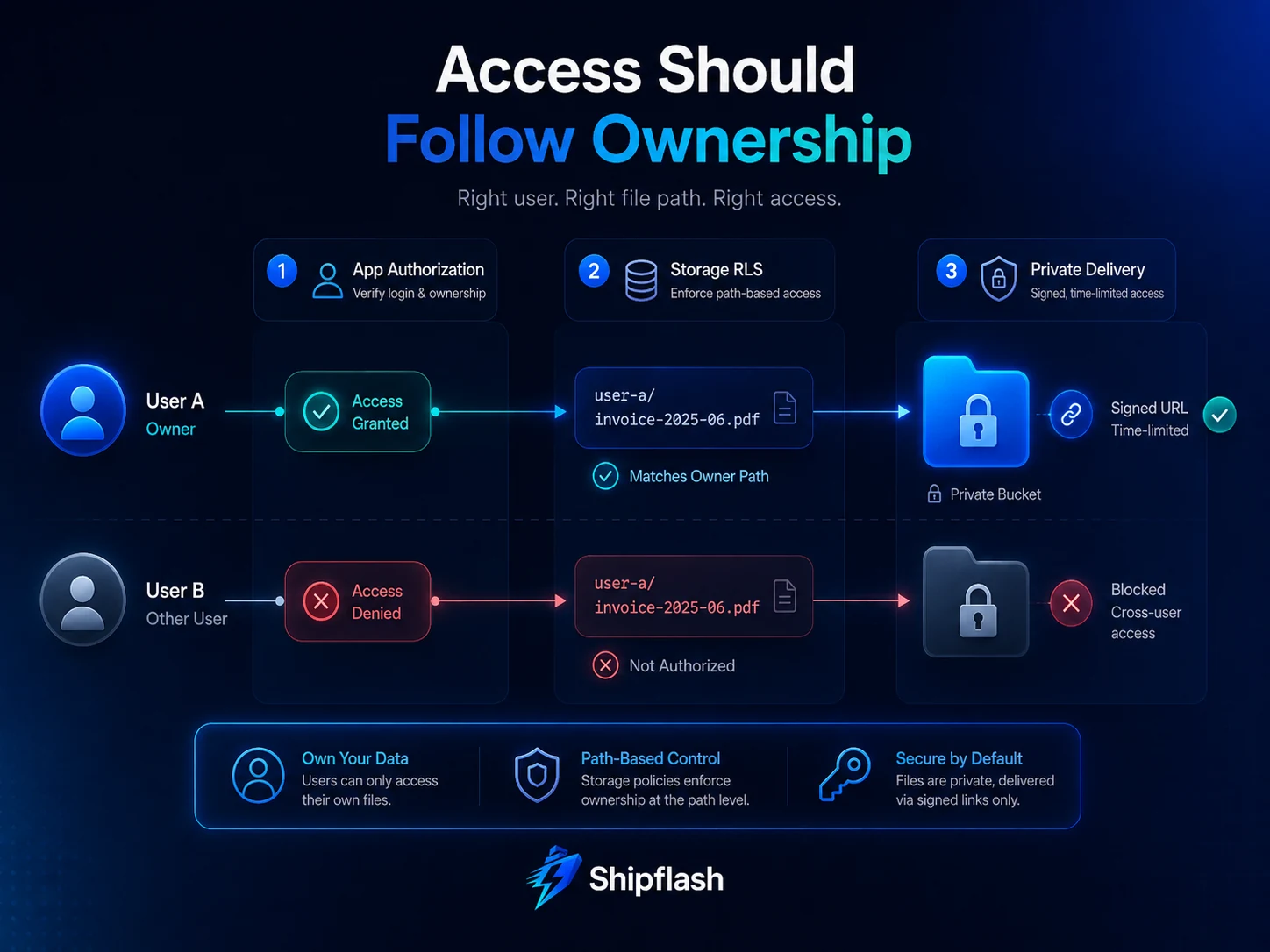
Application checks are necessary because business authorization often needs more context than a Storage policy should contain.
But application checks should not be the only thing standing between one user and another user's files.
Supabase Storage integrates with Postgres RLS on storage.objects. Upload operations can be constrained with INSERT policies, while reading, updating, and deleting objects use their respective policies.
A simple path convention makes those policies easier to reason about:
user-uploads/
  <user-id>/
    <generated-object-id>.pdf
You can then allow authenticated users to upload only beneath their own folder:
create policy "Users upload into their own folder"
on storage.objects
for insert
to authenticated
with check (
  bucket_id = 'user-uploads'
  and (storage.foldername(name))[1] = (select auth.uid()::text)
);
Supabase provides storage.foldername(), storage.filename(), and storage.extension() helpers specifically to make Storage policies easier to express.
For reading an owned object, you might instead use the object's automatically populated owner_id:
create policy "Users read their own uploads"
on storage.objects
for select
to authenticated
using (
  bucket_id = 'user-uploads'
  and owner_id = (select auth.uid()::text)
);
Supabase derives object ownership from the authenticated JWT when the object is created. Ownership alone does not grant access, but owner_id can be used inside your policies to enforce it.
This matters because browser code is not your security boundary.
Someone can ignore your UI and call Storage directly.
A correctly scoped RLS policy still applies.
Avoid Upserting Customer Uploads by Default
Overwriting a path sounds convenient:
await supabase.storage
  .from("user-uploads")
  .upload(path, file, {
    upsert: true,
  });
It also creates more state to reason about.
Supabase requires additional SELECT and UPDATE access when upserting, and its Storage documentation recommends avoiding overwrites when possible because cached content may remain stale while CDN changes propagate.
A safer pattern for most customer-generated content is:
old path:
user-id/f9c2...a1.png

new path:
user-id/1a38...77.png
Upload the replacement under a new generated key.
Verify it.
Update your database record to reference the new object.
Then remove the previous object.
This creates a cleaner transition and makes accidental collisions much less likely.
The original filename can still be stored as metadata for display:
Customer sees:
quarterly-report.pdf

Storage receives:
9b1329aa-a2b3-4eac-89ef-18fa384e6c91.pdf
Those are two separate concerns.
Validate More Than the File Extension
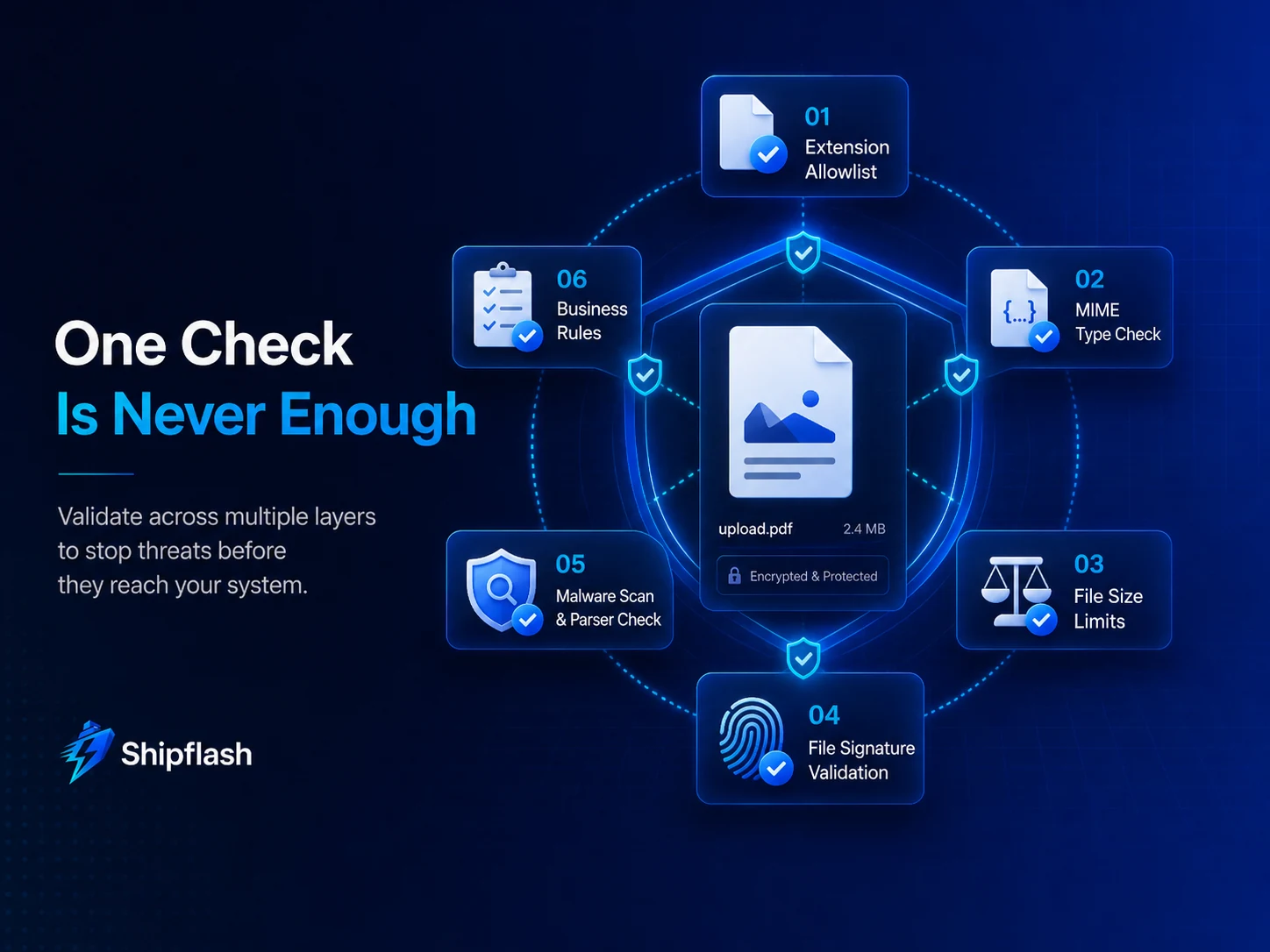
A filename ending in .png does not prove that the object is a safe PNG.
A header claiming:
Content-Type: image/png
does not prove it either.
OWASP specifically recommends treating the client-provided MIME type as untrusted and combining multiple controls rather than treating one check as sufficient.
For a production upload path, think of validation as several independent questions:
| Validation | Question it answers |
|---|---|
| Extension allowlist | Is this file category needed by the product? |
| Declared MIME check | Does the request roughly match what the UI expected? |
| File signature | Do the leading bytes resemble the expected format? |
| Size limit | Can this object consume unreasonable resources? |
| Parser validation | Can the expected library successfully interpret the file? |
| Re-encoding | Can an image be decoded and rewritten into a controlled format? |
| Malware scan | Does a security scanner identify known malicious content? |
| Business validation | Does the file make sense for this feature? |
No single row is a universal security solution.
The combination depends on risk.
An avatar endpoint that accepts only JPEG and PNG images can be much stricter than a document-management product whose core feature requires many document formats.
That is a feature, not a limitation.
The narrower your legitimate file set is, the more confidently you can reject everything else.
Enforce Limits at More Than One Layer
Checking file size in React is good UX.
It is not a security control.
A malicious client does not need your React application.
At minimum, the backend that authorizes the upload should check the requested size, and Storage should have appropriate restrictions of its own.
Supabase buckets can restrict both accepted MIME types and maximum file size:
await supabase.storage.createBucket("avatars", {
  public: false,
  allowedMimeTypes: ["image/jpeg", "image/png"],
  fileSizeLimit: "2MB",
});
Supabase also supports a project-wide maximum together with smaller per-bucket restrictions.
For a SaaS, this should be combined with product-level quotas.
A 5 MB per-file limit still allows a script to upload thousands of valid 5 MB objects unless you also control frequency and total usage.
Your policy might therefore say:
Maximum avatar:       2 MB
Maximum attachment:  10 MB
Maximum files/user:  100
Total account quota: 500 MB
Upload requests:      rate limited
Those values are product decisions, not universal recommendations.
The architecture is the important part: limit the individual object, the request rate, and the accumulated resource consumption separately.
Shipflash's guide to rate limiting, bot protection, and SaaS cost controls in Next.js goes deeper into that runtime-abuse layer.
Do Not Make Sensitive Files Public Just to Simplify Downloads
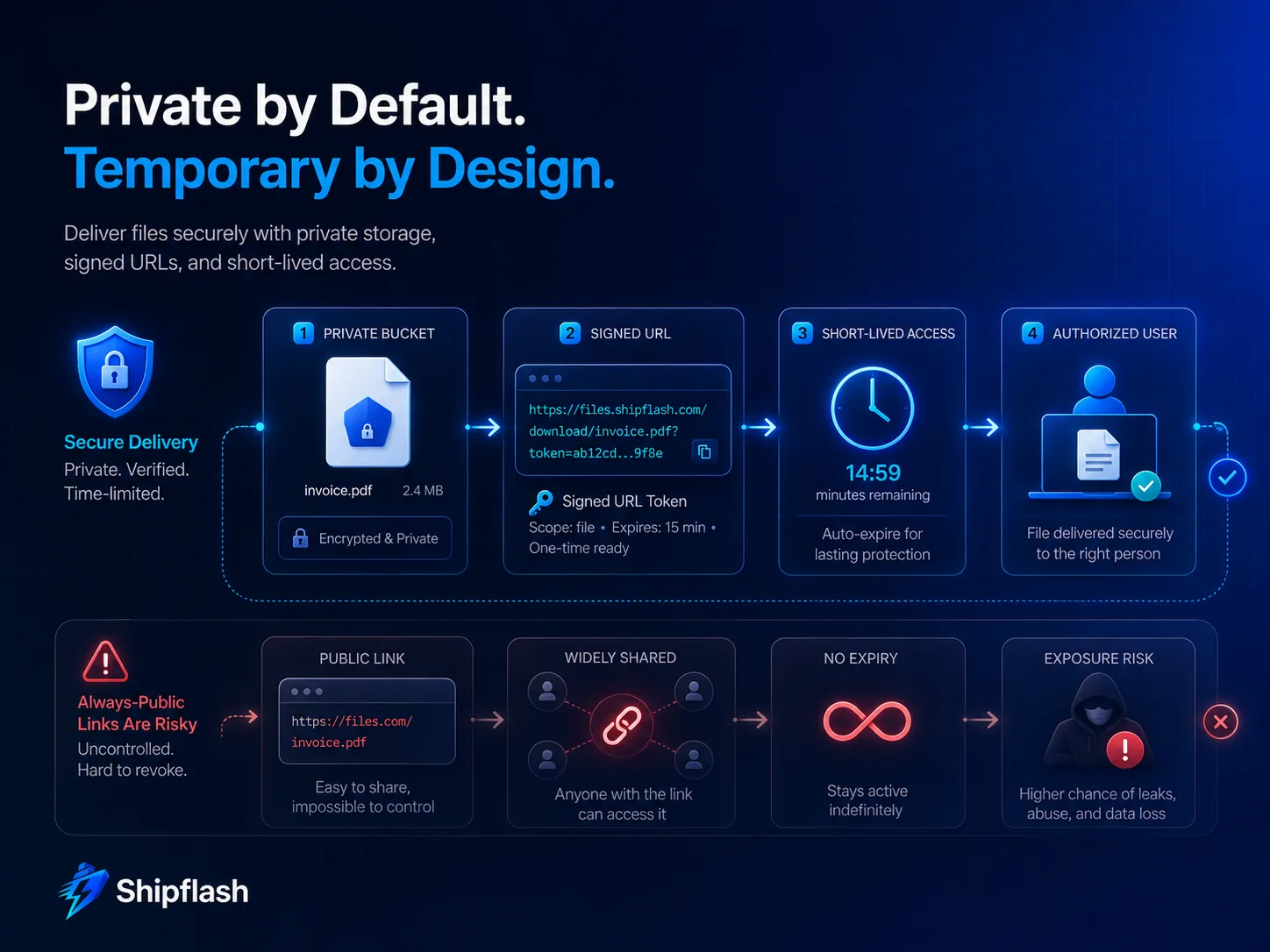
A public bucket is appropriate when public retrieval is an intentional product requirement.
For example, an approved public avatar or a marketing screenshot is very different from a private invoice.
For sensitive files, keep the bucket private and authorize the request when the user needs the object.
Supabase supports authenticated private downloads and time-limited signed URLs. With createSignedUrl, your server specifies the number of seconds for which the generated download URL should remain usable.
For example:
const { data, error } = await supabaseAdmin.storage
  .from("private-documents")
  .createSignedUrl(objectPath, 60);
A one-minute signed URL can be useful when the application has already confirmed that the current user may view the document.
But signed URLs introduce an important operational detail:
A signed URL is a temporary bearer capability. Anyone who receives the URL can use it until it expires.
That means you should avoid putting sensitive signed URLs into analytics events, persistent logs, support tickets, or long-lived database fields.
Supabase also notes that current Storage signed download URLs use a dedicated signing key and remain valid until expiration even if Auth JWT signing keys are rotated.
Choose the expiration with that behavior in mind.
Introduce Quarantine When Uploaded Content Will Be Trusted Later
Not every SaaS needs antivirus infrastructure.
But some products accept files that will later be parsed, transformed, distributed, or opened by another person.
For those flows, a quarantine state is valuable.
A typical lifecycle looks like:
authorize
    ↓
pending_upload
    ↓
upload to private quarantine
    ↓
verify size + signature
    ↓
scan / parse / transform
    ↓
ready
    ↓
serve to authorized user
A rejected object follows a different branch:
processing
    ↓
rejected
    ↓
record reason
    ↓
remove object
The customer-facing UI can reflect this honestly:
Uploading…
Processing…
Ready
instead of declaring success the instant the transfer finishes.
This pattern is particularly valuable for uploaded CSV files. A CSV may contain no malware at all yet still be invalid for the product because required columns are missing, encodings are broken, rows exceed limits, or imported values violate business constraints.
"Safe enough to store" and "valid enough to use" remain separate checks.
For computationally expensive scanning, imports, image processing, or document transformation, move post-upload work out of the original browser request and into a durable background workflow.
Design Uploads for Failure, Not Only Success
File transfers fail.
Mobile connections disappear. Tabs close. A signed token expires. A customer submits the same file twice. Processing workers crash. A database write succeeds after the corresponding object upload failed—or the opposite happens.
Your model should be able to answer:
Was an upload authorized?
Did bytes reach Storage?
Did processing start?
Did processing finish?
Can the customer use the file?
Should the object be cleaned up?
This is why the database asset record introduced earlier is useful.
Suppose the client receives a signed destination and then disappears.
After a reasonable expiration window, a cleanup job can detect:
select id, object_path
from upload_assets
where status = 'pending_upload'
  and created_at < now() - interval '2 hours';
If no corresponding object exists, the incomplete record can be closed.
If an object exists but the application never transitioned it out of uploaded, the worker can retry processing or move it to manual investigation.
That is much safer than assuming every upload follows the perfect sequence represented in a frontend demo.
Resumable Uploads Solve Network Reliability, Not Authorization
Large uploads introduce a different problem: repeating the entire transfer after a brief network interruption wastes time and bandwidth.
Supabase's resumable upload implementation uses the TUS protocol. It is recommended for larger objects and for uploads where progress tracking and network recovery matter. Supabase currently documents a unique resumable upload URL for each transfer that can remain valid for up to 24 hours.
That is a reliability feature.
It does not replace your authorization model.
You still need to determine whether the user may create the object, which bucket and object path they may target, which quota applies, what the completed file may contain, and who may retrieve it later.
In other words:
TUS answers:
"How can these bytes reach storage reliably?"

Authorization answers:
"Should this user be allowed to create this object?"

Validation answers:
"Should the application trust these bytes?"

RLS answers:
"Who may operate on this stored object?"

Lifecycle logic answers:
"What happens next?"
Keeping those concerns separate produces a system that is much easier to debug and change.
Treat File Paths as Identifiers, Not User Input
Storage paths often become part of your authorization model.
That makes them security-sensitive.
A predictable pattern such as:
<user-id>/<generated-id>.<extension>
has several advantages.
Ownership is visible in the path. Collisions are unlikely. The original filename cannot inject unexpected path structure. Replacements naturally receive new identifiers. RLS can reason about the first folder component.
Avoid constructing storage paths directly from untrusted names:
const path = `${user.id}/${file.name}`;
A better implementation derives the extension from an allowed, verified type and generates the actual key:
const objectPath =
  `${user.id}/${crypto.randomUUID()}.${verifiedExtension}`;
Then save the original display name separately.
This also makes later migrations easier because your application's identifier does not depend on whatever naming convention happened to be used on the customer's laptop.
Deleting the Database Row Is Not the Same as Deleting the File
Storage introduces a consistency problem that ordinary database rows do not.
Your application might have:
database record → object path
Deleting only the record loses your reference to the object.
Deleting only the Storage object leaves application metadata pointing to nothing.
Supabase specifically warns that Storage objects should be deleted through the Storage API rather than deleting rows from the Storage schema with SQL. Direct SQL deletion can leave the actual underlying object orphaned.
A controlled deletion flow should therefore know which side completed.
For example:
await supabaseAdmin.storage
  .from(asset.bucket)
  .remove([asset.objectPath]);

await markAssetDeleted(asset.id);
In higher-value workflows, make deletion idempotent so a retry after a network failure is harmless.
You should also periodically reconcile application records with Storage.
Examples of useful discrepancies include:
Database record exists, object missing
Object exists, application record missing
Asset has stayed "processing" for too long
Deleted asset still has an object
Temporary export has exceeded retention period
Those are operational signals.
They should not wait for a customer support ticket.
File Storage Needs Observability Too
Uploads fail differently from ordinary API requests.
A healthy upload dashboard does not need dozens of charts, but you should be able to observe enough signals to answer why customers are failing.
Useful measurements include upload attempts, successful transfers, rejected uploads by reason, processing duration, scanning failures, average and percentile file sizes, quota rejections, storage growth, signed-URL issuance, orphan cleanup counts, and unexpectedly high download traffic.
Attach a request or correlation identifier to the upload authorization record and subsequent processing work when possible.
Then one customer report can be traced through:
upload authorization
→ asset record
→ Storage object
→ processing job
→ validation result
→ final download
That is much faster than searching unrelated logs using a filename supplied by the customer.
Test the Authorization Failures You Hope Never Happen
A storage feature is not adequately tested because one Playwright test successfully uploads an avatar.
The most important cases are often negative.
Your automated coverage should prove that User A cannot read User B's object, cannot overwrite it, cannot delete it, and cannot upload into User B's path. It should also verify rejected MIME types, oversized objects, expired signed-upload flows, duplicate submissions, processing failure, cleanup, and download authorization.
A useful high-level release gate is:
- Authorization: cross-user upload, read, update, and delete attempts fail.
- Content controls: invalid types, oversized objects, malformed files, and prohibited states are rejected.
- Recovery: interrupted uploads, failed processing, duplicate requests, expired capabilities, and cleanup retries leave consistent state.
This is where database and E2E testing complement each other. RLS tests prove the storage boundary while application tests prove the surrounding workflow.
For a broader test architecture, see Shipflash's Next.js, Supabase, Vitest, and Playwright SaaS testing strategy.
A Practical Architecture for Common SaaS Uploads
The safest architecture depends on what the product is doing with the file.
Avatar upload
Use a strict image-only bucket. Keep the maximum size small. Generate the object name. Reject formats your application does not need. If public avatars are part of the product, expose only the finished asset publicly rather than using the public bucket as a staging area.
For higher assurance, decode and rewrite the image before making it available.
Customer attachment
Keep the bucket private. Authorize the owner before issuing an upload capability. Use generated object paths. Validate the object after upload when the accepted formats justify it. Give downloads short-lived signed access or serve them through authenticated Storage access.
CSV import
Store the original privately.
Do not mark the import as successful because the bytes arrived.
Parse asynchronously, enforce row and column limits, validate the schema, capture row-level errors, and transition the asset and import records through explicit states.
Generated export
The file is created by your system, so malicious upload content is not the primary threat.
Unauthorized disclosure is.
Keep exports private, use a predictable retention window, generate short-lived access only after checking the requesting user, and delete expired exports automatically.
Sensitive document
Use a private bucket with strict authorization.
Consider quarantine, malware scanning, and content-specific validation based on your threat model. Keep signed download lifetimes short and avoid persistent distribution URLs.
The same Storage product supports all five cases.
The policies should not be identical.
Common Secure File Upload Mistakes
"The bucket URL is hard to guess, so it is private"
Unpredictability is not authorization.
If the object should be private, use a private bucket and a real access policy.
"The browser checked the MIME type"
The browser belongs to the requester.
Server-side or post-upload validation must protect security decisions.
"Only authenticated users can upload"
Authentication does not answer which path, bucket, size, number of objects, or account resources that authenticated user may consume.
"We use RLS, so uploads are safe"
RLS controls access to storage objects.
It does not decide whether a PDF contains malicious content or whether a 40 MB upload makes sense for an avatar feature.
"The object uploaded successfully, so processing succeeded"
Storage success only proves that Storage received an object.
Parsing, scanning, transformation, import, or business validation may still fail.
"We'll just delete old records with SQL"
Storage is not an ordinary application table. Supabase recommends deleting stored objects through its Storage API to avoid orphaning the underlying files.
Secure Upload Architecture at a Glance
A production-ready Next.js and Supabase upload flow can be summarized as:
┌─────────────────────┐
│ Authenticated user  │
└──────────┬──────────┘
           │
           ▼
┌─────────────────────┐
│ Next.js authorization│
│ quota + intent check │
└──────────┬──────────┘
           │
           ▼
┌─────────────────────┐
│ Generate object path │
│ Create pending asset │
└──────────┬──────────┘
           │
           ▼
┌─────────────────────┐
│ Signed/direct upload │
│ or TUS transfer      │
└──────────┬──────────┘
           │
           ▼
┌─────────────────────┐
│ Private Storage      │
│ protected by RLS     │
└──────────┬──────────┘
           │
           ▼
┌─────────────────────┐
│ Validate / process   │
│ scan when required   │
└──────────┬──────────┘
           │
      ┌────┴─────┐
      ▼          ▼
┌───────────┐  ┌───────────┐
│   Ready   │  │ Rejected  │
└─────┬─────┘  └─────┬─────┘
      │              │
      ▼              ▼
Authorized         Cleanup
download
The architecture is intentionally layered.
If one control fails, another still limits the damage.
Frequently Asked Questions
What is the safest way to upload files in Next.js with Supabase?
There is no universal single upload method. For many SaaS products, a strong default is to authenticate and authorize the upload in Next.js, generate the object path server-side, upload directly to a private Supabase bucket, enforce RLS, validate the completed object where necessary, and only then mark it ready for use.
For larger files or unstable connections, Supabase recommends resumable TUS uploads rather than relying on the standard upload method.
Should Supabase Storage buckets be public or private?
Use a public bucket only when public retrieval is an intentional feature of the product.
Supabase buckets are private by default, and private objects can be retrieved through authenticated access or time-limited signed URLs. Sensitive documents, customer attachments, exports, and account-specific files should generally remain private.
Does Supabase RLS protect Storage files?
Yes. Supabase Storage integrates with Postgres RLS through storage.objects. Policies can control operations such as inserting, selecting, updating, and deleting objects. A service-role credential bypasses RLS, which is why it must remain server-side.
Is checking the MIME type enough to secure file uploads?
No.
The MIME type supplied by the client can be spoofed. OWASP recommends combining an extension allowlist with additional controls such as size restrictions, generated filenames, authorization, file-signature validation, and malware or content inspection where the threat model requires it.
When should I use resumable uploads?
Use resumable uploads when files are large, connections may be unreliable, or progress and recovery matter. Supabase currently recommends its TUS-based resumable upload method for files larger than roughly 6 MB rather than standard uploads.
Are Supabase signed URLs secure?
Signed URLs are useful for temporary access, but they should be treated as bearer capabilities. Anyone possessing the URL can use it while it remains valid.
For private downloads, issue them only after authorization, choose an expiry appropriate to the sensitivity of the object, and avoid leaking them into analytics or persistent logs.
Should uploads go through a Next.js server?
Sometimes.
Proxying a smaller file through a Route Handler can be useful when you must inspect or transform the contents synchronously. For larger objects, direct-to-storage uploads usually avoid unnecessary application bandwidth and make resumable transfer easier.
Keep the authorization decision in your application even when the bytes travel directly to object storage.
The Production Standard Is the Whole Lifecycle
A working file uploader proves that a browser can transfer bytes.
A production file system proves much more.
It proves that the correct user can create the object, that the destination cannot be manipulated, that dangerous or unreasonable files are rejected, that private objects remain private, that large transfers recover cleanly, that failed processing does not expose half-trusted content, that usage cannot grow without limits, that support can diagnose failures, and that deletion actually removes what the application intended to remove.
That is the gap between "file upload works" and file storage you can confidently put in front of customers.
Shipflash approaches these kinds of systems as part of the SaaS foundation rather than treating production concerns as work that begins after launch. The goal is not to add complexity everywhere. It is to put the necessary boundaries in the right places so product-specific work can grow on top of them without repeatedly rebuilding the infrastructure underneath.
Technical References
The implementation decisions in this guide are based on current documentation from Supabase Storage access control, Supabase Storage bucket configuration, Supabase resumable uploads, Supabase signed upload URLs, Supabase private downloads and signed URLs, Next.js Route Handlers, and the OWASP File Upload Cheat Sheet.