
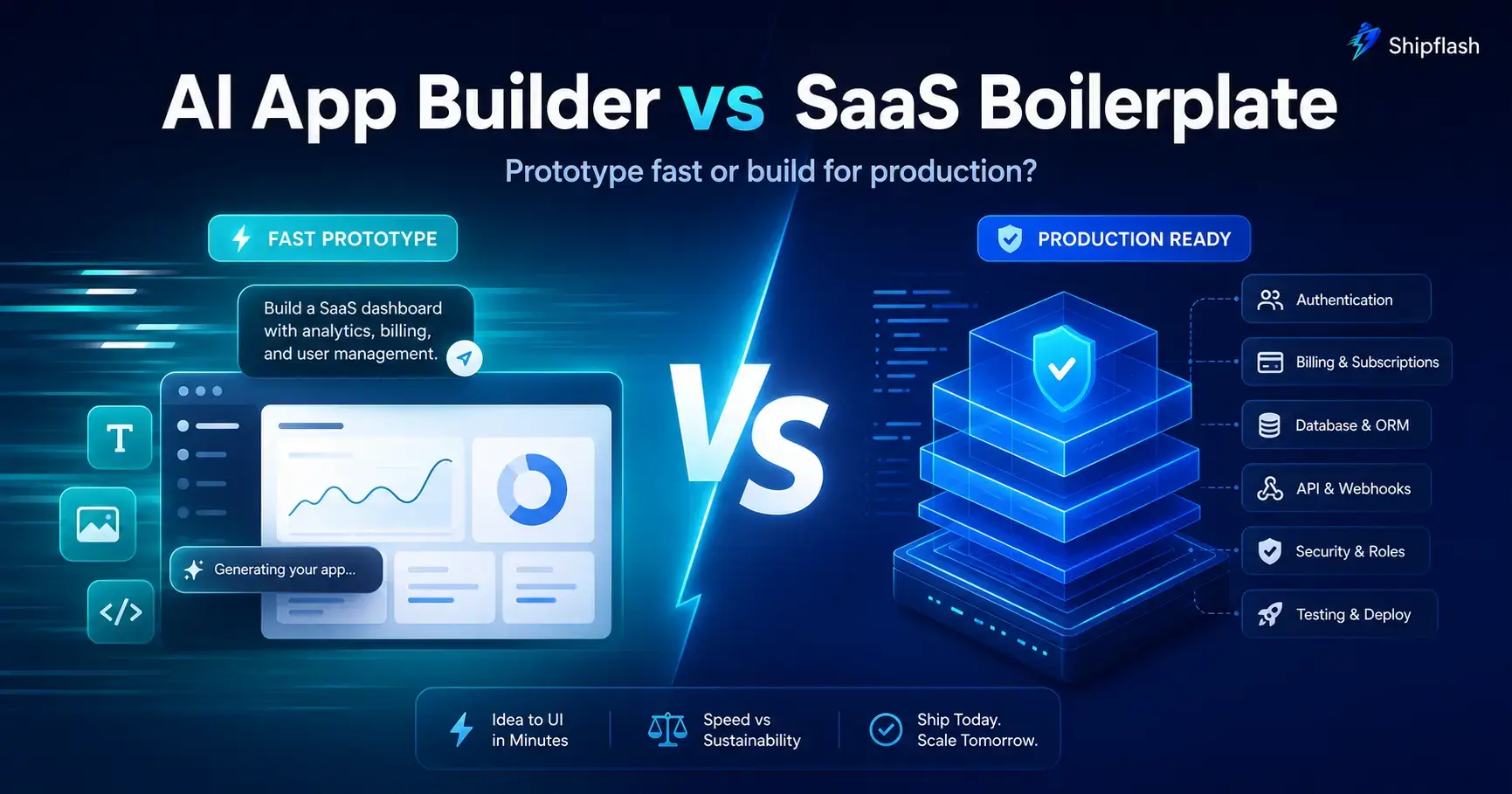
An AI app builder can turn a prompt into something that looks like a product before you finish your coffee.
You describe the idea, choose a visual direction, answer a few questions, and watch the interface take shape. Pages appear. Forms work. Data gets saved. A public URL is ready to share.
That experience is powerful. It has changed who can build software and how quickly a founder can test an idea.
But a working demo and a production-ready SaaS are not the same thing.
The difficult questions often arrive after the first version looks complete:
How should permissions work across users, teams, and administrators? What happens when a billing webhook is delivered twice? Where is customer access stored? Can a failed payment remove an entitlement safely? Are database policies protecting every table? Can another developer understand the code six months from now?
This is where the difference between an AI app builder and a SaaS boilerplate becomes important.
The Short Answer
An AI app builder is usually better for creating and validating a prototype quickly. It reduces setup, generates interfaces from natural-language instructions, and helps non-technical or lightly technical founders turn an idea into something testable.
A SaaS boilerplate is usually better when you need an owned, structured foundation for a product that will handle real users, billing, permissions, data, operations, and continued development.
The best option for many founders is not choosing AI or a foundation. It is using AI development tools inside a production-oriented SaaS foundation. That gives the AI a stable architecture to extend instead of asking it to invent the product’s most important systems while it is also building the features.
What Is an AI App Builder?
An AI app builder is a platform that converts natural-language instructions into an application.
Instead of manually creating every route, component, database model, and integration, you describe the product you want. The builder generates some or all of the interface and application logic for you.
A typical prompt might look like this:
Build a project-management SaaS for marketing agencies. Users should create workspaces, invite team members, manage client projects, assign tasks, and view a dashboard showing overdue work.
The AI builder interprets those requirements and produces a first implementation. You can then continue editing the product through conversation:
- Add a dark mode.
- Create an administrator dashboard.
- Connect the project to Supabase.
- Add a pricing page.
- Make the dashboard work on mobile.
- Fix the broken form submission.
Modern AI app builders are becoming more capable than the simple page generators that came before them. Some can generate full-stack applications, connect databases, integrate external services, publish applications, or synchronize generated code with GitHub. Lovable, for example, documents GitHub synchronization, Supabase integration, backend options, and external deployment paths. Replit describes Agent-generated web applications as full-stack by default, with API routes, databases, server-side logic, and integrated publishing.
That makes AI app builders useful for much more than static mockups. They can create functional products, internal tools, landing pages, dashboards, marketplaces, directories, and early SaaS applications.
Their greatest advantage is not that they eliminate development. It is that they dramatically shorten the distance between an idea and something you can see, use, and show to another person.
What Is a SaaS Boilerplate?
A SaaS boilerplate is a reusable codebase containing common systems that many software-as-a-service products need.
Instead of beginning with an empty repository, you begin with an application that already has foundational capabilities such as:
- Authentication and session handling
- Protected routes
- User or team permissions
- Database structure
- Billing integration
- Webhook processing
- Customer management
- Transactional email
- Administration tools
- Testing and deployment configuration
The word boilerplate covers a wide range of products.
At one end, a boilerplate may be little more than a landing page, login screen, and Stripe checkout example. At the other end, it may be a production-oriented SaaS foundation with database policies, local billing records, entitlement logic, webhook idempotency, administrative workflows, tests, documentation, and operational safeguards.
That difference matters.
A thin starter kit helps you avoid writing repetitive UI. A production-ready SaaS foundation helps you avoid repeatedly designing the systems that protect your product when real customers begin using it.
An AI app builder primarily asks:
What application should I generate?
A SaaS foundation primarily asks:
What reliable systems should already exist before product-specific development begins?
AI App Builder vs. SaaS Boilerplate at a Glance
| Area | AI app builder | SaaS boilerplate |
|---|---|---|
| Starting point | Natural-language description | Existing source-code foundation |
| Fastest outcome | Visual prototype or early application | Structured SaaS product |
| Initial learning curve | Usually lower | Requires some development knowledge |
| UI generation | Often excellent and very fast | Usually requires manual or AI-assisted customization |
| Architecture | Commonly generated during development | Defined before feature development |
| Code ownership | Depends on the platform and export workflow | Usually owned from the beginning |
| Authentication | Can be generated or connected | Often pre-integrated and structured |
| Billing | May generate checkout integration | Can include checkout, webhooks, records, and access logic |
| Authorization | Often added through prompts | Can be designed into application and database layers |
| Testing | Varies significantly | May include unit, integration, and end-to-end foundations |
| Deployment | Frequently integrated | Usually platform-flexible, depending on the codebase |
| Best use | Prototyping and validating ideas | Building and operating a maintainable SaaS |
| Primary risk | Hidden architectural and operational gaps | Quality varies between boilerplates |
| Long-term strength | Rapid iteration through conversation | Predictability, ownership, and extensibility |
This table highlights the broad distinction, but it should not be treated as an absolute rule.
Some AI builders now support GitHub synchronization, local development, and external hosting. Some SaaS boilerplates are poorly documented, outdated, or too rigid to be useful.
The decision should be based on the quality of the resulting system—not only the category printed on the product’s landing page.
Where AI App Builders Are Genuinely Better
AI app builders deserve their popularity. They solve several real problems exceptionally well.
They Reduce the Cost of Reaching a First Prototype
A founder no longer needs to spend days configuring a project before testing whether the concept makes sense.
The application can become visible almost immediately. That changes the quality of early product thinking because abstract discussions become concrete.
It is easier to decide whether a workflow is confusing when you can click through it. It is easier to explain an idea to a potential customer when you can show an interactive product instead of a slide deck.
For idea validation, this speed can be more valuable than architectural perfection.
They Make Interface Exploration Faster
Traditional development makes visual experimentation expensive. Even a small design direction may require changes across multiple components and layouts.
With an AI builder, a founder can request several alternatives quickly:
Make this feel more like a focused developer tool.
Replace the large dashboard cards with a compact operational view.
Simplify onboarding to three steps.
Create a mobile-first version of this screen.
Not every generated result will be good, but the cost of exploring an alternative is dramatically lower.
They Give Non-Technical Founders More Agency
Before AI app builders, a non-technical founder often needed a designer or developer before testing even a modest software concept.
AI does not eliminate the need for technical judgment, but it lets more people participate directly in product creation. Founders can prototype workflows, test positioning, gather feedback, and communicate requirements with much greater clarity.
They Are Excellent for Disposable or Low-Risk Applications
Not every application needs a sophisticated architecture.
A temporary event tool, internal calculator, customer survey, campaign microsite, personal dashboard, or proof of concept may not justify a large engineering foundation.
When the cost of failure is low and the application is unlikely to become a complex long-term product, an AI app builder may be the most rational choice.
Where SaaS Boilerplates Are Stronger
The value of a strong SaaS boilerplate becomes more visible as the product moves beyond its first demonstration.
The Architecture Exists Before Feature Pressure Arrives
Early development is unusually forgiving. There are few users, little data, no support burden, and limited pressure to preserve existing behavior.
That makes it tempting to postpone structural decisions.
Then the product begins to grow. A user asks for teams. Another needs a different role. Billing needs annual plans. An administrator needs to inspect an account. A webhook fails. A customer requests a refund. A developer must change code generated three months earlier.
A well-designed foundation establishes predictable boundaries before these changes accumulate.
Instead of placing database queries, billing calls, and UI behavior wherever the current prompt finds convenient, the codebase has clear locations for server logic, shared domain rules, persistence, validation, tests, and interfaces.
This does not prevent change. It makes change easier to reason about.
Product Systems Are Treated as Systems
Adding a Stripe checkout button is not the same as building a billing system.
A production billing system may need to coordinate:
- Products and prices
- Checkout sessions
- Customer records
- Subscriptions or one-time purchases
- Webhook verification
- Duplicate event handling
- Local billing state
- Entitlements
- Failed payments
- Cancellations
- Grace periods
- Refunds
- Administrative reconciliation
Stripe’s own webhook documentation instructs developers to verify webhook signatures and handle duplicate events. Those are not optional details when webhook events control customer access.
A production-oriented SaaS foundation can model these concerns before your product depends on them.
Security Can Be Designed Into the Data Layer
Authorization should not rely entirely on whether a page is hidden or whether an API route appears protected.
For an application using Supabase, Row Level Security can enforce which database rows each user may access. Supabase states that RLS should be enabled for tables in exposed schemas and recommends limiting grants to the permissions each role actually needs.
This becomes especially important in multi-user and multi-tenant SaaS products. A user should not be able to retrieve another customer’s data simply by modifying a request.
An AI builder can create RLS policies, but the presence of generated policies is not enough. They need to be complete, tested, understandable, and aligned with the application’s actual permission model.
A strong foundation gives the AI and the developer an established authorization pattern to follow.
Maintenance Becomes a First-Class Requirement
The code that ships the first version is rarely the code that serves the product forever.
Customers create edge cases. Dependencies change. Providers deprecate APIs. Security issues appear. Features interact in unexpected ways. Someone eventually needs to debug a flow they did not build.
Maintainable code is not merely clean formatting. It means a developer can answer questions such as:
- Where is this business rule defined?
- Which code is allowed to update an entitlement?
- What tests protect this behavior?
- Which provider events change local state?
- What happens when this operation fails?
- Can this module be replaced without rewriting the product?
A structured boilerplate can make these answers predictable. A generated application may also achieve that quality, but only when its architecture is deliberately reviewed and maintained.
Why Generated Code Is Not Automatically Production-Ready
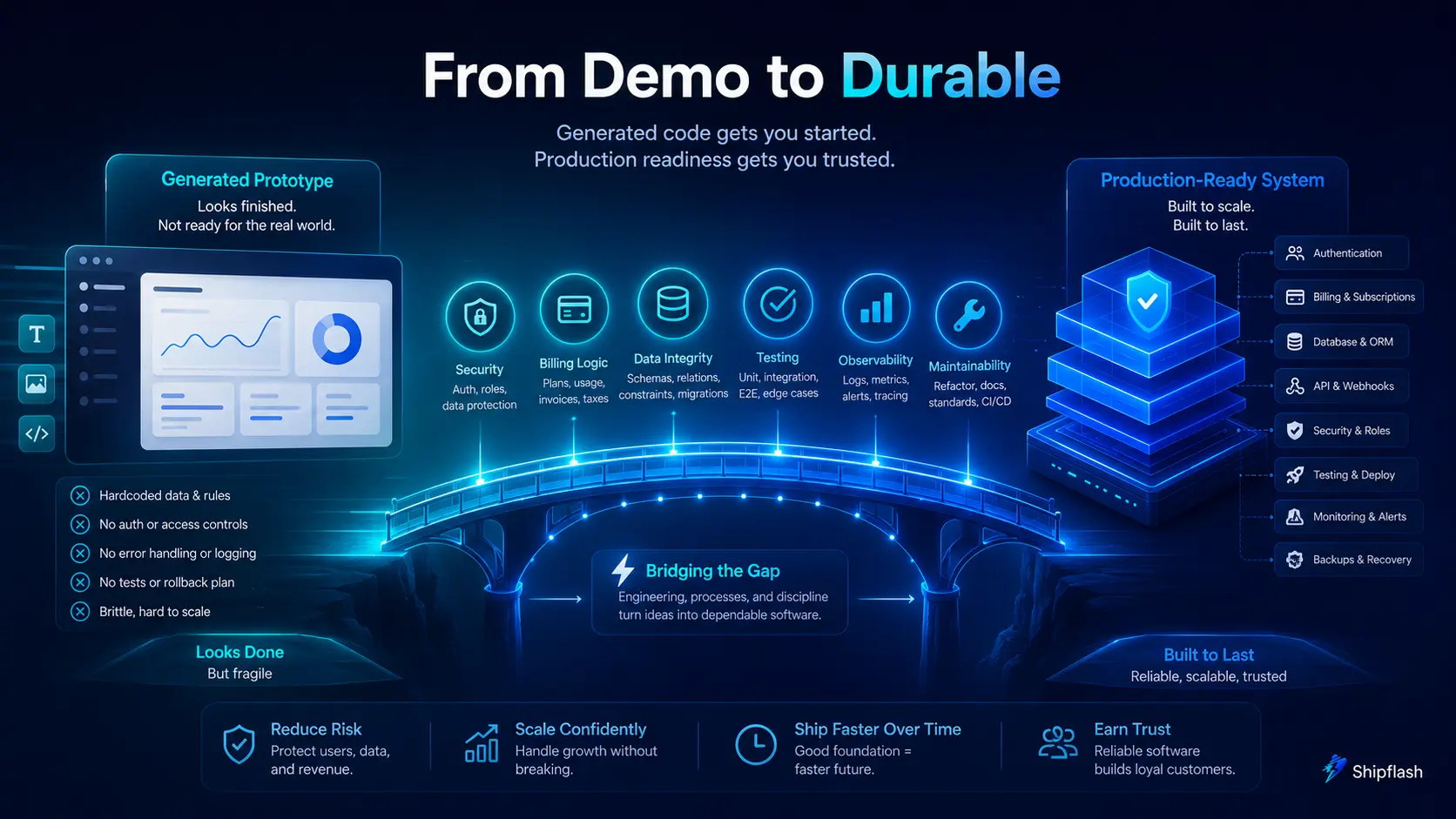
“AI-generated” and “production-ready” describe two different properties.
AI-generated describes how the code was created.
Production-ready describes whether the resulting system is prepared to handle real users, valuable data, failures, abuse, maintenance, and continued development.
A product can be manually coded and still be unsafe. It can also be AI-generated and carefully engineered.
The risk appears when speed is mistaken for completeness.
A screen that displays a user’s subscription does not prove that subscription state remains correct after delayed events, duplicated events, failed payments, refunds, plan changes, or provider outages.
A protected dashboard does not prove that the database prevents unauthorized access.
A successful deployment does not prove that the application has appropriate caching, security headers, metadata, error handling, accessibility, monitoring, or type safety. Next.js maintains a production checklist covering routing, rendering, caching, security, metadata, accessibility, type safety, performance, and deployment concerns precisely because a successful local build is only one part of production readiness.
The problem is not that an AI tool cannot implement these systems.
The problem is that the tool must be given enough context, constraints, and review to implement them consistently.
The Hidden Systems Every Real SaaS Needs
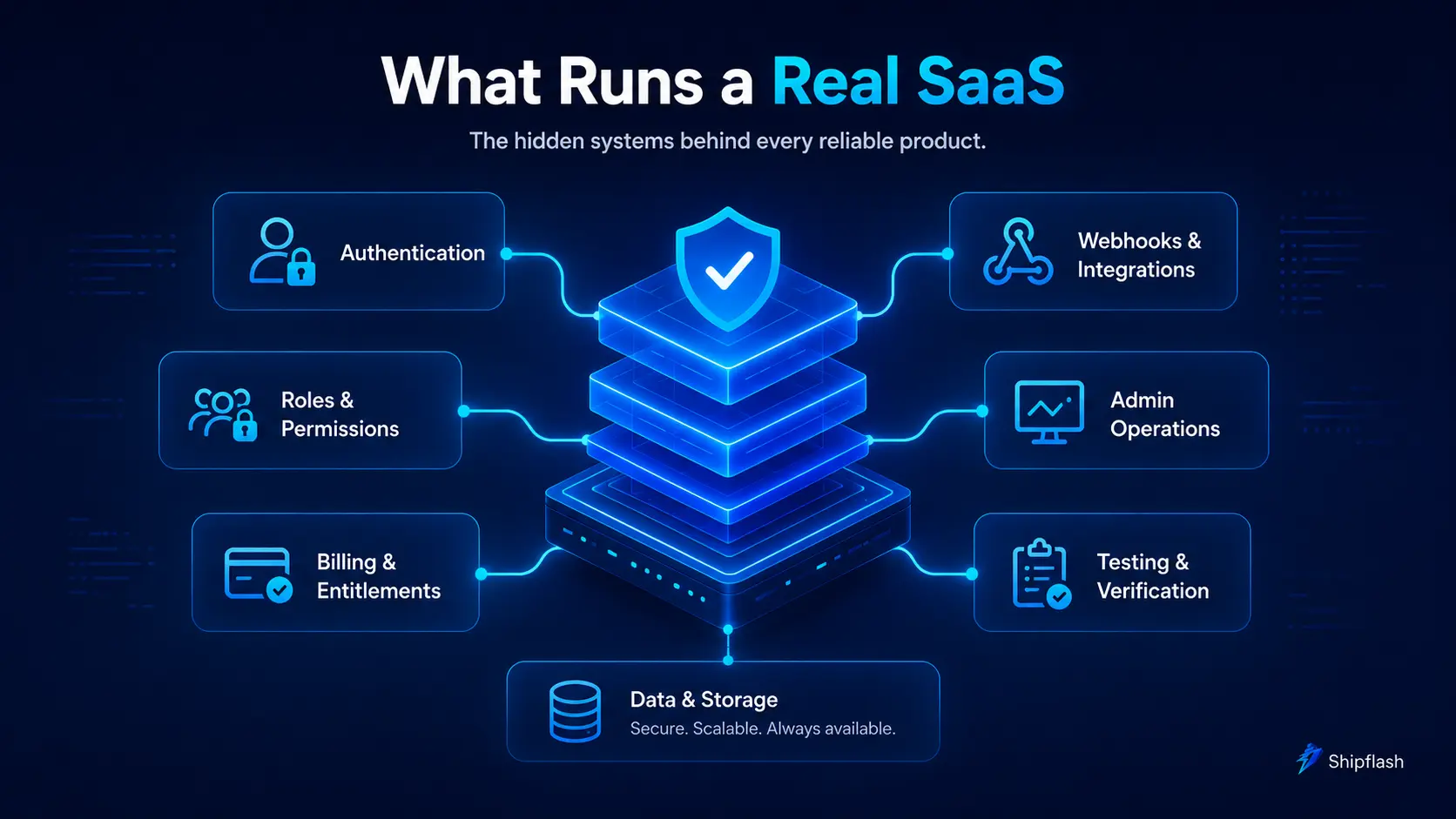
The visible interface is only the top layer of a SaaS product.
Underneath it sits a group of systems that determine whether the product remains reliable as more people use it.
Authentication and Session Handling
Authentication is more than displaying a login form.
The product must handle signup, login, logout, session refresh, email verification, password recovery, authentication callbacks, protected routes, expired sessions, and safe redirects.
It must also clearly separate authentication—who the user is—from authorization—what the user is allowed to do.
Roles and Permissions
Many products begin with a simple is_admin field and later discover that their permission model is more complicated.
A real SaaS may need account owners, administrators, members, support access, internal operators, or product-specific roles.
Permissions should behave consistently across the interface, server operations, and database.
Billing and Entitlements
Billing answers, “What did the provider report?”
Entitlements answer, “What may this customer use right now?”
Those questions are related, but they are not identical.
A subscription may be cancelled but remain active until the end of the paid period. A refunded one-time purchase may need its access revoked. A failed payment may enter a grace period. A usage-based plan may require limits that cannot be derived from a simple subscription status.
Separating provider state from internal access rules gives the product a stable business model even if the payment provider changes.
Webhook Reliability
Webhooks can arrive late, more than once, or in an unexpected order.
A robust handler verifies the sender, validates the payload, records the event, prevents duplicated processing, applies changes safely, and retains enough history to investigate failures.
The happy path is only the beginning.
Administrative Operations
When a customer reports a problem, someone needs a way to understand what happened.
An operational admin surface may need to show users, billing state, event history, failed jobs, contact messages, content, settings, and actions that require elevated permission.
Without this visibility, every support request becomes a database investigation.
Testing and Verification
A production system needs more than a successful build.
Unit tests protect business rules. Integration tests verify boundaries. End-to-end tests protect critical customer journeys. CI prevents known failures from reaching production.
The goal is not to test every visual detail. It is to make the most expensive regressions harder to introduce.
Which Approach Costs Less?
The answer depends on which cost you measure.
An AI app builder often has the lowest cost to reach a visible first version. It can reduce the amount of specialized work needed before an idea can be demonstrated.
A SaaS boilerplate may have a higher upfront purchase price or learning cost, but it can reduce the cost of repeatedly implementing foundational systems.
The mistake is comparing only subscription fees or license prices.
The more useful comparison is total product cost:
| Cost category | Questions to ask |
| Initial setup | How quickly can I reach a usable first version? |
| Customization | How difficult is it to implement product-specific behavior? |
| Platform cost | What will building, hosting, deployment, and AI usage cost? |
| Migration | Can I move the code, database, and infrastructure later? |
| Debugging | How easily can I trace failures across the system? |
| Security review | Who verifies permissions, secrets, policies, and server boundaries? |
| Maintenance | Can another developer understand and extend the application? |
| Rework | Which foundational systems may need to be rebuilt after validation? |
| Opportunity cost | Am I spending time on infrastructure instead of product differentiation? |
The cheapest prototype is not always the cheapest product.
At the same time, the most comprehensive foundation is not automatically the right choice for an idea that has not earned further investment.
Match the level of engineering to the level of uncertainty.
When Should You Choose an AI App Builder?
Choose an AI app builder when your most important question is:
Does this idea deserve to become a product?
It is particularly suitable when you need to test a workflow, demonstrate an idea, create an internal tool, gather early feedback, or explore several product directions quickly.
An AI app builder is likely the better starting point when:
- You need a working prototype as quickly as possible.
- The application has low security or operational risk.
- You are still uncertain about the core problem.
- You do not yet need sophisticated billing or permissions.
- The first version may be discarded after validation.
- You value visual iteration more than architectural control.
- You understand that successful validation may lead to additional engineering work.
The important point is to define the prototype honestly.
Do not call it production-ready simply because it has authentication, a database, and a public URL. Decide which risks have been addressed and which are deliberately postponed.
When Should You Choose a SaaS Boilerplate?
Choose a SaaS boilerplate or production-ready SaaS foundation when your most important question is:
How do I build this product without recreating the same infrastructure again?
It is usually the stronger choice when you already understand the problem, expect to keep the codebase, plan to charge customers, or need a product that can continue evolving.
A SaaS foundation is likely the better starting point when:
- You plan to accept payments early.
- Users will store private or commercially valuable data.
- The product needs teams, roles, or multi-tenant access.
- You want direct ownership of the repository.
- You expect developers or AI agents to make frequent changes.
- You need tests, CI, administrative visibility, and operational controls.
- You want the freedom to change hosting or providers later.
- Rebuilding the foundation after launch would be costly.
You should still evaluate the boilerplate carefully.
Check whether it is actively maintained, clearly documented, tested, understandable, and aligned with your preferred stack. A large codebase is not automatically a good foundation. Unnecessary complexity can slow development just as badly as missing structure.
The Better Workflow: AI-Assisted Development on a Stable Foundation
The most productive comparison is not necessarily:
AI app builder or SaaS boilerplate?
A more useful question is:
What should AI generate, and what should already be defined?
AI is excellent at accelerating bounded work:
- Creating product-specific pages
- Building components
- Refactoring repeated code
- Adding forms and validation
- Writing tests
- Explaining unfamiliar modules
- Connecting an API
- Creating documentation
- Investigating a failure
- Implementing a feature inside an existing pattern
AI becomes less predictable when it must continuously reinvent foundational decisions while also shipping product features.
That is why an AI-friendly SaaS foundation can be so effective. The foundation gives both the developer and the AI clear boundaries:
- Authentication has an established flow.
- Billing providers follow a shared contract.
- Entitlements have one source of truth.
- Database access has defined security patterns.
- Server code has a predictable location.
- Feature modules follow a consistent shape.
- Tests demonstrate expected behavior.
- Documentation explains how the pieces connect.
The AI is no longer guessing where a change belongs. It can inspect the existing pattern and extend it.
A Practical Hybrid Workflow
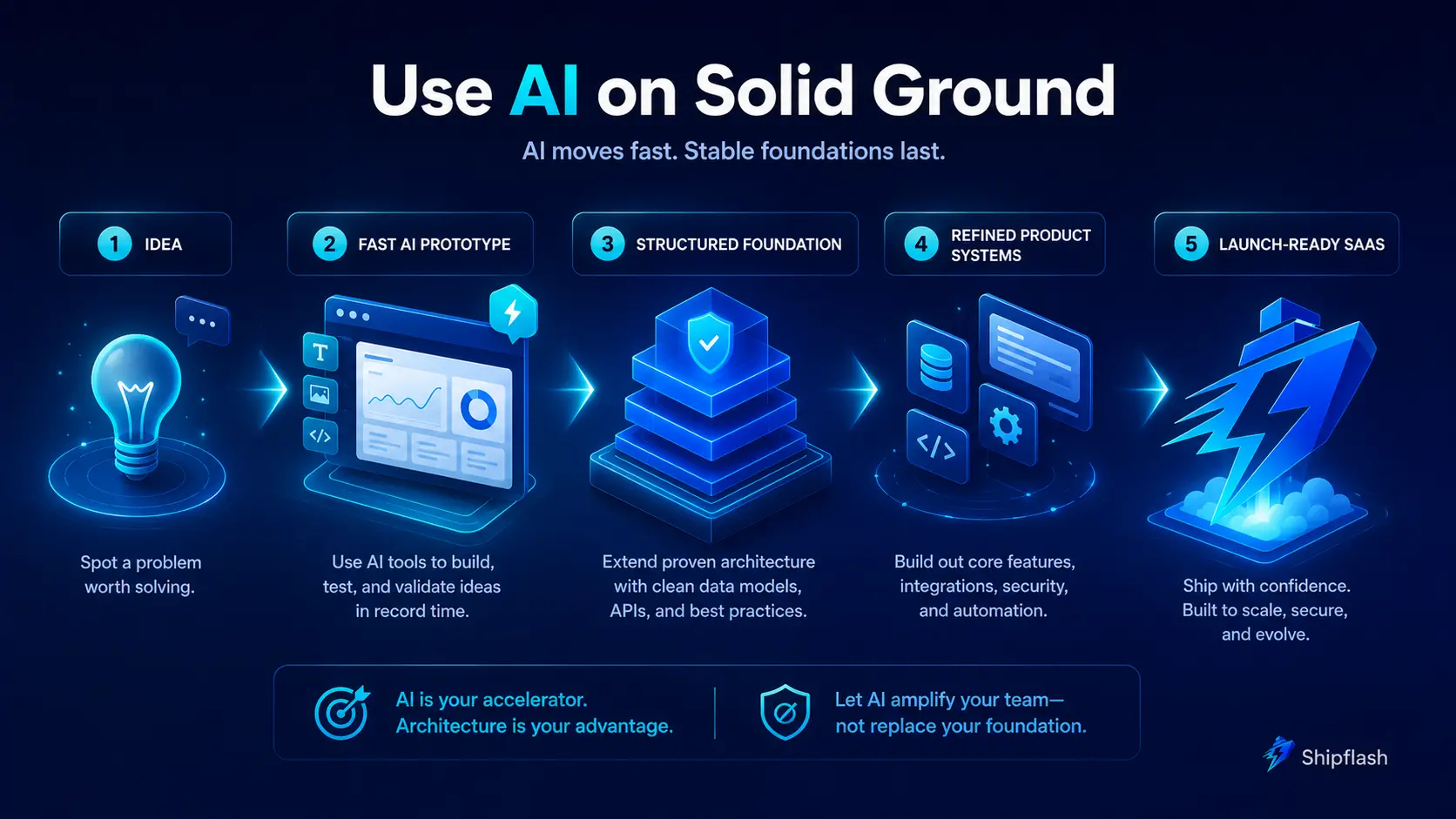
A founder can combine rapid AI development with production discipline in five stages.
1. Validate the Core Workflow
Use an AI builder, a design prototype, or a small implementation to prove that users understand and value the central workflow.
At this stage, optimize for learning.
2. Define the Product Invariants
Before expanding the application, identify the rules that must remain correct:
- Who owns each record?
- Which roles may perform each action?
- What grants or removes access?
- Which actions must be idempotent?
- Which data must be private?
- Which failures require retries?
- Which user journeys cannot break?
These invariants are more important than the first implementation.
3. Start From or Move Into a Structured Foundation
Establish the architecture before adding a large number of features.
This may mean using a production-oriented SaaS foundation from the beginning. It may also mean moving a validated prototype into an owned repository with clearer boundaries.
Modern AI builders increasingly support GitHub synchronization and external deployment, which can make this transition easier. However, code export alone does not guarantee that the exported system has the architecture, tests, permissions, and operational safeguards you need. That conclusion is an engineering inference from the difference between export capabilities and the broader production requirements documented by frameworks and infrastructure providers.
4. Let AI Extend Existing Patterns
Give the AI specific context and constraints.
Instead of asking:
Add billing.
Ask:
Add the annual plan to the existing billing catalog. Preserve the provider adapter contract, store provider identifiers separately from entitlements, handle duplicate webhook delivery, and add regression tests for upgrades and cancellations.
The second request gives the AI an architectural destination.
5. Review the Product as a System
Before launch, inspect how authentication, permissions, database policies, billing, entitlements, webhooks, email, admin operations, and deployment interact.
Production failures often appear between modules, not inside a single component.
How to Evaluate an AI App Builder
Do not evaluate an AI app builder only by how impressive the first prompt looks.
A polished demo is valuable, but long-term suitability depends on what happens after the demo.
Ask these questions:
Can You Access and Own the Code?
Determine whether the platform supports code export, GitHub synchronization, local development, and continued work outside the managed editor.
Also check whether synchronization has restrictions. For example, a platform may synchronize only a default branch or require the repository to remain at a specific path.
Can You Control the Backend?
Find out where authentication, data, storage, server functions, and secrets live.
Can you inspect migrations? Can you test database policies? Can you move the backend later? Can you separate development and production environments safely?
How Does It Handle Existing Projects?
Some tools are designed to create a new application but cannot import an existing repository into the same workflow.
This matters when your prototype becomes a team-owned engineering project.
Can You Review Important Changes?
Look for version history, checkpoints, branches, pull-request support, previews, testing capabilities, and clear diffs.
Speed without review can make a product feel productive while quietly increasing risk.
What Happens When the AI Is Wrong?
Every AI development tool will eventually generate an incorrect assumption.
The important question is whether you can recognize, isolate, and repair it without destabilizing the rest of the application.
How to Evaluate a SaaS Boilerplate
A SaaS boilerplate should be evaluated as code, not as a feature checklist.
A long landing page can hide a shallow implementation. Look beyond screenshots and ask how the systems actually behave.
Inspect the Architecture
Can you understand where features, server operations, database access, validation, and shared business rules belong?
The best structure is not necessarily the most complex. It is the one that helps future changes remain predictable.
Inspect Authentication and Authorization
Check both route protection and data-level access.
Confirm how sessions are refreshed, how roles are represented, how server actions are authorized, and whether database policies prevent cross-user access.
Inspect Billing Beyond Checkout
Look for webhook signature verification, idempotency, local records, entitlement handling, cancellations, grace periods, refunds, reconciliation, and failure recovery.
Inspect Testing and CI
A few component tests are not enough to prove production readiness.
Look for tests around permissions, billing transitions, webhook duplication, server boundaries, and critical user journeys.
Inspect Documentation
Good documentation should explain not only how to run the project, but why important systems are designed the way they are.
AI agents also benefit from this context. A documented architecture gives them better constraints and reduces arbitrary changes.
Inspect Portability
Understand which parts are tightly coupled to a hosting provider, database, payment platform, or deployment system.
Some coupling is reasonable. Hidden coupling is the problem.
Where Shipflash Fits
Shipflash is designed for founders, vibe coders, indie hackers, developers, and small teams who want AI-assisted development without asking AI to invent the entire SaaS foundation from scratch.
It starts with a Next.js and Supabase foundation that includes structured authentication, billing paths, administrative capabilities, customer-facing systems, operational safeguards, tests, and an AI-readable codebase.
The goal is not to replace AI development tools.
The goal is to give those tools a better place to work.
Instead of spending the first stage of product development repeatedly assembling authentication, billing, webhooks, content, administration, and operational systems, you can begin with those foundations in place and focus on the product-specific experience that makes your SaaS valuable.
Shipflash currently positions itself as a production-ready SaaS foundation with essential product systems, structured billing paths, Supabase authentication, role-based access helpers, verified webhooks, local billing records, and an AI-readable feature structure.
That approach is especially valuable when you want to move quickly but still expect to own, understand, and maintain the resulting product.
Final Verdict: AI App Builder or SaaS Boilerplate?
Choose an AI app builder when speed to learning is the highest priority.
Choose a SaaS boilerplate when speed to a maintainable product is the highest priority.
An AI app builder is often the fastest way to turn an uncertain idea into a testable application. It makes product creation more accessible, shortens feedback loops, and gives founders a powerful way to explore interfaces and workflows.
A production-oriented SaaS boilerplate is often the stronger choice once the application must handle customers, payments, permissions, private data, operational failures, and continued development.
For many SaaS founders, the strongest workflow is a combination:
- Validate the problem quickly.
- Establish the product’s critical rules.
- Build on an owned and understandable foundation.
- Use AI aggressively within that structure.
- Review the result as a complete production system.
The future of SaaS development is not AI-generated code versus human-written code.
It is fast generation combined with reliable foundations, clear constraints, and responsible ownership.
A prototype proves that an idea can work.
A production-ready foundation helps it keep working after customers arrive.
Frequently Asked Questions
Is an AI app builder the same as a SaaS boilerplate?
No. An AI app builder generates an application from instructions, while a SaaS boilerplate provides an existing source-code foundation containing reusable product systems. Some products combine elements of both approaches.
Can an AI app builder create a complete SaaS?
Yes, an AI app builder can generate a functional SaaS application with pages, authentication, data, backend logic, integrations, and deployment. Whether the result is production-ready depends on its architecture, authorization, billing behavior, testing, security, and operational reliability.
Are AI-generated applications safe for production?
They can be, but AI generation alone does not guarantee safety. The application still needs security review, database access controls, secret management, server-side authorization, input validation, webhook protection, testing, monitoring, and failure handling.
Do AI app builders let you own the code?
Some do. Several modern platforms support GitHub synchronization, code export, local development, or external hosting. The exact ownership and portability rules vary, so review the platform’s current documentation before committing to it.
Is a SaaS boilerplate faster than an AI app builder?
An AI app builder is generally faster for producing a first visual prototype. A SaaS boilerplate can be faster for building a complete product because common systems and architectural decisions are already implemented.
What is the biggest disadvantage of an AI app builder?
The biggest risk is not necessarily platform lock-in. It is allowing foundational architecture and business rules to emerge through disconnected prompts without sufficient review.
What is the biggest disadvantage of a SaaS boilerplate?
Quality varies widely. Some boilerplates contain outdated dependencies, shallow integrations, unnecessary complexity, weak documentation, or features that look complete but do not handle real production edge cases.
Should a non-technical founder use an AI app builder?
Yes, particularly for prototyping, testing workflows, creating internal tools, and communicating a product vision. Before accepting payments or storing sensitive customer data, involve someone who can review the application’s security and production architecture.
Can I use AI coding tools with a SaaS boilerplate?
Yes. A structured boilerplate can make AI coding tools more effective because the repository already contains conventions, feature boundaries, examples, tests, and documentation that the AI can follow.
What is the best option for building a SaaS in 2026?
For rapid validation, begin with an AI-assisted prototype. For a product you intend to operate and maintain, use an owned, production-oriented foundation and continue using AI to build product-specific features within its established architecture.